Category: Blog

  • Blood Cold Chain – Vein to Vein solutions

    Track your blood bags from arrival to transfusion

    We have solutions for increasing patient safety through the tracking of blood bags from arrival to transfusion. Additionally, we provide solutions around Bedside Blood Specimen collection and tracking of non-replaceable specimens from collection to the lab.

    Key Features

    • Manages all fresh and fractionated blood products
    • Manages devices, locations, users, and notifications
    • API available for seamless integration
    • Can read blood bags using both 1D/2D barcodes and HF RFID tags
    • Used for managing remote fridges in remote locations
    • Detailed reporting and diagnostic tools.
  • Fixed Asset Audit Report Ready?

    With the financial year ending soon,
    how prepared are you to face the auditors?

    Do you have a fixed asset register giving proper details of:

    • Assets Grouping / Class (Land, Plant & machinery, IT assets…)
    • Asset Locations (incl. sub-locations & internal location of assets)
    • Asset Conditions (in use and in good condition, scrapped or written off etc.)
    • Asset Identifiers (Make, Model, Serial No. etc.)
    • Asset Tags (with barcodes, QR Codes, NFC Tags / RF ID Tags)

    We can help with

    • Verification of assets
    • Reconciliation
    • Tagging
    • Updation of asset records
  • Document Management for Accounts

    Don’t get lost in the maze of Accounting Documents.
    Use a Document Management Software

    The finance and accounts department is swamped with papers and finding the right paper, when needed, is like a needle in a haystack

    • Document management solutions (DMS) helps you locate documents in a jiffy so your team can focus on core activities.
    • DMS is accessible and affordable.
    • It helps the Finance and Accounts department improve by reducing time spent managing paperwork and approvals.
  • Reblog: The Environmental Costs of Fax

    Fax still forms the communications backbone of many industries (especially healthcare) for a variety of reasons, including regulatory and security concerns. However, traditional analog fax machines can be very wasteful environmentally as well as financially. The good news is that there’s a way your organization can have your cake and eat it too, continuing to do the faxing you need while improving both monetary and environmental costs.

    The Financial Cost of Traditional Fax

    Traditional fax machines require power, paper, and toner to do their job. The machines themselves need to be manufactured, as do replacement parts due to wear and tear and the machines’ inherent unreliability).

    An average Fortune 500 company may spend millions of dollars per year on paper, toner, energy, and fax hardware. Assuming they’ve assigned a dedicated phone line to each machine, they’re also spending more than $25/month per copper line.

    Believe it or not, most of these costs can be completely avoided with the right tools.

    The Environmental Cost of Traditional Fax

    These monetary costs bring environmental ones with them. Paper, toner, and parts all need to be manufactured. Their raw materials need to be acquired and delivered to factories. Then the finished products all need to be transported to depots, and from there to customers. Even if the paper and portions of toner cartridges or parts can be recycled, they still need to be transported from consumers to recycling facilities, and then further energy must be spent processing them.

    Each year fax machines consume approximately 200 billion pieces of paper.

    MOUNTAINS OF PAPER

    It has been estimated that each year fax machines consume approximately 200 billion pieces of paper (Cox).

    Even if every piece of paper is made from recycled fiber, and is then itself recycled, the environmental impact of paper transport, processing, and toner remains significant.

    It’s unlikely that most organizations need every single incoming fax to be printed. Fax spam continues to be a problem leading to significant costs over time. Many desirable faxes end up being more efficient and secure if they’re received and stored digital form.

    A quality Fax over IP solution can deliver faxes directly to recipients’ workstations, allowing them to be viewed on screens, and then printed if necessary. An additional benefit is that faxes are kept securely behind a login screen rather than sitting in an unattended tray for anyone to read. This can be a particularly important consideration if your organization is bound by regulations like HIPAA, FERPA, or SOX.

    POWER DRAIN

    Traditional fax machines are dedicated devices with their own energy needs. The average drain of a single business fax machine is 84kWh per year (LG&E), which translates to approximately 59.4kg of CO2 emitted into the atmosphere (US Environmental Protection Agency, 2018).

    Consolidating your faxing to other devices that are already in use for other purposes can reduce electrical costs. Instead of utilizing a fax machine and an MFP or a fax machine and workstations, Fax over IP allows you to shift all fax communications to workstations and/or MFPs.

    Even Small Steps Matter

    By switching the way your organization communicates documents you’ll be making a difference while improving your balance sheet, a great win-win. Depending on how your organization interfaces with the public, you may also be able to harness these changes for PR, newsletters, or other halo effect/brand awareness campaigns.

    XM Fax: The FoIP Solution that Drops Pollution

    XM Fax is the industry-leading software-only fax over IP solution. By eliminating the dedicated machine, instead augmenting the MFPs and computers your organization is already using for other tasks, it dramatically reduces the costs of fax. No longer do you need to receive every incoming fax as a printed page. Staff can also fax electronic documents directly from computers or mobile devices, without printing them first.

    Reach out to us to learn more about how XM Fax can streamline workflows, drop costs, and help your organization take important steps toward reducing your carbon footprint.

    The original article can be found here.

    E-mail us on [email protected] and we will be glad to assist you.

  • Does your department receive hundreds of emails a day?

    Is there a solution that can help automate this ever-increasing volume? Introducing Email Integrator, an application that runs in the background saves time and allows you to focus on your important tasks. Works with any email service.

    Features

    • Auto-print and stamp emails such as a purchase order received
    • Export your emails to PDF such as transaction confirmations
    • Customise auto-reply to the sender
    • Auto Archival of sent and received emails for future reference
    • Download emails/attachments and integrate them with your applications
    • Automatically forward emails to the concerned person in the department

    So what are you waiting for? Send us an email now to schedule a demo.

  • Medicare Nurse Call – iButton System

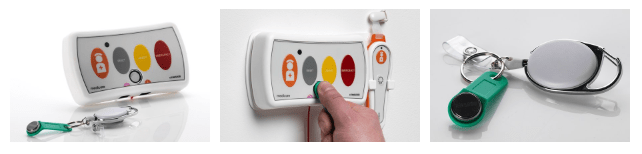
    The HTM6500iB system is a nurse call system that provide specific data to meet CQC standards and allows the monitoring of care, whilst fundamentally providing an alarm system to raise an alarm for help and assistance when required the HTM6500iB system provides versatility and many other options.

    The system benefits from being addressable so not only recording response times it can also record the staff member who has attended to help and provide care or assistance. Like the HTM6500S system the call points also have two sockets under the call point providing connections for both a pear push lead and assistive technology should you have the requirement.

    One of our clients had the problem of proving that care was being provided as the patient suffered from memory loss and often said that they were left alone for hours on end. The HTM6500iB system helped document and record the amount of care given providing evidence of nightly visits and attendance times whilst providing care.

    Get in touch with our product specialist and learn how you can get started with Nurse Call System. To know more contact us on [email protected]

  • Hospital System

    The HTM6500E Wireless Nurse Call System, is complete with an Emergency or Cardiac pull switch. The system can be surface mounted or flush mounted onto a standard 2-gang electrical back box within the trunking.

    The System is easy to install, durable, cost effective and versatile in any Hospital Ward, Theatre or Unit. The systems over door and follow me lights all come with optional sounders built in. Online training videos make it an easy to maintain the system for estates and facilities teams, reducing cost of engineers and call outs.

    As limited budgets and ageing nurse call systems within old buildings can prove to be an issue. The system has been designed to meet the HTM08-03 standard and also be cost effective, versatile and easy to install. The HTM6500E System offers the latest technology and is IP capable. It can be surfaced mounted to avoid issues with asbestos in walls and ceilings or recessed into 2-gang back boxes within trunking. The system is easy to maintain, look after and modify.

    Get in touch with our product specialist and learn how you can get started with Nurse Call System. To know more contact us on [email protected]

  • Reblog: Going Beyond HIPAA: 5 HIPAA-Related Pitfalls And How To Avoid Them

    The Health Insurance Portability and Accountability Act (HIPAA) is a very complicated compliance standard to tackle. There are strict privacy requirements surrounding the handling of patient medical and personally identifiable information, but how these requirements are met is left largely up to the individual healthcare organizations. Add HIPAA’s requirements for portability and accessibility to the fact a given healthcare organization’s electronic medical records (EMR/EHR) system may not be able to directly communicate with another organization’s and exchanging protected information can get complicated.

    The complicated process of exchanging protected health information (PHI) opens the door to accidental HIPAA violations, and potentially worse, a full-scale data breach. To help, here are 5 common HIPAA pitfalls to avoid while you navigate the path to compliance:

    Insurance Claims Denial

    Every organization that needs to comply with HIPAA should be keenly aware of the costs of a data breach, but what happens if a violation or breach happens anyway?

    Organizations typically have some kind of insurance policy to protect against damages from HIPAA violations or data breaches, but it is not uncommon for them to have their claim denied over improperly filled out applications, a failure to maintain adequate security, or otherwise not meeting the requirements placed by the insurance company.

    Insurance providers may have security requirements that go beyond what is required by HIPAA. It is important for organizations to meet these requirements not only to ensure their insurance policy is valid in the event of a breach but because they can often help an organization shore up its security, helping to avoid a breach or violation in the first place.

    Lawsuits and Legal Expenses

    The annual cost of a Data Breach Report 2019 from IBM Security and the Ponemon Institute indicates one of the biggest expenses related to a data breach isn’t the fines from the violation itself, rather the “post-data breach response.” That is, everything related to helping customers affected by a breach, as well as costs associated with redressing the situation, paying reparations, and dealing with any legal fallout from partners.

    What this means is that while complying with requirements laid out by HIPAA and insurance policies is essential, it is also vital to ensure your organization complies with every other relevant law, standard, business associate agreement, or even contractual obligation. Considerations even extend to things like PCI DSS compliance if a given healthcare organization accepts or handles credit card payments, satisfying state laws for protecting patient and employee information, and ensuring the organization and its employees meet professional licensing requirements.

    There are multiple reasons for this. Not only does compliance with many of these requirements help bolster your organization’s security posture, but it also helps to ensure any available legal protections are applicable and works to mitigate liability if a HIPAA violation does occur. This in turn can help reduce the overall cost of the post data breach response.

    For example, if an organization contracted to handle payment processing for a major hospital suffers a data breach resulting in a HIPAA violation, the hospital may hold them responsible for damages if the payment processor failed to meet PCI DSS compliance, regardless if they were meeting the requirements for HIPAA compliance. On top of this, the payment processor may see their insurance claim denied over failing to maintain PCI DSS compliance.

    Hardware and Software Misconfiguration

    Setting up an IT environment is complicated in the first place. Add in HIPAA compliance requirements, contractual and insurance obligations, and meeting other applicable standards and legal requirements like the ones mentioned above, and it’s a recipe for confusion. Confusion, in turn, leads to mistakes.

    A best practice for mitigating this confusion is to identify all of the requirements for your IT environment, both in regard to the functions it needs to perform and the legal and security requirements it needs to meet. From there, generate a thorough checklist for every individual piece of hardware and software that needs to be implemented, being sure to include things like proper environment architectures, app security policies, and even steps for testing to ensure the environment and all of its components are functioning as intended.

    Falling Out of Compliance

    Basic logging and monitoring is a requirement of HIPAA, however, modern monitoring solutions can do more than meet HIPAA requirements. Many of these solutions can not only deliver valuable insights into usage trends in your IT environment, but many are capable of proactively identifying security risks. These risks can include misconfigurations, suspicious network activity, and applications or hardware that have fallen out of compliance or need a software update.

    Further, in the event of an audit or incident, a quality logging solution can help provide clear insight into user and environment activity. Detailed logs can help rapidly address the requirements of a compliance audit as well as in identifying the source of a data breach if one occurs.

    Insufficient Auditing

    An organization leveraging a quality logging and monitoring solution should not stop there, however. While it may deliver meaningful and actionable insights into your environment’s activity, audits remain the best way to assure ongoing compliance. Organizations may leverage internal compliance assessment teams and monitoring solutions, however, it is possible for organizations to erroneously believe they are compliant when they are not. As such, it remains a best practice to leverage an expert third party to conduct compliance and security audits, including for HIPAA.

    Every time a new piece of hardware or software is implemented, one of the last steps on the implementation checklist should be to audit the entire IT environment before making it live. An audit serves as a final check to ensure applications and hardware are properly configured, the environment is architected in the most efficient way. An audit can also check to ensure that the organization is in fact meeting all of the requirements and criteria for HIPAA and any other applicable legal requirements and security policies like those noted above. The audit can also check to ensure that security policies, procedures for implementing the policies, and evidence they’ve been implemented have been properly documented and that those policies have been updated as appropriate.

    If security gaps or any other issues are identified in this audit, the organization will then have a chance to remediate these issues before the environment goes live and the issues actualize into real problems. Organizations should leverage both regularly scheduled as well as random audits to help avoid any undetected error or issue that could result in a breach or falling out of compliance. Additionally, in the event of a breach or HIPAA violation, regular audits may help mitigate claims that a given organization was negligent in their security practices.

    The original article can be found here.

    For more information e-mail us at [email protected] and we will be glad to assist you.
  • Fax over IP (FoIP) software, XM Fax 9.0 – New Version

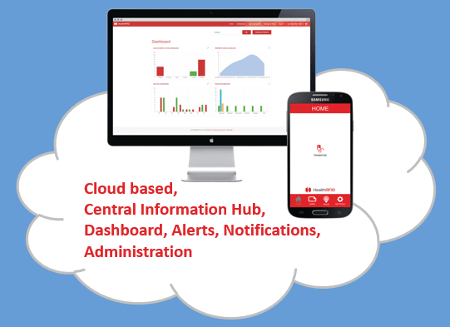
    We are pleased to announce that the newest version of our popular Fax over IP (FoIP) software, XM Fax 9.0.

    This newest version of XM Fax builds upon the successes of XM Fax 8.0, delivering new features designed to further bolster the security, scalability, and reliability of your customers’ fax environment – all while boosting employee efficiency, especially for those on-the-go.

    Focused on the safe, confidential electronic transmission of data, XMedius has enhanced its XM Fax solution to bring a diverse set of benefits to users and administrators. A few examples include:

    Enhanced Security: Configurable password policies, encryption at rest for fax documents, hardened TLS configurations, and support for TLS 1.3 are new in XM Fax 9.0. Frameworks and third-party libraries have been updated to ensure the highest security standards and long-term support.

    Improved System Integration: Customizable fax properties can be edited at any point in the lifecycle, allowing for additional integrations and workflows. IPv6 support is now available in XM Fax 9.0, enabling seamless integration with various enterprise network types.

    Enriched User Experience: Users can now integrate their web phone book with SendFAX, preview faxes before sending them in the web client, and unlock new XM Fax mobile app capabilities (iOS and Android).

    Augmented Administrative Tooling: Administrators can now take advantage of single sign-on (SSO) in the administration interface, manage fax box delegations on behalf of users, and have better control over OCR management.

    For more information e-mail us on [email protected] and we will be glad to assist you.

  • Reblog: How Can an Audit Trail Help Law Firms Protect Client Interests?

    Sharing legal documentation can be a tricky, but vital, aspect of virtually any legal firm’s business. Legal firms need to deliver documents to clients, the courts, and other concerned parties in a timely manner. Their delivery methods must also take special care to avoid accidentally sharing information with unintended parties as to avoid an accidental breach of attorney-client privilege.

    In the past, when a legal firm needed to ensure proper delivery of documents to a specific party, they would typically hire a process server to physically hand deliver documents. This has typically been considered the best way to securely deliver documents and prove they were received by the intended party. The drawback of this method is that it can be time consuming and very costly, especially if the process server encounters difficulty delivering the documents.

    SHARING INFORMATION VIA EMAIL: DANGEROUS FOR EVERYONE

    For more routine document sharing, such as an attorney sharing court documents with a client or internally with other attorneys, many legal firms find themselves leaning on email and file sharing services. Email, as a rule, should never be used to share sensitive files of any kind. While emailing files is a quick way to share information, someone monitoring traffic in and out of a firm’s IT environment may be able to see the contents.

    The risk of information being accidentally emailed or shared with unintended parties is also a reason to avoid emailing sensitive files. To illustrate the point, according to the Australian government’s Notifiable Data Breaches Quarterly Statistics Report in May 2019, human error was in general, the cause of 31% of breaches in Australia; the second most common reason overall (the first being malicious or criminal attack at 61% of all breaches). The most common error made was sending personal information to the wrong recipient, accounting for 31% of all breaches caused by human error. The second most common error was unauthorized disclosure of information through an unintended release or publication (including online), which could include files inadvertently forwarded to an unintended party.

    Of the malicious and criminal attacks, 5% were caused by social engineering, including email-based executive fraud. All of these factors make sharing files via email an especially risky policy.

    SHARING INFORMATION VIA EMAIL: ESPECIALLY DANGEROUS FOR LAW FIRMS

    If these numbers weren’t daunting enough, the law sector-specific statistics are even worse. While the percentage of breaches caused by human error remains consistent (approximately 34% of legal sector breaches were caused by human error, versus 31% across all industries), 62.5% of those were caused by personal information being emailed to the wrong recipient. Add in the percentage of breaches through unauthorized disclosures, assuming the information was disclosed via email, and that brings the total to 75% of all breaches caused by human error.

    Put another way, during the first quarter of 2019, potentially up to 75% of Australian legal sector breaches caused by human error could have been prevented simply by avoiding the use of email.

    MOST FILE SHARING SERVICES AREN’T MUCH BETTER

    File sharing services may seem like an obvious solution; they are simple to set up and it’s easy to invite relevant parties to collaborate and share documents. The truth is, these types of services frequently lack adequate security (such as two-factor authentication) and retention policies. Additionally, if permissions are not properly set up, it may be possible for collaborators to invite others or share a direct link to the files with unintended parties. These services also often lack detailed auditing functionalities that can decisively prove documents were properly delivered to their intended recipient, nor do they record who actually accessed and downloaded files. What may be the most significant problem is the lack of retention policy controls. File sharing services frequently require files be manually deleted, which can lead to old files remaining in a shared folder well past when is necessary.

    FAX IS BETTER, BUT LIMITED

    Sending documents via fax remains a popular way to securely transfer documents as it is very difficult to intercept faxes in transit. There are a few drawbacks of using traditional fax solutions, however. One is that there can be a risk of unintended parties viewing the files, such as if there is one central, office-wide fax machine. Another is that fax can only support transferring printed documents (no audio or video) and may have constraints on the number of pages that can be faxed based on the memory of the machine receiving the fax (analog fax machines commonly have 64 MB of memory). There often will be a delivery confirmation feature with fax, but in the event the fax is being sent to an office-wide fax machine, there is no real way to tell who has actually looked at the document.

    BUT HOW CAN AN AUDIT TRAIL ACTUALLY HELP?

    A detailed audit trail can make a huge difference in protecting the sanctity of attorney-client privilege, ensuring the proper delivery of legal documents, and holding individuals accountable.

    The original article can be found here.

    E-mail us on [email protected] and we will be glad to assist you.