Tag: Backup

  • Protecting Client Data During Tax Season

    Tax season means more business for financial institutions, but it also means higher risk of data breach! Find out what you can do to keep client data safe as business volume ramps up.

    Tax season is upon us, which means the volume of sensitive data being sent and received by accounting departments, tax practitioners, CPAs, banks, and other financial institutions goes up drastically. It should come as no surprise then, that it’s also the time of year that the rates of cyberattack and identity theft also rise. With the public’s growing awareness of the risk of cyberattacks, how you safeguard and transmit client data will have a significant impact on you and/or your institution’s reputation.

    Compliance regulations like the Sarbanes-Oxley Act have provided organizations with a solid framework for quarterly and annual financial submissions and require that companies have strong internal controls in place for handling all accounting data. The challenge is that these regulations are typically vague in their wording, and don’t go into detail on how companies of all sizes can strengthen their security protocols for day-to-day sensitive data transmissions. Check out our whitepaper for an in-depth look at SOX compliance including practical tips for IT professionals.

    If tax season has you worried in light of all the stories of cyberattacks and identity thefts that have been circulating over the past year, having a few security measures in place will help you rest assured that your client data is safe.

    Physical Security: Keeping Accounting Systems on Lockdown

    Your accounting system is the infrastructure that contains client’s confidential information and should be protected at all times. If it’s been a while since physical security of your systems has been reexamined, tax season is the perfect time to do a thorough analysis. Physical security should be your first priority; whether your system consists of a personal laptop or multiple servers and computers. In the event of an audit, proper physical security of your accounting systems will also help you avoid any regulatory compliance issues or penalties.

    It’s usually advised to keep accounting equipment in a room or area that can be locked to prevent unauthorized access. If you work for an organization with multiple exposed workstations, make sure that there are processes in place that limit who gets into the server room where sensitive data is stored. If you’re on a wireless internet connection, be sure to follow security protocols since most wireless networks are relatively easy for experienced hackers to breach.

    The workforce continues to evolve towards increased mobility. While this provides flexibility and accessibility, misplaced devices are also a top cause of data breaches throughout the world. It’s crucial to consider software that tracks the whereabouts of laptops and mobile devices. Kensignton, a leading desktop and mobile device accessories provider, recently reported that a laptop gets stolen every 53 seconds and 70 million smartphones are lost each year (and only 7 percent are recovered). 52 percent of devices are stolen from the workplace, and Kensignton states that a well-implemented security policy that includes investing in physical security can reduce these incidents by up to 85 percent.

    The ABV’s of System Security Best Practices

    You probably know your ABC’s, and if you’re interested in learning more about keeping client data safe during tax season, it’s important to learn your ABV’s. We are, of course, referring to authentication, backup, and virus protection; 3 pillars of security that when practiced in tandem can go a long way towards keeping sensitive information secure.

    Authentication: Make sure that all systems are not only password protected, but that you maintain a password policy. This should include using lengthy passwords and a system that requests password changes roughly every 90 days. For multiple users, set up various access levels to sensitive data to limit the risk of data misuse.

    Backup: It’s standard practice to backup data on an accounting system, usually on an on-premises server, or in smaller practices, an external hard drive. While these typically function well as backup options, there’s a huge risk of data loss when something happens, such as a fire or flood. Reputable cloud storage companies are a viable option that’s grown in popularity since they still allow you to perform overnight backups and restore backups while keeping your data safe from harm.

    Virus Protection: Most computers come with limited default antivirus or antimalware subscriptions that expire after a short time. Consider beefing-up your digital protection by upgrading to a stronger full-scope anitivirus software or at the very least, ensure that your current subscriptions are up-to-date. Most users usually consider antivirus software a given, but its easy to overlook subscription renewals with the long list of other work-related tasks on their plates. Some viruses can disrupt a system so severely that it may need to be replace, so consider this step a must.

    IP Solutions: Your Key to Secure File Transmissions

    Another major opportunity for data loss or data breach occurs during the sending and receiving of client data. Consider the risks associated with popular methods of file transmission: fax leaves a lot of room for human error and unless you’re using a highly encrypted email server, there are plenty of gaps that hackers can penetrate during email transmissions.

    If you’re receiving a higher volume of client data during tax season and are looking for a way to guarantee that files are secure both in transit and at rest, a secure file exchange solution could be the perfect fit.

    XMediusSENDSECURE offers robust security features with an incredibly user-friendly interface. It doesn’t require clients to have an account, and you can choose how clients authenticate themselves (via phone, email, or SMS) when sending them files, which ensures that all data is received by the right recipient. What’s more is that SendSecure integrates seamlessly with Outlook so that users can send and receive files directly from the platform they’re comfortable with, and with next-level security. Its easy-to-use interface requires minimal training and virtually no downtime, so you can incorporate it into your security plan without missing a beat during tax season.

    Considering an IP solution that takes care of added security features so that you don’t have to? Speak with an expert today about how XMediusSENDSECURE can work for your business.

    To learn more contact us sales@rincon.co.in
  • Reblog: The Top 7 Benefits of Document Management Systems

    Documents, whether electronic or paper, are an essential component of just about any enterprise. Managing business information, sometimes from several sources, can be a challenging task. Depending on the nature of your company, a document management (DM) solution that captures, stores, and retrieves both paper and electronic documents can provide many key benefits to your organization.

    In this post, I’ll discuss the top 7 benefits of document management systems, including:

    Reduced Storage Space
    Enhanced Security
    Improved Regulatory Compliance
    Easier Retrieval
    Better Collaboration
    Better Backup and Disaster Recovery
    And the “Intangibles”
    Read on to learn more!

    1. Reduced Storage Space

    Commercial property costs are increasing and so is the expense to store paper documents. A software-based document management solution (DMS) that can reduce the need for file cabinets, boxes and storage bins is a valuable asset to any enterprise, freeing up precious office space. Documents that have to be kept as hard copies can often be stored in less expensive locations, such as an offsite warehouse or vault.

    2. Enhanced Security

    Document security is vital to many enterprises. DMS provides better control over sensitive documents. Access to documents can be controlled at the folder level for different groups or individuals. Also, a DMS leaves an audit trail of who has viewed a document, when it was accessed, and how it may have been modified. Managed documents are highly traceable and can be tagged to allow for automated alerts.

    3. Improved Regulatory Compliance

    Compliance requirements for certain documents can be quite complex. Non-conformance can lead to fines, revoked licenses, and in some cases criminal liability. Federal and state regulatory regulations such as Sarbanes Oxley and HIPAA mandate strict security and privacy guidelines. DMS reduces the risk of non-compliance. Records retention schedules, for example, can be automated, and new documents can be more easily classified and stored.

    4. Easier Retrieval

    Searching for and retrieving documents can be very time consuming – and we all know time is money. In fact, PWC published these statistics illustrating the costs related to the average time spent managing paper documents:

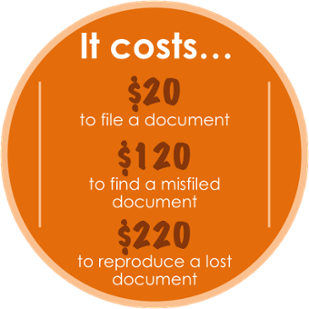
    1. Organizations spend $20 in labor to file a document, $120 in labor to find a misfiled document, and $220 in labor to reproduce a lost document.
    2. 7.5% of all documents get lost; 3% of the remainder get misfiled.
    3. Professionals spend 5 to 15% of their time reading information, and up to 50% of their time looking for it.

    A document management solution, specific for your enterprise, can be a powerful, time-saving tool. Depending on the solution implemented, a DMS can retrieve files by a word or phrase in a document – full text search, or DMS can apply index categories to a document or folder. Easier integration with business applications facilitates access to critical information. DMS also gives the opportunity to access documents remotely. As long as there is internet connection, documents can be accessed from virtually anywhere.

    5. Better Collaboration

    With DMS, information sharing and collaboration can be a lot easier. Documents captured from different sources can be accessed from multiple locations. Electronic imaging makes sharing documents over a network via email or the Internet possible. DMS provides greater visibility to business processes and can allow for better workflow monitoring. Authorized access by external users can be allowed and monitored. DMS also offers Version Control which allows for older versions of the same document to be recovered if needed. This feature is important if several parties work on the same document and there are changes made to a document that were not authorized or meant to happen.

    6. Better Backup and Disaster Recovery

    Any document management solution should include a data backup and disaster recovery plan. With digital archiving as a backup, paper documents are protected from fire and flood and other disasters. With a DMS, documents are highly traceable and can be tracked within a range of criteria.

    Also, because imaged documents are centrally stored they cannot be lost or misplaced after viewing. Documents are less likely to be misfiled, and if so they are easier to locate with cross-indexing. Documents can be digitized and archived at their point of entry into the system.

    7. The Intangibles

    Just a few of the intangible benefits of a document management system include:

    1.Flexibility
    2.Competitiveness
    3.Improved client relations
    4.Peace of mind

    Time is valuable, and time saved is a definite benefit of DMS that often translates directly into increased productivity. Faster and more efficient document retrieval can boost staff morale and increase client satisfaction. Also, document management solutions are scalable to meet the changing needs of any enterprise.

    Proper document management systems can bring many benefits to you and your office. Take initiative and schedule a demo today to see how a tailored document management solution can help you by improving business processes and increasing efficiency.

    The original article can be found here.

    If you are considering implementing a document management system for your business, but you are still sitting on the fence when it comes to selecting the right solution, we encourage you to e-mail us on sales@rincon.co.in and we will be glad to assist you.

  • Document Management system for Property Management organisations

    paperpiles

    A Property Management organisation is one that looks after the management of personal property, equipment, tooling and physical capital assets that are acquired and used to build, repair and maintain end item deliverables. Property management involves the processes, systems and manpower required to manage the life cycle of all acquired property as defined above including acquisition, control, accountability, responsibility, maintenance, utilization and disposition.

    These organisations have to manage leases, contracts, notices, and other property records in a property document management system that keeps important property documents secure and makes them easily retrievable.

    With a document management system in place, property managers, property owners, and property management staff can use it to improve efficiency and make informed decisions regarding the leasing and ownership of property.

    A document management system keeps all records, including important plans and facilities documents, ready for access. Authorised persons can access files outside the office using Web and Mobile access. Users are able to search and retrieve documents on the fly thereby enabling them to make faster and more accurate decisions.

    If you are considering the implementation of a document management system for your business, but you are still on the fence when it comes to selecting the right solution, please e-mail us on sales@rincon.co.in and we will be glad to assist you.

  • Video: Millions of Medical Records lost in fire

    Video: Millions of Medical Records lost in fire

    [youtube]http://www.youtube.com/watch?v=rL7RQzBUMrM[/youtube]

    UNM hospitals based out of Albuquerque, New Mexico, USA lost medical records of 1 Lakh patients due to a fire in a warehouse complex. This was the warehouse where they had stored the records. This only goes to show how vulnerable hospitals are to such losses in the absence of a proper records management solution. Get smart. Get a good EDMS solution. Contact us on sales@rincon.co.in or call us on +91 22 61461616

  • Act before it’s too late! Documents are vital …

    A major telecom company warehouse in India had outsourced the storage and scanning of its Consumer Application Forms (CAFs) from 1996 onwards. This warehouse unfortunately caught fire in February this year. After this event, it was found that only 8 million forms had been scanned whereas 12 million unscanned forms had been destroyed. This was a major lapse. The incident not only highlighted the fact that important data had been lost completely, but also underscored the slow rate at which the digitisation of subscriber data was being carried out. Following this incident, the telecom service providers have been asked to ensure quick and time bound scanning of all CAFs, proper duplication of records with a mirror image in the archives, storage of the CAFs to have fireproof arrangements and secure from other hazards. (Refer to the news link http://bit.ly/hDH2MC and http://bit.ly/kh8MVP) Just ponder over the loss of imformation and the lack of records!! This would not have happened if all the documents were digitised regularly and stored in a good document management system.

    Security of documents isn’t just about access. You have to ensure that your documents do not get misplaced, lost or damaged. Who hasn’t looked for hours through file cabinets to find the document(s) needed? Sometimes documents are misfiled; other times they are left on someone’s desk or the worst case scenario it could be lost due to pest attack or some natural calamities like flood, fire etc. Many people believe storing documents on their computer or on the company network is considered a form of document management. If the files stored in computer are not backed up and something were to happen to the hard drive, all information is lost. A true document management system ensures that your organization’s information is protected at all times, from natural disaster, catastrophe and corruption.

    With a document management system, gone are the days of lost documents because they are all in a secure central electronic repository. Also gone are the days of wasted time because multiple people can retrieve documents from various locations and multiple file cabinets. With a document management system, the documents are immediately retrieved for the person looking for information. This not only makes them more productive for that one task, it shifts the focus from the document retrieval to solving the original issue. A good document management system’s aim is to provide everything you need to help your business run more efficiently, ensuring that you do not waste any unnecessary time and space maintaining your documents. It should also enable businesses to easily share and collaborate on documents in an efficient and productive way. A digital document management system is a great way to save time and take the first steps towards a paperless office.

    Along with convenient document sharing and data protection, businesses can take advantage of full audit control, reduced storage requirements, put an end to photocopying / misplaced / lost documents. Meeting regulatory requirements such as HIPAA, SEC and FINRA can be a headache. If you use an EDM, many of the regulatory requirements are built right in, helping you become compliant. No matter what your organization does, you find yourself liable to maintain documents. A document management solution secures the documents that are critical to your business so you can remain accountable to your clients.

    Contributed by Ashish Baby