Tag: Cloud

  • Adding value to your HP MFP sales

    Reduce Costs And Enhance Security By Faxing From HP MFPs

    • Still, using fax kits for faxing from HP MFPs?
    • Still, using decentralised faxing using MFPs?
    • Looking for a solution for HP Workpath-enabled MFPs?

    Look no further. We have a solution that delivers a host of business benefits, including improved employee efficiency, streamlined workflows, and a steep reduction in the total cost of ownership (TCO) over traditional fax.

    We have solutions tailored for different-sized organisations, as well as a Cloud version that is flexible and scalable to suit organizations of any size.

  • Automate your email processes in less than 5 minutes

    Actions Are Automatically Processed, Without A Click.

    Anyone in the service industry is well aware of how they are inundated with emails which are critical in nature. The number of emails is increasing exponentially and managing them is an arduous task. Is there a solution that can help automate this ever-increasing volume?

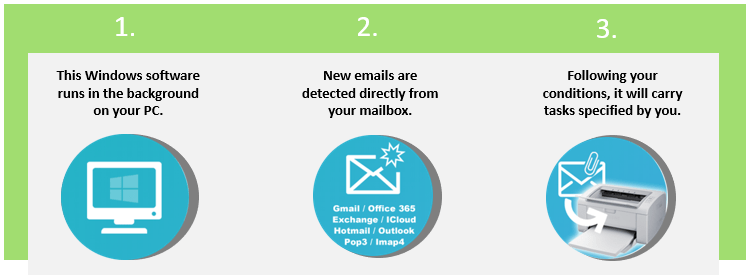
    Introducing Email Integrator, an application that runs in the background saves time and allows you to focus on your important tasks. It works with any email box like Exchange server, Cloud emails service Gmail, Office 365, Yahoo mail, Hotmail, Outlook.com, and any IMAP4 or POP3.

    Features

    • Auto printing and stamping of incoming emails
    • Export your emails to PDF for integration
    • Customised auto-reply to the sender’s email
    • Auto Archival of sent and received emails for future reference
    • Quick searching of emails
    • Reports
    • Keep your email box clean
  • Software Development

    At Rincon, we believe there is no “one size fits all” solution on this planet. Each customer is unique and so are the requirements. We therefore first understand the client’s business operations and then propose a solution which is the right fit for their line of business. Based on the feedback from the client, modifications are made and the solution evolves.

    To put the whole process in perspective, we first analyse the needs of the customer and propose a solution. Based on the approved proposal, we design the solution. Then the development work starts. No development can be bug free and so the solution is subjected to rigorous testing. We finally hand over the solution to the client and also train their team members on using and maintaining the solution.

    Technologies we use include:

    • Ruby on Rails
    • PHP – WordPress, WooCommerce, Drupal, OSCommerce and other CMS
    • IOS / Android APP development (Native / Hybrid)
    • Cloud Migration
    • Open Source ERP

    For more information e-mail us on sales@rincon.co.in and we will be glad to assist you.

  • Asset Tracking System

    Asset Tracking System

    Bluetooth Low Energy (BLE) beacon is an evolving technology & being actively used for tracking. Using BLE tracking tags, assets and staff can be tracked throughout buildings and within defined outdoor areas.

    Key Features:
    • Real-time tracking within premises
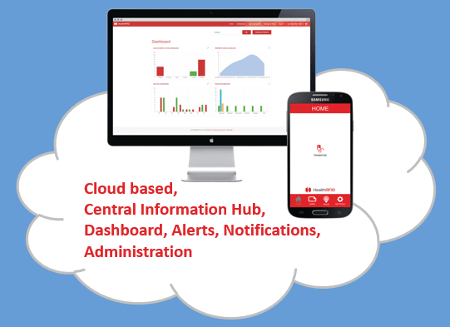
    • Cloud-based & Secure
    • Alarms & Alerts
    • SMS / Email Notification
    • Web console
    • Mobile consoles for assets
    The system consists of 3 main components:

    [wc_tabgroup class=”” layout=”box”]

    [wc_tab title=”Bluetooth Tracking Tags“]

    Using Bluetooth tags based on the iBeacon standards, means that the tags are manufactured in hundreds of combinations of form factor, battery size and additional sensors. This ensures that they’ll be a low-cost tag to achieve a huge range of specific use cases and scenarios.

    [/wc_tab]

    [wc_tab title=”Bluetooth Readers“]

    The Bluetooth readers pick up messages from the Bluetooth tags and report the location of the tags back to the platform / application. Readers can be deployed at choke points for entry / exit monitoring, or more widely for full real-time location information of tracked assets. The system is flexible, enabling further readers to be added as required to extend the system’s footprint.

    [/wc_tab]

    [wc_tab title=”The Platform / Application“]

    The Platform / Application brings the tracking information to life for users. Users are able to report on assets – to see the locations of specific assets or a group of assets, locations – to see which assets are at a specific location or just view a map to see the locations of all assets graphically. With built-in user profiles, administrators can ensure that authorised users can only view the assets & locations they need.

    [/wc_tab]

    [/wc_tabgroup]

    The asset tracking system is used in businesses of all sizes and also in enterprise customer segments as the first step towards change management. The industries where the solution can easily be implemented are Agriculture, Education, Retail, Hospitality, Logistics, Manufacturing, Pharma and Storage Warehouses.

  • Blood Cold Chain – Vein to Vein solutions

    Track your blood bags from arrival to transfusion

    We have solutions for increasing patient safety through the tracking of blood bags from arrival to transfusion. Additionally, we provide solutions around Bedside Blood Specimen collection and tracking of non-replaceable specimens from collection to the lab.

    Key Features

    • Manages all fresh and fractionated blood products
    • Manages devices, locations, users, and notifications
    • API available for seamless integration
    • Can read blood bags using both 1D/2D barcodes and HF RFID tags
    • Used for managing remote fridges in remote locations
    • Detailed reporting and diagnostic tools.
  • Reblog: Why Do Organizations Still Choose an On-Premises Solution in the Age of the Cloud

    Cloud solutions offer a lot of potential benefits for organizations looking to upgrade their communications infrastructure. They can be scalable, reliable (thanks to geo-redundancy & high availability options), and can allow reductions in staff costs. However, they aren’t for everyone. Some organizations have requirements that Cloud can’t fulfill at this time.

    1. A Hands-On Approach

    Cloud deployments typically get managed outside of the organization. For large enterprises or organizations in regulated industries, handling sensitive data carries with it significant risks. If it is mismanaged, the organization could be fined, or worse, a poor reputation could be the result, causing business to evaporate. Everything is riding on the host of your organization’s communications solution.

    When there is an outage or a system failure, getting the critical services to your organization back up and running is again left up to the host. In contrast, an on-premises solution allows your team of experts to take matters into their own hands and resolve them as quickly as possible.

    2. Following Industry Rules and Regulations

    If an organization is in a highly regulated industry, like finance or healthcare, there are strict compliance standards that need to be followed such as HIPAA and SOX. Not every cloud provider offers the right security measures for every organization. Some organizations need to keep their communications out of the Cloud and in their physical control.

    3. What Level of Support Do You Expect?

    If your organization is used to having the best of the best in-house, migrating to a cloud might be too painful at this time. Internal support who knows your systems integrations inside and out can ensure rapid response times, easily troubleshoot system failures, and ensure protocols are followed. It can be hard for executives to give up being able to walk down the hall and knock on the system administrator’s door.

    4. CAPEX vs. OPEX

    Different organizations have different budgeting habits and limitations. Some might need to plan for a one-time expense instead of a subscription-based service. This can be the case for charities, businesses, and government offices who know they have the budget now, but can’t easily predict fluctuations in donations, allotments, or business in the future.

    The upfront cost can be less with an OPEX model communications solution; however, the overall cost continues for its ongoing services. With a CAPEX model, the ongoing costs are smaller, with much of the expense front-loaded.

    The original article can be found here.

    XMedius Enterprise Communications Solutions

    XMedius has developed a powerful range of enterprise-grade communications applications, such as FoIP, Unified Messaging/Voicemail, Call Center, Secure File Transfer, and more. These solutions are designed to deliver excellent ROI by increasing efficiency while preserving operational security.

    We offer our Unified Communications and secure document exchange products both in the Cloud and On-Premises, allowing organizations to utilize the model that works best for them.

    Both deployment styles of our products have options that include high availability, security to keep your communications safe, and interoperability to leverage your existing infrastructure and meet the changes of tomorrow.

    For more information e-mail us on sales@rincon.co.in and we will be glad to assist you.

  • XM Fax Enabling modern businesses to fax documents online

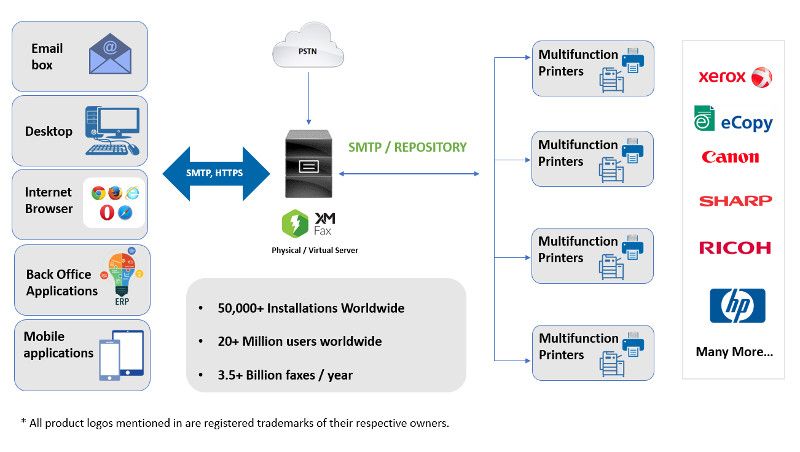
    For several years, XMedius has been offering its customers the most efficient solutions that are constantly optimized to meet the new realities of business’ data transfer requirements. The XM Fax® solutions suite transforms the manual handling of your organization’s inbound and outbound data transmissions into a managed business workflow. XM Fax software solutions are designed and continuously optimized to enhance productivity, streamline operations, and keep companies compliant with ever-increasing regulatory requirements.

    Whether you choose a cloud fax service, software or the best of both worlds, XMedius solutions will exceed your expectations.

    XM Fax On-Premises

    Redefining fax since 2002, XM Fax On-Premises is the XMedius flagship solution to fax documents online. XM Fax On-Premises is highly scalable to meet the growing document exchange needs of organizations of all sizes. Eliminate fax hardware by sending and receiving sensitive documents from an industry-leading fax solution directly from your workstation, multifunction printer, laptop, or mobile device.

    To offer flexible deployment options, XM Fax On-Premises is available in Service Provider, Enterprise, and Express editions.

    XM Fax Cloud

    In addition to reducing costs by eliminating fax machines, ink, and toner, XM Fax Cloud happens to be hosted by one of the most secure hosting infrastructures in the world. The XMedius cloud fax solution deploys rapidly, so you’ll experience virtually no downtime. Sending and receiving your data transmissions through the cloud means no additional hardware or software investments, and no busy signals.

    XM Fax Cloud also offers unlimited scalability and fax capacity, so as your business grows, your eFax solution will grow right alongside it.

    XM Fax Hybrid

    When it comes to choosing a secure file transfer software, XM Fax Hybrid offers the best of both worlds. It leverages the XM Fax Cloud infrastructure to offer a fast, simple deployment while also giving you full control over data storage, location, and ownership. The robust XM Fax Hybrid solution offers high availability and disaster recovery so you can continue to send business-critical data transmissions in the event of outages.


    For more information e-mail us on sales@rincon.co.in and we will be glad to assist you.

  • Reblog:The public switched telephone network (PSTN) is becoming obsolete.

    As has been predicted by telecom operators in the industry for years, the public switched telephone network (PSTN) is becoming obsolete. Multinational telecom companies already have plans in place to phase-out the country’s PSTN and gradually move to an IP-only service. Nationwide rollouts have already begun with telecom giants like Orange in France, Deutsche Telekom in Germany, and Swisscom in Switzerland, to name a few. Europe is not alone in their efforts to phase-out the PSTN; Major Australian telecom companies have already announced their rollout calendars, and providers have been conducting regional testing of all-IP phone services in the US.

    The main reasons for the migration to an IP-based network is that the traditional PSTN model is becoming increasingly expensive to maintain. Not only does it consume massive amounts of energy, but thousands of older model circuit switches still in operation to maintain existing PSTN networks are based on electromechanical technologies that are over 30 years old. Spare parts, when they exist, are very hard to come by and many equipment suppliers are abandoning the technology. When repairs are needed, locating these components or their equivalent can become extremely expensive.

    A major generation gap

    Telecom operators around the world have already been working on replacing time division multiplexing (TDM) technology with IP or SIP trunking solutions for nearly two decades, for example, by building voice over internet protocol (VoIP) on fiber optic infrastructures. On the level of regional infrastructures, however, traditional telephony around the world remains mostly in parallel with that of the 1980’s, which means huge maintenance costs and increasing risks of breakdowns and malfunctions.

    It’s important to note that the migration towards an all-IP service won’t completely cancel out the older generation of technology. The copper network (twisted pair cabling) remains useful in supporting other, now digital forms of telecommunications, such as dedicated link services (or “leased lines”) and xDSL Internet access.

    Why switch to IP? Because it meets all demands

    The Internet’s packet-switching architecture, open standards, non-proprietary protocols, peered networks and digital hardware are a clear improvement over separate, closed analog networks still using older technology.

    For years, phone companies dismissed IP as an inadequate alternative. Carriers of all sizes have now grasped that the Internet is the only option to satisfy the ever-growing demand from consumers and cloud-based services.

    Europe’s IP Network Migration Rollout

    Migration plans are starting to take shape across Europe, with many countries at various phases of implementation. With 200 national telecom operators across the European continent, it’s understandable that complete IP adoption will take time.

    • Orange explains that from Q4 of 2018, telephone lines in mainland France will no longer be built on the analog Switched Telephone Network (PSTN), but on IP technology. All operators will then offer tailored commercial services. By the end of 2018, neither homes or business in France will be able to order analog phone lines on the old model.
    • As of June 2017, Deutsche Telekom had migrated 61% of access lines in Germany and 64% in the Eastern European countries where it holds stake. Macedonia, Slovakia, and Croatia are now all-IP. DT’s rollout plan is set for completion by end of 2018.
    • As of February 2018, Swisscom has successfully transitioned 2 million customers to all-IP services. They estimate that nearly all private customers will have converted to IP by Q4.

    Even though an all-IP future is taking shape, carriers can’t simply “switch-off” existing PSTN networks, even in countries where there are clearly better and cheaper IP alternatives. In many cases, there are decades-old regulations that enforce the continued operation of obsolete analog networks, no matter how many users they have and regardless of costs.

    Implications of an “All-IP” future

    Telecom companies have already had plenty of time to advance their alternative offers, and have been providing solutions that combine fixed and mobile telephony very transparently for years. Many organizations around the world are already operating on a hybrid model. Take businesses, for example, who’ve maintained the same telephone infrastructure for years, but who’ve decided to reap the cost savings benefits of cloud fax solutions. We’re already in the era of a mobile workforce, and many companies are already on-board with the technology of the future, using fully implemented IP phone systems and cloud-based UC solutions that seamlessly link their mobile, email, and data infrastructures.

    IP networks can use packets to transmit voice, data, or video content equally— and for telecom companies, this represents a single network for voice, video, and data. It’s no shock then, that IP technology has already won the telephone network war, just as it won the data war and is also dominating the video war.

    Europe’s bold move toward an all-IP service is setting an example of what’s inevitably to come for the rest of the world. There’s no question that analog is obsolete, it’s only a matter of time before telephony as we know it globally is completely IP based.

    What can organizations do now?

    At this stage, it’s necessary for organizations who want to take the next step (if only partially) to analyze the expectations and needs of different internal departments: management, business units, marketing & communications, etc. Identify various special needs, and where you could benefit from a migration to IP such as videoconferencing, group calls using collaborative tools, secure file exchange, etc.

    There is already a wide variety of choices for all your needs on the market whether you prefer IPBX, on-premise options, or a solution hosted by a service provider through the cloud.

    Are you looking to learn more about IP solutions that can boost workflow, save money and future-proof your telecom infrastructure? Email us: sales@rincon.co.in today about which solution would work best for your specific needs.

    The original article can be found here.
  • Reblog: Top Options to Boost Your Healthcare IT Infrastructure [Infographic]

    Healthcare IT is evolving and is responsible for bigger & bigger portions of today’s healthcare budgets. Discover 3 ways to take your health IT infrastructure to the next level.

    The evolution of EHR/EMR systems

    When the HIPAA act was introduced in 1996, the landscape of EHR/EMR management shifted. Whereas EHR/EMR systems offered healthcare organizations a way to lower costs, increase efficiency, reduce error and improve patient satisfaction, HIPAA forced EHR/EMR system vendors, as well as healthcare providers and their business associates to conform to mandated security regulations. These regulations required new levels of security to protect patient health information, and as a result, EHR system security was upgraded to include the standardization of safeguards like role-based access control, automatic data backups, audit trails, automatic log-offs, and data encryption. To add to this, the HITECH act, introduced in 2009, outlines “meaningful use” of government-approved EHR/EMR systems in the US, and even included financial incentives for physicians and hospitals who follow its guidelines. Needless to say, since HITECH was implemented, there’s been a dramatic increase in the implementation of EHR/EMR solutions in healthcare organizations.

    Health IT expenditures are growing

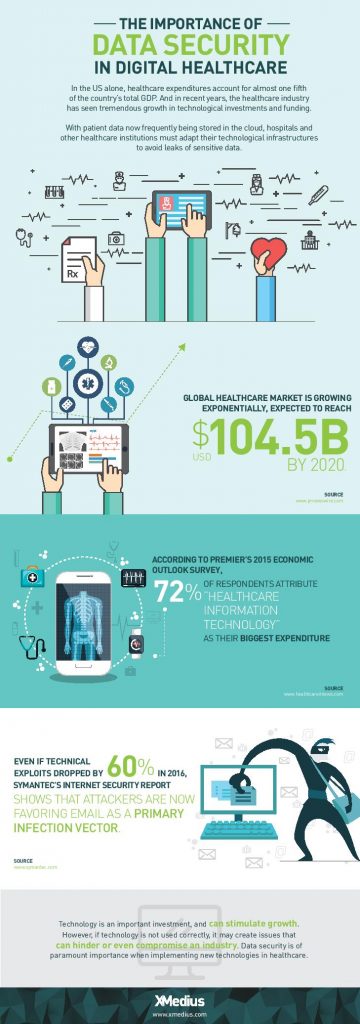
    While EHR/EMR solutions help a great deal when it comes to accessibility, improved workflow, and interoperability between healthcare institutions when it comes to managing patient records, they only represent a fraction of the IT expenditures in the healthcare industry. 72% of respondents in a 2015 survey of healthcare professionals said that healthcare IT is their organizations biggest expenditure: a number that’s expected to increase globally with upcoming data regulations like GDPR.

    Healthcare IT doesn’t only encompass EHR/EMR systems, but also the networks that support them, as well as the servers, workstations, and mobile devices that healthcare staff access them from.

    When it comes to data management, today’s healthcare IT professionals know that there are a lot of options to invest in when attempting to simplify and centralize their IT infrastructure. There are many health IT hardware and software tools on the market that help healthcare providers reach improved levels of patient care, staff workflow and regulation compliance. Let’s take a look at a few of the best pathways to an improved healthcare IT infrastructure.

    1. Investigate alterative data storage options

    In order to meet growing data storage needs and compliance regulations, many healthcare organizations are building their IT datacenters to be more flexible and scalable. Traditionally, hospital IT admnistrators have preferred on-premise, physical data storage options because of the control it gives them. But with physical on-site storage comes the work of maintenance, deployment of expansion storage, troubleshooting, and more. While not every healthcare organization will benefit from the same type of data storage, many are more likely these days to implement cloud storage into their IT infrastructure.

    Cloud data storage options are flexible, scalable, and come at a lower cost than on-premise deployments. Today’s healthcare providers can choose between public or private hosting facilities, many of which offer appealing back up and disaster recovery plans. Other advantages of storing data on the cloud is freed-up internal storage and resources, improved interoperability, and better integration with applications. If you’re considering migrating some of your healthcare data storage over to the cloud, be sure to discuss the compliance and security measures that potential vendors have in place to ensure you make the best choice.

    2. Ditch traditional fax

    As surprising as it may seem, decades-old fax machines are still widely used in today’s hospitals and physician’s offices. Data security is of utmost importance in today’s healthcare environments, but a large number of providers don’t have the time or resources to explore alternative options.

    Fax machines not only break away from the digital and paperless landscape that compliance regulations have mostly succeeded to build, but the technology is also plain old unreliable:

    • It leaves too much room for human error: sending a fax to a wrong number is a common error as evidenced by a large number or reported data breaches
    • Paper, ink, and maintenance costs add up
    • Regulations such as the HIPAA privacy rule strongly suggest that the minimum amount of information necessary be contained in fax transmissions

    Other options, such as t.38 and cloud fax solutions have emerged as popular alternatives for safely transmitting patient records and other sensitive data. But what is t.38 faxing? It’s a technology that allows you to send faxes over your existing computer network. Cloud faxing essentially allows your fax transmissions to take place over a remote server. These solutions are highly affordable and leverage existing internet connections, they eliminate lost or misused faxes that might be left lying around, and they scale easily. What’s more is that many of today’s fax solution options integrate seamlessly with existing EHR/EMR systems, allowing staff to send and receive mission-critical data right from the platforms they’re most comfortable with.

    3. Secure file exchange: simple solutions for data transmission

    Email is another commonly used tool for transmitting patient data to patients themselves and within the healthcare network. Not all healthcare institutions can afford to implement the security measures needed to make their email servers secure enough to remain compliant and keep incidents of data breach at bay. Another issue within certain healthcare departments is that email doesn’t permit them to attach files over a certain size, forcing them to find other options for sending and receiving bulky patient records and medical images. The radiation Oncology departments at Inova Health System in VA, for example, were burning large files onto CDs and using mail services in order to get patient data to other hospitals and medical facilities in their network before transitioning to XMediusSENDSECURE.

    SendSecure is an example of a collaborative secure file exchange software that takes minimal time and effort to deploy. It uses double encryption, which keeps files encrypted during both the upload and download processes unlike most email servers which only encrypt files while in transit. Users can send an unlimited number of files up to 5TB/ea., thus eliminating any concerns of getting large files where they need to get in a hurry. Similar to today’s FoIP or cloud fax solutions, SendSecure also integrates with day-to-day applications, such as Outlook, and can even be used from any internet browser.

    Looking for ways to boost your health IT infrastructure and ensure your data is safe in transit and at rest? Speak with an expert today about FoIP and secure file exchange solutions that could work for you! Contact us: sales@rincon.co.in

    The original article can be found here.
  • Your data – worry-free and safe

    • Maximum Benefit, minimum effort
    • Security, out of the box
    • Reliable Microsoft Azure Platform

    Powerful: FileDirector Cloud by Spielberg Solutions provides your company a scalable and effective solution for all your your off premise Electronic-Content-Management needs.
    Due to the scalability, it is the perfect solution for workgroups, small business or a worldwide operating enterprise.

    For this, FileDirector covers the whole range from simply benefiting from an OCR full text search up to the usage of the powerful Business Process Management. This allows you to use FileDirector Cloud just for a quick retrieval of documents or having the benefits of a process management routing your documents through your company.

    Cost-effective: FileDirector Cloud software as a service enables the business to reallocate IT operations costs towards meeting other IT goals.
    See the advantages of a modern and powerful ECM system – smart and away from hardware and software spending and operational costs for the server equipment.

    Secure: Of course, our FileDirector Cloud solution provides all security features of a local FileDirector installation e.g. its 3-layer-architecture and the built-in rights management.
    FileDirector Cloud is hosted on a Microsoft Azure data centre close to your economic region.

    Easy Budgeting: Unlike traditional software which is conventionally sold as a perpetual license with an up-front cost (and an optional ongoing support fee), Software As A service price applications using a subscription fee. Consequently, the initial setup cost for SaaS is typically lower than the equivalent enterprise software and due to the monthly or annual subscription budgeting is completely transparent and easily calculable.

    To learn more contact us sales@rincon.co.in