Tag: Data

  • XM Fax Enabling modern businesses to fax documents online

    For several years, XMedius has been offering its customers the most efficient solutions that are constantly optimized to meet the new realities of business’ data transfer requirements. The XM Fax® solutions suite transforms the manual handling of your organization’s inbound and outbound data transmissions into a managed business workflow. XM Fax software solutions are designed and continuously optimized to enhance productivity, streamline operations, and keep companies compliant with ever-increasing regulatory requirements.

    Whether you choose a cloud fax service, software or the best of both worlds, XMedius solutions will exceed your expectations.

    XM Fax On-Premises

    Redefining fax since 2002, XM Fax On-Premises is the XMedius flagship solution to fax documents online. XM Fax On-Premises is highly scalable to meet the growing document exchange needs of organizations of all sizes. Eliminate fax hardware by sending and receiving sensitive documents from an industry-leading fax solution directly from your workstation, multifunction printer, laptop, or mobile device.

    To offer flexible deployment options, XM Fax On-Premises is available in Service Provider, Enterprise, and Express editions.

    XM Fax Cloud

    In addition to reducing costs by eliminating fax machines, ink, and toner, XM Fax Cloud happens to be hosted by one of the most secure hosting infrastructures in the world. The XMedius cloud fax solution deploys rapidly, so you’ll experience virtually no downtime. Sending and receiving your data transmissions through the cloud means no additional hardware or software investments, and no busy signals.

    XM Fax Cloud also offers unlimited scalability and fax capacity, so as your business grows, your eFax solution will grow right alongside it.

    XM Fax Hybrid

    When it comes to choosing a secure file transfer software, XM Fax Hybrid offers the best of both worlds. It leverages the XM Fax Cloud infrastructure to offer a fast, simple deployment while also giving you full control over data storage, location, and ownership. The robust XM Fax Hybrid solution offers high availability and disaster recovery so you can continue to send business-critical data transmissions in the event of outages.


    For more information e-mail us on sales@rincon.co.in and we will be glad to assist you.

  • FileDirector Enterprise Solution

    [thumbnail target=”_self” src=”https://backend.rincon.co.in/wp-content/uploads/2017/10/document-automation-300×113.png”]

    Bringing documents into today’s world

    • Lower costs
    • Processes paper documents in the same way as digital documents
    • Unlimited users
    • Perfect integration in Microsoft Office
    • Automatic email recording directly from the email server

    FileDirector brings the future of company management and data distribution into today’s world. Our Electronic Content Management solution shortens the time required to organise and handle documents within an enterprise enormously. This noticeably more productive and more efficient way of working reduces costs significantly.

    In achieving this, FileDirector covers all the working stages that a document goes through in modern enterprises: from recording paper documents, or handling documents already in digital format, across search and retrieval to secure archiving of data – all functions are covered. Moreover, FileDirector is not limited to a single location: multiple servers can work together in a network, enabling enterprises to gain the benefits of FileDirector even when operating on a global footing.

    Security is massively important in all Electronic Content Management solutions – which is why FileDirector manages all access authorisations to documents, changes, access periods, automatic storage of documents and emails.

    Capturing information is a very quick process using FileDirector. Scanning was never easier, as the program works with most digital input devices and uses pre-definable scan profiles. Thanks to the integration of FileDirector in Microsoft Office, you and your staff can archive documents, tables and emails with a simple mouse-click.

    Indexing and sorting documents is handled manually or via OCR (Optical Character Recognition) zones in the document, via full text or barcodes. Index data can be imported via ODBC from other databases or files, or transferred automatically when importing or recording.

    Searching for documents could not be easier: using full text search, you can find words or even whole sentences in the document content or index fields. A single double-click is all that is needed to display the document – even if the application used to create the document is not installed on your computer, as FileDirector supports a wide range of file formats. It is easy to scroll through pages, to display miniature images of the pages as a preview, and to call up any previous version of something has been changed. It is also possible to open and view several documents simultaneously.

    Business Process Management sends documents to users, using predefined processes, with each user being required to trigger actions, such as accept/reject. This makes it an ideal tool for tasks such as processing invoices.

    Storage is no problem for FileDirector. Due to the usage of Microsoft SQL or Oracle databases FileDirector can handle millions of datasets and documents with ease.

    For more information e-mail us on sales@rincon.co.in and we will be glad to assist you.

  • Reblog: Ahmedabad Civil Hospital Embraces Digitisation

    Medical Records are now easier to retrieve for patients and doctors due to digital entry and filing of documents

    The Ahmedabad Civil Hospital has started digitising its records and has instituted a modern system of physical filing of records for the first time since digitisation came of age and years after Prime Minister Narendra Modi launched the Digital India campaign.

    However, the hospital claims it is far ahead of other hospitals in state and that its data is linked to other government hospitals as well.

    The new system will make it easy for patients to gain access to records, for doctors to study medical history and police to get information in medico-legal cases.

    With the new Hospital Information System, digital records are interlinked to physical filing, divided by bundles, shelves and racks at the micro level to ensure it is retrieved as a moment’s notice.

    The system that is operational since past two months ends the dependence on trusted peons and keepers of archives who until now were the only ones who could find a file.

    With over 10,00,000 files accumulated in past decade, locating a file from the archives was a nightmare for patients and doctors in the absence of these men. Civil Hospital sees 3,000 patients a day with 250-300 new cases being registered daily.

    At present the hospital has three scanners but talks are under way to get two more so that digitization can keep pace with number of cases.

    Medical Record Officer (MRO) of Civil Hospital Dr. Sanjay Solanki said, “There are two phases to this operation. One is to digitize new cases and we have begun doing so for two months. We can now access any document with the click of a button. The second phase is to digitize earlier documents which will take time.”

    Dr. Rajnish Patel of the General Surgery Department said, “It is wishful thinking that this will fall in place immediately. It is still quite an effort to get patient records, but it will get better with time.”

    Superintendent Dr. M M Prabhakar said, “Our Hospital Information System is at least five years ahead of other hospitals. We have connected our system to other government hospitals so our data is available to all. The digitisation of our archives will take some time, but it will happen.”

    Meanwhile, for those entrusted to maintain records for years, it is a big turnaround.

    Ashok Nagpure, (59), an old-timer who has for decades handled the medical records is one of the two to be trusted to locate a file within half an hour in case of emergencies. It is a gargantuan task given that there are two large halls stacked with a decade worth of data.

    The advent of the digital filing, Nagpure can now relax. He is set to retire in a couple months and says it is only fitting that his tenure is ending just as the winds of change are blowing through the sanitized corridors.

    Deepak Shinde, 54, another Peon said, “Earlier, we went through so many files each day to locate one. We had a search time of half an hour to three days. Plus, at least 50 files were demanded every day. With all our old staff slowly retiring, I’m glad there’s another way to get the files.”

    The original article can be found here.

    If you are looking for a patient record management or a document / records management solutions, e-mail us on sales@rincon.co.in and we will be glad to assist you.

  • Reblog: Top Options to Boost Your Healthcare IT Infrastructure [Infographic]

    Healthcare IT is evolving and is responsible for bigger & bigger portions of today’s healthcare budgets. Discover 3 ways to take your health IT infrastructure to the next level.

    The evolution of EHR/EMR systems

    When the HIPAA act was introduced in 1996, the landscape of EHR/EMR management shifted. Whereas EHR/EMR systems offered healthcare organizations a way to lower costs, increase efficiency, reduce error and improve patient satisfaction, HIPAA forced EHR/EMR system vendors, as well as healthcare providers and their business associates to conform to mandated security regulations. These regulations required new levels of security to protect patient health information, and as a result, EHR system security was upgraded to include the standardization of safeguards like role-based access control, automatic data backups, audit trails, automatic log-offs, and data encryption. To add to this, the HITECH act, introduced in 2009, outlines “meaningful use” of government-approved EHR/EMR systems in the US, and even included financial incentives for physicians and hospitals who follow its guidelines. Needless to say, since HITECH was implemented, there’s been a dramatic increase in the implementation of EHR/EMR solutions in healthcare organizations.

    Health IT expenditures are growing

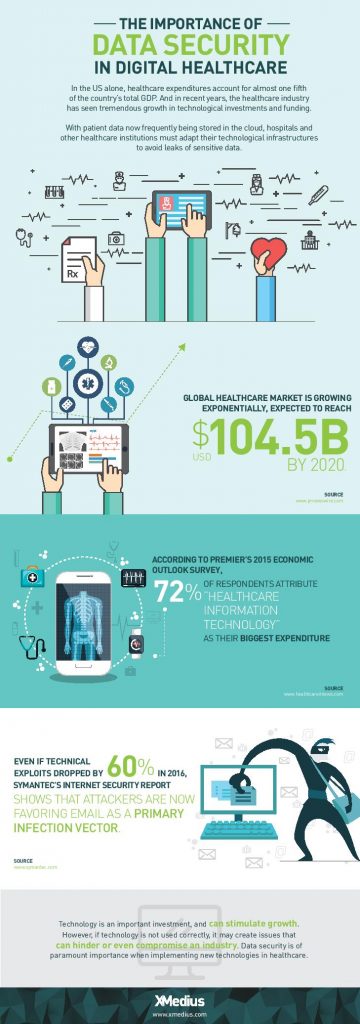
    While EHR/EMR solutions help a great deal when it comes to accessibility, improved workflow, and interoperability between healthcare institutions when it comes to managing patient records, they only represent a fraction of the IT expenditures in the healthcare industry. 72% of respondents in a 2015 survey of healthcare professionals said that healthcare IT is their organizations biggest expenditure: a number that’s expected to increase globally with upcoming data regulations like GDPR.

    Healthcare IT doesn’t only encompass EHR/EMR systems, but also the networks that support them, as well as the servers, workstations, and mobile devices that healthcare staff access them from.

    When it comes to data management, today’s healthcare IT professionals know that there are a lot of options to invest in when attempting to simplify and centralize their IT infrastructure. There are many health IT hardware and software tools on the market that help healthcare providers reach improved levels of patient care, staff workflow and regulation compliance. Let’s take a look at a few of the best pathways to an improved healthcare IT infrastructure.

    1. Investigate alterative data storage options

    In order to meet growing data storage needs and compliance regulations, many healthcare organizations are building their IT datacenters to be more flexible and scalable. Traditionally, hospital IT admnistrators have preferred on-premise, physical data storage options because of the control it gives them. But with physical on-site storage comes the work of maintenance, deployment of expansion storage, troubleshooting, and more. While not every healthcare organization will benefit from the same type of data storage, many are more likely these days to implement cloud storage into their IT infrastructure.

    Cloud data storage options are flexible, scalable, and come at a lower cost than on-premise deployments. Today’s healthcare providers can choose between public or private hosting facilities, many of which offer appealing back up and disaster recovery plans. Other advantages of storing data on the cloud is freed-up internal storage and resources, improved interoperability, and better integration with applications. If you’re considering migrating some of your healthcare data storage over to the cloud, be sure to discuss the compliance and security measures that potential vendors have in place to ensure you make the best choice.

    2. Ditch traditional fax

    As surprising as it may seem, decades-old fax machines are still widely used in today’s hospitals and physician’s offices. Data security is of utmost importance in today’s healthcare environments, but a large number of providers don’t have the time or resources to explore alternative options.

    Fax machines not only break away from the digital and paperless landscape that compliance regulations have mostly succeeded to build, but the technology is also plain old unreliable:

    • It leaves too much room for human error: sending a fax to a wrong number is a common error as evidenced by a large number or reported data breaches
    • Paper, ink, and maintenance costs add up
    • Regulations such as the HIPAA privacy rule strongly suggest that the minimum amount of information necessary be contained in fax transmissions

    Other options, such as t.38 and cloud fax solutions have emerged as popular alternatives for safely transmitting patient records and other sensitive data. But what is t.38 faxing? It’s a technology that allows you to send faxes over your existing computer network. Cloud faxing essentially allows your fax transmissions to take place over a remote server. These solutions are highly affordable and leverage existing internet connections, they eliminate lost or misused faxes that might be left lying around, and they scale easily. What’s more is that many of today’s fax solution options integrate seamlessly with existing EHR/EMR systems, allowing staff to send and receive mission-critical data right from the platforms they’re most comfortable with.

    3. Secure file exchange: simple solutions for data transmission

    Email is another commonly used tool for transmitting patient data to patients themselves and within the healthcare network. Not all healthcare institutions can afford to implement the security measures needed to make their email servers secure enough to remain compliant and keep incidents of data breach at bay. Another issue within certain healthcare departments is that email doesn’t permit them to attach files over a certain size, forcing them to find other options for sending and receiving bulky patient records and medical images. The radiation Oncology departments at Inova Health System in VA, for example, were burning large files onto CDs and using mail services in order to get patient data to other hospitals and medical facilities in their network before transitioning to XMediusSENDSECURE.

    SendSecure is an example of a collaborative secure file exchange software that takes minimal time and effort to deploy. It uses double encryption, which keeps files encrypted during both the upload and download processes unlike most email servers which only encrypt files while in transit. Users can send an unlimited number of files up to 5TB/ea., thus eliminating any concerns of getting large files where they need to get in a hurry. Similar to today’s FoIP or cloud fax solutions, SendSecure also integrates with day-to-day applications, such as Outlook, and can even be used from any internet browser.

    Looking for ways to boost your health IT infrastructure and ensure your data is safe in transit and at rest? Speak with an expert today about FoIP and secure file exchange solutions that could work for you! Contact us: sales@rincon.co.in

    The original article can be found here.

  • Reblog: Ways to Ensure Secure Communication Inside Your Business

    secure-communication

    As threats to data security become more widespread, the need to standardize solid cybersecurity measure in also becomes more crucial.

    In a recent report by CyberSecurity Ventures, it was revealed that global annual cybercrime will grow from $3 trillion in 2015 to $6 trillion annually by 2021 – encompassing damage and destruction of data, stolen money, lost productivity, theft of intellectual property, theft of personal and financial data, embezzlement, fraud, post-attack disruption to the normal course of business, forensic investigation, restoration and deletion of hacked data and systems, and reputational harm.

    With the whopping amount of damage that they can cause, it’s safe to assume that hackers these days don’t seem to bother selecting their targets – even a local café could suffer from the same detrimental effects of a data breach as bigger companies.

    The key to ensuring effective cyber security in business starts with secure communication framework. By keeping all the communication channels of your business secure, you’ll be able to make sure that all data being sent by your employees in and outside your business premises is protected against unauthorized access and manipulation.

    Here are few ways to achieve a secure communication framework in your business.

    1. Ensure Buy-in From Key Stakeholders of the Business

    The first and most important step in achieving secure communication is to make sure that all the stakeholders in the organization are on the same page and accepts that cyber security is a serious matter you cannot afford to ignore.

    These stakeholders include:

    • Cyber security team
    • Outside incident response team,
    • Chief Information Officer, Chief Security Officer
    • Business executive management (CEO, CFO, COO)
    • General Counsel
    • Board of Directors
    • Employees and support staffs
    1. Develop Clear Security Policies

    Based on a risk assessment conducted by your cyber security team, you must quickly develop policies for communication. These policies govern exactly who can access, use or receive which type of content, and who will oversee enforcement actions for violations of these policies.

    These policies should cover key security topic issues as:

    • Security risk management
    • Critical asset management
    • Physical security
    • System and network Management
    • Authentication and authorization
    • Access control
    • Vulnerability management
    • Incident management
    • Awareness and training
    • Privacy
    • Ensure that the intent of each policy is reflected in the standards, procedures, practices, training, and security architectures that implement it.
    1. Establish a Monitoring and Enforcement Team

    Having a separate team who will monitor and enforce communication policy adherence is crucial to the protection of confidential information assets being communicated over various channels. There must be control point in place to track information usage and traffic, so you can verify compliance with information distribution policies and perform enforcement actions for violation of those policies.

    With the amount of electronic communication taking place in modern businesses, your chosen communication platforms should have a monitoring system that will allow you to detect failed access of password hacking, stop unauthorized app usage, and track service availability to ensure high SLA compliance.

    1. Use a Secure Enterprise Text Messaging Platform

    The need for a reliable and secure text messaging app is often overlooked in many companies and organizations. With 80% of professionals currently using text for business-purposes, it’s only imperative for companies and organizations to have their employees use secure messaging service for all work-related purposes.

    As mobile workforce continues to rise, using a platform that will allow an employee to communicate work-related details with his/her colleagues with less risk to data theft is a way to achieve productivity in the workplace as well. With this platform, you will be able to monitor all the conversations being sent through the app, and remotely delete the message if ever the user’s device gets lost or stolen.

    These added benefits make it possible for your workforce to work collaboratively outside your business without running the risk of being intercepted by unauthorized users.

    Protecting confidential information doesn’t start in your enterprise database but on communication channels that connect with it, such as your mobile messaging app. To protect your valuable and sensitive business data, everyone must understand their roles in maintaining cyber security in the workplace, and uphold their duty on ensuring safe and secure communication at all times.

    The original article can be found here.

    To learn more, contact us on sales@rincon.co.in