Tag: DMS

  • How a DMS Enhances Teamwork and Productivity in Remote Work Environments

    Streamlining Remote Work with a Document Management System

    Remote work has become the new normal for many businesses. While it offers flexibility and freedom, it also presents challenges—especially when it comes to document sharing, collaboration, and maintaining efficiency. 

    Enter the Document Management System (DMS): a game-changing tool that simplifies remote work and ensures seamless collaboration. 

    Here’s how a DMS can make remote work smoother, more productive, and more secure for your team. 

    1. Centralized Document Storage

    One of the biggest challenges in remote work is accessing important documents. A DMS stores all files in one secure, centralized location. Employees can access what they need anytime, anywhere, eliminating the back-and-forth of asking, “Where’s that file?” 

    Example: Instead of hunting for contracts in email threads or shared drives, a DMS lets employees locate them instantly with a few clicks. 

    2. Real-Time Collaboration

    Collaborating on documents can be tricky in remote setups. A DMS allows multiple team members to work on the same document in real-time, ensuring everyone stays on the same page—literally. 

    How It Helps: 

    • Version control ensures no one overwrites someone else’s changes. 
    • Team members can leave comments, suggestions, or approvals directly within the document. 
    3. Enhanced Security for Sensitive Data 

    Remote work often involves sharing sensitive documents across multiple locations. A DMS protects these files with encryption, role-based access control, and secure sharing options, ensuring your data remains safe. 

    Bonus: Many DMS platforms come with automatic backups, so you’ll never lose data—even if someone accidentally deletes a file. 

    4. Streamlined Workflows and Approvals

    Need approvals from multiple stakeholders? A DMS automates workflows, ensuring documents are routed to the right people at the right time. This keeps projects moving, even when the entire team is working remotely. 

    Example: When submitting an invoice, the DMS automatically sends it to the finance team for approval and notifies the sender once it’s done. 

    5. Instant File Search and Retrieval

    In a remote setup, wasting time searching for files can disrupt productivity. A DMS offers advanced search capabilities, allowing employees to locate documents using keywords, metadata, or filters like date or file type. 

    Result: No more wasted time or frustration looking for misplaced files. 

    6. Mobile Accessibility

    Work doesn’t always happen at a desk. A modern DMS lets employees access files from their smartphones or tablets, making remote work even more flexible and accessible. 

    Example: Whether you’re at home, in a coffee shop, or on the go, a DMS ensures you can access and share critical documents securely. 

    7. Improved Compliance and Audit Readiness

    Many industries require businesses to maintain detailed records for compliance. A DMS ensures all document activities—like edits, shares, and approvals—are tracked and logged, making it easier to meet regulatory requirements. 

    Pro Tip: When auditors request documents, a DMS lets you pull up what they need in seconds, even in a remote setup. 

    The Benefits of Using a DMS for Remote Work 

    • Boost Productivity: Reduce wasted time searching for files or waiting for approvals. 
    • Increase Collaboration: Enable seamless teamwork regardless of location. 
    • Enhance Security: Protect sensitive documents with advanced encryption and role-based permissions. 
    • Save Time: Automate repetitive tasks like approvals and notifications. 
    • Enable Flexibility: Let employees work from anywhere without compromising efficiency. 
    Conclusion: The Key to Remote Work Success

    A Document Management System is more than just a tool for storing files—it’s the backbone of efficient remote work and collaboration. By centralizing documents, automating workflows, and enhancing security, a DMS empowers teams to work smarter, no matter where they are. 

    At Rincon, we specialize in advanced Document Management and Workflow Solutions designed to make remote work hassle-free and productive. 

    Ready to transform your remote work experience?Contact us today to learn how a DMS can streamline your operations and improve collaboration. 

  • 10 Ways Document Management Systems Transform🚀 Your Documents. Unlock Your World🤩

    A Document Management System (DMS) is like a modern digital librarian, transforming how organizations handle their information.

    Imagine a vast, well-organized library where all kinds of documents, from ancient scrolls to latest eBooks, are easy to find. In the digital world, a DMS does this job with impressive skill.

    A DMS is software designed to collect, store, handle, and keep track of electronic documents and images. It is a flexible storage system that helps organizations deal with their ever-growing amount of digital data. Let’s explore what makes a DMS so interesting in simpler terms.

    Document Management Systems

    Centralized Storage: A DMS is a secure digital storage space where you keep all your documents. Searching through emails or folders are not needed– everything is neatly organized and easy to find.

    Metadata Organization: Each document in a DMS can have extra information like keywords, tags, and dates. These help you find things quickly, just like a librarian who knows every book’s details.

    Version Control: A DMS keeps a history of your documents. You can see all the modifications done. You can go back to previous versions if needed.

    Access Control: You can decide who can see, edit, or use specific documents. It keeps your data safe and follows rules and laws.

    Collaboration: A DMS makes it easy to work with others. You can edit documents together, add comments, and see the changes in real-time.

    Automated Tasks: Think of a DMS as a helpful assistant. It can do repetitive tasks like moving documents around, getting approvals, and saving old files.

    Audit Trail: Every action on a document is listed. You can see who did what and when, like a detective monitoring your digital library.

    Disaster Recovery: Your documents are safe, even if something unexpected happens, like a fire or flood. DMS systems often have backup plans in place.

    Intelligent Searching: Some DMSs use better technology to find documents. They can look for specific words in documents and even suggest related info.

    Eco-Friendly: Using a DMS helps the environment by reducing the need for paper. You save trees and lower your carbon footprint.

    A DMS is not just a file organizer; it’s like having a digital guardian for your essential data. It helps you find, keep, and protect your electronic documents. In the current age, a DMS ensures your digital legacy is secure and accessible, like a well-maintained library preserving history for future generations.

    If you deal with a significant volume of physical or digital documents that require long-term storage, then a DMS will be a valuable asset. Our team of experts can assist you in choosing the right solution.

    Contact us at sales@rincon.co.in or call +91 9321064487

  • Document Management System – Guide

    What Is A Document Management System?

    Document management system (DMS) is a computer system (or a set of computer programs) used to track and store electronic documents. It is usually also capable of keeping track of the different versions modified by different users (history tracking). The term has some overlap with the concepts of content management systems. It is often viewed as a component of enterprise content management (ECM) systems and is related to digital asset management, document imaging, workflow systems and records management systems.

    Document Management System

    Butler Group, a London-based IT research and analysis organization, in its report entitled “Enterprise Search and Retrieval,” concluded that “ineffective search and discovery strategies are hampering business competitiveness, impairing service delivery and putting companies at risk.” Specifically, they contended that as much as 10% of a company’s salary costs are “frittered away” as employees scramble to find adequate and accurate information to perform their overall jobs and complete assigned tasks.

    What Are The Current Challenges Faced By Customers?

    The vast majority of documents in most organizations are not connected to the people or processes who need them. Examples include contracts, invoices, statements, reports, technical documentation, medical records and even email. This results in Lost or misplaced information – Knowledge workers spend 3.5 hours weekly searching for information that is never found and 3 hours a week recreating that lost content. (Source: The hidden costs of information work, International Data Corporation (IDC), March 2005)

    Information Overload: Knowledge workers spend more than 27 hours a week searching, gathering and analyzing information. (Source: Ibid.) Fixed content is often left out because it is not well organized

    Inefficient Business Processes: Just one example: it costs more than $50 on average to process and manage a paper invoice. (Source: Institute of Management and Information (Source: IOMA, Dec. 2005)

    Compliance Issues: Organizations are under more pressure than ever before to manage fixed content for compliance and risk reduction purposes

    Lack of integration with other applications CRM, ERP, HR, ECM, claims processing, health information systems, etc. all these applications need fast and accurate access to archived content but it is rarely accessible

    Costly real estate is being used for hard copy storage.

    How Can Document Management Solution Help In Overcoming These Challenges?

    • Increases productivity by speeding up document retrieval and finding lost information
    • Saves money by reducing the need for paper supplies, paper delivery and storage
    • Streamlines business processes by eliminating paper. Helps with compliance by creating a secure archive with audit trails, electronic discovery support and options to store data on non-erasable storage media
    • Connects the archived content to other applications that need it Hard copies can be stored off site saving on costly real estate.

    What Should One Consider When Looking For A Document Management System?

    Some of the most important features and functionalities that businesses should look for when choosing a document management solution are:

    File Structure: The system should offer an easy-to-use file structure that makes sense to users, such as a cabinet-drawer-folder approach.

    Searching: You want a wide range of options for quickly finding files. You should be able to search not only by the file’s name, but also by the content inside the file.

    Ease Of Use: The system should be simple for employees to use. If it is too difficult, you won’t get complete buy-in from the staff, which will make the system less effective.

    Mobile Access: You want a document management system that is accessible via smartphones and tablets.

    Integration: The system should easily integrate with the programs you’re already using, such as your email client and customer relationship management software.

    Scanning: The solution should be compatible with a wide variety of scanners.

    Security: The system should allow you to restrict who can see specific folders and files. You should be able to set access permissions by the employee.

    How Do You Get Documents Stored In The System?

    There are several ways to add files including by uploading them from the computer (say .doc or .pdf or .xls files etc.) or by scanning paper documents directly into the system or by using our document scanning service.

    Scanning

    Scanning Capabilities Are A Huge Part Of A System.

    Scanning now takes just seconds, and if you get the right package, you can automatically create editable, keyword-searchable files in a universal format, like PDF, while you scan. A good scanning solution even makes bulk scanning easy, recognizing where separate documents begin and end in a stack and sending them to the right folder.

    How Do You Find Documents In The System After They’re Filed Away?

    Document Management systems offer a number of ways to quickly locate documents, including by searching the file’s title, the name of the author and when it was added into the system. In addition, many of these solutions allow you to search for content within each file.

    With the integrated search features, you can simply conduct a keyword search to pull up documents in seconds, get a preview to make sure you’ve got the right file before opening it.

    Document Management System User Benefits

    There are a number of advantages of using these systems and some of the biggest ones are listed below:

    Easy Access: John Bustrum, CEO and founder of My403bCoach.com, said having such software in place means he’s no longer forced to stockpile loads of files on his desk. Instead, when clients call, he can instantly find the documents he needs on his computer.

    Easy To Search: Being able to easily search through her company’s documents is a huge benefit, said Karen Walker, founder of One Team Consulting. She said the ability to quickly search for and retrieve presentations and notes is invaluable.

    Better Collaboration: Getting rid of hard copies of documents makes it easy for employees to work with each other, said Gary Tuch, founder of the Professor Egghead Science Academy. When multiple employees are working off of one document and editing is constantly happening, document management systems ensure workers always have the most up-to-date copy, he said. Employees waste no time on printing revisions or double-checking to make sure they have the current version, Tuch added.

    Added Security: Increased security is a huge advantage of using document management solutions, said Andrew Southard, general manager of the Indiana-based Data Management Shredding, Inc. The technology has given his company the option to track who is viewing and editing each document, and designate which employees have access to which files, he said.

    Saves Space: Exchanging paper documents for digital versions can save a tremendous amount of physical space, said Randy Jourgensen, owner of Digital Office Solutions. Since transforming his office to a paperless environment more than 15 years ago, Jourgensen has been able to convert space that was formerly used only for file storage into space that can generate revenue, he said.

    Disaster Recovery: Businesses that have all of their documents stored in physical filing cabinets face the risk that these papers might be destroyed, or that the business may lose access to them should a disaster occur, said Alan Baker, president and chief consultant at Spitfire Innovations. If a water pipe bursts or there is a fire, business owners can still operate with little impact, since their critical documents are stored online and spared from any destruction.

  • ISO Certification – Can a Document Management System help?

    iso9001

    ISO 9001 certification is a must-have for most manufacturing and service companies.  The certification is increasingly required in subcontracts, especially by European multinationals.
    It helps in:
    • Increased marketability
    • Reduction of operational expenses
    • Better management control
    • Increased customer satisfaction
    • Improved internal communication
    • Improved customer service
    • Reduction of product-liability risks
    • Increased attractiveness to investors
    To achieve ISO 9001 certification, a manufacturer must collect, update and share its large library of ISO documents with single point access to the latest documentation.  This is a humongous task using paper-based documents and processes. Digitising the document processes would help simplify and streamline the certification process.
    Some of the processes that must be standardized and documented in ISO 9001 include:
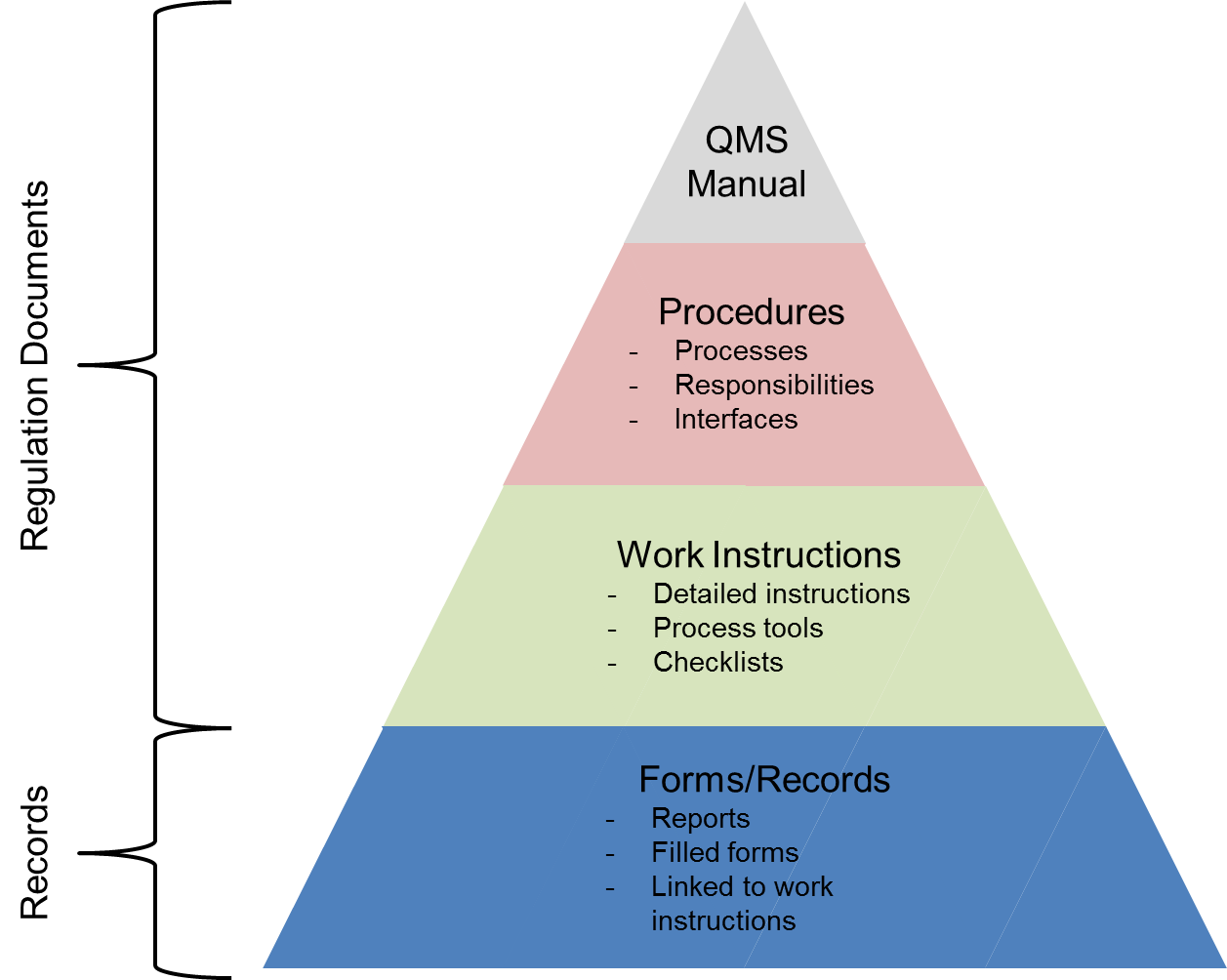
    • Quality Manual – The quality manual defines how each requirement of the rather generic ISO 9001:2008 standard is applied at the company.
    • Quality Procedures – The quality procedures are the essence of the ISO 9001 documentation. The ISO 9001 quality procedures explicitly describe how certain key processes within the company must be performed and who is responsible for them.
    • Quality Policy – The quality policy is the company’s policy defining its stance towards quality and customer satisfaction.
    • Quality Objectives – The quality objectives define measurable goals relative to the company’s quality management system.
    • Process Flowchart – The process flowchart is a description of how the various processes of the ISO 9001 QMS interact with each other.
    • Work Instructions – Work instructions are the most detailed and most company-specific of all ISO 9001 documents. Work instructions describe in detail how particular tasks must be performed. Work instructions are typically written by the people who perform the actual work.
    • Records – Records are different from the above documents, all of which provide directions on how to conduct business. Records, on the other hand, are evidence of things done. ISO 9001:2008 contains numerous explicit requirements on records plus requirements for many more undefined records.
    Most organizations are unaware that even if they previously went through the ISO 9001 certification process, things are changing. A new ISO 9001 standard has been published in September 2015. This means that the ISO 9001:2008 standard will become obsolete on September 14, 2018, and that all ISO 9001:2008 certifications issued in late 2015 and beyond bear an expiry date of September 14, 2018.
    There has never been a better opportunity than now to examine the underlying document management practices associated with ISO 9001 certification. Certifying against the new standard provides an opportunity to view ISO 9001 not only as a paper documentation exercise, but as an opportunity for digitizing document processes – and in the process transforming the business. Leading organizations are increasingly realising that if approached strategically through a document management system, compliance-mandated digital documents can provide a foundation for more effective processes throughout the business and provide insights that are critical to digital transformation.
    If you are considering the implementation of a document management system for your business, but you are still on the fence when it comes to selecting the right solution, please e-mail us on sales@rincon.co.in and we will be glad to assist you.
  • Why do Housing Finance Companies use Document Management Systems?

    mortgagedocuments

    A Housing Finance Company (HFC) processes loans at multiple locations, and retains all related documents at the local / zonal office. Each files received consists of multiple documents and should be filed and processed swiftly considering the competitive environment.
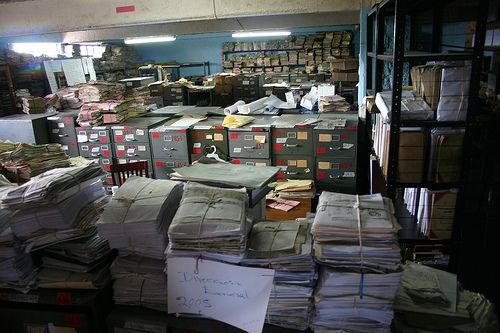
    In the manual process, documents need to be stored physically in the office resulting in wastage of expensive real estate. Additional paperwork needs to be stored in the right place with the other documents so as to make it easily accessible. This results in a lot of time and money spent on handling paper. Finding the correct document is akin to finding a needle in a haystack especially at the time of audits or at the time of a default.
    With a document management system in place,
    • All documents are scanned and archived on a central server thereby making it available to users anywhere (provided they have the requisite rights and permissions).
    • Expensive real estate can be put to better use and documents can be stored off site.
    • The concerned people have access to the records from anywhere they work using the web or mobile interface.
    • Improve workflow, response times and efficiency
    • Reduce costs
    If you are considering the implementation of a document management system for your business, but you are still on the fence when it comes to selecting the right solution, please e-mail us on sales@rincon.co.in and we will be glad to assist you.
  • Document Management system for Property Management organisations

    paperpiles

    A Property Management organisation is one that looks after the management of personal property, equipment, tooling and physical capital assets that are acquired and used to build, repair and maintain end item deliverables. Property management involves the processes, systems and manpower required to manage the life cycle of all acquired property as defined above including acquisition, control, accountability, responsibility, maintenance, utilization and disposition.

    These organisations have to manage leases, contracts, notices, and other property records in a property document management system that keeps important property documents secure and makes them easily retrievable.

    With a document management system in place, property managers, property owners, and property management staff can use it to improve efficiency and make informed decisions regarding the leasing and ownership of property.

    A document management system keeps all records, including important plans and facilities documents, ready for access. Authorised persons can access files outside the office using Web and Mobile access. Users are able to search and retrieve documents on the fly thereby enabling them to make faster and more accurate decisions.

    If you are considering the implementation of a document management system for your business, but you are still on the fence when it comes to selecting the right solution, please e-mail us on sales@rincon.co.in and we will be glad to assist you.

  • Document Management System for Accounts Payable

    Accounts Payable (AP) is a basic function of every organisation. Whatever be your business, you will have invoices to pay, processes to adhere to and accountability to document. Missed early payment discounts, late fees, lost invoices, dozens of calls, emails, faxes, and other inefficiencies can substantially drive up your operating costs.

    Beyond invoices and payments, there are compliance issues surrounding accounting. Auditors require an ability to keep track of and report all aspects of your accounting system and processes including Accounts Payable. Failed audits resulting from lost documents or poor documentation can result in large fines, or a range of other penalties.

    With a Document Management System (DMS) in place, you can ensure processes are being adhered to and are fully auditable. It allows you to:

    • Secure and keep track of all incoming invoices and related documents (PO’s, notes, GRNs, etc.)
    • Ensure early payment discounts and eliminate late payment fees
    • Reduce data entry errors
    • Compare approved purchase order amounts to invoices and eliminate overpayment
    • Ensure all your accounting procedures and approvals are adhered to using automated routing for review, approvals, and processing

    If you are considering the implementation of a document management system for your business, but you are still on the fence when it comes to selecting the right solution, please e-mail us on sales@rincon.co.in and we will be glad to assist you.

  • Automation of Insurance Process at Hospitals

    Simplification of insurance processes

    Many big hospitals these days offer cashless hospitalisation. This means that a policyholder who is covered under medical insurance will be able to avail of services at these designated hospitals and their bills would be settled by Insurance Company or their TPA (third party administrators). This saves the policyholder / immediate family’s blocking of money.

    (more…)

  • FileDirector announces release of Version 3

    Customers do not want new products, they want solutions that offer new and superior benefits. With technology advancing at an incredible pace, the gap between what is currently in the market and the possibility for new or significantly improved products needs to be reduced. With the appropriate combination of technology, innovation and experience, Spielberg Software of Germany is pleased to announce the third generation of FileDirector document management solution. This new release gives a dramatic boost to server performance and has a host of new features and enhancements.

    Contributed by Ashish Baby