Tag: Document

  • Are You Worried About Document Safety?

    Luckily, there is a technology that you can use to protect your important documents. Storing documents electronically can be much more cost-effective and safer than paper storage. Protecting the electronic documents from alteration and keeping a history of authorized changes is a must and now no more need to worry about documents.

    We offer an end-to-end solution right from scanning your documents to archival of the same.

    Concerned about maintaining the server on your premises? We also have the solution available on the cloud.

    Importance of Scanning & Storing

    • Eliminate Paper Clutter
    • Never Lose a File
    • Improve Customer Service
    • Lower Expenses
    • Secure Your Information
    • Access Your Documents Anywhere.
  • Still struggling with managing documents?

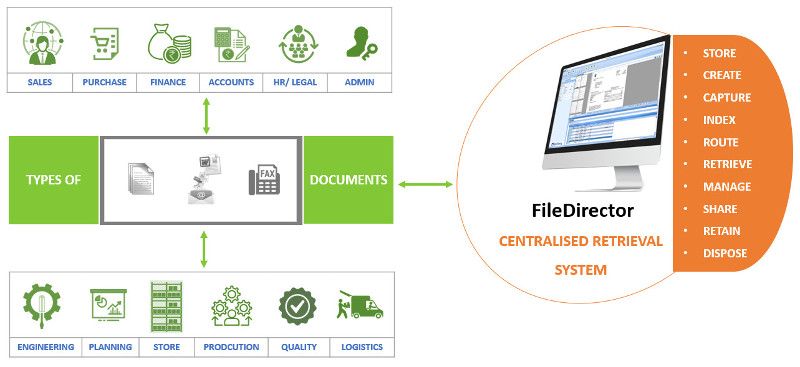
    Centralised Document Retrieval System

    FileDirector Document Management Software

    • Safeguard information
    • Supports both paper and electronic documents
    • Bulk Upload
    • Email Archiving
    • Integrated with Microsoft Office
    • Workflow for document review & business processing
    • Simplify disaster recovery
  • FileDirector For Hospital’s Health Insurance Process Automation


    Many hospitals these days offer cashless hospitalisation. This means that a policyholder who is covered under medical insurance will be able to avail of services at these designated hospitals and their bills would be settled by Insurance Company or their TPA (third party administrators). This saves the policyholder/ immediate family’s blocking of money.

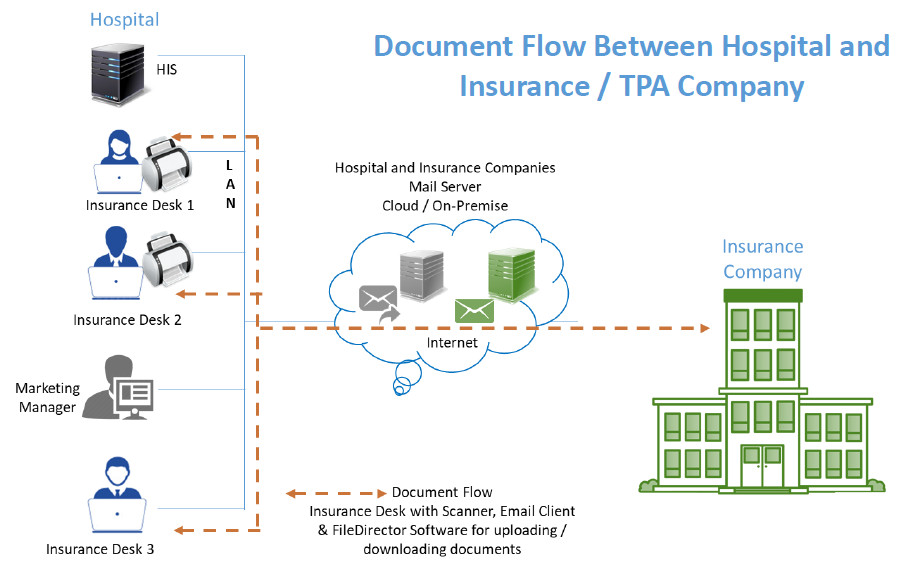
    FileDirector software from Spielberg, Germany would be a good fit to streamline the document exchange process which happens between hospitals and Insurance / TPA companies.

    FileDirector will check for prerequisites and inform whether the machine has sufficient rights for installation, operating system compatibility and if the required ports are open.

    The FileDirector server component will be installed on either

    • Windows 7 or above desktop
    • Windows 2008 or above server

    The FileDirector software will run with SQL Express Database which is free of cost. It will install this component in case it is not there on the FileDirector server.

    The hospital insurance desk will have FileDirector scan station license. It is assumed that the Hospital would have reasonably stable internet connectivity to send / receive documents.

    Hospital will get standard cabinet structure for health insurance records. The structure would include mandatory fields such as Name of the patient, Admission Number, Mobile Number, Policy Number etc. as per Insurance company requirements. Broadly speaking these would be common across all Insurance / TPA companies.

    Hospital would get Masters such as Document type which could include but not limited to pre-authorisation application, Query, Response to query, Approval letter, Letter of denial etc. Masters of Insurance Company as well as TPA would be provided for easy indexing.

    Insurance Desk user would be able to scan / drag and drop the document in FileDirector, Index and send the same to Insurance / TPA company. Option will be available to Scan / drag and drop the document in FileDirector, Index and Hold. He or she will be able to add more documents to make this document set complete and then send to Insurance / TPA company via Email.

    Insurance desk user will have an option to print acknowledgement letter for the patient confirming receipt of the number of documents that have been submitted for Insurance processing.


    Reports:
    The system would be able to generate different reports such as:

    • Claims processed today
    • Pending as of today
    • Approved today
    • Rejected today
    • Rejection with reason
    • Partial approved with reason

    View
    View for checking insurance company’s incoming email messages / documents would be provided using IMAP integration. Insurance desk user will index and store these incoming messages in FileDirector for future retrieval.

    Search
    Users would be able to search documents using one or more indexing parameters and see records.

    For more information e-mail us on sales@rincon.co.in and we will be glad to assist you.


  • FileDirector Enterprise Solution

    [thumbnail target=”_self” src=”https://backend.rincon.co.in/wp-content/uploads/2017/10/document-automation-300×113.png”]

    Bringing documents into today’s world

    • Lower costs
    • Processes paper documents in the same way as digital documents
    • Unlimited users
    • Perfect integration in Microsoft Office
    • Automatic email recording directly from the email server

    FileDirector brings the future of company management and data distribution into today’s world. Our Electronic Content Management solution shortens the time required to organise and handle documents within an enterprise enormously. This noticeably more productive and more efficient way of working reduces costs significantly.

    In achieving this, FileDirector covers all the working stages that a document goes through in modern enterprises: from recording paper documents, or handling documents already in digital format, across search and retrieval to secure archiving of data – all functions are covered. Moreover, FileDirector is not limited to a single location: multiple servers can work together in a network, enabling enterprises to gain the benefits of FileDirector even when operating on a global footing.

    Security is massively important in all Electronic Content Management solutions – which is why FileDirector manages all access authorisations to documents, changes, access periods, automatic storage of documents and emails.

    Capturing information is a very quick process using FileDirector. Scanning was never easier, as the program works with most digital input devices and uses pre-definable scan profiles. Thanks to the integration of FileDirector in Microsoft Office, you and your staff can archive documents, tables and emails with a simple mouse-click.

    Indexing and sorting documents is handled manually or via OCR (Optical Character Recognition) zones in the document, via full text or barcodes. Index data can be imported via ODBC from other databases or files, or transferred automatically when importing or recording.

    Searching for documents could not be easier: using full text search, you can find words or even whole sentences in the document content or index fields. A single double-click is all that is needed to display the document – even if the application used to create the document is not installed on your computer, as FileDirector supports a wide range of file formats. It is easy to scroll through pages, to display miniature images of the pages as a preview, and to call up any previous version of something has been changed. It is also possible to open and view several documents simultaneously.

    Business Process Management sends documents to users, using predefined processes, with each user being required to trigger actions, such as accept/reject. This makes it an ideal tool for tasks such as processing invoices.

    Storage is no problem for FileDirector. Due to the usage of Microsoft SQL or Oracle databases FileDirector can handle millions of datasets and documents with ease.

    For more information e-mail us on sales@rincon.co.in and we will be glad to assist you.

  • Reblog: Is Fax Dead in Healthcare?

    The word “fax” has some pretty outdated connotations within today’s highly mobile and technologically savvy workforce. When people think fax, it may invoke a flashback of standing in front of a jammed machine as they attempt another go at sending a single page for the 6th time, or trying to get an urgent document over to a waiting recipient, only to discover that the receiving fax machine is out of ink. Regardless of the reputation fax has for being obsolete tech, the reality is that fax usage in many industries is still rising, not dropping, and faxing itself no longer means having to rely on outdated machines.

    If you’ve pondered the question “Who still faxes in 2018?” the straightforward answer is that many businesses rely on fax for their day-to-day operations.

    In The International Data Corporation’s (IDC) 2017 fax survey, 82% of respondents in the Finance, Healthcare, Manufacturing, Legal, and Government sectors saw fax usage go up or remain consistent compared to the previous year. The average growth of fax usage across the board was 27%, with a quarter of companies in these sectors reporting growth between 50-74% – a very far cry from the statement that “fax is dead”!

    Fax is far from dead. Not only is it still widely used, it has evolved into a digitized medium that integrates seamlessly with interfaces that most of us use regularly, like email. While fax machines may remain for a little while longer, their use is no longer synonymous with faxing itself. Fax-over-internet-protocol (FoIP) technology has revolutionized communications, allowing for increased security, mobility, and ease-of-use. Read on for an overview of how and why fax has remained commonplace in the healthcare industry.

    The Role of Compliance in Healthcare Faxing

    The healthcare industry’s wide use of fax has a lot to do with regulatory compliance, namely with the Health Insurance Portability and Accountability Act, or HIPAA, which was passed by the US Congress in 1996. Navigating the details of regulatory compliance can get overwhelming: when it comes to secure data transmission, what does HIPAA actually say? The HIPAA Privacy Rule was enacted in 2001, shedding a little more light on exactly how healthcare organizations should protect patient data. It urges healthcare professionals to take “reasonable safeguards” when sharing patient files between hospitals, labs, doctors’ offices, and insurance providers.

    The US Department of Health and Human Services (HHS) clearly names fax as an essential method of transmitting medical records, test results, and anything else containing personally identifiable information (PII). This is not to say that email isn’t widely used as well, but there are tremendous security risks that come along with using email to send and receive sensitive files.

    A quick “healthcare data breach” search in Google will reveal the startling number of phishing scams and email hacks that take place in the industry almost every day. While there are secure email servers galore available on the market, these platforms are often reserved for larger healthcare corporations or hospital networks since they are often too costly or complicated for the average healthcare provider.

    EHR/EMR Systems and Paperless Faxing

    The advent of Electronic Health Record and Electronic Medical Record (EHR/EMR) systems have completely changed the healthcare records management landscape. Not only is electronic record management in accordance with HIPAA’s efforts to digitize the healthcare environment, it provides a safer means for storing data. Electronic record keeping also allows healthcare professionals to minimize human error while taking full advantage of cost savings.

    As technology advances, EHR/EMR systems vendors now offer on-site or cloud data hosting options, and the systems themselves provide improved coordination between healthcare providers, even granting patients the ability to access their records online. They’ve progressively become more prevalent in healthcare facilities of all sizes – It’s estimated that 77% of today’s healthcare providers have moved their records into the digital sphere.

    Fax-over-Internet-Protocol (FoIP) technology has also evolved over time, with many vendors offering seamless integration with today’s EHR/EMR systems. From a user perspective, sending a fax is now as simple as pushing a button on the interface they already use every day. This eliminates the need for paper filing and simplifies the data transmission process since documents no longer need to be printed or scanned to before users hit send.

    Healthcare Carries the Highest Digital Fax Adoption Rate

    Healthcare showed 9% growth in digital fax usage in 2017. Right now, in healthcare facilities across North America, GPs, surgeons, nurses and other staff are putting a sensitive document in a fax tray, pressing send, and listening to the cringey audio-frequency tones that signify their information being transmitted one page per minute. Of course, not all medical records are sent through fax machines – many healthcare organizations have digitized their faxing or are in the process of doing so. In fact, the healthcare industry leads the pack for transitioning to modern FoIP technology, representing a whopping 30% contribution to the fax services global market in 2017.

    Confirmations of Receipt: From Paper Trail to Audit Trail

    The fact that faxing gives organizations confirmation of receipt is a major reason that it remains a prevalent form of communication. For years, the confirmation page (the printout that lets users know that their message has been completely received) has served as a faster and cheaper equivalent of sending registered mail. Most email systems come equipped with a read receipt feature, but these typically still give recipients the choice to opt out.

    For healthcare organizations who send and receive large volumes of sensitive data daily, confirmations of receipt offer several benefits:

    • They eliminate both administrative and IT guesswork (follow-up calls, manual logging)
    • They facilitate easy records keeping

    When it comes to dealing with sensitive patient information, confirmations of receipt are necessary from both an administrative and regulatory compliance perspective. Today, medical staff have a few ways of maintaining a paper trail of how, when, and to whom patient data is exchanged. While physical paper filing might be a slightly outdated practice, it remains a reliable system for some healthcare organizations. Many use document scanners or multifunction printers (MFPs) to scan confirmations of receipt and file them electronically.

    Healthcare facilities who have implemented FoIP solutions, however, often do so for their built-in records keeping features. XMediusFAX, for example, is designed to keep an audit trail of all fax transmissions, maintaining detailed records that can generate reports any time. Not only does this free up time for healthcare administration, it alleviates healthcare IT of having to use additional software to log communications.

    FoIP for Savings

    In addition to security and compliance benefits, switching to FoIP can bring significant savings as well. Switching organizations regularly reduce costs by eliminating expensive analog fax lines and paper filing/waste. IT departments love being able to get rid of high-maintenance fax machines in favor of more reliable software and MFP integration.

    Beyond the IT and accounting departments, FoIP is a win for the rest of the staff too. Staff members across Healthcare report significant time savings between reducing/eliminating trips to machines, no longer waiting for acknowledgement receipts, and incoming faxes automatically being routed directly to them, wherever they are.

    Fax Isn’t Dead, It’s Evolving

    Discover how fax software can improve the security and compliance of your healthcare document transmissions. Speak with one of our knowledgeable experts today about how FoIP solutions could work for you.

    The original article can be found here.

    For more information e-mail us on sales@rincon.co.in and we will be glad to assist you.

  • Reblog: Are law firms required to use secure solutions for sending documents?

    Finding the right balance between cost-effectiveness, security features, and adherence to data governance regulations is the key to choosing the right file exchange solution for your law firm.

    New data management and communications technologies are leading an increasing number of law firms to exchange documents online. Although this new approach saves a significant amount of time and money, the fact remains that some risks are still involved.

    With strict regulations governing document sharing and storage in the legal field, it’s important to consider what tools to use to that sensitive information doesn’t fall into the wrong hands when choosing a solution to send and receive your files.

    What the Code of Ethics for Lawyers Says About the Exchange of Confidential Information

    According to the Code of Ethics for Lawyers, all legal professionals are required to take reasonable steps to ensure that the sensitive or confidential information of their clients cannot be accessed or intercepted by an unauthorized third party. This of course includes documents that are sent from or hosted in the Cloud.

    This means that before using Cloud-based file transfer software, lawyers must perform thorough checks that will guarantee the security of the data being exchanged.

    Security Measures Recommended for Sending Legal Documents

    Here are a few tips to help lawyers adopt safe behaviors when they exchange sensitive documents or files, based on best practices suggested by several North American regulatory bodies.

    When using Cloud services, it’s recommended that they have at least one facility in your country of origin. Often, Cloud Service providers use multiple facilities to guarantee uptime in the event of issues like a natural disaster. But if all a provider’s facilities are overseas, it could make things difficult when trying to communicate with them (and in-turn, your clients) if or when disaster does strike.

    Next, law firms should always inform their clients when using a software or Cloud-based file exchange solution. This allows your practice to get client approval before sending any information, and can often positively affect your credibility. Everyone appreciates knowing that their data is in good hands whether its in transit or at rest.

    Finally, it’s also advisable for legal professionals to keep a backup copy of sensitive information stored in the Cloud. This way, the data will be available even in the event of a system outage or a dispute with the Cloud service provider.

    How can lawyers ensure they choose secure file exchange software?

    Legal professionals who want to send files online are faced with a tough choice. While many software solutions exist, not all of them offer the same data protection and privacy features. However, certain certifications can be reassuring.

    For example, ISO 27001 is a model for information security. Among other things, it serves as a benchmark for protecting sensitive and confidential information. It is considered a standard that oversees other legal requirements and rules and ensures that the measures taken to ensure information security are continually updated. This is an essential precaution to cope with the constant and rapidly changing nature of cyber threats.

    A secure file exchange solution tailored to lawyers’ needs

    Lawyers must be very careful when choosing an exchange platform since it is mandatory for them to use every means possible to ensure their clients’ information security.

    They can nevertheless count on the data solutions offered by XMedius. ISO 27001-certified, our trusted company has unique expertise in information security. We are the company to contact if you want to avoid any issues with confidentiality. Questions? Feel free to reach out to one of our knowledgeable experts today.

    The original article can be found here.

    For more information e-mail us on sales@rincon.co.in and we will be glad to assist you.
  • Reblog: Best Practices for Protecting Client File Privacy in the Legal Sector

    There are ways to protect the sensitive data contained in client files and reduce data loss around the legal office with software updates, document digitization, and FoIP solutions.

    The legal sector is comprised of law firms of all sizes, independent legal practitioners, and legal departments within organizations. Although this describes a vast array of legal offices, what ties them all together is that the legal workforce is responsible for high volumes of sensitive client information. Client files often contain the full gamut of personally identifiable information (PII) – from medical records to banking history and credit card numbers – placing the legal sector in the unique position of being under several compliance regulations when it comes to handling said data.

    Whereas regulations like HIPAA govern the exchange, storage, and auditing of PII for the healthcare industry, and regulations like SOX do the same for the financial sector, organizations in the legal sector can be subject to fines and penalties from both of these regulatory bodies and more. In a recent blog, we took a look at the inherent risks involved in transmitting client info via email. Taking the time to understand the threats linked with email use is a great first step, but email risks are only the tip of the iceberg when it comes to the possibilities of a data breach. If you work in the legal sector, this article aims to look at the broader picture and provide a few best practices you can apply around the office to keep client files safe.

    Perform an IT Audit and Update your Software

    Is your legal practice still using Windows XP? Despite the rising prevalence of data breaches due to unpatched and/or unsupported software with highly exploitable vulnerabilities, many companies still don’t see the need to upgrade to newer systems. After the WannaCry attacks in May, 2017, Microsoft provided legacy Windows platforms that were no longer receiving standard support, including Windows XP, Windows 8, and Windows Server 2003 with a security update. It was revealed that at the time of the attack, there were over 100 million legacy windows systems still in use around the world.

    Regardless of your current operating system, outdated technology puts your legal practice, and all the sensitive data within, at huge risk. You can have strong data governance policies in place and all your other organizational ducks in a row, but if you’re running an outdated OS, hackers can and will exploit such vulnerabilities. Don’t let this happen to you.

    Digitize Legal Records

    Transitioning to a completely paperless legal office may seem like a daunting task. Look around and you’ll likely see paper documents all over the place: client letters, court filings, case notes and more. Regulations like HIPAA for the healthcare industry are pushing organizations in the direction of electronically managing and filing records containing PII for several reasons. Paper file management is time consuming, costly, and leaves too much room for human error in a time where data breaches are so prevalent. Surprisingly though, a significant amount of legal practices still resorts to paper filing for their legal records, mostly because up until recently, practices involved in litigations have been required to print, bind, and share thick stacks of paper related to court cases.

    Luckily, many courts today are adopting electronic filing and services. This enables legal practices to transmit documents directly to a court’s case management system where it can be distributed to any other parties involved.

    Transitioning to a paperless environment doesn’t happen overnight, but most of today’s paralegal training incorporates digital filing and systems management, making it easier for law firms of all sizes to hire the right help. Legal practices that print and collate files for long-term storage may want to consider secure cloud-based storage and sharing services. Even in-house servers take up way less space than your average paper filing cabinet, and greatly reduce the likelihood of unauthorized parties accessing client files.

    Make your Document Transmissions Paperless

    The fax machine is the most paper-intensive communication technology still in use, and it’s still going strong in the legal sector. Not only is it costly to maintain a fax machine, its leaves the details of client files up for grabs, whether documents are left lying around in plain sight, or the fax machine at the receiving end of your transmissions is left unattended. Email and scanning technology have their own list of security risks and have therefore not made outdated fax technology obsolete. A range of fax services, including fax over internet protocol (FoIP) solutions have made a tremendous impact on organizational efficiency in recent years, allowing users to send and receive secure faxes directly from their PCs, laptops, and mobile devices. This means no more printing is required, and the legal workforce can securely send their documents while on-the-go – a relief for those rushing to make their next courtroom appearance.

    Want to learn more about FoIP and secure file exchange solutions that can simplify document management, improve compliance, and boost security for your client files? E-mail us on sales@rincon.co.in for more information and we will be glad to assist you.
    The original article can be found here.

  • Repost: GST may add to India Inc’s documentation burden

    India gears up for GST to be rolled out from July 1. However, have we thought of the documentation needed for compliance? Here is an interesting article.

    Industry is worried it might face increased compliance burden due to rules under the proposed goods and services tax (GST) regime.

    Companies would have to upload three returns every month – by the 10th, 15th and 20th of the month after a sale happens, said M S Mani, senior director, indirect tax, Deloitte.

    According to rules on returns, companies would have to submit details of its supplies or invoices by the 10th of the subsequent month. They have to upload details of purchases of inputs by the 15th of the subsequent month.

    GST returns, carrying details of taxes paid and input credit taken, have to be filed by the 20th of the next month, said Mani. Besides, by the next year-end, companies would have to upload annual returns as well.

    This would burden industry with too much compliance. Service companies such as Infosys, Tata Consultancy Services (TCS) and Airtel, among others, would be particularly hit.

    Service providers would have to file 37 returns each a year, said Mani, from two returns – one every six months – now.

    Besides, service tax is a central duty. So service providers do not have to file returns in each of the state where they have offices. This will, however, change under the GST regime and they would have to file 37 returns for each state they have an office in, besides the central government.

    Currently, goods companies, on their part, have to file returns every month for value-added tax (VAT) and excise duties.

    The GST Council is to discuss pending rules and changes to the already approved norms this month-end. The Council will work out rules on composition, valuation, input tax credit and transitions on March 31.

    It has already approved rules on refunds, invoices, returns, payments and registration. The government had made public rules on five categories before taking these to the Council. But it would not do so in case of pending rules, said officials.

    Industry is worried that online marketplace players such as Flipkart and Amazon will have to pay up to one per cent tax collected at source (TCS) – rules for which have not yet come — on behalf of vendors and this would add too much procedural work.

    S S Gupta of Taxmann said these marketplaces have thousands of vendors and to exactly match TCS of each would be extremely difficult. If anything goes wrong while matching, the input credit would go to another and the vendor would be asked to pay more, he said.

    If a customer returns a product purchased via an online marketplace, it will take time to reach the supplier. By then, TCS might have been paid by the online company. If that vendor does not supply to the online company again, the marketplace would have to bear the burden, explained Gupta.

    Though a cap on TCS has been reduced from two per cent in draft GST Bills to one per cent in the revised drafts approved by the Council, the tax is not aimed at revenue generation but to keep a track of vendors by the tax authorities.

    The government’s logic has been that as it can’t go after every vendor, it would ask the marketplace to deduct TCS. Keeping track of the vendors and not revenues was the concern here, said the expert with Taxmann.

    Mani said the government was basically burdening industry with compliance, even in areas where the authorities should take the responsibility.

    The other issue relates to input tax credit, rules on which are yet to come. However, rules would not contradict the Bills. A buyer would not get input tax credit unless the supplier concerned paid tax. In state-level VAT, input tax credit would be given as soon as the invoice was uploaded, he added.

    Archit Gupta, founder & chief executive officer of ClearTax.com, said there might be issues around pre-existing VAT credit in the earlier regime when these goods are exempted in GST. “So we hope this is covered under the inputs credit and transition rules.”

    For a truly unified structure, he said, the government must focus on greater fungibility of credit.

    “Exempted excise manufacturers and exempted VAT manufactures may have to face GST rates and taxes, and most of these are state-specific exemptions. So it needs to be seen how these concerns can be uniformly addressed,” added Gupta.

    The Council has cleared all GST Bills and most of these will go to the Cabinet and be tabled in Parliament. Similarly, state GST Bills will be moved to the respective state Cabinets and Assemblies. Only rules and item-wise rates have to be decided.

    While we would have electronic filing, we still have to maintain the pdf files for records. Do give a thought to managing so many files which may be pdfs or maybe hard copy. A Document Management System can help overcome these challenges. Contact sales@rincon.co.in on how we can help achieve your goals and overcome your obstacles.

    The original article appears on rediff.com and is available here

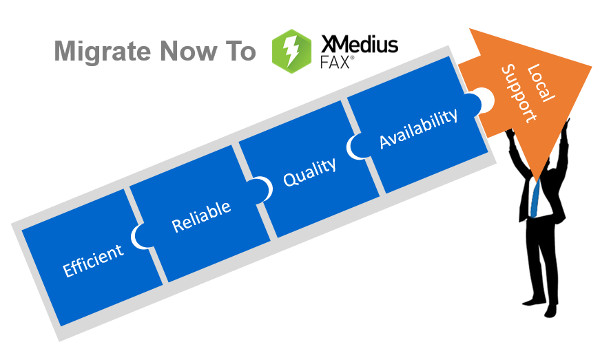
  • Migrating your Fax Server to XMEDIUSFAX

    Fax-over-IP is a critical component in the communications infrastructure of many organizations. It is optimized to secure and streamline their document workflows, and it helps them to achieve compliance with the security and privacy regulations that apply to their respective industry sectors.

    XMediusFAX® is an ideal FoIP solution. It is a single-source, software-only technology and includes its own patented T.38 protocol, the most reliable protocol for transmitting faxes over a VoIP network. Better yet, XMediusFAX® doesn’t require a third party to enable your fax infrastructure and our R&D team has fully mastered the software and can intervene quickly if any assistance is needed. Furthermore, XMediusFAX® features shared High Availability (HA) channels that replicate information in real time. Both of its servers are active, so should one fail, the other takes over until the malfunctioning server resumes its normal workload. This ensures an uninterrupted workflow.

    Because of all these critical benefits, the XMediusFAX® solution attracts a range of organizations that are interested in implementing a superior FoIP solution.

    However, switching over from another solution can raise some concerns. One that prospective customers most often express involves migrating and preserving their existing data. In response to this concern, the XMedius team has developed a tool to help our new customers migrate from their current database* to an XMediusFAX® server while preserving all of their fax records and user information.

    Would you like more information about the migration offer of your current Fax-over-IP solution to ours?

    *Conditions Apply

    E-mail us on sales@rincon.co.in for more information and we will be glad to assist you.

  • Wither fax?

    [wc_column size=”one-third” position=”first”]

    [/wc_column]

    [wc_column size=”two-third” position=”last”]

    Fax is the most commonly forgotten, but most reliable and secure method of document delivery. One of the biggest mistakes a company can make when it comes to securing sensitive data is not utilising the method of faxing for securing sensitive data in their document delivery mechanism.

    Fax is still a much more secure delivery method than both email and cloud storage. This is critical not only for industries such as finance, but also for health care, logistics, education, government and more. Viruses cannot infect your network from a fax, because they cannot be embedded anywhere. Besides your network cannot be hacked into using the fax protocol. [/wc_column]


    The advent of technology has helped companies move over from conventional fax machines to centralised fax servers. A fax server is part of the network yet uses the secure T.30 faxing protocol or the T.38 Fax over IP protocol. The fax server integrates with your mail server as well as your Line of Business applications to offer a seamless experience to users.

    If you are considering implementing a fax management solution for your organisation, but are still sitting on the fence when it comes to selecting the right solution, we encourage you to e-mail us on sales@rincon.co.in and we will be glad to assist you.