Tag: Email

  • Automate Email Driven Tasks

    Capture data from Mails to automate processes

    Is there a solution that can help automate this ever-increasing volume of e-mails?

    Introducing Email Integrator, an application that runs in the background saves time and allows you to focus on your important tasks. And it works with any email service!!

    Features

    • Monitor one or more inboxes for document or document request
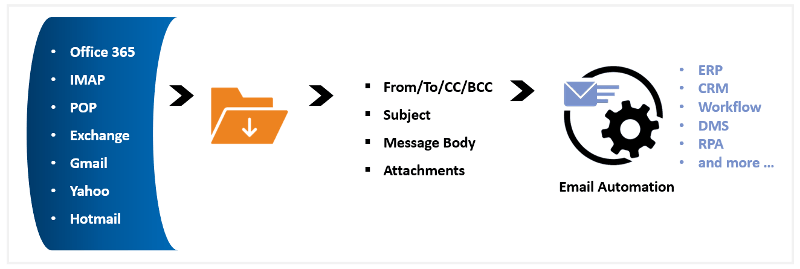
    • Download message Via POP3, IMAP or Exchange
    • Review message subject or body or attachment for request processing
    1. Order Status, Payment Status, Shipment Status etc.
    2. Download Reports, CSV, XLS etc. and upload in applications after validation
    3. Password Reset, New User ID creation in different applications, Deactivating and Reactivating user accounts etc.
    4. Print email to printer automatically and many more
  • Does your department receive hundreds of emails a day?

    Is there a solution that can help automate this ever-increasing volume? Introducing Email Integrator, an application that runs in the background saves time and allows you to focus on your important tasks. Works with any email service.

    Features

    • Auto-print and stamp emails such as a purchase order received
    • Export your emails to PDF such as transaction confirmations
    • Customise auto-reply to the sender
    • Auto Archival of sent and received emails for future reference
    • Download emails/attachments and integrate them with your applications
    • Automatically forward emails to the concerned person in the department

    So what are you waiting for? Send us an email now to schedule a demo.

  • Reblog: How Can an Audit Trail Help Law Firms Protect Client Interests?

    Sharing legal documentation can be a tricky, but vital, aspect of virtually any legal firm’s business. Legal firms need to deliver documents to clients, the courts, and other concerned parties in a timely manner. Their delivery methods must also take special care to avoid accidentally sharing information with unintended parties as to avoid an accidental breach of attorney-client privilege.

    In the past, when a legal firm needed to ensure proper delivery of documents to a specific party, they would typically hire a process server to physically hand deliver documents. This has typically been considered the best way to securely deliver documents and prove they were received by the intended party. The drawback of this method is that it can be time consuming and very costly, especially if the process server encounters difficulty delivering the documents.

    SHARING INFORMATION VIA EMAIL: DANGEROUS FOR EVERYONE

    For more routine document sharing, such as an attorney sharing court documents with a client or internally with other attorneys, many legal firms find themselves leaning on email and file sharing services. Email, as a rule, should never be used to share sensitive files of any kind. While emailing files is a quick way to share information, someone monitoring traffic in and out of a firm’s IT environment may be able to see the contents.

    The risk of information being accidentally emailed or shared with unintended parties is also a reason to avoid emailing sensitive files. To illustrate the point, according to the Australian government’s Notifiable Data Breaches Quarterly Statistics Report in May 2019, human error was in general, the cause of 31% of breaches in Australia; the second most common reason overall (the first being malicious or criminal attack at 61% of all breaches). The most common error made was sending personal information to the wrong recipient, accounting for 31% of all breaches caused by human error. The second most common error was unauthorized disclosure of information through an unintended release or publication (including online), which could include files inadvertently forwarded to an unintended party.

    Of the malicious and criminal attacks, 5% were caused by social engineering, including email-based executive fraud. All of these factors make sharing files via email an especially risky policy.

    SHARING INFORMATION VIA EMAIL: ESPECIALLY DANGEROUS FOR LAW FIRMS

    If these numbers weren’t daunting enough, the law sector-specific statistics are even worse. While the percentage of breaches caused by human error remains consistent (approximately 34% of legal sector breaches were caused by human error, versus 31% across all industries), 62.5% of those were caused by personal information being emailed to the wrong recipient. Add in the percentage of breaches through unauthorized disclosures, assuming the information was disclosed via email, and that brings the total to 75% of all breaches caused by human error.

    Put another way, during the first quarter of 2019, potentially up to 75% of Australian legal sector breaches caused by human error could have been prevented simply by avoiding the use of email.

    MOST FILE SHARING SERVICES AREN’T MUCH BETTER

    File sharing services may seem like an obvious solution; they are simple to set up and it’s easy to invite relevant parties to collaborate and share documents. The truth is, these types of services frequently lack adequate security (such as two-factor authentication) and retention policies. Additionally, if permissions are not properly set up, it may be possible for collaborators to invite others or share a direct link to the files with unintended parties. These services also often lack detailed auditing functionalities that can decisively prove documents were properly delivered to their intended recipient, nor do they record who actually accessed and downloaded files. What may be the most significant problem is the lack of retention policy controls. File sharing services frequently require files be manually deleted, which can lead to old files remaining in a shared folder well past when is necessary.

    FAX IS BETTER, BUT LIMITED

    Sending documents via fax remains a popular way to securely transfer documents as it is very difficult to intercept faxes in transit. There are a few drawbacks of using traditional fax solutions, however. One is that there can be a risk of unintended parties viewing the files, such as if there is one central, office-wide fax machine. Another is that fax can only support transferring printed documents (no audio or video) and may have constraints on the number of pages that can be faxed based on the memory of the machine receiving the fax (analog fax machines commonly have 64 MB of memory). There often will be a delivery confirmation feature with fax, but in the event the fax is being sent to an office-wide fax machine, there is no real way to tell who has actually looked at the document.

    BUT HOW CAN AN AUDIT TRAIL ACTUALLY HELP?

    A detailed audit trail can make a huge difference in protecting the sanctity of attorney-client privilege, ensuring the proper delivery of legal documents, and holding individuals accountable.

    The original article can be found here.

    E-mail us on sales@rincon.co.in and we will be glad to assist you.

  • Automate your email processes in less than 5 minutes

    [image src=”https://www.rincon.co.in/site/wp-content/uploads/2019/02/1532683853.png” shape=”img-rounded”]

    TPAs are inundated with emails and these mails are critical in nature. The number of emails is increasing exponentially and managing them is an arduous task. Is there a solution that can help automate this ever increasing volume?

    Introducing EMail Integrator, an application that runs in the background, saves time and allows you to focus on your important tasks. It works with any email box like Exchange server, Cloud emails service Gmail, Office 365, Yahoo mail, Hotmail, Outlook.com, any IMAP4 or POP3.

    Features:-

    • Auto printing and stamping of Insurance emails
    • Export your emails to PDF for integration
    • Customised auto reply to the sender’s email
    • Auto Archival of sent and received emails for future reference
    • Quick searching of emails
    • Reports
    • Keep your email box clean

    How will it help you?

    • Save all emails received from insurance companies in PDF, eml, txt for compliance and for future reference
    • Download insurance companys’ emails / attachments and integrate with your HIS
    • Automatically forward your patients’ insurance emails to the concerned person in the department
    • Print patients’ insurance emails directly to your desk printer.

    For more information e-mail us on sales@rincon.co.in and we will be glad to assist you.

  • Reblog: How Vigilant are You about Cybersecurity?

    Cybersecurity is a hot topic, as it should be. With growing amounts of personal data being stored online, we should all be taking security of our online presence seriously. It seems, however, that while Americans do not trust modern institutions to protect their data, they are neither vigilant in their private security measures nor do they consider cybersecurity a top worry.

    According to the Pew Research Center, approximately half of all Americans do not trust public or private institutions, including the federal government and social media sites, to protect their data. This mistrust is not entirely unfounded. The survey done by the center revealed that 64% of adults in the US have been impacted by a major data breach.

    Data breaches include fraudulent charges on credit cards, sensitive information (like account numbers) being compromised, email or social media accounts being taken over, attempts at taking out loans or lines of credit in their names, and more.

    Fourteen percent of adults in US reported having received notices that their Social Security number had been compromised.

    Nearly half of all Americans also reported feeling that their personal information is less secure than it was five years ago. Only 18% feel that their information has gotten more secure in recent years.

    Unfortunately, while cyber crimes are a concern and risk to personal data security, far too many Americans are failing to follow secure practices online.

    Only 12% of internet users report ever using password management software, and among those, only 3% say they rely on this password technique most. In fact, 65% of users say their primary method to remember passwords is simply to memorize them in their heads. Another 18% say they primarily write down their passwords on a piece of paper.

    Moreover, 41% of adults have shared the password to one of their online accounts with a friend or family member and 39% say they use the same or very similar passwords for many of their online accounts.

    And a full quarter of adults say they use passwords that are less secure than they’d like. Their explanation? They need to remember the passwords, so they can’t be too complex.

    The statistics don’t look any better on mobile devices. Twenty-eight percent of smartphone owners say that they do not use security features such as a screen lock to access their phone and 54% of adults report using public Wi-Fi networks that may not be secure. Among those 54%, one-in-five users reported using those networks to perform sensitive activities such as online banking.

    Given the attitude towards cybersecurity, it’s no wonder Americans are so lax about personal online security. Americans simply don’t worry much about the issue. Even Americans who have been the victim of data breaches are generally no more likely than the average American to take any additional cybersecurity measures.

    The fact is, complacency regarding cybersecurity is a risk and there are simple measures to take that can vastly improve the security of your online presence. We wouldn’t trust a bank that simply memorized our information or that didn’t have proper security measures surrounding it’s vaults where our money and safety-deposit boxes are kept, so why shouldn’t we demand the same security online, both of ourselves and of the institutions that keep our information?

    As we allow more of our personal information online, we must stay vigilant about personal, corporate, and government cybersecurity measures.

    The original article can be found here.

    To learn more, contact us on sales@rincon.co.in

  • Sales Order Processing Simplified

    The sales order (SO) is an entry point into the organisation’s system and involves different people / departments. Any business can benefit from the elimination of the current paper driven Order Fulfilment processes by replacing them with electronic Order Fulfilment and subsequent electronic storage.

    Benefits:

    • Incoming orders, invoices and legal documents are made available instantly and by mouse click
    • E-mail, the scanned order forms can be accessed instantly with the press of a button
    • Less filing, increased job satisfaction and lowered stress levels — this means less turnover and overall reduction of personnel costs for recruiting and training
    • Reduced paper handling (from capturing, retrieving to storing) allow employees to focus on core job responsibilities
    • Cost effective software solution to help them automate their workflow process
    • Business has grown without adding staff and that is the ultimate objective of every organization.

    If you are considering the implementation of a document management system for your business, but you are still on the fence when it comes to selecting the right solution, please e-mail us on sales@rincon.co.in and we will be glad to assist you.

  • Purchase Order Processing

    Any business can benefit from the elimination of the current paper driven Purchase Fulfilment processes by replacing them with electronic Purchase Fulfilment and subsequent electronic storage.

    Benefits:

    • Conversion of paper documentation into electronic form
    • Electronic documents, E-mails, PDF files can be put directly into a purchase workflow
    • These are reviewed, edited, approved and processed efficiently at every stage of the process
    • Reduces costs, increases control and maximises efficiencies
    • Search Purchase Requests and supporting documents based on Index Data and content.

    If you are considering the implementation of a document management system for your business, but you are still on the fence when it comes to selecting the right solution, please e-mail us on sales@rincon.co.in and we will be glad to assist you.

  • Email – The Silent Killer?

    Estimates suggest that there are around 150 million emails sent every 60 seconds. That’s over 90 billion every hour, and more than 200 billion every day. That’s an incomprehensible amount of information, and it’s no wonder that millions of inboxes are full-to-bursting with messages.

    We have all, at one time or another, experienced the irritation of trying to locate an email we received in the past. Whether it’s a week ago or a month ago, it’s a painstaking task that has become so engrained in our working lives that we accept it as unavoidable – it’s simply a price we have to pay for the easy, instant communication methods we use.

    Everyone understands that minutes spent searching through cluttered inboxes are minutes wasted, but is there anything else, apart from irritation, that’s happening when we’re faced with email overload?

    Maybe there is. A study conducted by researchers at Loughborough University set out to investigate the physical effects email has on us. They tracked the blood pressure, heart rate and Cortisol (stress hormone) levels of 30 government employees throughout their daily work activities, while the subjects themselves kept a diary.

    Their findings were remarkable. They showed that while an email was no more stressful than a phone call, it was the volume of emails received over the course of a workday that made it by far the most stressful communication method for workers. Elevated heart rate, increased blood pressure and increased Cortisol levels were all exhibited by the subjects, which, over time, can lead to various serious long-term illnesses. It’s no great leap to assume that millions of people are in the same boat – and this was just one study, the long-term effects of email are still yet to be observed.

    Of course, the effects of email on an individual will vary depending on the content of the message itself, and the task taking place when the email arrives. The study mentioned that emails containing praise were, unsurprisingly, not stressful to the recipient. Emails that interrupted a task, or were not relevant to the recipient, however, were noted to be the most stressful.

    So what do we do? Do we delete our email clients? Correspond entirely by carrier pigeon? Perhaps, but maybe an easier solution would be to deal with email more effectively.

    Prior to working at Oasys, like most people I used bog-standard Microsoft Outlook for everything related to email. It was great, for the most part, until my mailbox reached the maximum size and I was faced with the tedious task of scanning through thousands of emails and deleting what I thought I wouldn’t need anymore. Or when I needed to reference an email that I’d received months ago, or, even worse, when I needed to reference an email sent to a colleague who had since left the business. While great for sending and receiving, when it comes to organising, storing, sharing and managing emails, Outlook leaves a lot to be desired.

    Since joining Oasys and using Mail Manager, problems like this really are a thing of the past. I can view emails categorised by topic, project or any number of variables from when Oasys first began using Mail Manager all those years ago. The entire email thread is there, including what every recipient said, when they said it, along with all the attachments. Everything is stored in one central location, not stuck in individual mailboxes, meaning if someone leaves, valuable communication data isn’t lost.

    By far the most useful feature for me is the search tool. I always found Outlook’s search results to be too broad to be meaningful, and even after searching I would need to wade through dozens of results to find the correct one. This really isn’t the case with Mail Manager, which smartly filters out anything I haven’t specifically asked it to find. All in all, it makes for a much faster, easier experience, and as we know from the Loughborough study, this can only be a good thing.

    You can’t stop an email popup derailing your thoughts at a crucial point in a document, and you can’t stem the flow of messages into your inbox, but you can take back control of your email. You can, in essence, make your working life easier.