Tag: Exchange

  • Automate your email processes in less than 5 minutes

    Actions Are Automatically Processed, Without A Click.
    Anyone in the service industry is well aware of how they are inundated with emails which are critical in nature. The number of emails is increasing exponentially and managing them is an arduous task. Is there a solution that can help automate this ever-increasing volume?

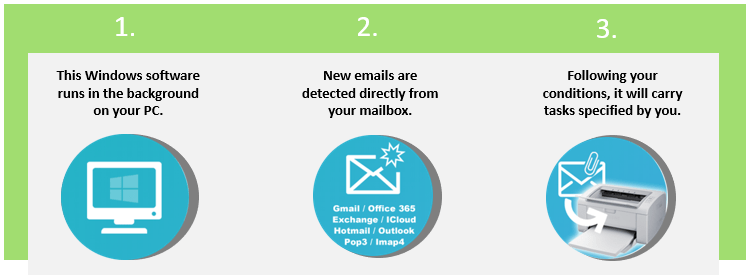
    Introducing Email Integrator, an application that runs in the background saves time and allows you to focus on your important tasks. It works with any email box like Exchange server, Cloud emails service Gmail, Office 365, Yahoo mail, Hotmail, Outlook.com, and any IMAP4 or POP3.

    Features

    • Auto printing and stamping of incoming emails
    • Export your emails to PDF for integration
    • Customised auto-reply to the sender’s email
    • Auto Archival of sent and received emails for future reference
    • Quick searching of emails
    • Reports
    • Keep your email box clean
  • OceanFax Application Solution

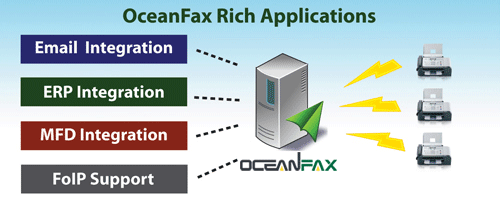
    OceanFax can seamlessly integrate with Email (Exchange, Lotus Notes, SMTP Mail Server), ERP (Oracle, SAP, IBM) and MFP (HP, Ricoh, Canon, Fuji Xerox). The server supports FoIP and is compatible with Cisco, Avaya, AudioCodes and Alcatel.

    Email Integration

    • Fax as easy as Email
    • SMTP connection with no need to install connector in mail server
    • No modification required on your Exchange Schema or Lotus Notes Mail Template
    • Simple fax address format: fax number@fax.local
    • Input recipients with intuitive Outlook Fax Form
    • Easily select recipients from Outlook Address Book

    ERP Integration (Production Fax)

    • Automatically generate outbound faxes from or import inbound faxes to backend systems
    • Fax types include purchase orders, invoices, statements, application forms, and etc.
    • Provide native integrations with ERP systems, including Oracle, SAP & IBM
    • Allow immediate or scheduled delivery
    • Two-way status updates
    • Auto Email notification attached with fax image

    MFP Integration (Scan to Fax)

    • Seamlessly integrate with MFPs, including HP, Ricoh, Canon & Fuji Xerox
    • Input fax numbers and recipients in LCD Panel
    • Simple fax address format: fax number@fax.local
    • Intuitive and Easy-to-use Fax Form
    • Auto Email notification attached with fax image

    E-mail us on sales@rincon.co.in for more information and we will be glad to assist you.

  • Announcing Zetafax 2014

    Announcing Zetafax 2014

    Equisys is pleased to announce the latest release of its award winning fax server, Zetafax 2014. The new release brings a range of enhancements for customers designed to deliver greater choice, flexibility and accessibility to modern business environments. Amongst the new capabilities are support for Windows 8.1, Windows Server 2012 R2 and Microsoft Exchange Online, as well as improvements for remote and mobile workers. The release also introduces a new Zetafax edition for use with multifunctional printers.

    For businesses migrating their IT infrastructure to the Cloud, Zetafax 2014 provides support for Microsoft Exchange Online, part of Microsoft’s Cloud-based Office 365 suite. Exchange Online users can now send and receive faxes via email with queuing, prioritization and delivery managed via their on-premise Zetafax Server. Integration is simple and secure with no need for changes to company firewalls, domain names or fax numbers.

    For more details click here.