Tag: File Exchange

  • Reblog: 4 Things You Might Not Know About HIPAA Compliance

    [thumbnail target=”_self” src=”https://www.rincon.co.in/site/wp-content/uploads/2019/01/Healthcare-1024×560.jpg”]

    HIPAA is an incredibly influential part of the US healthcare regulatory landscape. Because its focus is the security of electronic personal information, it’s no surprise that the law and its requirements continue to evolve as the tech landscape changes.

    While this is ultimately a good thing, ensuring that the law makes sense in regards to the resources available and challenges faced in healthcare IT, it can also make HIPAA compliance a bit of a moving target. What doesn’t change, however, is the extreme consequences of a security breach.

    1. It’s Not the Fines That Get You

    A HIPAA breach can deliver a serious blow to your organization’s financials, but the costs may not be coming from where you think. The requirement to publicize that the breach occurred can cause more damage than a government fine.

    [well type=””]

    “If you do the math and you look at an organization that has 10,000 records, that’s between $2 million and $4 million worth of risk. 25,000 records? Up to $10 million in risk. And 100,000 records mean $40 million in risk. Now, I’m saying risk because it’s not the cost of the breach itself. A study shows that about one-third of these numbers is the actual cost of the breach.

    The cost of the breach includes notifying patients and hiring lawyers. If it’s a big breach, you have to set up an 800-number and have people answering it. You may have to do credit monitoring. That’s about a third of these costs. What’s the other two-thirds? It’s the loss of business.”

    Mike Semel

    President & Chief Compliance Officer, Semel Consulting

    [/well]

    2. Inattention is No Excuse, Even If Nothing Bad Happens

    The law requires organizations to secure information from prying eyes, whether those eyes are there or not. Organizations are required to make sure all their systems are properly maintained, even if that means installing a completely new operating system (which may itself require new hardware).

    [well type=””]

    “HIPAA says that you have to have devices that are currently supported with patches and updates in order to be compliant.”

    Mike Semel

    President & Chief Compliance Officer, Semel Consulting

    [/well]

    3. HIPAA Breaches Can Even Come from Within

    It’s important to remember that HIPAA violations aren’t always caused by malicious outsiders, your own employees can be a source of trouble, either intentionally or unintentionally. It’s essential to remember that HIPAA requires only relevant staff have access to any given record. If a nurse looks at the diagnosis for a celebrity staying in another ward, that’s a violation. If your radiology department email’s a patient’s x-ray results to the wrong doctor, that’s a violation.

    Regular training and oversight are key to protecting your organization against threats from within, in addition to keeping bad actors out.

    4. A Key to Better Health Data Security Can Be Simplicity

    Because many data security solutions are cumbersome, it is common for staff to circumvent them by relying on insecure (but more user-friendly) consumer file-exchange solutions instead. The best way to keep this from happening? Make your security rules easier rather than weaker.

    If sending a document via Fax-Over-IP or a secure file exchange solution is as easy as sending an unsecured email, your employees are much more likely to do it. By making proper compliance the path of least resistance, you streamline workflows, reduce staff frustration, and better protect your organization.

    Ready to streamline regulatory compliance with XMedius secure document exchange solutions?

    The original article can be found here.

    For more information e-mail us on sales@rincon.co.in and we will be glad to assist you.
  • XMedius software for law firms and the legal industry

    Legal professionals throughout the world – whether in law firms, corporate legal departments, or otherwise – use fax daily to send and receive confidential documents with the courts, with clients, and with other attorneys. The majority of law offices rely on traditional fax, but with the increasing stringency of federal regulations, a paper-based infrastructure lacks the security required for modern legal communications. Law firms and in-house counsel are also becoming aware of the other inefficiencies that come along with using traditional fax: it’s costly and can decrease the efficiency and productivity of staff.

    XMedius’ electronic and cloud-based fax software for law firms step up to the plate where paper-based fax falls short with a range of built-in features designed to extend fax capabilities for legal professionals.

    Secure File Exchange On-the-Go

    With our mobile fax apps, your team can fax from anywhere, whether in the office, on the road, or in court using any internet connected mobile device. You’ll have the ability to turn any fax machine into your own personal printer by sending documents via your mobile phone or tablet and have the paperwork you need, whenever you need it.

    Fax Software For Law Firms that Integrates with MFPs

    XMedius solutions require no additional hardware investments. On top of staff being able to send and receive faxes directly from their email inboxes, XMedius law office technology can also integrate directly into your existing multifunction printers (MFPs). This means that rather than having to print documents first and run them through a fax machine, attorneys and staff can fax documents online right from the printer. This eliminates the cost of leasing and maintaining fax machines and updates the capabilities of the MFPs your organization has already invested in.

    Simplify Document Management with an Audit Trail

    XMedius solutions keep track of all sent and received fax transmissions with a built-in audit trail function. This makes document management hassle-free and helps law firms associate costs of faxes to specific clients, streamlining billing and cost recovery.

    Adhere to Compliance Regulations

    Secure file exchange solutions used in the legal industry need to protect your data while meeting Federal compliance regulations at all times. XMedius software for law firms allow you to send and receive sensitive legal documents in compliance with HIPAA, SOX, and more. Learn more about our certifications and compliance.

    To learn more contact us sales@rincon.co.in

  • Reblog: Top Options to Boost Your Healthcare IT Infrastructure [Infographic]

    Healthcare IT is evolving and is responsible for bigger & bigger portions of today’s healthcare budgets. Discover 3 ways to take your health IT infrastructure to the next level.

    The evolution of EHR/EMR systems

    When the HIPAA act was introduced in 1996, the landscape of EHR/EMR management shifted. Whereas EHR/EMR systems offered healthcare organizations a way to lower costs, increase efficiency, reduce error and improve patient satisfaction, HIPAA forced EHR/EMR system vendors, as well as healthcare providers and their business associates to conform to mandated security regulations. These regulations required new levels of security to protect patient health information, and as a result, EHR system security was upgraded to include the standardization of safeguards like role-based access control, automatic data backups, audit trails, automatic log-offs, and data encryption. To add to this, the HITECH act, introduced in 2009, outlines “meaningful use” of government-approved EHR/EMR systems in the US, and even included financial incentives for physicians and hospitals who follow its guidelines. Needless to say, since HITECH was implemented, there’s been a dramatic increase in the implementation of EHR/EMR solutions in healthcare organizations.

    Health IT expenditures are growing

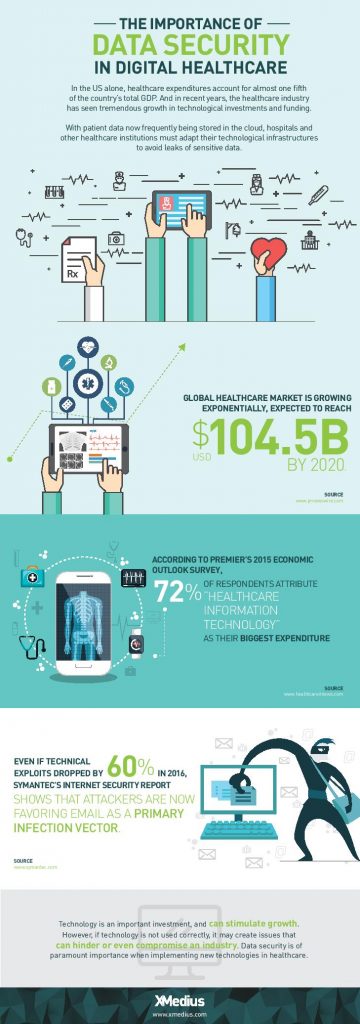
    While EHR/EMR solutions help a great deal when it comes to accessibility, improved workflow, and interoperability between healthcare institutions when it comes to managing patient records, they only represent a fraction of the IT expenditures in the healthcare industry. 72% of respondents in a 2015 survey of healthcare professionals said that healthcare IT is their organizations biggest expenditure: a number that’s expected to increase globally with upcoming data regulations like GDPR.

    Healthcare IT doesn’t only encompass EHR/EMR systems, but also the networks that support them, as well as the servers, workstations, and mobile devices that healthcare staff access them from.

    When it comes to data management, today’s healthcare IT professionals know that there are a lot of options to invest in when attempting to simplify and centralize their IT infrastructure. There are many health IT hardware and software tools on the market that help healthcare providers reach improved levels of patient care, staff workflow and regulation compliance. Let’s take a look at a few of the best pathways to an improved healthcare IT infrastructure.

    1. Investigate alterative data storage options

    In order to meet growing data storage needs and compliance regulations, many healthcare organizations are building their IT datacenters to be more flexible and scalable. Traditionally, hospital IT admnistrators have preferred on-premise, physical data storage options because of the control it gives them. But with physical on-site storage comes the work of maintenance, deployment of expansion storage, troubleshooting, and more. While not every healthcare organization will benefit from the same type of data storage, many are more likely these days to implement cloud storage into their IT infrastructure.

    Cloud data storage options are flexible, scalable, and come at a lower cost than on-premise deployments. Today’s healthcare providers can choose between public or private hosting facilities, many of which offer appealing back up and disaster recovery plans. Other advantages of storing data on the cloud is freed-up internal storage and resources, improved interoperability, and better integration with applications. If you’re considering migrating some of your healthcare data storage over to the cloud, be sure to discuss the compliance and security measures that potential vendors have in place to ensure you make the best choice.

    2. Ditch traditional fax

    As surprising as it may seem, decades-old fax machines are still widely used in today’s hospitals and physician’s offices. Data security is of utmost importance in today’s healthcare environments, but a large number of providers don’t have the time or resources to explore alternative options.

    Fax machines not only break away from the digital and paperless landscape that compliance regulations have mostly succeeded to build, but the technology is also plain old unreliable:

    • It leaves too much room for human error: sending a fax to a wrong number is a common error as evidenced by a large number or reported data breaches
    • Paper, ink, and maintenance costs add up
    • Regulations such as the HIPAA privacy rule strongly suggest that the minimum amount of information necessary be contained in fax transmissions

    Other options, such as t.38 and cloud fax solutions have emerged as popular alternatives for safely transmitting patient records and other sensitive data. But what is t.38 faxing? It’s a technology that allows you to send faxes over your existing computer network. Cloud faxing essentially allows your fax transmissions to take place over a remote server. These solutions are highly affordable and leverage existing internet connections, they eliminate lost or misused faxes that might be left lying around, and they scale easily. What’s more is that many of today’s fax solution options integrate seamlessly with existing EHR/EMR systems, allowing staff to send and receive mission-critical data right from the platforms they’re most comfortable with.

    3. Secure file exchange: simple solutions for data transmission

    Email is another commonly used tool for transmitting patient data to patients themselves and within the healthcare network. Not all healthcare institutions can afford to implement the security measures needed to make their email servers secure enough to remain compliant and keep incidents of data breach at bay. Another issue within certain healthcare departments is that email doesn’t permit them to attach files over a certain size, forcing them to find other options for sending and receiving bulky patient records and medical images. The radiation Oncology departments at Inova Health System in VA, for example, were burning large files onto CDs and using mail services in order to get patient data to other hospitals and medical facilities in their network before transitioning to XMediusSENDSECURE.

    SendSecure is an example of a collaborative secure file exchange software that takes minimal time and effort to deploy. It uses double encryption, which keeps files encrypted during both the upload and download processes unlike most email servers which only encrypt files while in transit. Users can send an unlimited number of files up to 5TB/ea., thus eliminating any concerns of getting large files where they need to get in a hurry. Similar to today’s FoIP or cloud fax solutions, SendSecure also integrates with day-to-day applications, such as Outlook, and can even be used from any internet browser.

    Looking for ways to boost your health IT infrastructure and ensure your data is safe in transit and at rest? Speak with an expert today about FoIP and secure file exchange solutions that could work for you! Contact us: sales@rincon.co.in

    The original article can be found here.