Tag: FileDirector

  • Service your accounting clients using technology

    Streamline data collection from your clients

    Introducing FileDirector, a workflow and document management software that can help in achieving your goals.

    With the ease of generating electronic documents and internet availability, document flow has increased four folds in the industry. WhatsApp, Telegram, email etc. are a few means of sharing information at your fingertips. While these have made things easy to share, it has also resulted in a massive pile of data. Finding the right document/data at any given point in time has become an increasingly lengthy process.  

    Chartered Accountancy firms find it extremely difficult to keep track of documents received from their various clients. There is a need to streamline the process of collection of data and sharing of information which would be in the form of .xls, .doc, .pdf etc. files or then Tally backups. Another problem faced is the multiple versions of documents floating around. How does one know which is the correct version? 

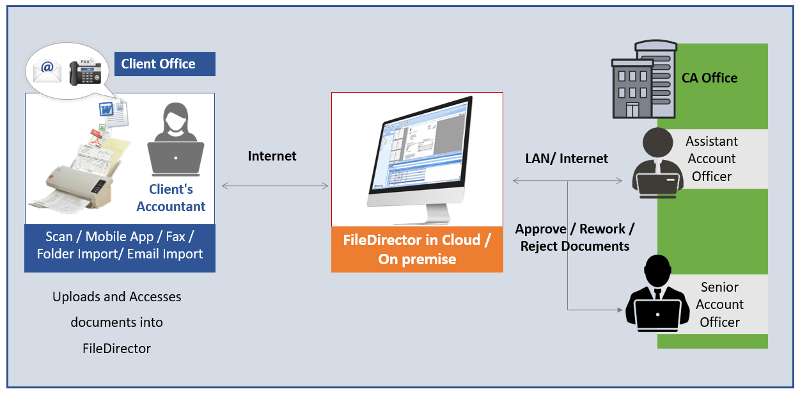
    Rincon has a portal which helps CA firms receive the information from their clients in an organized manner. Each document is uploaded by the client itself in the system using an easy-to-use web page under the different categories and adding the associated fields along with it. There can be different types of documents such as 

    1. GST 
    1. Audit 
    1. ITR 
    1. eTDS

    The authorized persons from the CA firms can download the required data for a particular client with a few clicks. They can download the document, go through their internal process and comment. Once done they can upload the document back into the system so that the latest version is available always. While the person is working on the file, if someone else tries to download it, the other person is notified that someone else is working on the file. No more version conflicts.

    A complete audit trail is maintained in the system like when the document was uploaded, who and when the document was opened, etc. A layer of security can be added which helps the CA firms

    protect their client information to be viewed/downloaded for certain employees only. Thus, data for a client’s GST matters cannot be viewed by someone who is looking after TDS.

    Instead of spending time searching for information, the system helps people concentrate on their work and increase their productivity.
    Benefits

    • Efficient, Flexible and Scaleable
    • Helps you focus on growth and core competency
    • Reduce Overheads
    • Maximize ROI
    • Value-added service for your clients
    • Clients and CA Firm can access documents at the click of a button
  • Still struggling with managing documents?

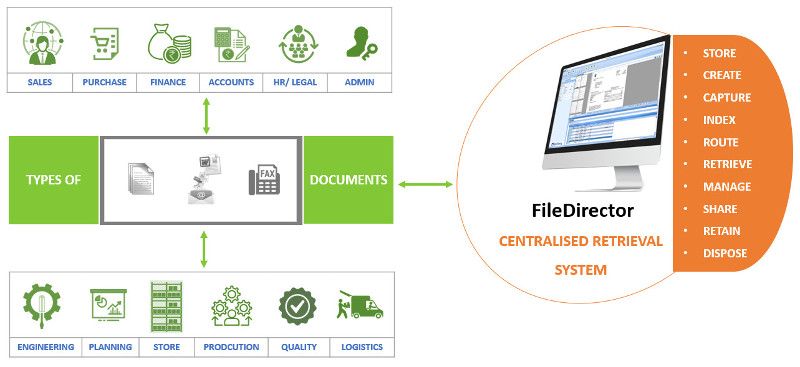
    Centralised Document Retrieval System

    FileDirector Document Management Software

    • Safeguard information
    • Supports both paper and electronic documents
    • Bulk Upload
    • Email Archiving
    • Integrated with Microsoft Office
    • Workflow for document review & business processing
    • Simplify disaster recovery
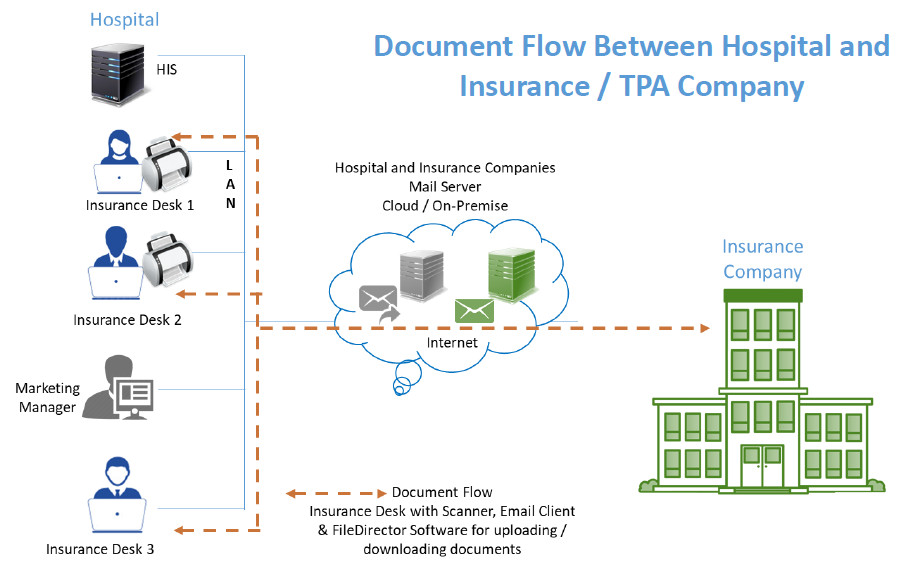
  • FileDirector For Hospital’s Health Insurance Process Automation


    Many hospitals these days offer cashless hospitalisation. This means that a policyholder who is covered under medical insurance will be able to avail of services at these designated hospitals and their bills would be settled by Insurance Company or their TPA (third party administrators). This saves the policyholder/ immediate family’s blocking of money.

    FileDirector software from Spielberg, Germany would be a good fit to streamline the document exchange process which happens between hospitals and Insurance / TPA companies.

    FileDirector will check for prerequisites and inform whether the machine has sufficient rights for installation, operating system compatibility and if the required ports are open.

    The FileDirector server component will be installed on either

    • Windows 7 or above desktop
    • Windows 2008 or above server

    The FileDirector software will run with SQL Express Database which is free of cost. It will install this component in case it is not there on the FileDirector server.

    The hospital insurance desk will have FileDirector scan station license. It is assumed that the Hospital would have reasonably stable internet connectivity to send / receive documents.

    Hospital will get standard cabinet structure for health insurance records. The structure would include mandatory fields such as Name of the patient, Admission Number, Mobile Number, Policy Number etc. as per Insurance company requirements. Broadly speaking these would be common across all Insurance / TPA companies.

    Hospital would get Masters such as Document type which could include but not limited to pre-authorisation application, Query, Response to query, Approval letter, Letter of denial etc. Masters of Insurance Company as well as TPA would be provided for easy indexing.

    Insurance Desk user would be able to scan / drag and drop the document in FileDirector, Index and send the same to Insurance / TPA company. Option will be available to Scan / drag and drop the document in FileDirector, Index and Hold. He or she will be able to add more documents to make this document set complete and then send to Insurance / TPA company via Email.

    Insurance desk user will have an option to print acknowledgement letter for the patient confirming receipt of the number of documents that have been submitted for Insurance processing.


    Reports:
    The system would be able to generate different reports such as:

    • Claims processed today
    • Pending as of today
    • Approved today
    • Rejected today
    • Rejection with reason
    • Partial approved with reason

    View
    View for checking insurance company’s incoming email messages / documents would be provided using IMAP integration. Insurance desk user will index and store these incoming messages in FileDirector for future retrieval.

    Search
    Users would be able to search documents using one or more indexing parameters and see records.

    For more information e-mail us on sales@rincon.co.in and we will be glad to assist you.


  • FileDirector Enterprise Solution

    [thumbnail target=”_self” src=”https://backend.rincon.co.in/wp-content/uploads/2017/10/document-automation-300×113.png”]

    Bringing documents into today’s world

    • Lower costs
    • Processes paper documents in the same way as digital documents
    • Unlimited users
    • Perfect integration in Microsoft Office
    • Automatic email recording directly from the email server

    FileDirector brings the future of company management and data distribution into today’s world. Our Electronic Content Management solution shortens the time required to organise and handle documents within an enterprise enormously. This noticeably more productive and more efficient way of working reduces costs significantly.

    In achieving this, FileDirector covers all the working stages that a document goes through in modern enterprises: from recording paper documents, or handling documents already in digital format, across search and retrieval to secure archiving of data – all functions are covered. Moreover, FileDirector is not limited to a single location: multiple servers can work together in a network, enabling enterprises to gain the benefits of FileDirector even when operating on a global footing.

    Security is massively important in all Electronic Content Management solutions – which is why FileDirector manages all access authorisations to documents, changes, access periods, automatic storage of documents and emails.

    Capturing information is a very quick process using FileDirector. Scanning was never easier, as the program works with most digital input devices and uses pre-definable scan profiles. Thanks to the integration of FileDirector in Microsoft Office, you and your staff can archive documents, tables and emails with a simple mouse-click.

    Indexing and sorting documents is handled manually or via OCR (Optical Character Recognition) zones in the document, via full text or barcodes. Index data can be imported via ODBC from other databases or files, or transferred automatically when importing or recording.

    Searching for documents could not be easier: using full text search, you can find words or even whole sentences in the document content or index fields. A single double-click is all that is needed to display the document – even if the application used to create the document is not installed on your computer, as FileDirector supports a wide range of file formats. It is easy to scroll through pages, to display miniature images of the pages as a preview, and to call up any previous version of something has been changed. It is also possible to open and view several documents simultaneously.

    Business Process Management sends documents to users, using predefined processes, with each user being required to trigger actions, such as accept/reject. This makes it an ideal tool for tasks such as processing invoices.

    Storage is no problem for FileDirector. Due to the usage of Microsoft SQL or Oracle databases FileDirector can handle millions of datasets and documents with ease.

    For more information e-mail us on sales@rincon.co.in and we will be glad to assist you.

  • FileDirector Small Business Edition (SBE)

    The ideal solution for SMEs
    • Cost-favourable
    • Easy to use
    • Up to 15 users simultaneously
    • World-wide access to your documents
    • Intuitive security concept

    FileDirector Small Business Edition (SBE) offers small businesses an effective, favourable priced and easy-to-use Electronic Content Management system. Perfectly matched to the requirements of smaller businesses for handling business-related documents such as orders, invoices or contracts, the software instantly makes your business more efficient.

    FileDirector SBE is a high performer when it comes to mapping your business processes. Your staff can go through their work with significantly-increased productivity, which means your customers are offered a higher level of service. At the same time, your documents are stored securely and accessible at any time.

    FileDirector SBE allows up to 15 users to be working at the same time, without the need to run on a Windows domain. Microsoft SQL Server or Oracle provide the database platforms. This means that you have acceptable hardware requirements, delivering a high degree of data security.

    If your business grows and along with it your requirements, FileDirector can grow with a simple license upgrade from SBE to Enterprise. The modular system of FileDirector products emphasises this philosophy.

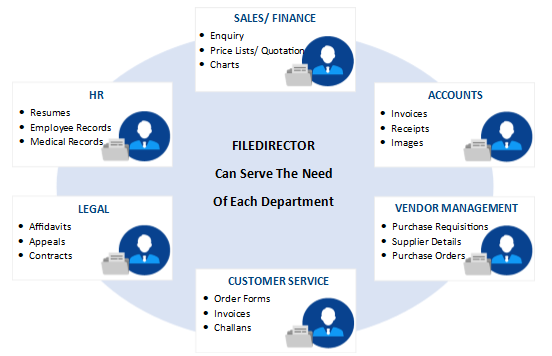
    Extend the usage to Purchase, HR, Legal, Administration, Accounts Receivable, Sales Order Processing and other Paper / E-mail / Electronic document driven processes.

    E-mail us on sales@rincon.co.in for more information and we will be glad to assist you.

  • FileDirector Express

    What small businesses have been waiting for:

    • Simple, fast, economic, express
    • Rent instead of buy – just pay for use
    • Up to 10 simlutaneous users
    • Local installation – local storage
    • Always the latest version
    • Compliance and security

    FileDirector express is the ideal Electronic Content Management solution for small businesses and start-ups. Simple to install, simple to set up, simple to use, and with no upfront costs. FileDirector express is the essential tool for your business, but without the capital commitment and you can evaluate FileDirector express 30 days free of charge.

    The benefits of an intelligent Electronic Content Management solution are self-evident. Documents will be captured, stored, managed and retrieved quickly and easily. You are able to rapidly access relevant information according to your needs. What’s more, staff will not waste time or money on duplicating or distributing documents. Scanning avoids all these unnecessary actions and gives you and your colleagues more time to concentrate on the essentials. On top of this, document storage costs are reduced as considerably smaller physical document storage space is required.

    What is just as relevant are factors such as better security control, and audit trail options. You decide at all times who has access to your documents. Then there is also the improvement in customer satisfaction, as a result of faster response times.

    A further – and not insignificant – argument for the use of FileDirector express is compliance with statutory requirements, since we help your organisation to minimise the financial or legal risks which can be caused by lost, damaged or improperly used information. Thanks to FileDirector, complying with the data protection provisions on retention periods and destruction of documents becomes child’s play.

    E-mail us on sales@rincon.co.in for more information and we will be glad to assist you.

  • ISO Certification – Can a Document Management System help?

    iso9001

    ISO 9001 certification is a must-have for most manufacturing and service companies.  The certification is increasingly required in subcontracts, especially by European multinationals.
    It helps in:
    • Increased marketability
    • Reduction of operational expenses
    • Better management control
    • Increased customer satisfaction
    • Improved internal communication
    • Improved customer service
    • Reduction of product-liability risks
    • Increased attractiveness to investors
    To achieve ISO 9001 certification, a manufacturer must collect, update and share its large library of ISO documents with single point access to the latest documentation.  This is a humongous task using paper-based documents and processes. Digitising the document processes would help simplify and streamline the certification process.
    Some of the processes that must be standardized and documented in ISO 9001 include:
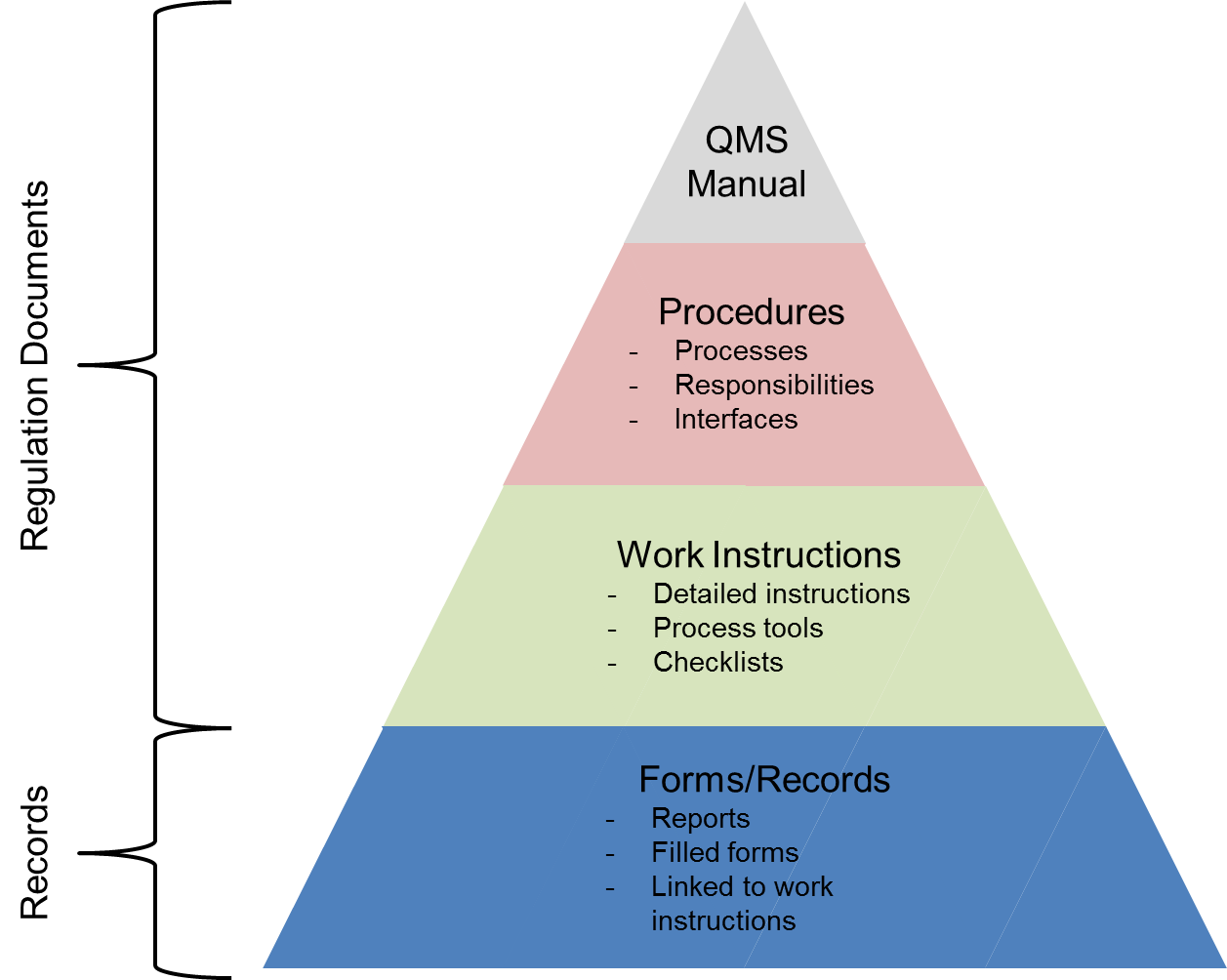
    • Quality Manual – The quality manual defines how each requirement of the rather generic ISO 9001:2008 standard is applied at the company.
    • Quality Procedures – The quality procedures are the essence of the ISO 9001 documentation. The ISO 9001 quality procedures explicitly describe how certain key processes within the company must be performed and who is responsible for them.
    • Quality Policy – The quality policy is the company’s policy defining its stance towards quality and customer satisfaction.
    • Quality Objectives – The quality objectives define measurable goals relative to the company’s quality management system.
    • Process Flowchart – The process flowchart is a description of how the various processes of the ISO 9001 QMS interact with each other.
    • Work Instructions – Work instructions are the most detailed and most company-specific of all ISO 9001 documents. Work instructions describe in detail how particular tasks must be performed. Work instructions are typically written by the people who perform the actual work.
    • Records – Records are different from the above documents, all of which provide directions on how to conduct business. Records, on the other hand, are evidence of things done. ISO 9001:2008 contains numerous explicit requirements on records plus requirements for many more undefined records.
    Most organizations are unaware that even if they previously went through the ISO 9001 certification process, things are changing. A new ISO 9001 standard has been published in September 2015. This means that the ISO 9001:2008 standard will become obsolete on September 14, 2018, and that all ISO 9001:2008 certifications issued in late 2015 and beyond bear an expiry date of September 14, 2018.
    There has never been a better opportunity than now to examine the underlying document management practices associated with ISO 9001 certification. Certifying against the new standard provides an opportunity to view ISO 9001 not only as a paper documentation exercise, but as an opportunity for digitizing document processes – and in the process transforming the business. Leading organizations are increasingly realising that if approached strategically through a document management system, compliance-mandated digital documents can provide a foundation for more effective processes throughout the business and provide insights that are critical to digital transformation.
    If you are considering the implementation of a document management system for your business, but you are still on the fence when it comes to selecting the right solution, please e-mail us on sales@rincon.co.in and we will be glad to assist you.
  • Why do Housing Finance Companies use Document Management Systems?

    mortgagedocuments

    A Housing Finance Company (HFC) processes loans at multiple locations, and retains all related documents at the local / zonal office. Each files received consists of multiple documents and should be filed and processed swiftly considering the competitive environment.
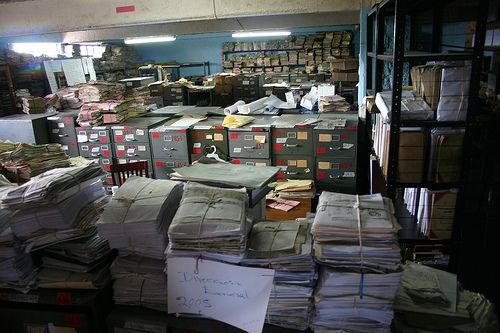
    In the manual process, documents need to be stored physically in the office resulting in wastage of expensive real estate. Additional paperwork needs to be stored in the right place with the other documents so as to make it easily accessible. This results in a lot of time and money spent on handling paper. Finding the correct document is akin to finding a needle in a haystack especially at the time of audits or at the time of a default.
    With a document management system in place,
    • All documents are scanned and archived on a central server thereby making it available to users anywhere (provided they have the requisite rights and permissions).
    • Expensive real estate can be put to better use and documents can be stored off site.
    • The concerned people have access to the records from anywhere they work using the web or mobile interface.
    • Improve workflow, response times and efficiency
    • Reduce costs
    If you are considering the implementation of a document management system for your business, but you are still on the fence when it comes to selecting the right solution, please e-mail us on sales@rincon.co.in and we will be glad to assist you.
  • Document Management system for Property Management organisations

    paperpiles

    A Property Management organisation is one that looks after the management of personal property, equipment, tooling and physical capital assets that are acquired and used to build, repair and maintain end item deliverables. Property management involves the processes, systems and manpower required to manage the life cycle of all acquired property as defined above including acquisition, control, accountability, responsibility, maintenance, utilization and disposition.

    These organisations have to manage leases, contracts, notices, and other property records in a property document management system that keeps important property documents secure and makes them easily retrievable.

    With a document management system in place, property managers, property owners, and property management staff can use it to improve efficiency and make informed decisions regarding the leasing and ownership of property.

    A document management system keeps all records, including important plans and facilities documents, ready for access. Authorised persons can access files outside the office using Web and Mobile access. Users are able to search and retrieve documents on the fly thereby enabling them to make faster and more accurate decisions.

    If you are considering the implementation of a document management system for your business, but you are still on the fence when it comes to selecting the right solution, please e-mail us on sales@rincon.co.in and we will be glad to assist you.

  • Automation of Insurance Process at Hospitals

    Simplification of insurance processes

    Many big hospitals these days offer cashless hospitalisation. This means that a policyholder who is covered under medical insurance will be able to avail of services at these designated hospitals and their bills would be settled by Insurance Company or their TPA (third party administrators). This saves the policyholder / immediate family’s blocking of money.

    (more…)