Tag: FoIP

  • Fax over IP (FoIP) software, XM Fax 9.0 – New Version

    We are pleased to announce that the newest version of our popular Fax over IP (FoIP) software, XM Fax 9.0.

    This newest version of XM Fax builds upon the successes of XM Fax 8.0, delivering new features designed to further bolster the security, scalability, and reliability of your customers’ fax environment – all while boosting employee efficiency, especially for those on-the-go.

    Focused on the safe, confidential electronic transmission of data, XMedius has enhanced its XM Fax solution to bring a diverse set of benefits to users and administrators. A few examples include:

    Enhanced Security: Configurable password policies, encryption at rest for fax documents, hardened TLS configurations, and support for TLS 1.3 are new in XM Fax 9.0. Frameworks and third-party libraries have been updated to ensure the highest security standards and long-term support.

    Improved System Integration: Customizable fax properties can be edited at any point in the lifecycle, allowing for additional integrations and workflows. IPv6 support is now available in XM Fax 9.0, enabling seamless integration with various enterprise network types.

    Enriched User Experience: Users can now integrate their web phone book with SendFAX, preview faxes before sending them in the web client, and unlock new XM Fax mobile app capabilities (iOS and Android).

    Augmented Administrative Tooling: Administrators can now take advantage of single sign-on (SSO) in the administration interface, manage fax box delegations on behalf of users, and have better control over OCR management.

    For more information e-mail us on sales@rincon.co.in and we will be glad to assist you.

  • Reblog: Are IP Fax Solutions More Economical Than Traditional Fax?

    [image src=”https://www.rincon.co.in/site/wp-content/uploads/2019/02/traditionalfax.jpg” shape=”img-rounded”]


    If your organization is still using traditional phone lines, going with a traditional fax machine can be tempting. The machine itself is relatively affordable, and it can use the phone lines you already have. It’s quite possible that your organization already has a traditional fax setup, which can make the costs of a change seem high relative to just staying put with what you know.

    Unfortunately, several factors make traditional fax machines unsustainable today. The day-to-day costs of ink/toner and paper add up fast. Machines break easily, which not only means they’re out of service, but that you’re paying to fix them.

    1. The hidden cost of Traditional Fax is time

    Employees have to print their document, walk to the machine, then wait for it to send its payload so they can retrieve the original (especially important if it contains data covered under GDPR, HIPAA, SOX, FERPA, or similar laws).

    It’s difficult to tell if an entire fax has been received on the other end, so if they’re doing the sending, they may need to call or email the intended recipient to check. If they’re on the receiving end and document is particularly timely, essential, or private, they may have to coordinate with the sender to make sure they’re standing by the machine ready to catch the document when it comes out.

    That’s a lot of wasted time where staff could instead be doing productive work.

    2. Phone lines are dying

    Reliability and consumable costs aside, one key consideration trumps all others: fax machines will be completely unable to operate in a post-phone line world. That time is coming sooner than you may think, Europe has announced an end date for their traditional phone services, Australia is following suit, and several US carriers are planning on ending installation of new lines.

    Once those lines are no longer supported, traditional fax infrastructure becomes useless. This is already the case for many organizations who have moved or are moving their phone services to a VoIP system (such as a SIP Trunk).

    3. Fax over IP (FoIP) has none of these problems

    Cheaper connections & SIP-friendly

    FoIP can completely sidestep a connection to the conventional phone network, using the internet to get the message out instead. IP connections are dramatically cheaper than traditional phone lines, and have the added benefit of being technology that continues to be useful after the traditional network eventually goes away.

    Save time by faxing from anywhere

    Using a FoIP solution, faxes can be sent from an employee’s desk (via a laptop or desktop) rather than a machine down the hall. Solutions with mobile & web clients can even send faxes from mobile devices like tablets and cell phones, allowing faxes to be sent from anywhere there’s a signal.


    The added benefit of routing faxes through these devices is the security your IT department can put around them. If someone has to log into your machine to see a fax, it’s a lot more secure than a piece of paper sitting in a public tray.


    Skip the ink, toner, and paper

    While you can print out a FoIP document, you don’t have to, when sending or receiving. That means fewer consumable costs, and less paper copies of sensitive documents to file or shred.

    Manage IT how you wish, and subscribe rather than buy

    A good FoIP solution should be available both on-premises and in the Cloud. If maintaining a fax server on site isn’t something your organization would like to take on, Cloud FoIP solutions allow you to handle everything via a SaaS subscription. Prepaid credit systems are also available that allow you to only pay for what you use.


    Decrease Costs and Increase Efficiency with XM Fax

    XM Fax is a cutting-edge FoIP solution that can deliver excellent ROI and dramatically reduce the wasted time and frustration associated with traditional fax. Bring all the benefits listed above to bear on your communications needs to reap the rewards. Reach out to us to learn more about what it can do for your organization’s workflows and bottom line.

    The original article can be found here.

    For more information e-mail us on sales@rincon.co.in and we will be glad to assist you.
  • Reblog: Is Fax Dead in Healthcare?

    The word “fax” has some pretty outdated connotations within today’s highly mobile and technologically savvy workforce. When people think fax, it may invoke a flashback of standing in front of a jammed machine as they attempt another go at sending a single page for the 6th time, or trying to get an urgent document over to a waiting recipient, only to discover that the receiving fax machine is out of ink. Regardless of the reputation fax has for being obsolete tech, the reality is that fax usage in many industries is still rising, not dropping, and faxing itself no longer means having to rely on outdated machines.

    If you’ve pondered the question “Who still faxes in 2018?” the straightforward answer is that many businesses rely on fax for their day-to-day operations.

    In The International Data Corporation’s (IDC) 2017 fax survey, 82% of respondents in the Finance, Healthcare, Manufacturing, Legal, and Government sectors saw fax usage go up or remain consistent compared to the previous year. The average growth of fax usage across the board was 27%, with a quarter of companies in these sectors reporting growth between 50-74% – a very far cry from the statement that “fax is dead”!

    Fax is far from dead. Not only is it still widely used, it has evolved into a digitized medium that integrates seamlessly with interfaces that most of us use regularly, like email. While fax machines may remain for a little while longer, their use is no longer synonymous with faxing itself. Fax-over-internet-protocol (FoIP) technology has revolutionized communications, allowing for increased security, mobility, and ease-of-use. Read on for an overview of how and why fax has remained commonplace in the healthcare industry.

    The Role of Compliance in Healthcare Faxing

    The healthcare industry’s wide use of fax has a lot to do with regulatory compliance, namely with the Health Insurance Portability and Accountability Act, or HIPAA, which was passed by the US Congress in 1996. Navigating the details of regulatory compliance can get overwhelming: when it comes to secure data transmission, what does HIPAA actually say? The HIPAA Privacy Rule was enacted in 2001, shedding a little more light on exactly how healthcare organizations should protect patient data. It urges healthcare professionals to take “reasonable safeguards” when sharing patient files between hospitals, labs, doctors’ offices, and insurance providers.

    The US Department of Health and Human Services (HHS) clearly names fax as an essential method of transmitting medical records, test results, and anything else containing personally identifiable information (PII). This is not to say that email isn’t widely used as well, but there are tremendous security risks that come along with using email to send and receive sensitive files.

    A quick “healthcare data breach” search in Google will reveal the startling number of phishing scams and email hacks that take place in the industry almost every day. While there are secure email servers galore available on the market, these platforms are often reserved for larger healthcare corporations or hospital networks since they are often too costly or complicated for the average healthcare provider.

    EHR/EMR Systems and Paperless Faxing

    The advent of Electronic Health Record and Electronic Medical Record (EHR/EMR) systems have completely changed the healthcare records management landscape. Not only is electronic record management in accordance with HIPAA’s efforts to digitize the healthcare environment, it provides a safer means for storing data. Electronic record keeping also allows healthcare professionals to minimize human error while taking full advantage of cost savings.

    As technology advances, EHR/EMR systems vendors now offer on-site or cloud data hosting options, and the systems themselves provide improved coordination between healthcare providers, even granting patients the ability to access their records online. They’ve progressively become more prevalent in healthcare facilities of all sizes – It’s estimated that 77% of today’s healthcare providers have moved their records into the digital sphere.

    Fax-over-Internet-Protocol (FoIP) technology has also evolved over time, with many vendors offering seamless integration with today’s EHR/EMR systems. From a user perspective, sending a fax is now as simple as pushing a button on the interface they already use every day. This eliminates the need for paper filing and simplifies the data transmission process since documents no longer need to be printed or scanned to before users hit send.

    Healthcare Carries the Highest Digital Fax Adoption Rate

    Healthcare showed 9% growth in digital fax usage in 2017. Right now, in healthcare facilities across North America, GPs, surgeons, nurses and other staff are putting a sensitive document in a fax tray, pressing send, and listening to the cringey audio-frequency tones that signify their information being transmitted one page per minute. Of course, not all medical records are sent through fax machines – many healthcare organizations have digitized their faxing or are in the process of doing so. In fact, the healthcare industry leads the pack for transitioning to modern FoIP technology, representing a whopping 30% contribution to the fax services global market in 2017.

    Confirmations of Receipt: From Paper Trail to Audit Trail

    The fact that faxing gives organizations confirmation of receipt is a major reason that it remains a prevalent form of communication. For years, the confirmation page (the printout that lets users know that their message has been completely received) has served as a faster and cheaper equivalent of sending registered mail. Most email systems come equipped with a read receipt feature, but these typically still give recipients the choice to opt out.

    For healthcare organizations who send and receive large volumes of sensitive data daily, confirmations of receipt offer several benefits:

    • They eliminate both administrative and IT guesswork (follow-up calls, manual logging)
    • They facilitate easy records keeping

    When it comes to dealing with sensitive patient information, confirmations of receipt are necessary from both an administrative and regulatory compliance perspective. Today, medical staff have a few ways of maintaining a paper trail of how, when, and to whom patient data is exchanged. While physical paper filing might be a slightly outdated practice, it remains a reliable system for some healthcare organizations. Many use document scanners or multifunction printers (MFPs) to scan confirmations of receipt and file them electronically.

    Healthcare facilities who have implemented FoIP solutions, however, often do so for their built-in records keeping features. XMediusFAX, for example, is designed to keep an audit trail of all fax transmissions, maintaining detailed records that can generate reports any time. Not only does this free up time for healthcare administration, it alleviates healthcare IT of having to use additional software to log communications.

    FoIP for Savings

    In addition to security and compliance benefits, switching to FoIP can bring significant savings as well. Switching organizations regularly reduce costs by eliminating expensive analog fax lines and paper filing/waste. IT departments love being able to get rid of high-maintenance fax machines in favor of more reliable software and MFP integration.

    Beyond the IT and accounting departments, FoIP is a win for the rest of the staff too. Staff members across Healthcare report significant time savings between reducing/eliminating trips to machines, no longer waiting for acknowledgement receipts, and incoming faxes automatically being routed directly to them, wherever they are.

    Fax Isn’t Dead, It’s Evolving

    Discover how fax software can improve the security and compliance of your healthcare document transmissions. Speak with one of our knowledgeable experts today about how FoIP solutions could work for you.

    The original article can be found here.

    For more information e-mail us on sales@rincon.co.in and we will be glad to assist you.

  • Reblog: Best Practices for Protecting Client File Privacy in the Legal Sector

    There are ways to protect the sensitive data contained in client files and reduce data loss around the legal office with software updates, document digitization, and FoIP solutions.

    The legal sector is comprised of law firms of all sizes, independent legal practitioners, and legal departments within organizations. Although this describes a vast array of legal offices, what ties them all together is that the legal workforce is responsible for high volumes of sensitive client information. Client files often contain the full gamut of personally identifiable information (PII) – from medical records to banking history and credit card numbers – placing the legal sector in the unique position of being under several compliance regulations when it comes to handling said data.

    Whereas regulations like HIPAA govern the exchange, storage, and auditing of PII for the healthcare industry, and regulations like SOX do the same for the financial sector, organizations in the legal sector can be subject to fines and penalties from both of these regulatory bodies and more. In a recent blog, we took a look at the inherent risks involved in transmitting client info via email. Taking the time to understand the threats linked with email use is a great first step, but email risks are only the tip of the iceberg when it comes to the possibilities of a data breach. If you work in the legal sector, this article aims to look at the broader picture and provide a few best practices you can apply around the office to keep client files safe.

    Perform an IT Audit and Update your Software

    Is your legal practice still using Windows XP? Despite the rising prevalence of data breaches due to unpatched and/or unsupported software with highly exploitable vulnerabilities, many companies still don’t see the need to upgrade to newer systems. After the WannaCry attacks in May, 2017, Microsoft provided legacy Windows platforms that were no longer receiving standard support, including Windows XP, Windows 8, and Windows Server 2003 with a security update. It was revealed that at the time of the attack, there were over 100 million legacy windows systems still in use around the world.

    Regardless of your current operating system, outdated technology puts your legal practice, and all the sensitive data within, at huge risk. You can have strong data governance policies in place and all your other organizational ducks in a row, but if you’re running an outdated OS, hackers can and will exploit such vulnerabilities. Don’t let this happen to you.

    Digitize Legal Records

    Transitioning to a completely paperless legal office may seem like a daunting task. Look around and you’ll likely see paper documents all over the place: client letters, court filings, case notes and more. Regulations like HIPAA for the healthcare industry are pushing organizations in the direction of electronically managing and filing records containing PII for several reasons. Paper file management is time consuming, costly, and leaves too much room for human error in a time where data breaches are so prevalent. Surprisingly though, a significant amount of legal practices still resorts to paper filing for their legal records, mostly because up until recently, practices involved in litigations have been required to print, bind, and share thick stacks of paper related to court cases.

    Luckily, many courts today are adopting electronic filing and services. This enables legal practices to transmit documents directly to a court’s case management system where it can be distributed to any other parties involved.

    Transitioning to a paperless environment doesn’t happen overnight, but most of today’s paralegal training incorporates digital filing and systems management, making it easier for law firms of all sizes to hire the right help. Legal practices that print and collate files for long-term storage may want to consider secure cloud-based storage and sharing services. Even in-house servers take up way less space than your average paper filing cabinet, and greatly reduce the likelihood of unauthorized parties accessing client files.

    Make your Document Transmissions Paperless

    The fax machine is the most paper-intensive communication technology still in use, and it’s still going strong in the legal sector. Not only is it costly to maintain a fax machine, its leaves the details of client files up for grabs, whether documents are left lying around in plain sight, or the fax machine at the receiving end of your transmissions is left unattended. Email and scanning technology have their own list of security risks and have therefore not made outdated fax technology obsolete. A range of fax services, including fax over internet protocol (FoIP) solutions have made a tremendous impact on organizational efficiency in recent years, allowing users to send and receive secure faxes directly from their PCs, laptops, and mobile devices. This means no more printing is required, and the legal workforce can securely send their documents while on-the-go – a relief for those rushing to make their next courtroom appearance.

    Want to learn more about FoIP and secure file exchange solutions that can simplify document management, improve compliance, and boost security for your client files? E-mail us on sales@rincon.co.in for more information and we will be glad to assist you.

    The original article can be found here.

  • Reblog: 5 reasons why a company should rely on an online fax system

    Even today, sending faxes remains a critical component in company communications, especially for certain types of documents such as legal contracts and health records.

    However, the traditional fax, because of certain limitations in its use, is gradually being abandoned in favor of a resolutely more modern technology: fax by Internet, or fax over IP (FoIP).

    So take a few moments to learn 5 reasons why companies both big and small should rely on an online fax system.

    1 – Online faxing saves money and space.

    The use of the traditional fax inevitably results in additional expenses for a company. The cost of paper and ink must be considered along with regular maintenance of often-fragile fax machines.

    In contrast, online fax needs no maintenance and will not require you to buy ink and paper. Moreover, you can send and receive faxes automatically through your computer, tablet or smartphone. With online fax, say goodbye to cumbersome equipment and piles of faxes that get in the way of your work.

    2 – Online faxing makes it easier to transfer confidential files

    Have you ever had to wait patiently by the fax machine for a confidential fax, to ensure that no one will have access to the information it contains?

    With online fax, incoming faxes are sent directly to your mailbox. You don’t have to worry about prying eyes when you receive confidential faxes.

    3 – Fax over IP sends bulky files quickly

    Traditional fax machines can be quite uncooperative when you need to fax large quantities of documents. In fact, it is not rare for sheets of paper to become jammed, forcing you to start all over again.

    In contrast, an online fax system lets you send as many documents as you want without running the risk of wasting valuable time watching over the machine, ensuring that your transmission goes smoothly. You can even send faxes to several recipients at the same time, which greatly increases the speed of execution.

    4 – Fax over IP makes your company more reactive

    With older-generation fax machines, you had to be present at the office to get your hands on the sent documents, whether they were bills or contracts.

    As mentioned above, online faxing makes it possible to send and receive faxes from any location using mobile devices. This means that you can stay on top of your faxes, even when you’re on the road. This significant advantage enables a company to be much more reactive.

    5 – Say goodbye to busy telephone lines with online faxing

    Do you feel a bit frustrated when you hear a busy signal or when your customers or business partners tell you that your phone line is busy?

    Since an online fax system uses the IP network rather than land telephone lines, you can send and receive multiple faxes simultaneously without the busy signal.

    To switch to online faxing, E-mail us on sales@rincon.co.in and we will be glad to assist you.
    To benefit from the many advantages of online faxing or for more detailed information on how your organization can profit from cutting-edge solutions in file transfer, don’t hesitate to contact our team of experts. XMediusFAX, launched in 2002, represents the best possible choice for companies that want to bid goodbye to their traditional fax machines.

    The original article can be found here.

  • OceanFax Application Solution

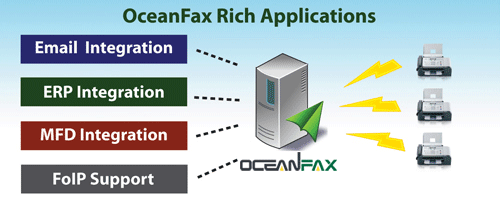
    OceanFax can seamlessly integrate with Email (Exchange, Lotus Notes, SMTP Mail Server), ERP (Oracle, SAP, IBM) and MFP (HP, Ricoh, Canon, Fuji Xerox). The server supports FoIP and is compatible with Cisco, Avaya, AudioCodes and Alcatel.

    Email Integration

    • Fax as easy as Email
    • SMTP connection with no need to install connector in mail server
    • No modification required on your Exchange Schema or Lotus Notes Mail Template
    • Simple fax address format: fax number@fax.local
    • Input recipients with intuitive Outlook Fax Form
    • Easily select recipients from Outlook Address Book

    ERP Integration (Production Fax)

    • Automatically generate outbound faxes from or import inbound faxes to backend systems
    • Fax types include purchase orders, invoices, statements, application forms, and etc.
    • Provide native integrations with ERP systems, including Oracle, SAP & IBM
    • Allow immediate or scheduled delivery
    • Two-way status updates
    • Auto Email notification attached with fax image

    MFP Integration (Scan to Fax)

    • Seamlessly integrate with MFPs, including HP, Ricoh, Canon & Fuji Xerox
    • Input fax numbers and recipients in LCD Panel
    • Simple fax address format: fax number@fax.local
    • Intuitive and Easy-to-use Fax Form
    • Auto Email notification attached with fax image

    E-mail us on sales@rincon.co.in for more information and we will be glad to assist you.
  • Reblog: Top Options to Boost Your Healthcare IT Infrastructure [Infographic]

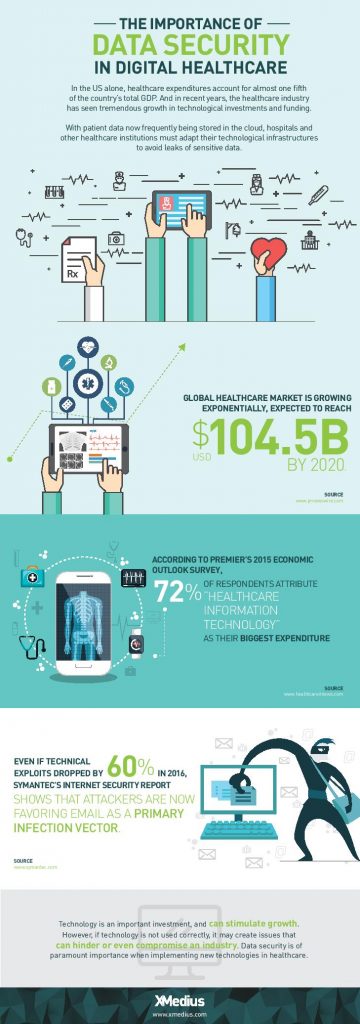
    Healthcare IT is evolving and is responsible for bigger & bigger portions of today’s healthcare budgets. Discover 3 ways to take your health IT infrastructure to the next level.

    The evolution of EHR/EMR systems

    When the HIPAA act was introduced in 1996, the landscape of EHR/EMR management shifted. Whereas EHR/EMR systems offered healthcare organizations a way to lower costs, increase efficiency, reduce error and improve patient satisfaction, HIPAA forced EHR/EMR system vendors, as well as healthcare providers and their business associates to conform to mandated security regulations. These regulations required new levels of security to protect patient health information, and as a result, EHR system security was upgraded to include the standardization of safeguards like role-based access control, automatic data backups, audit trails, automatic log-offs, and data encryption. To add to this, the HITECH act, introduced in 2009, outlines “meaningful use” of government-approved EHR/EMR systems in the US, and even included financial incentives for physicians and hospitals who follow its guidelines. Needless to say, since HITECH was implemented, there’s been a dramatic increase in the implementation of EHR/EMR solutions in healthcare organizations.

    Health IT expenditures are growing

    While EHR/EMR solutions help a great deal when it comes to accessibility, improved workflow, and interoperability between healthcare institutions when it comes to managing patient records, they only represent a fraction of the IT expenditures in the healthcare industry. 72% of respondents in a 2015 survey of healthcare professionals said that healthcare IT is their organizations biggest expenditure: a number that’s expected to increase globally with upcoming data regulations like GDPR.

    Healthcare IT doesn’t only encompass EHR/EMR systems, but also the networks that support them, as well as the servers, workstations, and mobile devices that healthcare staff access them from.

    When it comes to data management, today’s healthcare IT professionals know that there are a lot of options to invest in when attempting to simplify and centralize their IT infrastructure. There are many health IT hardware and software tools on the market that help healthcare providers reach improved levels of patient care, staff workflow and regulation compliance. Let’s take a look at a few of the best pathways to an improved healthcare IT infrastructure.

    1. Investigate alterative data storage options

    In order to meet growing data storage needs and compliance regulations, many healthcare organizations are building their IT datacenters to be more flexible and scalable. Traditionally, hospital IT admnistrators have preferred on-premise, physical data storage options because of the control it gives them. But with physical on-site storage comes the work of maintenance, deployment of expansion storage, troubleshooting, and more. While not every healthcare organization will benefit from the same type of data storage, many are more likely these days to implement cloud storage into their IT infrastructure.

    Cloud data storage options are flexible, scalable, and come at a lower cost than on-premise deployments. Today’s healthcare providers can choose between public or private hosting facilities, many of which offer appealing back up and disaster recovery plans. Other advantages of storing data on the cloud is freed-up internal storage and resources, improved interoperability, and better integration with applications. If you’re considering migrating some of your healthcare data storage over to the cloud, be sure to discuss the compliance and security measures that potential vendors have in place to ensure you make the best choice.

    2. Ditch traditional fax

    As surprising as it may seem, decades-old fax machines are still widely used in today’s hospitals and physician’s offices. Data security is of utmost importance in today’s healthcare environments, but a large number of providers don’t have the time or resources to explore alternative options.

    Fax machines not only break away from the digital and paperless landscape that compliance regulations have mostly succeeded to build, but the technology is also plain old unreliable:

    • It leaves too much room for human error: sending a fax to a wrong number is a common error as evidenced by a large number or reported data breaches
    • Paper, ink, and maintenance costs add up
    • Regulations such as the HIPAA privacy rule strongly suggest that the minimum amount of information necessary be contained in fax transmissions

    Other options, such as t.38 and cloud fax solutions have emerged as popular alternatives for safely transmitting patient records and other sensitive data. But what is t.38 faxing? It’s a technology that allows you to send faxes over your existing computer network. Cloud faxing essentially allows your fax transmissions to take place over a remote server. These solutions are highly affordable and leverage existing internet connections, they eliminate lost or misused faxes that might be left lying around, and they scale easily. What’s more is that many of today’s fax solution options integrate seamlessly with existing EHR/EMR systems, allowing staff to send and receive mission-critical data right from the platforms they’re most comfortable with.

    3. Secure file exchange: simple solutions for data transmission

    Email is another commonly used tool for transmitting patient data to patients themselves and within the healthcare network. Not all healthcare institutions can afford to implement the security measures needed to make their email servers secure enough to remain compliant and keep incidents of data breach at bay. Another issue within certain healthcare departments is that email doesn’t permit them to attach files over a certain size, forcing them to find other options for sending and receiving bulky patient records and medical images. The radiation Oncology departments at Inova Health System in VA, for example, were burning large files onto CDs and using mail services in order to get patient data to other hospitals and medical facilities in their network before transitioning to XMediusSENDSECURE.

    SendSecure is an example of a collaborative secure file exchange software that takes minimal time and effort to deploy. It uses double encryption, which keeps files encrypted during both the upload and download processes unlike most email servers which only encrypt files while in transit. Users can send an unlimited number of files up to 5TB/ea., thus eliminating any concerns of getting large files where they need to get in a hurry. Similar to today’s FoIP or cloud fax solutions, SendSecure also integrates with day-to-day applications, such as Outlook, and can even be used from any internet browser.

    Looking for ways to boost your health IT infrastructure and ensure your data is safe in transit and at rest? Speak with an expert today about FoIP and secure file exchange solutions that could work for you! Contact us: sales@rincon.co.in

    The original article can be found here.

  • Migrating your Fax Server to XMEDIUSFAX

    Fax-over-IP is a critical component in the communications infrastructure of many organizations. It is optimized to secure and streamline their document workflows, and it helps them to achieve compliance with the security and privacy regulations that apply to their respective industry sectors.

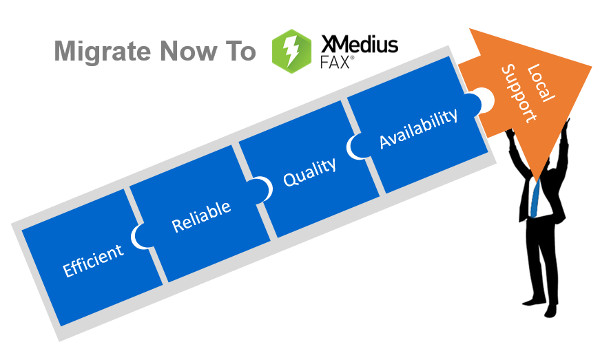
    XMediusFAX® is an ideal FoIP solution. It is a single-source, software-only technology and includes its own patented T.38 protocol, the most reliable protocol for transmitting faxes over a VoIP network. Better yet, XMediusFAX® doesn’t require a third party to enable your fax infrastructure and our R&D team has fully mastered the software and can intervene quickly if any assistance is needed. Furthermore, XMediusFAX® features shared High Availability (HA) channels that replicate information in real time. Both of its servers are active, so should one fail, the other takes over until the malfunctioning server resumes its normal workload. This ensures an uninterrupted workflow.

    Because of all these critical benefits, the XMediusFAX® solution attracts a range of organizations that are interested in implementing a superior FoIP solution.

    However, switching over from another solution can raise some concerns. One that prospective customers most often express involves migrating and preserving their existing data. In response to this concern, the XMedius team has developed a tool to help our new customers migrate from their current database* to an XMediusFAX® server while preserving all of their fax records and user information.

    Would you like more information about the migration offer of your current Fax-over-IP solution to ours?

    *Conditions Apply

    E-mail us on sales@rincon.co.in for more information and we will be glad to assist you.
  • Reblog: Fax Server, Less a Luxury, More a Necessity for Any Business

    Technology is revolutionary and each industry is taking benefit of it. Businesses are moving towards the digital revolution. A few tradition are still as important as it was before. Faxing is one of those traditions still having its own importance in businesses and many industries. Still, a few documents such as contracts, legal papers, bills, etc. needs to get faxed as fax has its own legal value. The technology has also paved its way into the faxing to satisfy the business need. The fax server is a technological advancement to make the faxing digitized.

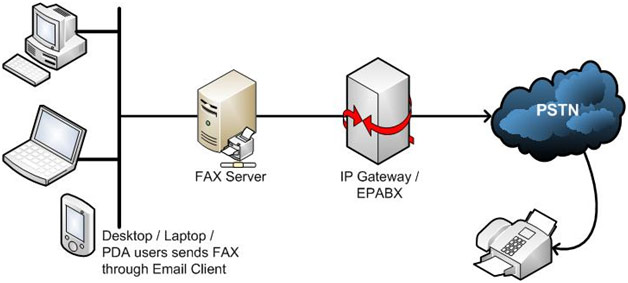
    Fax servers can use the traditional lines or VoIP to send and receive faxes. One of the most widely accepted efaxing technology is FoIP (Fax over IP). It uses the cost-effective and reliable VoIP technology to send the faxes.

    The fax server converts the documents into the digitized format and send it using the predefined channels. It gets converted into the original format at the receiving end. It can be either printed document or an email based on the configuration.

    Benefits of The Fax Server For Any Business:

    • Reduced Costs
      The fax server reduces the operational cost and stationary required in traditional faxing. It eliminates the papers, toner, and bulky fax machines. It also reduces the maintenance cost required to maintain the traditional machines. The fax servers don’t require any extra hardware or plug-ins to work efficiently, which makes it perfect for any business.
    • Improved Productivity
      The faxing can be performed from anywhere with the FoIP. It eliminates the possible long queues to send the fax from the physical machine. With the fax server, one may easily send the faxes using their desktops, laptops, tablets and even phones.
    • Leveraged Network
      The fax servers eliminate the extra telephone lines required for the fax server. It takes the complete benefit of the existing VoIP network. It also removes the need of extra wiring which makes it more scalable and extensible.
    • 24*7 Availability On Finger Tip
      The fax server can be integrated into the web, software or any mail server based on company’s requirement and choice. It makes it available 24*7 even when you are traveling or on a dinner table. You may send and receive the faxes from anywhere using your simple web or mail servers.
    • Robust Disaster Management
      Majority of the fax servers come with the security configuration. It makes the copy of each or important documents on the server which works as a disaster management. Any time, one can get the backup and recover the lost faxes which is nearly impossible with the traditional fax system.
    • Competitive Edge
      The fax servers give a competitive edge to the business with its advanced features. For example, companies can add their own cover page as a signature of all their documents sent to other firms. It also gives notification once the fax is received by the receiving party. The fax can be auto forwarded in case of failure. It gives a competitive edge to any business.

    There is a plethora of advantages rendered by the fax server software. The modern fax server software has many features which makes it more appropriate compared to the traditional fax machines. It provides the fax templates which can be used to send the faxes of the same nature. One may also block unwanted faxes with ease. The color faxing can never be so easy and cheap as it is with the FoIP software. Any business can use their resources efficiently and improve the productivity by giving their business a professional touch with the fax server software.

    If you are considering implementing a fax management solution for your organisation, but are still sitting on the fence when it comes to selecting the right solution, we encourage you to e-mail us on sales@rincon.co.in and we will be glad to assist you.
  • Reblog: What is Fax over IP?

    Everything is going IP these days. The same is true for businesses across the world.

    From voice to video surveillance systems businesses across the world are migrating their legacy analog systems to those that are IP based. Of course the time tested method for sending and receiving important business documents – fax – is also undergoing this migration

    For years you’ve been able to send and receive faxes over an IP network. But until recently successful faxing over an IP network has escaped many a person.

    What’s changed?

    A lot. However, before we get into that, let’s first take a closer look at Fax over IP.

    What is Fax over IP?

    Fax over IP (also known as FoIP) refers to the method and technology of sending fax documents over an IP network (local or wide area). This is different from the way faxes have traditionally been handled.

    For years the sending and receiving of fax documents has been handled over the PSTN or Publicly Switched Telephone Network. With Fax over IP fax documents by-pass the PSTN completely.

    This is similar to how VoIP (Voice over IP) works, but requires additional network bandwidth due to the increased size of fax documents.

    How does Fax over IP work?

    The concept behind how Fax over IP works is very straight forward (especially if you’re already familiar with how VoIP works).

    With Fax over IP your fax document is first packetized, then encapsulated in a transport protocol and sent from “Point A” to “Point B”. Point A and Point B are typically fax machines which interface with a Fax over IP gateway or some sort of IP adapter.

    These devices allow fax machines to interface with an IP network as well as conduct the digitizing and encapsulating of the fax document.

    Benefits of Fax over IP

    In reading about Fax over IP you might be thinking that Fax over IP simply mimics traditional faxing capabilities.

    While Fax over IP does closely mimic the general set-up and use of traditional faxing it does come with several unique benefits:

    • Unified network connectivity – Fax over IP leverages your existing LAN and WAN IP networks so you don’t have to manage or pay for a separate analog network.
    • Advanced management – Bringing fax documents into IP realm allows for fax documents to be easily archived, sorted and emailed.
    • Lower cost – With one less network to pay for and manage there is a definitive cost saving in using Fax over IP. Fax over IP also tends to be more cost effective on a per-minute rate versus faxing over the PSTN.
    • Remote usage – There are many locations throughout the world in which a fax line cannot be provisioned. In areas such as these individuals typically rely on satellite connections, like satellite Internet, which allows faxing over IP.

    What about Fax over IP being hit or miss?

    Ah yes! Let’s get back to this.

    Due to the nature of IP technology there have traditionally been many hurdles to successfully implementing Fax over IP.

    Like voice, Fax over IP is subject to issues such as latency, packet loss and jitter. With voice calls you can typically deal with these issues as they don’t substantially impact the result of the call.

    But when it comes to faxing anything less than perfect document transmission is unacceptable.

    So what has changed to make Fax over IP 100% reliable?

    Well, much.

    Advances in technology and new offerings from Fax over IP gateway manufacturers have finally made 100% reliable Fax over IP a reality.

    The original article can be found here.

    If you are considering implementing a fax management solution for your organisation, but are still sitting on the fence when it comes to selecting the right solution, we encourage you to e-mail us on sales@rincon.co.in and we will be glad to assist you.