Tag: HIPAA

  • Reblog: Going Beyond HIPAA: 5 HIPAA-Related Pitfalls And How To Avoid Them

    The Health Insurance Portability and Accountability Act (HIPAA) is a very complicated compliance standard to tackle. There are strict privacy requirements surrounding the handling of patient medical and personally identifiable information, but how these requirements are met is left largely up to the individual healthcare organizations. Add HIPAA’s requirements for portability and accessibility to the fact a given healthcare organization’s electronic medical records (EMR/EHR) system may not be able to directly communicate with another organization’s and exchanging protected information can get complicated.

    The complicated process of exchanging protected health information (PHI) opens the door to accidental HIPAA violations, and potentially worse, a full-scale data breach. To help, here are 5 common HIPAA pitfalls to avoid while you navigate the path to compliance:

    Insurance Claims Denial

    Every organization that needs to comply with HIPAA should be keenly aware of the costs of a data breach, but what happens if a violation or breach happens anyway?

    Organizations typically have some kind of insurance policy to protect against damages from HIPAA violations or data breaches, but it is not uncommon for them to have their claim denied over improperly filled out applications, a failure to maintain adequate security, or otherwise not meeting the requirements placed by the insurance company.

    Insurance providers may have security requirements that go beyond what is required by HIPAA. It is important for organizations to meet these requirements not only to ensure their insurance policy is valid in the event of a breach but because they can often help an organization shore up its security, helping to avoid a breach or violation in the first place.

    Lawsuits and Legal Expenses

    The annual cost of a Data Breach Report 2019 from IBM Security and the Ponemon Institute indicates one of the biggest expenses related to a data breach isn’t the fines from the violation itself, rather the “post-data breach response.” That is, everything related to helping customers affected by a breach, as well as costs associated with redressing the situation, paying reparations, and dealing with any legal fallout from partners.

    What this means is that while complying with requirements laid out by HIPAA and insurance policies is essential, it is also vital to ensure your organization complies with every other relevant law, standard, business associate agreement, or even contractual obligation. Considerations even extend to things like PCI DSS compliance if a given healthcare organization accepts or handles credit card payments, satisfying state laws for protecting patient and employee information, and ensuring the organization and its employees meet professional licensing requirements.

    There are multiple reasons for this. Not only does compliance with many of these requirements help bolster your organization’s security posture, but it also helps to ensure any available legal protections are applicable and works to mitigate liability if a HIPAA violation does occur. This in turn can help reduce the overall cost of the post data breach response.

    For example, if an organization contracted to handle payment processing for a major hospital suffers a data breach resulting in a HIPAA violation, the hospital may hold them responsible for damages if the payment processor failed to meet PCI DSS compliance, regardless if they were meeting the requirements for HIPAA compliance. On top of this, the payment processor may see their insurance claim denied over failing to maintain PCI DSS compliance.

    Hardware and Software Misconfiguration

    Setting up an IT environment is complicated in the first place. Add in HIPAA compliance requirements, contractual and insurance obligations, and meeting other applicable standards and legal requirements like the ones mentioned above, and it’s a recipe for confusion. Confusion, in turn, leads to mistakes.

    A best practice for mitigating this confusion is to identify all of the requirements for your IT environment, both in regard to the functions it needs to perform and the legal and security requirements it needs to meet. From there, generate a thorough checklist for every individual piece of hardware and software that needs to be implemented, being sure to include things like proper environment architectures, app security policies, and even steps for testing to ensure the environment and all of its components are functioning as intended.

    Falling Out of Compliance

    Basic logging and monitoring is a requirement of HIPAA, however, modern monitoring solutions can do more than meet HIPAA requirements. Many of these solutions can not only deliver valuable insights into usage trends in your IT environment, but many are capable of proactively identifying security risks. These risks can include misconfigurations, suspicious network activity, and applications or hardware that have fallen out of compliance or need a software update.

    Further, in the event of an audit or incident, a quality logging solution can help provide clear insight into user and environment activity. Detailed logs can help rapidly address the requirements of a compliance audit as well as in identifying the source of a data breach if one occurs.

    Insufficient Auditing

    An organization leveraging a quality logging and monitoring solution should not stop there, however. While it may deliver meaningful and actionable insights into your environment’s activity, audits remain the best way to assure ongoing compliance. Organizations may leverage internal compliance assessment teams and monitoring solutions, however, it is possible for organizations to erroneously believe they are compliant when they are not. As such, it remains a best practice to leverage an expert third party to conduct compliance and security audits, including for HIPAA.

    Every time a new piece of hardware or software is implemented, one of the last steps on the implementation checklist should be to audit the entire IT environment before making it live. An audit serves as a final check to ensure applications and hardware are properly configured, the environment is architected in the most efficient way. An audit can also check to ensure that the organization is in fact meeting all of the requirements and criteria for HIPAA and any other applicable legal requirements and security policies like those noted above. The audit can also check to ensure that security policies, procedures for implementing the policies, and evidence they’ve been implemented have been properly documented and that those policies have been updated as appropriate.

    If security gaps or any other issues are identified in this audit, the organization will then have a chance to remediate these issues before the environment goes live and the issues actualize into real problems. Organizations should leverage both regularly scheduled as well as random audits to help avoid any undetected error or issue that could result in a breach or falling out of compliance. Additionally, in the event of a breach or HIPAA violation, regular audits may help mitigate claims that a given organization was negligent in their security practices.

    The original article can be found here.

    For more information e-mail us at sales@rincon.co.in and we will be glad to assist you.

  • Reblog: Why Do Organizations Still Choose an On-Premises Solution in the Age of the Cloud

    Cloud solutions offer a lot of potential benefits for organizations looking to upgrade their communications infrastructure. They can be scalable, reliable (thanks to geo-redundancy & high availability options), and can allow reductions in staff costs. However, they aren’t for everyone. Some organizations have requirements that Cloud can’t fulfill at this time.

    1. A Hands-On Approach

    Cloud deployments typically get managed outside of the organization. For large enterprises or organizations in regulated industries, handling sensitive data carries with it significant risks. If it is mismanaged, the organization could be fined, or worse, a poor reputation could be the result, causing business to evaporate. Everything is riding on the host of your organization’s communications solution.

    When there is an outage or a system failure, getting the critical services to your organization back up and running is again left up to the host. In contrast, an on-premises solution allows your team of experts to take matters into their own hands and resolve them as quickly as possible.

    2. Following Industry Rules and Regulations

    If an organization is in a highly regulated industry, like finance or healthcare, there are strict compliance standards that need to be followed such as HIPAA and SOX. Not every cloud provider offers the right security measures for every organization. Some organizations need to keep their communications out of the Cloud and in their physical control.

    3. What Level of Support Do You Expect?

    If your organization is used to having the best of the best in-house, migrating to a cloud might be too painful at this time. Internal support who knows your systems integrations inside and out can ensure rapid response times, easily troubleshoot system failures, and ensure protocols are followed. It can be hard for executives to give up being able to walk down the hall and knock on the system administrator’s door.

    4. CAPEX vs. OPEX

    Different organizations have different budgeting habits and limitations. Some might need to plan for a one-time expense instead of a subscription-based service. This can be the case for charities, businesses, and government offices who know they have the budget now, but can’t easily predict fluctuations in donations, allotments, or business in the future.

    The upfront cost can be less with an OPEX model communications solution; however, the overall cost continues for its ongoing services. With a CAPEX model, the ongoing costs are smaller, with much of the expense front-loaded.

    The original article can be found here.

    XMedius Enterprise Communications Solutions

    XMedius has developed a powerful range of enterprise-grade communications applications, such as FoIP, Unified Messaging/Voicemail, Call Center, Secure File Transfer, and more. These solutions are designed to deliver excellent ROI by increasing efficiency while preserving operational security.

    We offer our Unified Communications and secure document exchange products both in the Cloud and On-Premises, allowing organizations to utilize the model that works best for them.

    Both deployment styles of our products have options that include high availability, security to keep your communications safe, and interoperability to leverage your existing infrastructure and meet the changes of tomorrow.

    For more information e-mail us on sales@rincon.co.in and we will be glad to assist you.

  • Reblog: 4 Things You Might Not Know About HIPAA Compliance

    [thumbnail target=”_self” src=”https://www.rincon.co.in/site/wp-content/uploads/2019/01/Healthcare-1024×560.jpg”]

    HIPAA is an incredibly influential part of the US healthcare regulatory landscape. Because its focus is the security of electronic personal information, it’s no surprise that the law and its requirements continue to evolve as the tech landscape changes.

    While this is ultimately a good thing, ensuring that the law makes sense in regards to the resources available and challenges faced in healthcare IT, it can also make HIPAA compliance a bit of a moving target. What doesn’t change, however, is the extreme consequences of a security breach.

    1. It’s Not the Fines That Get You

    A HIPAA breach can deliver a serious blow to your organization’s financials, but the costs may not be coming from where you think. The requirement to publicize that the breach occurred can cause more damage than a government fine.

    [well type=””]

    “If you do the math and you look at an organization that has 10,000 records, that’s between $2 million and $4 million worth of risk. 25,000 records? Up to $10 million in risk. And 100,000 records mean $40 million in risk. Now, I’m saying risk because it’s not the cost of the breach itself. A study shows that about one-third of these numbers is the actual cost of the breach.

    The cost of the breach includes notifying patients and hiring lawyers. If it’s a big breach, you have to set up an 800-number and have people answering it. You may have to do credit monitoring. That’s about a third of these costs. What’s the other two-thirds? It’s the loss of business.”

    Mike Semel

    President & Chief Compliance Officer, Semel Consulting

    [/well]

    2. Inattention is No Excuse, Even If Nothing Bad Happens

    The law requires organizations to secure information from prying eyes, whether those eyes are there or not. Organizations are required to make sure all their systems are properly maintained, even if that means installing a completely new operating system (which may itself require new hardware).

    [well type=””]

    “HIPAA says that you have to have devices that are currently supported with patches and updates in order to be compliant.”

    Mike Semel

    President & Chief Compliance Officer, Semel Consulting

    [/well]

    3. HIPAA Breaches Can Even Come from Within

    It’s important to remember that HIPAA violations aren’t always caused by malicious outsiders, your own employees can be a source of trouble, either intentionally or unintentionally. It’s essential to remember that HIPAA requires only relevant staff have access to any given record. If a nurse looks at the diagnosis for a celebrity staying in another ward, that’s a violation. If your radiology department email’s a patient’s x-ray results to the wrong doctor, that’s a violation.

    Regular training and oversight are key to protecting your organization against threats from within, in addition to keeping bad actors out.

    4. A Key to Better Health Data Security Can Be Simplicity

    Because many data security solutions are cumbersome, it is common for staff to circumvent them by relying on insecure (but more user-friendly) consumer file-exchange solutions instead. The best way to keep this from happening? Make your security rules easier rather than weaker.

    If sending a document via Fax-Over-IP or a secure file exchange solution is as easy as sending an unsecured email, your employees are much more likely to do it. By making proper compliance the path of least resistance, you streamline workflows, reduce staff frustration, and better protect your organization.

    Ready to streamline regulatory compliance with XMedius secure document exchange solutions?

    The original article can be found here.

    For more information e-mail us on sales@rincon.co.in and we will be glad to assist you.

  • Reblog: Is Fax Dead in Healthcare?

    The word “fax” has some pretty outdated connotations within today’s highly mobile and technologically savvy workforce. When people think fax, it may invoke a flashback of standing in front of a jammed machine as they attempt another go at sending a single page for the 6th time, or trying to get an urgent document over to a waiting recipient, only to discover that the receiving fax machine is out of ink. Regardless of the reputation fax has for being obsolete tech, the reality is that fax usage in many industries is still rising, not dropping, and faxing itself no longer means having to rely on outdated machines.

    If you’ve pondered the question “Who still faxes in 2018?” the straightforward answer is that many businesses rely on fax for their day-to-day operations.

    In The International Data Corporation’s (IDC) 2017 fax survey, 82% of respondents in the Finance, Healthcare, Manufacturing, Legal, and Government sectors saw fax usage go up or remain consistent compared to the previous year. The average growth of fax usage across the board was 27%, with a quarter of companies in these sectors reporting growth between 50-74% – a very far cry from the statement that “fax is dead”!

    Fax is far from dead. Not only is it still widely used, it has evolved into a digitized medium that integrates seamlessly with interfaces that most of us use regularly, like email. While fax machines may remain for a little while longer, their use is no longer synonymous with faxing itself. Fax-over-internet-protocol (FoIP) technology has revolutionized communications, allowing for increased security, mobility, and ease-of-use. Read on for an overview of how and why fax has remained commonplace in the healthcare industry.

    The Role of Compliance in Healthcare Faxing

    The healthcare industry’s wide use of fax has a lot to do with regulatory compliance, namely with the Health Insurance Portability and Accountability Act, or HIPAA, which was passed by the US Congress in 1996. Navigating the details of regulatory compliance can get overwhelming: when it comes to secure data transmission, what does HIPAA actually say? The HIPAA Privacy Rule was enacted in 2001, shedding a little more light on exactly how healthcare organizations should protect patient data. It urges healthcare professionals to take “reasonable safeguards” when sharing patient files between hospitals, labs, doctors’ offices, and insurance providers.

    The US Department of Health and Human Services (HHS) clearly names fax as an essential method of transmitting medical records, test results, and anything else containing personally identifiable information (PII). This is not to say that email isn’t widely used as well, but there are tremendous security risks that come along with using email to send and receive sensitive files.

    A quick “healthcare data breach” search in Google will reveal the startling number of phishing scams and email hacks that take place in the industry almost every day. While there are secure email servers galore available on the market, these platforms are often reserved for larger healthcare corporations or hospital networks since they are often too costly or complicated for the average healthcare provider.

    EHR/EMR Systems and Paperless Faxing

    The advent of Electronic Health Record and Electronic Medical Record (EHR/EMR) systems have completely changed the healthcare records management landscape. Not only is electronic record management in accordance with HIPAA’s efforts to digitize the healthcare environment, it provides a safer means for storing data. Electronic record keeping also allows healthcare professionals to minimize human error while taking full advantage of cost savings.

    As technology advances, EHR/EMR systems vendors now offer on-site or cloud data hosting options, and the systems themselves provide improved coordination between healthcare providers, even granting patients the ability to access their records online. They’ve progressively become more prevalent in healthcare facilities of all sizes – It’s estimated that 77% of today’s healthcare providers have moved their records into the digital sphere.

    Fax-over-Internet-Protocol (FoIP) technology has also evolved over time, with many vendors offering seamless integration with today’s EHR/EMR systems. From a user perspective, sending a fax is now as simple as pushing a button on the interface they already use every day. This eliminates the need for paper filing and simplifies the data transmission process since documents no longer need to be printed or scanned to before users hit send.

    Healthcare Carries the Highest Digital Fax Adoption Rate

    Healthcare showed 9% growth in digital fax usage in 2017. Right now, in healthcare facilities across North America, GPs, surgeons, nurses and other staff are putting a sensitive document in a fax tray, pressing send, and listening to the cringey audio-frequency tones that signify their information being transmitted one page per minute. Of course, not all medical records are sent through fax machines – many healthcare organizations have digitized their faxing or are in the process of doing so. In fact, the healthcare industry leads the pack for transitioning to modern FoIP technology, representing a whopping 30% contribution to the fax services global market in 2017.

    Confirmations of Receipt: From Paper Trail to Audit Trail

    The fact that faxing gives organizations confirmation of receipt is a major reason that it remains a prevalent form of communication. For years, the confirmation page (the printout that lets users know that their message has been completely received) has served as a faster and cheaper equivalent of sending registered mail. Most email systems come equipped with a read receipt feature, but these typically still give recipients the choice to opt out.

    For healthcare organizations who send and receive large volumes of sensitive data daily, confirmations of receipt offer several benefits:

    • They eliminate both administrative and IT guesswork (follow-up calls, manual logging)
    • They facilitate easy records keeping

    When it comes to dealing with sensitive patient information, confirmations of receipt are necessary from both an administrative and regulatory compliance perspective. Today, medical staff have a few ways of maintaining a paper trail of how, when, and to whom patient data is exchanged. While physical paper filing might be a slightly outdated practice, it remains a reliable system for some healthcare organizations. Many use document scanners or multifunction printers (MFPs) to scan confirmations of receipt and file them electronically.

    Healthcare facilities who have implemented FoIP solutions, however, often do so for their built-in records keeping features. XMediusFAX, for example, is designed to keep an audit trail of all fax transmissions, maintaining detailed records that can generate reports any time. Not only does this free up time for healthcare administration, it alleviates healthcare IT of having to use additional software to log communications.

    FoIP for Savings

    In addition to security and compliance benefits, switching to FoIP can bring significant savings as well. Switching organizations regularly reduce costs by eliminating expensive analog fax lines and paper filing/waste. IT departments love being able to get rid of high-maintenance fax machines in favor of more reliable software and MFP integration.

    Beyond the IT and accounting departments, FoIP is a win for the rest of the staff too. Staff members across Healthcare report significant time savings between reducing/eliminating trips to machines, no longer waiting for acknowledgement receipts, and incoming faxes automatically being routed directly to them, wherever they are.

    Fax Isn’t Dead, It’s Evolving

    Discover how fax software can improve the security and compliance of your healthcare document transmissions. Speak with one of our knowledgeable experts today about how FoIP solutions could work for you.

    The original article can be found here.

    For more information e-mail us on sales@rincon.co.in and we will be glad to assist you.
  • Reblog: Best Practices for Protecting Client File Privacy in the Legal Sector

    There are ways to protect the sensitive data contained in client files and reduce data loss around the legal office with software updates, document digitization, and FoIP solutions.

    The legal sector is comprised of law firms of all sizes, independent legal practitioners, and legal departments within organizations. Although this describes a vast array of legal offices, what ties them all together is that the legal workforce is responsible for high volumes of sensitive client information. Client files often contain the full gamut of personally identifiable information (PII) – from medical records to banking history and credit card numbers – placing the legal sector in the unique position of being under several compliance regulations when it comes to handling said data.

    Whereas regulations like HIPAA govern the exchange, storage, and auditing of PII for the healthcare industry, and regulations like SOX do the same for the financial sector, organizations in the legal sector can be subject to fines and penalties from both of these regulatory bodies and more. In a recent blog, we took a look at the inherent risks involved in transmitting client info via email. Taking the time to understand the threats linked with email use is a great first step, but email risks are only the tip of the iceberg when it comes to the possibilities of a data breach. If you work in the legal sector, this article aims to look at the broader picture and provide a few best practices you can apply around the office to keep client files safe.

    Perform an IT Audit and Update your Software

    Is your legal practice still using Windows XP? Despite the rising prevalence of data breaches due to unpatched and/or unsupported software with highly exploitable vulnerabilities, many companies still don’t see the need to upgrade to newer systems. After the WannaCry attacks in May, 2017, Microsoft provided legacy Windows platforms that were no longer receiving standard support, including Windows XP, Windows 8, and Windows Server 2003 with a security update. It was revealed that at the time of the attack, there were over 100 million legacy windows systems still in use around the world.

    Regardless of your current operating system, outdated technology puts your legal practice, and all the sensitive data within, at huge risk. You can have strong data governance policies in place and all your other organizational ducks in a row, but if you’re running an outdated OS, hackers can and will exploit such vulnerabilities. Don’t let this happen to you.

    Digitize Legal Records

    Transitioning to a completely paperless legal office may seem like a daunting task. Look around and you’ll likely see paper documents all over the place: client letters, court filings, case notes and more. Regulations like HIPAA for the healthcare industry are pushing organizations in the direction of electronically managing and filing records containing PII for several reasons. Paper file management is time consuming, costly, and leaves too much room for human error in a time where data breaches are so prevalent. Surprisingly though, a significant amount of legal practices still resorts to paper filing for their legal records, mostly because up until recently, practices involved in litigations have been required to print, bind, and share thick stacks of paper related to court cases.

    Luckily, many courts today are adopting electronic filing and services. This enables legal practices to transmit documents directly to a court’s case management system where it can be distributed to any other parties involved.

    Transitioning to a paperless environment doesn’t happen overnight, but most of today’s paralegal training incorporates digital filing and systems management, making it easier for law firms of all sizes to hire the right help. Legal practices that print and collate files for long-term storage may want to consider secure cloud-based storage and sharing services. Even in-house servers take up way less space than your average paper filing cabinet, and greatly reduce the likelihood of unauthorized parties accessing client files.

    Make your Document Transmissions Paperless

    The fax machine is the most paper-intensive communication technology still in use, and it’s still going strong in the legal sector. Not only is it costly to maintain a fax machine, its leaves the details of client files up for grabs, whether documents are left lying around in plain sight, or the fax machine at the receiving end of your transmissions is left unattended. Email and scanning technology have their own list of security risks and have therefore not made outdated fax technology obsolete. A range of fax services, including fax over internet protocol (FoIP) solutions have made a tremendous impact on organizational efficiency in recent years, allowing users to send and receive secure faxes directly from their PCs, laptops, and mobile devices. This means no more printing is required, and the legal workforce can securely send their documents while on-the-go – a relief for those rushing to make their next courtroom appearance.

    Want to learn more about FoIP and secure file exchange solutions that can simplify document management, improve compliance, and boost security for your client files? E-mail us on sales@rincon.co.in for more information and we will be glad to assist you.

    The original article can be found here.

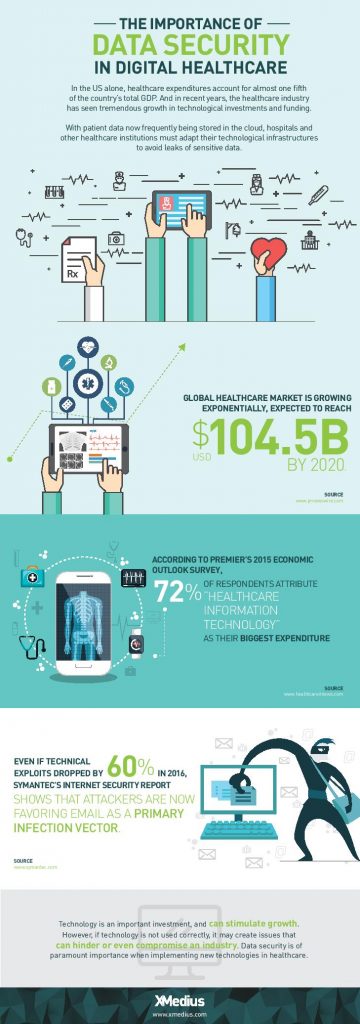
  • Reblog: Top Options to Boost Your Healthcare IT Infrastructure [Infographic]

    Healthcare IT is evolving and is responsible for bigger & bigger portions of today’s healthcare budgets. Discover 3 ways to take your health IT infrastructure to the next level.

    The evolution of EHR/EMR systems

    When the HIPAA act was introduced in 1996, the landscape of EHR/EMR management shifted. Whereas EHR/EMR systems offered healthcare organizations a way to lower costs, increase efficiency, reduce error and improve patient satisfaction, HIPAA forced EHR/EMR system vendors, as well as healthcare providers and their business associates to conform to mandated security regulations. These regulations required new levels of security to protect patient health information, and as a result, EHR system security was upgraded to include the standardization of safeguards like role-based access control, automatic data backups, audit trails, automatic log-offs, and data encryption. To add to this, the HITECH act, introduced in 2009, outlines “meaningful use” of government-approved EHR/EMR systems in the US, and even included financial incentives for physicians and hospitals who follow its guidelines. Needless to say, since HITECH was implemented, there’s been a dramatic increase in the implementation of EHR/EMR solutions in healthcare organizations.

    Health IT expenditures are growing

    While EHR/EMR solutions help a great deal when it comes to accessibility, improved workflow, and interoperability between healthcare institutions when it comes to managing patient records, they only represent a fraction of the IT expenditures in the healthcare industry. 72% of respondents in a 2015 survey of healthcare professionals said that healthcare IT is their organizations biggest expenditure: a number that’s expected to increase globally with upcoming data regulations like GDPR.

    Healthcare IT doesn’t only encompass EHR/EMR systems, but also the networks that support them, as well as the servers, workstations, and mobile devices that healthcare staff access them from.

    When it comes to data management, today’s healthcare IT professionals know that there are a lot of options to invest in when attempting to simplify and centralize their IT infrastructure. There are many health IT hardware and software tools on the market that help healthcare providers reach improved levels of patient care, staff workflow and regulation compliance. Let’s take a look at a few of the best pathways to an improved healthcare IT infrastructure.

    1. Investigate alterative data storage options

    In order to meet growing data storage needs and compliance regulations, many healthcare organizations are building their IT datacenters to be more flexible and scalable. Traditionally, hospital IT admnistrators have preferred on-premise, physical data storage options because of the control it gives them. But with physical on-site storage comes the work of maintenance, deployment of expansion storage, troubleshooting, and more. While not every healthcare organization will benefit from the same type of data storage, many are more likely these days to implement cloud storage into their IT infrastructure.

    Cloud data storage options are flexible, scalable, and come at a lower cost than on-premise deployments. Today’s healthcare providers can choose between public or private hosting facilities, many of which offer appealing back up and disaster recovery plans. Other advantages of storing data on the cloud is freed-up internal storage and resources, improved interoperability, and better integration with applications. If you’re considering migrating some of your healthcare data storage over to the cloud, be sure to discuss the compliance and security measures that potential vendors have in place to ensure you make the best choice.

    2. Ditch traditional fax

    As surprising as it may seem, decades-old fax machines are still widely used in today’s hospitals and physician’s offices. Data security is of utmost importance in today’s healthcare environments, but a large number of providers don’t have the time or resources to explore alternative options.

    Fax machines not only break away from the digital and paperless landscape that compliance regulations have mostly succeeded to build, but the technology is also plain old unreliable:

    • It leaves too much room for human error: sending a fax to a wrong number is a common error as evidenced by a large number or reported data breaches
    • Paper, ink, and maintenance costs add up
    • Regulations such as the HIPAA privacy rule strongly suggest that the minimum amount of information necessary be contained in fax transmissions

    Other options, such as t.38 and cloud fax solutions have emerged as popular alternatives for safely transmitting patient records and other sensitive data. But what is t.38 faxing? It’s a technology that allows you to send faxes over your existing computer network. Cloud faxing essentially allows your fax transmissions to take place over a remote server. These solutions are highly affordable and leverage existing internet connections, they eliminate lost or misused faxes that might be left lying around, and they scale easily. What’s more is that many of today’s fax solution options integrate seamlessly with existing EHR/EMR systems, allowing staff to send and receive mission-critical data right from the platforms they’re most comfortable with.

    3. Secure file exchange: simple solutions for data transmission

    Email is another commonly used tool for transmitting patient data to patients themselves and within the healthcare network. Not all healthcare institutions can afford to implement the security measures needed to make their email servers secure enough to remain compliant and keep incidents of data breach at bay. Another issue within certain healthcare departments is that email doesn’t permit them to attach files over a certain size, forcing them to find other options for sending and receiving bulky patient records and medical images. The radiation Oncology departments at Inova Health System in VA, for example, were burning large files onto CDs and using mail services in order to get patient data to other hospitals and medical facilities in their network before transitioning to XMediusSENDSECURE.

    SendSecure is an example of a collaborative secure file exchange software that takes minimal time and effort to deploy. It uses double encryption, which keeps files encrypted during both the upload and download processes unlike most email servers which only encrypt files while in transit. Users can send an unlimited number of files up to 5TB/ea., thus eliminating any concerns of getting large files where they need to get in a hurry. Similar to today’s FoIP or cloud fax solutions, SendSecure also integrates with day-to-day applications, such as Outlook, and can even be used from any internet browser.

    Looking for ways to boost your health IT infrastructure and ensure your data is safe in transit and at rest? Speak with an expert today about FoIP and secure file exchange solutions that could work for you! Contact us: sales@rincon.co.in

    The original article can be found here.

  • Reblog:3 Best Practices for Protecting Student Records

    Compliance, compliance, compliance! A closer look at the basics of FERPA

    Taking measures to protect student record confidentiality isn’t just a list of suggested best practices – it’s the law. Since student records contain so much PII, including student or parent financial and health information, educational institutions must comply with several regulations to keep sensitive data safe.

    These regulations may include:

    • The Family Educational Rights and Privacy Act (FERPA)
    • The Health Insurance Portability and Accountability Act(HIPAA)
    • The Children’s Online Privacy Protection Act (CORPA)

    The regulation that most commonly applies to schools is FERPA. The Family Educational Rights and Privacy Act (FERPA) is a federal law that protects the privacy of student education records. Educational institutions receiving funds under programs administered by the U.S. Secretary of Education are bound by FERPA regulations. The law basically outlines when and to whom it’s okay to disclose student PII to. Whether you’re a teacher, professor, school administrator or healthcare provider, a few key components of the FERPA act you should know are:

    • Once a student turns 18, or begins attending college, university, or any higher education institution considered post high school, the rights transfer from the parents having the right to inspect and review a student’s record to the student themselves.
    • School officials may not disclose PII about students, nor permit inspection of their records, without written permission from the student, unless such action is covered by exceptions permitted by the Act. An acceptable example would be disclosing information to school officials determined by the institution to have a legitimate educational interest.
    • Students have the right to see and review their educational records within 45 days of a request. They also have the right to request an amendment of their education records that the they believe is inaccurate or in violation of their privacy rights.

    Whether one, all of the above, or other compliance regulations for protecting student data apply to your educational institution, it’s clear that it’s important to have the proper security measures in place. Let’s take a look at a few best practices.

    1. Appoint a data security leader: an educator for educators

    One practice that’s required to adhere to strict compliance regulations in healthcare, financial services, technology and other sectors is to designate an individual who’s responsible for understanding regulations, educating staff, and ensuring that the right processes are in place. By tasking an individual (or a committee of individuals) who are responsible for overseeing compliance, you’re well on your way to creating effective security roadmap for protecting your student’s data.

    Your data security leader, whether an appointed existing staff member or outside consultant, can stay informed of changes in the compliance landscape and determine the best and safest methods for responding to both internal and external for access and use of student data. In doing so, it would be this individual (or committee’s) responsibility to:

    • Assess your data collection practices (and improve them accordingly)
    • Identify and implement your security objectives (each institution has its own protocols for things like wireless network access, etc.)
    • Provide ongoing training to educators and administrators

    Which brings us to our next point…

    2. Provide ongoing student privacy training

    Training employees at every level is essential to a solid security program. Everyone in your organization should have a good understanding of the types of issues that can create student privacy and data security risks. In an educational environment, there are endless possibilities for creative training and messaging that will help familiarize all staff of good data privacy and security practices.

    Try to make sure that training is performed regularly, is updated alongside any changes in the laws, and that new staff members receive security training within a reasonable amount of time.

    3. Develop monitoring, auditing, and reporting processes

    No matter which security processes and measures you choose to implement, monitoring is a critical element to keeping your security program in check. Your security processes need to be routinely tested, monitored, and updated to make sure your student data remains safe over time. Malicious computer malware, for example, is a rapidly evolving threat that will always be looking for new ways to make its way onto school databases, so only through continuous auditing by qualified internal or external individuals can your student privacy and security efforts maintain credibility. An important part of your reporting process should include clear protocols for identifying and reporting data breaches in case they occur.

    Looking for a way to ensure your student records are protected in transit and at rest? Speak with an expert today about secure file exchange solutions that improve your security levels and help you adhere to strict compliance regulations.

    The original article can be found here.

    To learn more contact us sales@rincon.co.in