Tag: Hospital

  • Blood Control Solution

    Blood Control Solution

    Blood Control

    Hospitals want solutions which will help them to ensure that the right blood is being transfused to the right patient. They want to be confident that each bag of blood have met standards such as time out of the fridge and blood life. At the same time, hospitals need to be more accountable for the use and management of this precious resource.

    Hospitals are a busy environment and relying on manual registers and manual checks will not ensure that the right blood is being provided to the correct patient.

    Hospitals are not confident to have blood returned from remote fridges and theatres as they are using manual systems to manage the blood when it is in their control. There is also a clear focus from hospital management and authorities on pathology departments to be more accountable for the usage of blood. Existing manual and handwritten systems with their inevitable high levels of mistakes are clearly not the answer!

    The Blood Management solution from HealthRFID, Australia provides real-time tracking of blood throughout the cold chain.

    The solution enables:

    • The tracking of individual blood bags through to transfusion.
    • Individually configurable, time-based notifications ensure that blood is delivered on time, blood isn’t out of the fridge longer than it should, and much more.
    • The system uses “touch n’ go” RFID technology to minimise transaction times and ensuring staff compliance.
    • Being digital, a full record of where each blood bag has been is available instantly.


    Specimen Control

    The loss of a non-replaceable specimens can occur when they roll under a car seat when they are transported, when they drop down the back of a bench at SRA or being lodged somewhere within the Lamson tube system. The first that pathology can find out about the issue is when the physician calls to follow-up on the test result. The loss goes to the heart of the relationship between the physician and the pathology organisation where the physician is putting their trust in the organisation to look after their patient’s specimen within the supply chain and provide accurate results. From a financial prospective it can lead to the loss of the physician’s future test revenue.

    The Specimen tracking system from HealthRFID, Australia can be used to track individual specimens as well as eskies and their associated episodes. This provides Pathology with the peace of mind that if any specimens are misplaced within their supply chain, they will be identified immediately rather than have a physician follow-up the non-delivery of their test results.

    The Specimen Tracking solution enables:

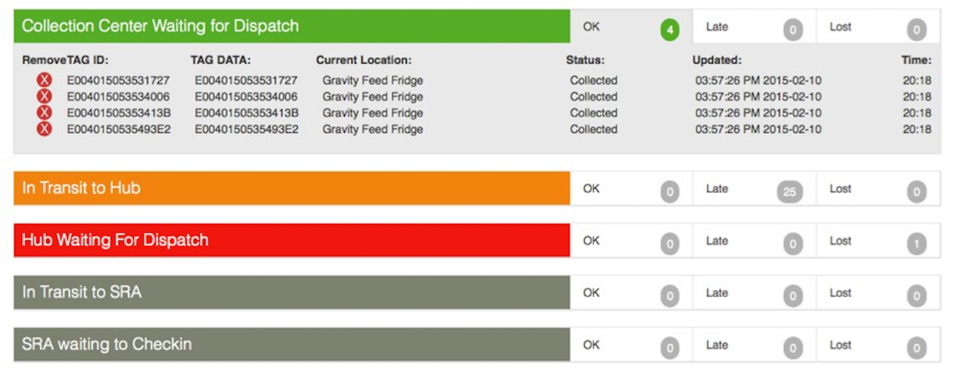
    • The tracking of individual specimen jars from collection through to SRA or individual labs.
    • The tracking of eskies and their associated patient episodes from collection through to SRA or between labs.
    • The fast reading of multiple specimen jars or episodes at each read point through the use of “touch n’ go” RFID technology to minimise transaction times.
    • Provides couriers with real-time information as to what specimens or eskies are ready to be picked up from what collection center.
    • Individually configurable, time-based notifications ensure that specimens reach each point within the required time.
    Label Control

    Between 6-8% of all blood tests in hospitals need to be recollected.

    This error rate occurs in traditional manual blood sample collection because of incorrect, unreadable and missing label information. This is due to handwriting of patient details.

    Blood Sample labelling solution from HealthRFID, Australia ensures that blood sample collection and patient identification takes place at the bedside.

    The solution enables:

    • The production of printed sample labels at the bedside thereby minimising mistakes and recollection.
    • The positive patient identification of the patient and the test to be undertaken.
    • The solution can be integrated with HealthRFID’s specimen tracking solution enabling the tracking of the test through to the lab.

    Clinical Control

    The loss of tests can occur at any time within a time-sensitive clinical trial process, impacting on the test results provided to the customer. Complete and granular digital data is required to replace manual work and registers to ensure that the right decisions are made and to achieve compliance. A complete system is required to manage the individual clinical trials, from checks at point-of-test collection, positive patient identification and vital matching of aliquots to the original patient blood sample.

    For the first time, ClinicalControl system from HealthRFID, Australia can be used to track individual tests as well as the overall clinical trial project. This ensures that individual tests will not be misplaced within their supply chain, that all tests required by the project are being undertaken and that all aliquots required by the customer will be sent.

    The ClinicalControl Tracking solution enables:

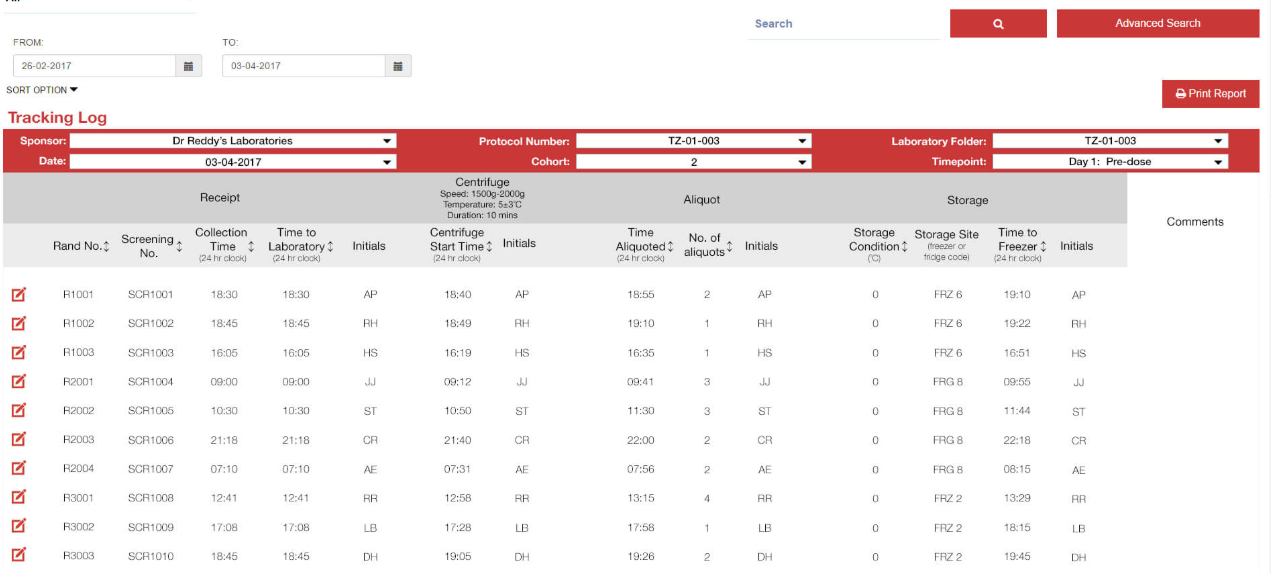
    • The tracking of individual tests from collection through to aliquot, through to despatch to the customer.
    • The labelling of the tests to replace the handwriting of individual tests.
    • The fast reading of multiple tests or episodes at each read point through the use of “touch n’ go” RFID technology to minimise transaction times.
    • Individually configurable, time-based notifications ensure that tests reach each point within the required time.
    • Notification is provided via the ControlPoint dashboard, or email or SMS as required, when tests are not taken according to the requirements of the protocol.
  • Nurse Call System

    Nurse Call System

    With the ever increasing number in Hospitals, nursing home and home healthcare facilities, there is a growing need for better patient response time along with eliminating nurse fatigue. Products can also be integrating the devices with different diagnostic solutions and technologies.

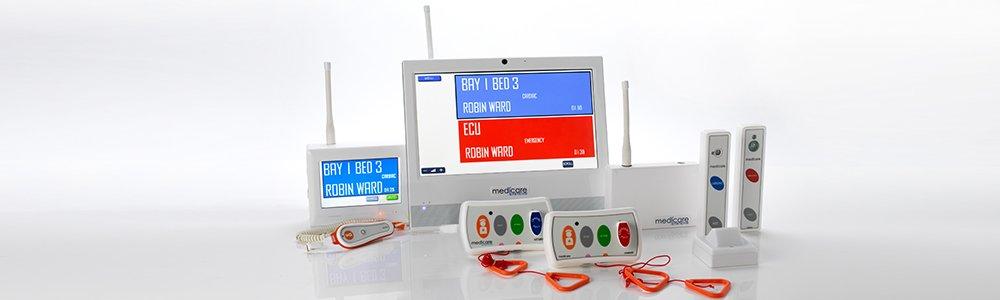
    A Nurse Call system collects the information that matters, identifies opportunities to improve care and delivers actionable insight to caregivers and patients, all supported by clinicians every step of the way.

    The system also transmits immediate notifications and alerts. By integrating staff locating and nurse call systems, drastically reduces the time wasted and increases efficiency by automating workflow processes.

    When a staff member enters a room, the system automatically detects and records their presence while canceling the call alternatively the staff member can reset the button manually. To help with potential liability and billing issues, the solution can also document exactly how long a staff member is in a patient room.

    Patient safety and satisfaction:

    Proactive alerts about the patient, room and bed status can be sent directly to caregivers, through nurse call or wireless devices, to provide the real‐time information needed to drive patient safety and satisfaction.

    Caregiver productivity:

    Nurse Call provides patient information to caregivers where and when they need it, giving them more time to deliver direct, quality care. Innovations such as the graphical touch screen patient station, automated patient surveillance and integrated staff locating may help improve caregiver adoption of technology.

    What is a nurse call system?

    A nurse call system is an alert mechanism by which ailing patients in hospitals or homes for the aged or such can inform nurses or other health care givers remotely of their need for help. It consists of a button placed somewhere on or around the hospital bed which when pressed, alerts the staff at the nurse’s station, and usually, a nurse or nurse assistant responds to such a call. Some systems also allow the patient to speak directly to the staff; others simply beep or buzz at the station, requiring a staff member to actually visit the patient’s room to determine the patient’s needs.

    [icon type=”glyphicon glyphicon-asterisk”] Benefits of Nurse call system:

    [wc_accordion collapse=”1″ leaveopen=”0″ layout=”box”]
    [wc_accordion_section title=”Benefits to patients”]

    • Enables the patient who is confined to bed and has no other way of communicating with staff to alert a nurse of the need for any kind of assistance
    • Enables a patient who is able to get out of bed, but for whom this may be hazardous, exhausting, or otherwise difficult to alert a nurse of the need for any type of assistance
    • Provides the patient an increased sense of security
    • The call button can also be used by a health care staff member already with the patient to call for another when such assistance is needed, or by visitors to call for help on behalf of the patient
    • Can call for services without disturbing nurses on wired and wireless call devices
    • Handsets can control the entertainment system.

    [/wc_accordion_section]
    [wc_accordion_section title=”Benefits to caregivers”]

    • Spend more time with the patients rather than co-ordination work
    • Give help where it’s needed most
    • When the caregivers don’t have time, someone else does
    • Read the display from across the room
    • A calmer environment for both caregivers and their patients
    • Patient handsets for every need
    • Safely monitoring all medical alarms
    • Keeping track of confused patients
    • Making work easier with workflow support
    • Log all events
    • A simple way to connect to different systems
    • Wander control keeps track of confused patients
    • Different workflows are supported, including escalation chains
    • Logging and viewing for easy overview, or in-depth analysis of events.

    [/wc_accordion_section]
    [/wc_accordion]

    [panel style=”panel-default”]
    [panel-header]
    Application Areas
    [/panel-header]
    [panel-content]
    Nurse Call systems are used in many environments, including but not limited to:

    • Hospital Wards
    • Nursing Homes
    • Hydrotherapy Units
    • Swimming Pools and Gyms
    • Operating Theaters
    • Day Clinics
    • Private Patient Rooms
    • High Dependency Unit
    • Consulting Rooms
    • Disabled Toilets
    • X-ray Departments
    • Temporary Buildings
      [/panel-content]
      [/panel]

    We offer both wireless as well as wired nurse call systems depending on the requirements of our customers. Please contact us for a detailed discussion on which system would be the right fit for your needs.

  • Medicare Nurse Call – iButton System

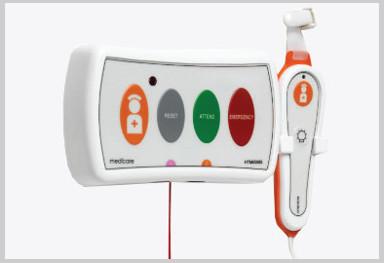
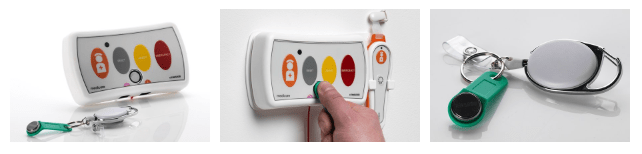
    The HTM6500iB system is a nurse call system that provide specific data to meet CQC standards and allows the monitoring of care, whilst fundamentally providing an alarm system to raise an alarm for help and assistance when required the HTM6500iB system provides versatility and many other options.

    The system benefits from being addressable so not only recording response times it can also record the staff member who has attended to help and provide care or assistance. Like the HTM6500S system the call points also have two sockets under the call point providing connections for both a pear push lead and assistive technology should you have the requirement.

    One of our clients had the problem of proving that care was being provided as the patient suffered from memory loss and often said that they were left alone for hours on end. The HTM6500iB system helped document and record the amount of care given providing evidence of nightly visits and attendance times whilst providing care.

    Get in touch with our product specialist and learn how you can get started with Nurse Call System. To know more contact us on sales@rincon.co.in

  • Hospital System

    The HTM6500E Wireless Nurse Call System, is complete with an Emergency or Cardiac pull switch. The system can be surface mounted or flush mounted onto a standard 2-gang electrical back box within the trunking.

    The System is easy to install, durable, cost effective and versatile in any Hospital Ward, Theatre or Unit. The systems over door and follow me lights all come with optional sounders built in. Online training videos make it an easy to maintain the system for estates and facilities teams, reducing cost of engineers and call outs.

    As limited budgets and ageing nurse call systems within old buildings can prove to be an issue. The system has been designed to meet the HTM08-03 standard and also be cost effective, versatile and easy to install. The HTM6500E System offers the latest technology and is IP capable. It can be surfaced mounted to avoid issues with asbestos in walls and ceilings or recessed into 2-gang back boxes within trunking. The system is easy to maintain, look after and modify.

    Get in touch with our product specialist and learn how you can get started with Nurse Call System. To know more contact us on sales@rincon.co.in

  • Reblog: Going Beyond HIPAA: 5 HIPAA-Related Pitfalls And How To Avoid Them

    The Health Insurance Portability and Accountability Act (HIPAA) is a very complicated compliance standard to tackle. There are strict privacy requirements surrounding the handling of patient medical and personally identifiable information, but how these requirements are met is left largely up to the individual healthcare organizations. Add HIPAA’s requirements for portability and accessibility to the fact a given healthcare organization’s electronic medical records (EMR/EHR) system may not be able to directly communicate with another organization’s and exchanging protected information can get complicated.

    The complicated process of exchanging protected health information (PHI) opens the door to accidental HIPAA violations, and potentially worse, a full-scale data breach. To help, here are 5 common HIPAA pitfalls to avoid while you navigate the path to compliance:

    Insurance Claims Denial

    Every organization that needs to comply with HIPAA should be keenly aware of the costs of a data breach, but what happens if a violation or breach happens anyway?

    Organizations typically have some kind of insurance policy to protect against damages from HIPAA violations or data breaches, but it is not uncommon for them to have their claim denied over improperly filled out applications, a failure to maintain adequate security, or otherwise not meeting the requirements placed by the insurance company.

    Insurance providers may have security requirements that go beyond what is required by HIPAA. It is important for organizations to meet these requirements not only to ensure their insurance policy is valid in the event of a breach but because they can often help an organization shore up its security, helping to avoid a breach or violation in the first place.

    Lawsuits and Legal Expenses

    The annual cost of a Data Breach Report 2019 from IBM Security and the Ponemon Institute indicates one of the biggest expenses related to a data breach isn’t the fines from the violation itself, rather the “post-data breach response.” That is, everything related to helping customers affected by a breach, as well as costs associated with redressing the situation, paying reparations, and dealing with any legal fallout from partners.

    What this means is that while complying with requirements laid out by HIPAA and insurance policies is essential, it is also vital to ensure your organization complies with every other relevant law, standard, business associate agreement, or even contractual obligation. Considerations even extend to things like PCI DSS compliance if a given healthcare organization accepts or handles credit card payments, satisfying state laws for protecting patient and employee information, and ensuring the organization and its employees meet professional licensing requirements.

    There are multiple reasons for this. Not only does compliance with many of these requirements help bolster your organization’s security posture, but it also helps to ensure any available legal protections are applicable and works to mitigate liability if a HIPAA violation does occur. This in turn can help reduce the overall cost of the post data breach response.

    For example, if an organization contracted to handle payment processing for a major hospital suffers a data breach resulting in a HIPAA violation, the hospital may hold them responsible for damages if the payment processor failed to meet PCI DSS compliance, regardless if they were meeting the requirements for HIPAA compliance. On top of this, the payment processor may see their insurance claim denied over failing to maintain PCI DSS compliance.

    Hardware and Software Misconfiguration

    Setting up an IT environment is complicated in the first place. Add in HIPAA compliance requirements, contractual and insurance obligations, and meeting other applicable standards and legal requirements like the ones mentioned above, and it’s a recipe for confusion. Confusion, in turn, leads to mistakes.

    A best practice for mitigating this confusion is to identify all of the requirements for your IT environment, both in regard to the functions it needs to perform and the legal and security requirements it needs to meet. From there, generate a thorough checklist for every individual piece of hardware and software that needs to be implemented, being sure to include things like proper environment architectures, app security policies, and even steps for testing to ensure the environment and all of its components are functioning as intended.

    Falling Out of Compliance

    Basic logging and monitoring is a requirement of HIPAA, however, modern monitoring solutions can do more than meet HIPAA requirements. Many of these solutions can not only deliver valuable insights into usage trends in your IT environment, but many are capable of proactively identifying security risks. These risks can include misconfigurations, suspicious network activity, and applications or hardware that have fallen out of compliance or need a software update.

    Further, in the event of an audit or incident, a quality logging solution can help provide clear insight into user and environment activity. Detailed logs can help rapidly address the requirements of a compliance audit as well as in identifying the source of a data breach if one occurs.

    Insufficient Auditing

    An organization leveraging a quality logging and monitoring solution should not stop there, however. While it may deliver meaningful and actionable insights into your environment’s activity, audits remain the best way to assure ongoing compliance. Organizations may leverage internal compliance assessment teams and monitoring solutions, however, it is possible for organizations to erroneously believe they are compliant when they are not. As such, it remains a best practice to leverage an expert third party to conduct compliance and security audits, including for HIPAA.

    Every time a new piece of hardware or software is implemented, one of the last steps on the implementation checklist should be to audit the entire IT environment before making it live. An audit serves as a final check to ensure applications and hardware are properly configured, the environment is architected in the most efficient way. An audit can also check to ensure that the organization is in fact meeting all of the requirements and criteria for HIPAA and any other applicable legal requirements and security policies like those noted above. The audit can also check to ensure that security policies, procedures for implementing the policies, and evidence they’ve been implemented have been properly documented and that those policies have been updated as appropriate.

    If security gaps or any other issues are identified in this audit, the organization will then have a chance to remediate these issues before the environment goes live and the issues actualize into real problems. Organizations should leverage both regularly scheduled as well as random audits to help avoid any undetected error or issue that could result in a breach or falling out of compliance. Additionally, in the event of a breach or HIPAA violation, regular audits may help mitigate claims that a given organization was negligent in their security practices.

    The original article can be found here.

    For more information e-mail us at sales@rincon.co.in and we will be glad to assist you.

  • Patient Tracking Solutions

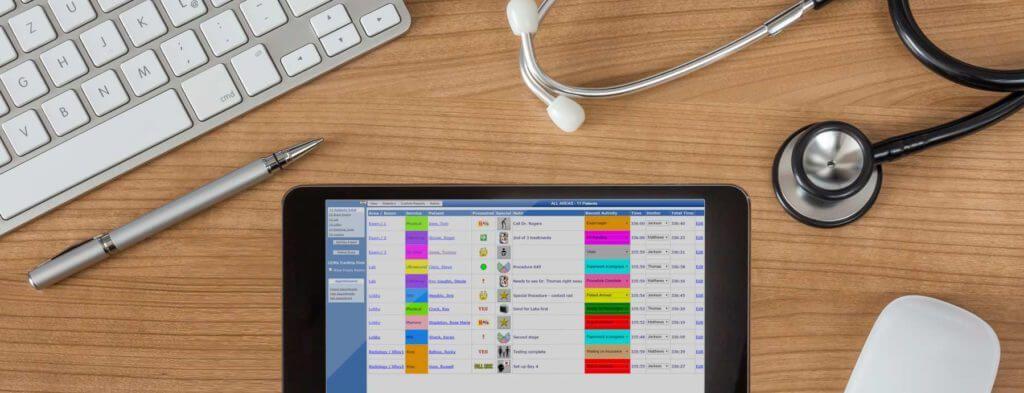
    PatientTrak offers world class patient tracking solutions which can be used in any healthcare setting needing to manage the patient flow process. From single provider practices to large hospital groups, to multi-facility healthcare organizations, our systems are both affordable and scalable.

    Health Clinic, Outpatient, and Hospital Unit Patient Tracking System – Import appointments from your scheduling system and track user defined “activities”, such as check-in time to treatment time, for example. Manage room usage by identifying those rooms which are under/over utilized. Set manual or automatic alerts and generate custom reports for analysis of patient flow. Standard reports include Average Wait & Treatment Times, Peak Times by Area, Time Between Activities, and more.

    Registration, Patient Tracking, and Productivity System – Manage the registration process effectively. Identify the average time it takes to register patients and track which resources are registering patients more efficiently. Eliminate phone calls to other departments and easily manage patient “handoffs” to Outpatient Services. Improve patient satisfaction by reducing wait time, eliminating patient misplacement or oversights, and monitoring lobby and departmental waiting queues. Notifications can be sent based on user defined criteria, such as for those patients who have been waiting for excessive amounts of time. Identify bottlenecks in the registration and patient access services processes. Standard reports include Patient Count, Peak Times, Desk Usage, and more.

    Emergency Department, Walk-In-Clinic, and Urgent Care Center Patient Tracking System – As patients arrive they are entered into the PatientTrak system, immediately recording wait time, chief complaint, and status. User defined “activities” allow your hospital to track times of any desired function or task, assisting in the improvement of patient flow. You may set custom alerts and send email notifications to better identify and inform of long patient wait times and delays. Standard reports include Length of Stay, Patient Count, Peak Times, and more.

  • FileDirector For Hospital’s Health Insurance Process Automation


    Many hospitals these days offer cashless hospitalisation. This means that a policyholder who is covered under medical insurance will be able to avail of services at these designated hospitals and their bills would be settled by Insurance Company or their TPA (third party administrators). This saves the policyholder/ immediate family’s blocking of money.

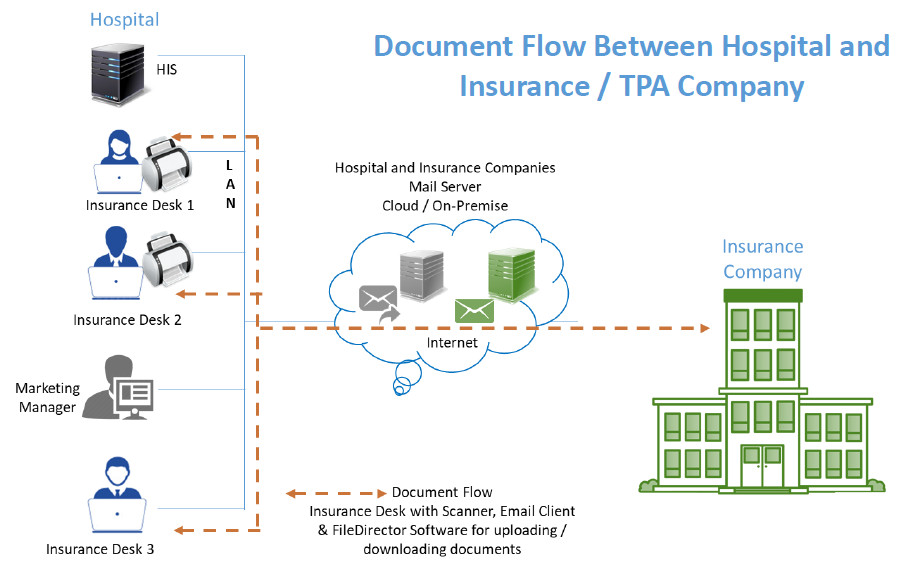
    FileDirector software from Spielberg, Germany would be a good fit to streamline the document exchange process which happens between hospitals and Insurance / TPA companies.

    FileDirector will check for prerequisites and inform whether the machine has sufficient rights for installation, operating system compatibility and if the required ports are open.

    The FileDirector server component will be installed on either

    • Windows 7 or above desktop
    • Windows 2008 or above server

    The FileDirector software will run with SQL Express Database which is free of cost. It will install this component in case it is not there on the FileDirector server.

    The hospital insurance desk will have FileDirector scan station license. It is assumed that the Hospital would have reasonably stable internet connectivity to send / receive documents.

    Hospital will get standard cabinet structure for health insurance records. The structure would include mandatory fields such as Name of the patient, Admission Number, Mobile Number, Policy Number etc. as per Insurance company requirements. Broadly speaking these would be common across all Insurance / TPA companies.

    Hospital would get Masters such as Document type which could include but not limited to pre-authorisation application, Query, Response to query, Approval letter, Letter of denial etc. Masters of Insurance Company as well as TPA would be provided for easy indexing.

    Insurance Desk user would be able to scan / drag and drop the document in FileDirector, Index and send the same to Insurance / TPA company. Option will be available to Scan / drag and drop the document in FileDirector, Index and Hold. He or she will be able to add more documents to make this document set complete and then send to Insurance / TPA company via Email.

    Insurance desk user will have an option to print acknowledgement letter for the patient confirming receipt of the number of documents that have been submitted for Insurance processing.


    Reports:
    The system would be able to generate different reports such as:

    • Claims processed today
    • Pending as of today
    • Approved today
    • Rejected today
    • Rejection with reason
    • Partial approved with reason

    View
    View for checking insurance company’s incoming email messages / documents would be provided using IMAP integration. Insurance desk user will index and store these incoming messages in FileDirector for future retrieval.

    Search
    Users would be able to search documents using one or more indexing parameters and see records.

    For more information e-mail us on sales@rincon.co.in and we will be glad to assist you.


  • Reblog: A slice from Evelyne’s life, executive assistant in a hospital specializing in cardiology

    In my work, I interact with many institutions in the health sector. I meet and have discussions with people who handle a great deal of medical information. I take the time to learn about their daily lives. I enjoy it when they share their experiences and stories with me.

    [row]
    [column lg=”6″ md=”12″ sm=”12″ xs=”12″ ]
    [thumbnail target=”_self” src=”https://www.rincon.co.in/site/wp-content/uploads/2019/01/Hospital-300×200.jpg”]
    [/column]
    [column lg=”6″ md=”12″ sm=”12″ xs=”12″ ]

    Evelyne held a number of positions in various hospitals (in health care and economic services) before becoming Executive Assistant in a hospital specializing in cardiology. She quickly discovered that the hospital had to manage a large number of fax documents of all types (medical notifications, insurance case takeovers, analyses results, care sheets, history certificates, intervention approvals, radiology reports, various test requests or results, purchase orders, invoices, etc.).
    [/column]
    [/row]

    It became increasingly difficult to handle them effectively. Many documents were lost and others were sent to the wrong recipient or forgotten near the fax machine in full view of everyone. With such a volume of documents piled up in the filing cabinets, searching for a fax was lengthy and tedious.

    It was then that Evelyne remembered that the hospital where she had worked a few years prior used a fax software solution instead of traditional fax machines. Showing initiative, she decided to talk to the hospital IT director about it. Aware of the problems associated with the processing of documents sent and received by fax, he dealt with the problem. He quickly approved the idea of replacing the fax machines and fax boards by a software solution.

    This is how the XM Fax® solution was adopted, to the great delight of Evelyne, her co-workers, the IT department and management.

    Evelyne can now send and receive faxes from her work station, her messaging device and her electronic medical records. The processing of faxed documents has thus become much faster and she saves a lot of time. She no longer goes to fax machines many times per day. Evelyne is more productive and effective. She can focus on her mission, which is to provide quality services to patients and to ensure the absolute confidentiality of their personal information. Incoming faxes are now forwarded to the correct recipient without any human intervention, thus limiting unauthorized viewings of health-related personal medical information by the wrong person. With XM Fax, confidential documents of various types are routed to mailboxes or network folders belonging to approved recipients and to designated secure printers.

    As for the IT director, in addition to optimizing his telephone and IP network, it has drastically reduced his expenses related to the use of fax equipment (fax machines, fax boards, maintenance, ink, paper, and telephone lines), and has made it possible to better control the flow and security of communicating by fax. His team is now equipped to administer, monitor and track all the operations and actions carried out in connection with fax transmissions. She can avoid any unauthorized viewings, including those carried out by the administrators themselves, create audit trails, and report to the hospital management. Furthermore, since the hospital is equipped with a high availability redundant fax solution, service continuity is assured. In addition, the advanced and integrated control features of the fax server, the encryption, and the management for users/administrators, meet the requirements of the medical sector in terms of security and compliance. This solution is gaining popularity within hospitals in expansion. Fortunately, this system is scalable to handle a larger volume of faxes and thus serve more departments and employees.

    Today, thanks to Evelyne’s initiative, the hospital is optimizing its unified communications infrastructure, reducing its costs, and increasing the productivity of its employees. Above all, the healthcare organization is now able to process its patient records quickly and in a completely secure manner.

    This truly inspiring account proves to me that any person, no matter his or her hierarchical position, can influence the course of events within the organization in a positive way.

    The original article can be found here.

    For more information e-mail us on sales@rincon.co.in and we will be glad to assist you.

  • Rincon Participating In Hospital Planning & Infrastructure Exhibition

    Save The Date: 11th to 13th October 2018

    Bombay Exhibition Center, Mumbai, at Booth No. C-22, 9:30am onwards

    Rincon India Solutions Pvt. Ltd., a leading solutions provider for document automation in the healthcare vertical is pleased to announce its participation in The Hospital Planning & Infrastructure International Exhibition and Summit. This exhibition is being held from October 11 to 13, 2018 at NESCO, Goregaon in Mumbai.

    Team Rincon will showcase their solutions in the area of:

    • Insurance Desk automation
    • Patient Records Management
    • Scanning Services

    These solutions have been successfully deployed across various hospitals in India.

    About the Conference

    Hospital Planning & Infrastructure, South Asia’s leading Exhibition on Hospital Infrastructure, Design & Planning is back with its fifth edition from October 11 to 13, 2018 at Bombay Exhibition Centre, Mumbai. The Expo is a focused Trade Show & Summit which brings together experienced Industry buyers including Key Budget Holders, Investors & Policy Makers who represent the real power behind the development of a World-Class Hospital Infrastructure in South Asia.

    For more information e-mail us on: sales@rincon.co.in

  • Reblog: Ahmedabad Civil Hospital Embraces Digitisation

    Medical Records are now easier to retrieve for patients and doctors due to digital entry and filing of documents

    The Ahmedabad Civil Hospital has started digitising its records and has instituted a modern system of physical filing of records for the first time since digitisation came of age and years after Prime Minister Narendra Modi launched the Digital India campaign.

    However, the hospital claims it is far ahead of other hospitals in state and that its data is linked to other government hospitals as well.

    The new system will make it easy for patients to gain access to records, for doctors to study medical history and police to get information in medico-legal cases.

    With the new Hospital Information System, digital records are interlinked to physical filing, divided by bundles, shelves and racks at the micro level to ensure it is retrieved as a moment’s notice.

    The system that is operational since past two months ends the dependence on trusted peons and keepers of archives who until now were the only ones who could find a file.

    With over 10,00,000 files accumulated in past decade, locating a file from the archives was a nightmare for patients and doctors in the absence of these men. Civil Hospital sees 3,000 patients a day with 250-300 new cases being registered daily.

    At present the hospital has three scanners but talks are under way to get two more so that digitization can keep pace with number of cases.

    Medical Record Officer (MRO) of Civil Hospital Dr. Sanjay Solanki said, “There are two phases to this operation. One is to digitize new cases and we have begun doing so for two months. We can now access any document with the click of a button. The second phase is to digitize earlier documents which will take time.”

    Dr. Rajnish Patel of the General Surgery Department said, “It is wishful thinking that this will fall in place immediately. It is still quite an effort to get patient records, but it will get better with time.”

    Superintendent Dr. M M Prabhakar said, “Our Hospital Information System is at least five years ahead of other hospitals. We have connected our system to other government hospitals so our data is available to all. The digitisation of our archives will take some time, but it will happen.”

    Meanwhile, for those entrusted to maintain records for years, it is a big turnaround.

    Ashok Nagpure, (59), an old-timer who has for decades handled the medical records is one of the two to be trusted to locate a file within half an hour in case of emergencies. It is a gargantuan task given that there are two large halls stacked with a decade worth of data.

    The advent of the digital filing, Nagpure can now relax. He is set to retire in a couple months and says it is only fitting that his tenure is ending just as the winds of change are blowing through the sanitized corridors.

    Deepak Shinde, 54, another Peon said, “Earlier, we went through so many files each day to locate one. We had a search time of half an hour to three days. Plus, at least 50 files were demanded every day. With all our old staff slowly retiring, I’m glad there’s another way to get the files.”

    The original article can be found here.

    If you are looking for a patient record management or a document / records management solutions, e-mail us on sales@rincon.co.in and we will be glad to assist you.