Tag: Secure Document

  • 10 Ways Document Management Systems Transform🚀 Your Documents. Unlock Your World🤩

    A Document Management System (DMS) is like a modern digital librarian, transforming how organizations handle their information.

    Imagine a vast, well-organized library where all kinds of documents, from ancient scrolls to latest eBooks, are easy to find. In the digital world, a DMS does this job with impressive skill.

    A DMS is software designed to collect, store, handle, and keep track of electronic documents and images. It is a flexible storage system that helps organizations deal with their ever-growing amount of digital data. Let’s explore what makes a DMS so interesting in simpler terms.

    Document Management Systems

    Centralized Storage: A DMS is a secure digital storage space where you keep all your documents. Searching through emails or folders are not needed– everything is neatly organized and easy to find.

    Metadata Organization: Each document in a DMS can have extra information like keywords, tags, and dates. These help you find things quickly, just like a librarian who knows every book’s details.

    Version Control: A DMS keeps a history of your documents. You can see all the modifications done. You can go back to previous versions if needed.

    Access Control: You can decide who can see, edit, or use specific documents. It keeps your data safe and follows rules and laws.

    Collaboration: A DMS makes it easy to work with others. You can edit documents together, add comments, and see the changes in real-time.

    Automated Tasks: Think of a DMS as a helpful assistant. It can do repetitive tasks like moving documents around, getting approvals, and saving old files.

    Audit Trail: Every action on a document is listed. You can see who did what and when, like a detective monitoring your digital library.

    Disaster Recovery: Your documents are safe, even if something unexpected happens, like a fire or flood. DMS systems often have backup plans in place.

    Intelligent Searching: Some DMSs use better technology to find documents. They can look for specific words in documents and even suggest related info.

    Eco-Friendly: Using a DMS helps the environment by reducing the need for paper. You save trees and lower your carbon footprint.

    A DMS is not just a file organizer; it’s like having a digital guardian for your essential data. It helps you find, keep, and protect your electronic documents. In the current age, a DMS ensures your digital legacy is secure and accessible, like a well-maintained library preserving history for future generations.

    If you deal with a significant volume of physical or digital documents that require long-term storage, then a DMS will be a valuable asset. Our team of experts can assist you in choosing the right solution.

    Contact us at sales@rincon.co.in or call +91 9321064487
  • Reblog: U.K. Healthcare System Victim of Vicious Global Cyberattack

    On Friday May 12, a large scale cyberattack was launched affecting tens thousands of computer systems in over 100 countries around the globe. While government officials state that no organizations were targeted specifically, some of the highest-profile victims include U.S.-based international shipment provider FedEx Corp. and England’s National Health Service (NHS). The NHS reports that as a result of the cyberattack, 16 hospitals and private clinics were forced to redirect ambulances and cancel appointments.

    Hackers used a software called WanaCrypt0r 2.0 or WannaCry that exploits a vulnerability in Microsoft Windows. Microsoft released a software patch that fixes the problem in March, but computers that had not installed the security update remained vulnerable.

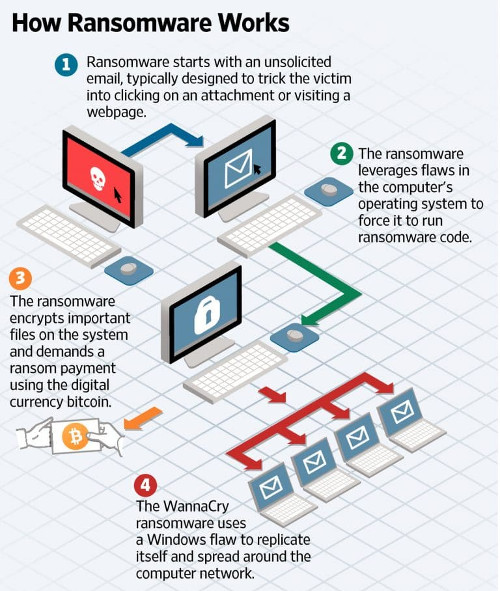
    The malicious malware used in the attack encrypts data on infected computers and blocks any access to files until a ransom is paid. The malware is disguised in spam emails that appear to contain invoices, job offers, security warnings or other legitimate files to trick users into opening them. Security researchers say that some victims made bitcoin digital currency payments ranging between ÂŁ300 and ÂŁ500 to regain access to their data, but the percentage of victims who paid up to the extortionists is unknown.

    What Happens when Ransomware Hits an Organization?

    A recent article by the Wall Street Journal explains how when WannaCry makes its way into a PC via an unsolicited email, it can replicate itself and spread into an entire network.

    The NHS reported on Saturday that it would upgrade its software in wake of the international attack. Security teams are working around the clock with the NHS to uncover the extent of the ransomware infection, and it remains unclear if any patient data has been affected. One of the many companies targeted in Spain, Telecommunications company Telefonica, said that the cyberattack was limited to some of its internal computers and hadn’t affected clients or services. Portugal Telecom and Telefonica Argentina are also among the organizations that were targeted.

    As international security organizations, Microsoft, and the U.S. authorities continue their investigations and efforts to help organizations globally, it’s still unclear what the full implications of the cyberattack are. The hackers responsible for what’s considered the largest global ransomware attack the cyber community has ever seen still haven’t come forward to identify themselves or claim responsibility.

    How can Organizations Defend Against Ransomware Attacks?

    In light of a global cyberattack, it is a daunting fact to know that an entire organization’s sensitive data could be at risk of an infection starting with a single email. Here are a few things organizations can do to defend against current or future cyber threats:

    Run a mandatory company-wide Windows Update. Organizations who use Windows Vista, Windows 7, and Windows 8.1 can protect from the main route of the WanaCrypt0r 2.0 or WannaCry infection by running Windows Update on their systems. Note: The vulnerability doesn’t exist in Windows 10.

    Raise awareness of ransomware. One of the best ways to defend against cyberattacks is to raise awareness from within an organization. A company-wide memo, ad-hoc meeting, or brief training from the IT department can raise awareness by showing all users how to look out for malicious email attachments.

    Stop Relying on email to transfer secure documents. Email is inherently-non-secure and regardless of the strength of an organization’s IT infrastructure, this recent attack shows that all it takes is the opening of a harmful attachment.

    Although email is the most used communication tool used in business today, there’s a long list of reasons why it can’t be trusted to securely transmit your sensitive data. Alternatives like a cloud fax or secure file transfer solution integrate with the email interface users are familiar with, but are reinforced with robust security features that protect against malware and other threats.

    If you’re looking for a user-friendly way to protect your data, contact us sales@rincon.co.in.

    The original article can be found here.