Blog

  • Things To Consider When Choosing A Nurse Call System

    What Is The Nurse Call System And How Do I Choose?

    A Nurse Call System facilitates communication between a healthcare provider (be it Nurse, a ward boy or an ayah) and the people they serve, allowing healthcare providers to serve their patients more attentively and efficiently. Nurse call systems can be wired as well as wireless.

    Wired systems as the name suggests have wires connecting the patient’s call to the nurse’s display panel. In the case of a wireless system, there are no wires except for the power supply needed for the display panel.

    So the question then is should Healthcare units go in for a wired or wireless nurse call system? Which is better and why?

    If you ask a manufacturer, he will no doubt offer a somewhat biased opinion towards the product he is selling. Each system has its advantages and disadvantages depending on the situation.

    What Are Wire And Wireless Nurse Call Systems?

    We will try and give you the pros & cons of both types of systems. Hospitals are very dynamic in nature and their role is not just limited to taking care of the hearts of patients but also winning the hearts of people. In this scenario, it may seem from the outside that wired systems would be a better bet but are they really better? Let us dig deeper.

    The wired system calls for the hassle and the upheaval required to install cables. If you can withstand that, then wired is probably the best option. You could opt for hiding the cables in the walls and flooring or using a trunking system. Hiding the cables is a neater option, but this calls for chasing the walls, holes for the boxes etc. Also if you have to lay the cables through the floor, God forbid, it can be a huge mess. The cables have to run through the corridors, through the false ceiling. If you were to opt for trunking over wires, you will obviate the need for chasing walls. However, the other problems continue as before. Trunking stands out like a sore thumb and makes it unappetising visually.

    What happens if you have to refurbish the room at a later date or move the bed? Also while the laying of cables is being carried out, it renders the room useless. Wireless systems score heavily here against wired systems.

    Most wireless systems can be installed and commissioned in as little as a single day. Once the system is designed and installed properly, there is no need for boosting radio signal strength.

    Common Elements Of A Wireless Nurse Call System.

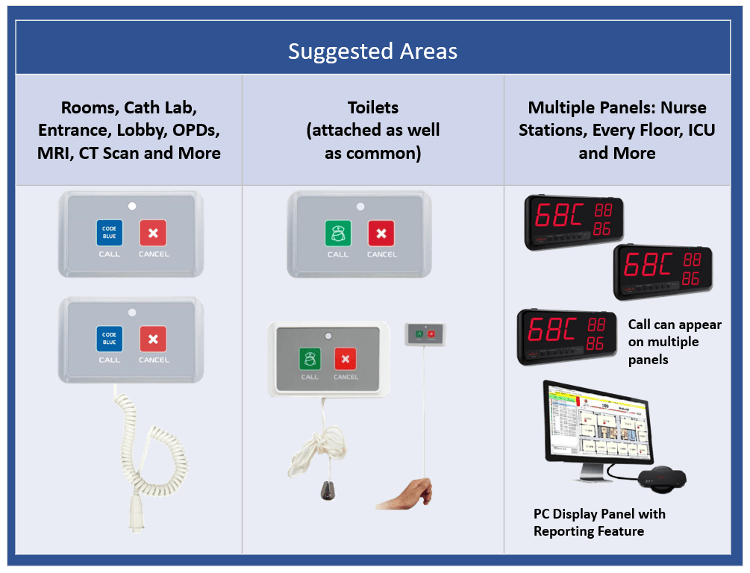
    Bedside point which is with the Patient – This enables the patient to call for assistance using the button. There are push buttons which can be placed on the bed head panel so the patient’s relative can call for assistance. There can also be buttons for Code Blue (cardiac emergency) or other emergency calls.

    Toilet Call Point – As the name suggests, these call points are meant for and located in the toilet. These points enable the patient to call for assistance if he/she is in the toilet. These call points have the option of a pull cord being attached to the call point. Otherwise, only the call point which can be operated by the patient can be installed.

    Code Blue – This is the button pressed in case of a cardiac emergency. The sound played is different to warn the concerned people about the exigency of the situation.
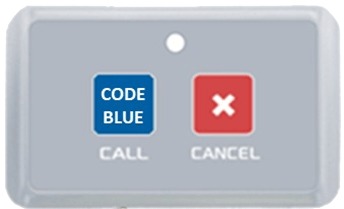
    Code Blue – call point

    Emergency call – This is the button pressed in case of an emergency. The sound played is different to warn the concerned people about the situation.

    Nurse Call Panel – This is the display panel which is normally installed at the Nurse Station but there are instances in which they are installed in the corridor and the area for Ward Boys/attendants. When the patient/relative presses the button, the call is indicated on the display panel with the appropriate sound to indicate if it is an emergency or not. The panels require a 240 V power supply socket.
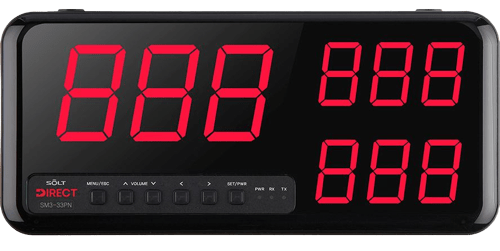
    Display Panel

    PC for Logging – If you have to maintain a report of all the calls made and answered to want to see more active calls, then we have a PC monitoring software which works on Windows 10 PC. It also gives a value-added feature of Reporting and calls escalation.

    Repeater – This is a signal repeater that boosts the signal strength so that the calls from the patient can reach the nurse call panel. The number of repeaters needed is dependent on the structure of the floor and the size of the ward. The repeaters require a 240 V power supply socket.
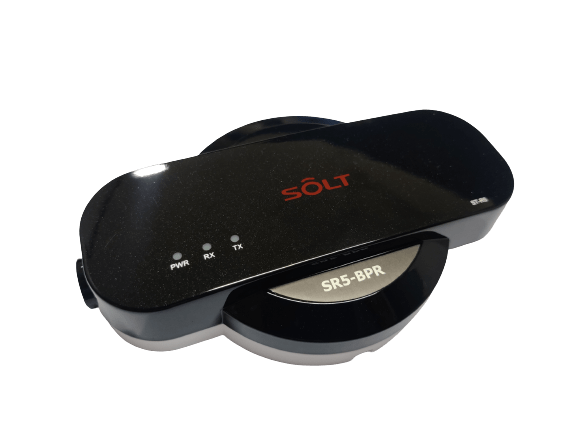
    Repeater

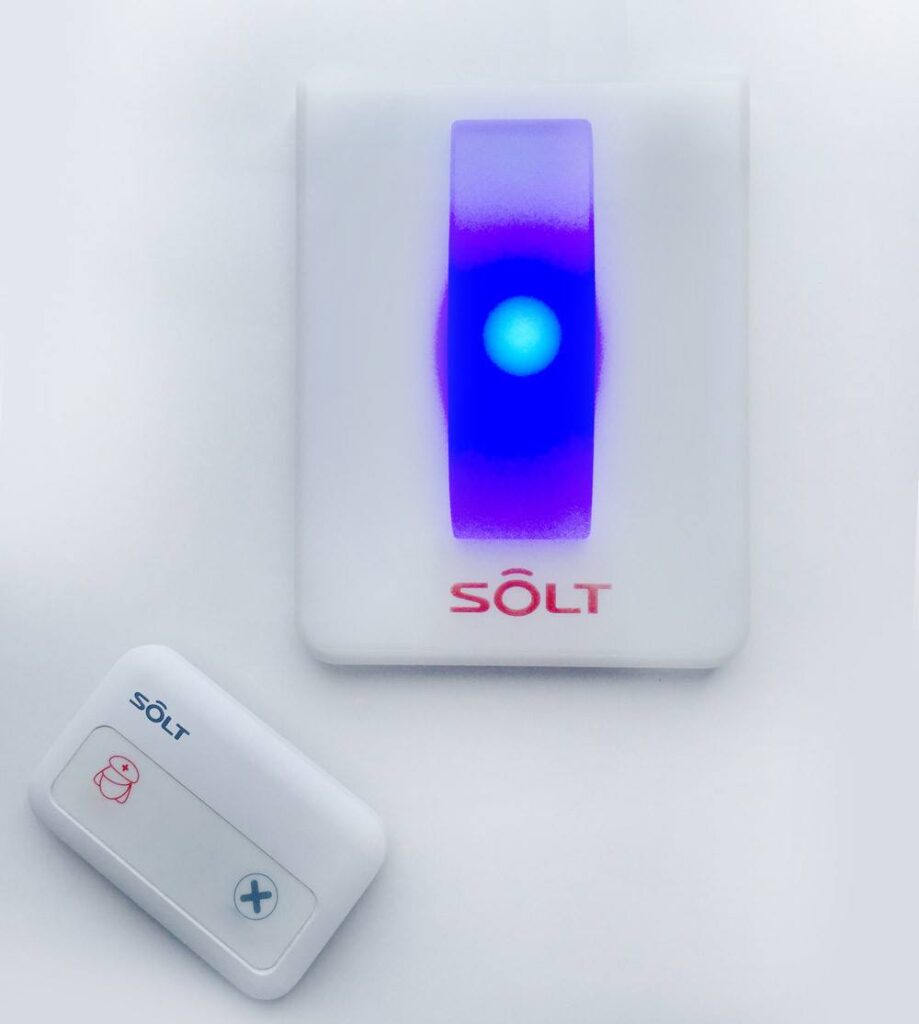
    Door lights – A door light can be mounted outside the door. It has different colours and has the option of sound also. A single door light can be connected to up to 20 beds so it can be installed in the general ward and the investment is reduced. These lights can be used for a single room and twin sharing rooms as well. The display colour can be customised as per the call type so in case there is a code blue call, the door light will show blue colour. The lights require a 240 V power supply socket.
    How Do You Install A Nurse Call System?

    Installation – The installation is very simple as it doesn’t involve any wiring. The system can be preconfigured for the bed numbers etc. so all one needs to do is fix the call points, the display panel and test. If not configured, the system location of the signal repeaters is to be determined based on the layout of the ward/floor.

    Is The Nurse Call System Hospital-Centric

    The Nurse call system is a complete solution that depends on the layout of the hospital. The number of call points depends on the number of beds that are there. Similarly, the number of toilet points depends on the number of toilets that are there. Display panels are based on the number of nurse stations. The number of repeaters needed is dependent on the structure of the floor and the size of the ward.

    Does The System Use Latest Technology

    Solt wireless Nurse call systems use (RF) radio frequency, 433 MHz which is an open band. The system is cable of handling up to 999 call points on a single nurse station panel. The system can have different call types to identify the nature of the request thus saving valuable time for the attendants and ease and speed of service. It can be used for Emergency and code blue as well and has the provision for up to 22 different sounds depending on the cell type. It also has the capability of generating reports on the PC for response times. These reports are mandatory for NABH and JCI compliance.
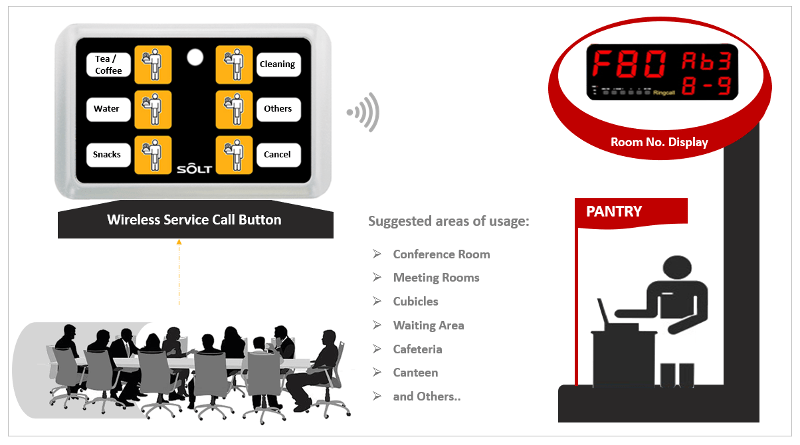
  • Want a coffee while in the conference room?

    Sitting with visitors in the meeting, you call up the pantry to order for your guests. Unfortunately, no one is there in the pantry. You continue with your meeting and completely forget to order. Sounds familiar? We have a better solution. A wireless call bell system which notifies the correct people about your needs such as pantry, housekeeping etc.

    Benefits

    • Wireless
    • Quiet operations for call and response
    • Multiple Call Points
    • Quick and Easy Installation
    • Scalable
  • Service your accounting clients using technology

    Streamline data collection from your clients

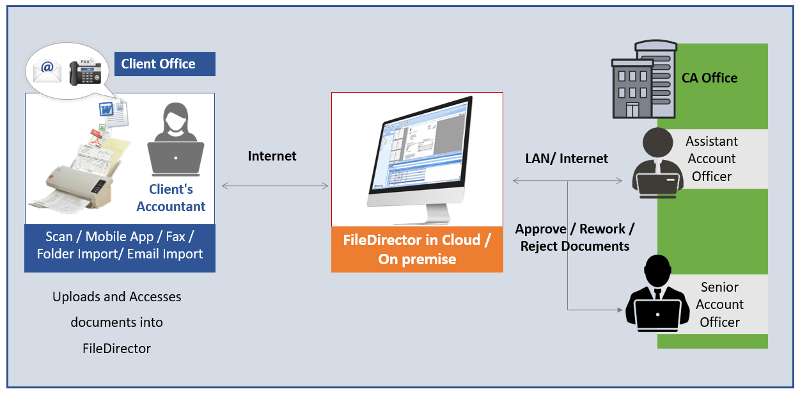
    Introducing FileDirector, a workflow and document management software that can help in achieving your goals.

    With the ease of generating electronic documents and internet availability, document flow has increased four folds in the industry. WhatsApp, Telegram, email etc. are a few means of sharing information at your fingertips. While these have made things easy to share, it has also resulted in a massive pile of data. Finding the right document/data at any given point in time has become an increasingly lengthy process.  

    Chartered Accountancy firms find it extremely difficult to keep track of documents received from their various clients. There is a need to streamline the process of collection of data and sharing of information which would be in the form of .xls, .doc, .pdf etc. files or then Tally backups. Another problem faced is the multiple versions of documents floating around. How does one know which is the correct version? 

    Rincon has a portal which helps CA firms receive the information from their clients in an organized manner. Each document is uploaded by the client itself in the system using an easy-to-use web page under the different categories and adding the associated fields along with it. There can be different types of documents such as 

    1. GST 
    1. Audit 
    1. ITR 
    1. eTDS

    The authorized persons from the CA firms can download the required data for a particular client with a few clicks. They can download the document, go through their internal process and comment. Once done they can upload the document back into the system so that the latest version is available always. While the person is working on the file, if someone else tries to download it, the other person is notified that someone else is working on the file. No more version conflicts.

    A complete audit trail is maintained in the system like when the document was uploaded, who and when the document was opened, etc. A layer of security can be added which helps the CA firms

    protect their client information to be viewed/downloaded for certain employees only. Thus, data for a client’s GST matters cannot be viewed by someone who is looking after TDS.

    Instead of spending time searching for information, the system helps people concentrate on their work and increase their productivity.

    Benefits

    • Efficient, Flexible and Scaleable
    • Helps you focus on growth and core competency
    • Reduce Overheads
    • Maximize ROI
    • Value-added service for your clients
    • Clients and CA Firm can access documents at the click of a button
  • Why opt for Capex when you can have Opex for Temperature and Humidity monitoring?

    Peace-of-mind knowing your sensitive assets are protected round the clock without Capital Expenditure

    WiFi Data Logger with Cloud Software Platform Starts at Rs. 50/-* + Taxes Per Logger Per day

    Benefits

    • Alarms can easily be set with alarm limits of your choice
    • You can choose to be alerted via SMS, email, or both
    • Get informed right away if there is a problem
    • All alarms are also documented in our automatically generated reports
    • Single software platform for Unlimited users & locations
    • Online Data Storage & Backup 3 years or more*

    *Conditions Apply

  • Automate Email Driven Tasks

    Capture data from Mails to automate processes

    Is there a solution that can help automate this ever-increasing volume of e-mails?

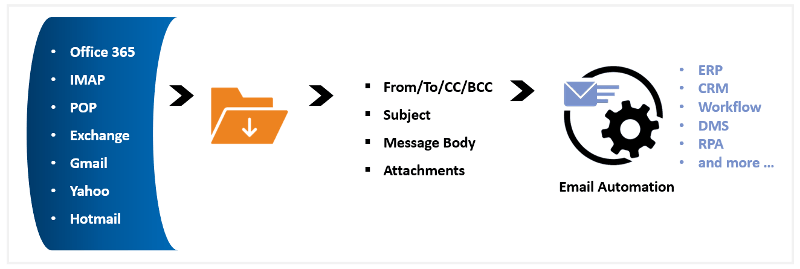
    Introducing Email Integrator, an application that runs in the background saves time and allows you to focus on your important tasks. And it works with any email service!!

    Features

    • Monitor one or more inboxes for document or document request
    • Download message Via POP3, IMAP or Exchange
    • Review message subject or body or attachment for request processing
    1. Order Status, Payment Status, Shipment Status etc.
    2. Download Reports, CSV, XLS etc. and upload in applications after validation
    3. Password Reset, New User ID creation in different applications, Deactivating and Reactivating user accounts etc.
    4. Print email to printer automatically and many more
  • Affordable Emergency Call Bell System

    Wireless Emergency Call Bell System for Code Blue and Toilets

    Features

    • Low power technology
    • Easy to configure
    • Cost effective
    • Versatile, flexible and easy to use
    • Plug and play technology
    • Long life with low maintenance
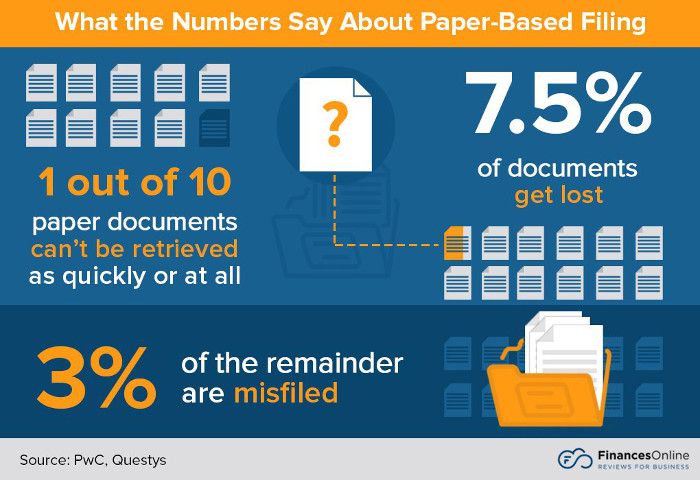
  • How many paper-based documents does your organization produce daily?

    The bitter truth is that you probably don’t even have an idea.

    It is estimated, however, that over 4 trillion paper documents are produced in the United States alone and growing at an alarming rate of 22% per year. This is even with the prevalent use of electronic or digital document management software.

    We have a solution. Feature-rich and easy-to-use FileDirector Document Management Solution from Spielberg, Germany.

    Features

    • Works with any ISIS & Twain compatible Scanners
    • Windows client or web browser access or Mobile App
    • Integration with the Windows desktop, IMAP Email Boxes & MS Office apps
    • Role-based access, Audit trail, version control, Document Workflow and document history
    • Create custom document exception reports
  • Reblog: Communication Compliance in a Post-Covid World

    The advent of the Covid-19 pandemic has brought about many changes in the lives of people all around the world. Even though the pandemic brought a crisis to businesses in the initial days, the amount of flexibility that was required to continue the business shattered long-standing conventional practices. Financial firms and banks also faced the need to shift to the work-from-home culture. People started working from home, attended online meetings, and still managed to be productive.

    Communication was the greatest challenge of all during this trying time. Video conferencing tools that the companies used to host internal meetings were now being used for all meetings, as physical meetings were no longer possible. As employees started working from home, the need for new communication methods started to emerge. Previously, the use of mobile instant messaging applications like WhatsApp, WeChat, Signal, and Telegram was not permitted in financial firms. But due to the evolving circumstances, customers require a communication channel where they can get a trustworthy feel from the brokers and traders, remotely. The swift and easy approach of mobile messaging applications now makes them the preferred choice of communication among customers and traders.

    Covid-19 and the trends in communication compliance

    The practices and policies that existed until the pandemic outbreak had to be revised rapidly. Though employees started working from a remote location, the need for a transparent communication channel between the client and the employees only increased. The communication perspective goes beyond geographic and cultural considerations as customers worried about the security and clarity of their communication. Furthermore, communication channel are often not linear. The client may start the conversation with a chat, but the need for clarity in certain matters may further take the conversation to voice and video calls. While considering the diversity of communication channels, inclusion of a mobile instant messaging (IM) tool is the right choice.

    Once the need is identified the tool can be selected based on the geographic and cultural preference of the client. WeChat is widely used in Asia, whereas WhatsApp is more prevalent in other parts of the world. The focus then should be towards functions like WhatsApp recording, WhatsApp archiving, WeChat recording, and WeChat archiving, to ensure communication compliance.

    But most firms allow their employees to use personal devices for business communication, as part of the companies BYOD (bring your own device) policies. While recording and archiving business conversations for compliance purposes, the usual confusions that employees have are about their private conversations, and whether such conversations are also being monitored. Tools like the WhatsApp Archiver, WeChat Archiver, Signal Archiver (coming soon), and Telegram Archiver (coming soon), provided by TeleMessage will record only the conversations from the employees’ business account of the mobile chat application they use. But when using corporate-owned devices, employees must refrain from using them for personal uses, as all conversations on such devices may be subject to monitoring.

    While monitoring business conversations, it is also important to uphold privacy regulations like the WhatsApp GDPR. The firm must let its clients know that the conversation that they have with the firm’s employees are being monitored for compliance purposes, and consent for the same must also be sought. The archiving solutions provided by TeleMessage displays a notice in the chat screen that the conversations are monitored when the first communication is made.

    Unified Call Recording (UCR) can be another effective practice in ensuring communication compliance. UCR solutions help firms record conversations directly from the network provider, thus reducing the complexity of installing any applications on the employees’ devices. The TeleMessage Network Archiver allows the recording and archiving of business conversations in smartphones as well as legacy phones.

    Archiving conversations alone is not the final step in communication compliance. The archived conversations must be investigated using AI and data models to check for any illegal trade practices.

    The original article can be found here.

    E-mail us on sales@rincon.co.in and we will be glad to assist you.

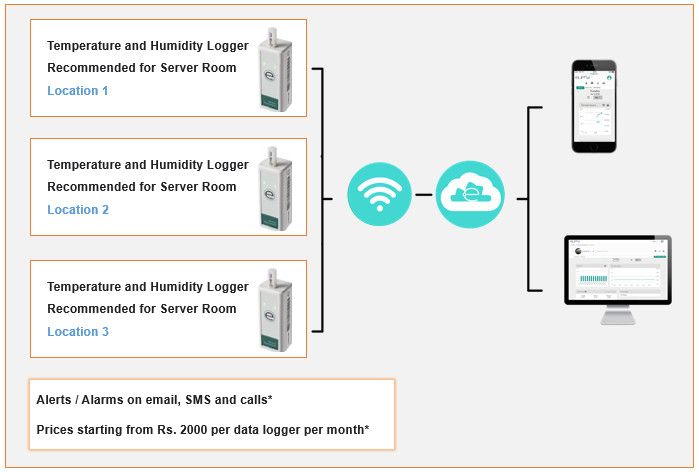
  • Temperature Monitoring Solution for Server Room and Data Center

    Temperature and Humidity Monitoring, Logging and Alerting

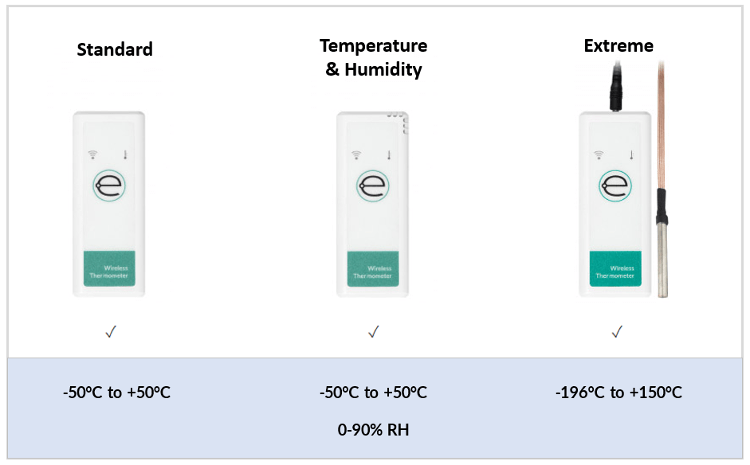
    The environment inside your Data Center or Server Room must be optimal and constant to ensure the effectiveness of the Assets within them. Introducing Online Temperature and Humidity monitoring solution using Eupry Data Logger.

    Features: Simple Installation | Secure Data | 2-Year Battery Life

    The Eupry Logger website is optimized for use on mobile platforms, and compatible with all browsers.

    One major cost of operating a data centre is the cooling infrastructure that supports the Information Technology Equipment. A study showed that maintaining a temperature range between 20° to 24°C was optimal for system reliability. Similarly, with too much humidity, condensation can occur and with too little humidity, static electricity can occur. Both can have a significant impact and can cause damage to computers and equipment in data centres. Thus, maintaining temperature and humidity levels in a data centre helps reduce unplanned downtime caused by adverse environmental conditions and can save companies thousands or even millions of dollars per year.

    Technical Specifications

    • Temperature Range: 0 to +50°C
    • Humidity Range: 0-90% RH
    • Temperature Accuracy: ±0.5°C (±0.9°F) {before calibration}
    • Temperature Resolution: 0.01°C (0.018°F)
    • Temperature Drift/Year: ±0.01°C (±0.018°F)
    • Power: 2 x AA (Lithium batteries recommended)
    • Measurement Frequency: Configurable: 30 sec. to 15 min. Dependent on the software package
    • Memory: 10,000 Measurements
    • Data Connection: Wifi 2.4GHz 802.11 b/g/n -End to End Encrypted
    • Certifications: CE, RoHS, FCC
    • Display: WiFi Status & Temperature Status
    • Dimensions: 91.5mm x 37mm x 33mm
    • Unit Weight (w/ Batteries): 83g
    • Display: Casing: ABS Polymer
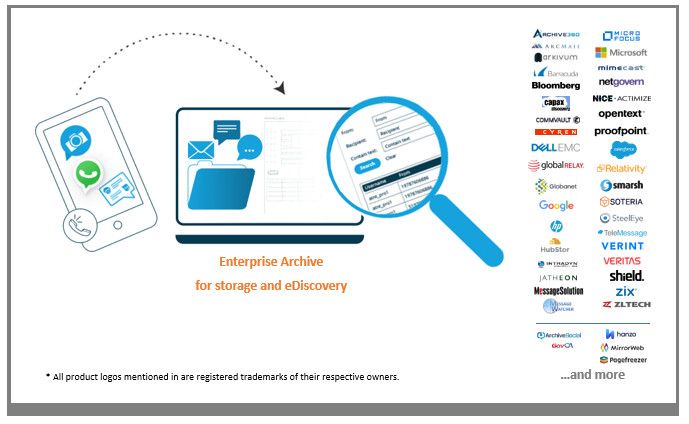
  • Archive and retrieve Business SMS, MMS, Voice calls, WhatsApp and WeChat

    With WhatsApp prevalent everywhere,

    are you able to archive and retrieve messages?

    Features

    • SMS, MMS, Voice call & WhatsApp & WeChat archiving: Keep electronic records of text messages and phone calls ahead of regulatory audits
    • Archive BYOD and Corporate devices, Any carrier & country
    • Store and search for mobile messages in enterprise archive
    • Archive On-Premise or in the Cloud
    • Seamless integration and onboarding
    • Meet Regulatory Compliance & Standards: FOIA, Public Records, GDPR, MiFID II, FINRA, SEC, NFA etc.
    • Secure: ISO 27001, ISO 27799 & ISO 9001 certification and SOC II datacenters
    • Administration, Policy enforcement, Reporting & eDiscovery