Tag: Document Management

  • The Paperless Office: Myths, Realities, and How a DMS Can Make It Happen

    The idea of a paperless office has intrigued businesses for decades. The vision of clutter-free desks, digital workflows, and instant access to files is appealing, but many still struggle to achieve it.

    What’s holding businesses back? Misconceptions about going paperless, lack of the right tools, or fear of change? Let’s break down the myths, uncover the realities, and explore how a Document Management System (DMS) can turn the vision of a paperless office into reality.

    Let’s Talk Numbers: What Impact Does Going Paperless Make?

    Going paperless isn’t just a buzzword; it’s a game-changer with tangible benefits. Here’s a closer look at the numbers behind its impact:

    Myths About Going Paperless

    1. “Going Paperless Is Too Expensive”
      Many believe transitioning to a paperless office requires a hefty upfront investment. However, studies show that companies can save up to $80 per employee annually by reducing paper usage, printing, and storage costs.
    2. “We’ll Lose Important Documents”
      Some fear digitizing documents might lead to data loss or disorganization. In reality, 93% of companies using DMS report better file retrieval efficiency, with fewer misplaced documents.
    3. “It’s Too Complicated to Implement”
      Businesses assume adopting a paperless system disrupts workflows. However, modern DMS platforms are user-friendly, and 70% of businesses report full implementation within 3 to 6 months.
    4. “It’s Not Secure”
      Paper-based systems are often considered safer because they’re tangible. Yet, 60% of paper records are at risk of physical damage or theft, whereas digital systems with encryption and role-based access provide superior protection.

    The Realities of a Paperless Office

    1. Time and Cost Savings
      Employees spend an average of 18 minutes searching for a paper document, costing companies both time and productivity. By going paperless, businesses save an estimated $2,000 per employee annually in lost productivity and operational costs.
    2. Improved Efficiency
      Digital workflows streamline processes like approvals, file sharing, and data retrieval. Studies indicate that paperless offices are 50% faster in task completion compared to their paper-reliant counterparts.
    3. Better Security and Compliance
      A paperless office ensures sensitive documents are encrypted and stored securely. Compliance features like audit trails and version control help 65% of companies reduce compliance-related penalties.
    4. Eco-Friendly Operations
      The average office worker uses 10,000 sheets of paper annually. Going paperless significantly reduces environmental impact, helping organizations align with sustainability goals.

    How a DMS Can Make the Paperless Office a Reality

    A Document Management System (DMS) is the backbone of a paperless office. Here’s how it works:

    • Document Digitization: Convert all your paper documents into searchable digital files. A DMS supports various file types like PDFs, images, and more, ensuring smooth digitization.
    • Centralized Storage: Store all documents in a secure, centralized repository. Say goodbye to filing cabinets and shared drives.
    • Automated Workflows: Automate repetitive tasks like document approvals and notifications, eliminating delays and errors.
    • Advanced Search: Locate documents in seconds using keywords, tags, or metadata. No more digging through folders!
    • Access Control: Restrict document access to authorized personnel, ensuring confidentiality.
    • Audit Trails: Keep track of every action on a document for transparency and compliance.

    The Journey to Paperless: Step-by-Step

    1. Assess Your Current Workflow: Identify processes and departments with heavy paper usage.
    2. Digitize Existing Records: Use a DMS to scan and store paper documents digitally.
    3. Implement Digital Workflows: Transition manual tasks like approvals and file sharing to automated workflows.
    4. Train Your Team: Familiarize employees with the DMS to ensure smooth adoption.
    5. Monitor and Optimize: Continuously improve processes based on feedback and usage data.

    Why It’s Worth the Effort

    Transitioning to a paperless office isn’t just about reducing clutter; it’s about building a more efficient, secure, and sustainable business.

    • Save Time: Reduce the 30% of working hours employees spend on document-related tasks.
    • Cut Costs: Save up to $25,000 annually by reducing printing, storage, and labor costs for medium-sized businesses.
    • Enhance Security: Protect sensitive documents with encryption and role-based access.
    • Achieve Sustainability: Help your organization contribute to environmental goals by drastically cutting paper usage.

    At Rincon, we specialize in helping businesses make the shift to a paperless office with our advanced Document Management and Workflow Solutions. Our tools are designed to simplify your journey, making the transition smooth and impactful.

    Ready to go paperless? Contact us today to learn how Rincon’s DMS can transform your operations and help you achieve your paperless goals.


  • The Top 5 Document Management Challenges Faced by Businesses (And How to Overcome Them)

    Managing documents effectively is a critical part of running a business. From financial records and contracts to operational workflows, every organization deals with vast amounts of information daily. Yet, without the right tools and strategies, document management can quickly become a headache.

    Did you know that 21% of daily productivity losses in medium-sized businesses are attributed to poor document management? Or that 7.5% of all company documents are lost entirely, costing businesses significant time and money to recreate or retrieve them?

    1. Difficulty in Document Retrieval

    One of the most common challenges is locating the right document when you need it most. Studies reveal that employees spend an average of 18 minutes searching for a single document, which translates to hours of lost productivity each week.

    How to Overcome It:

    • Implement a centralized document storage system.
    • Use advanced search capabilities, such as keyword or metadata tagging, to locate files quickly.

    2. Lack of Data Security

    According to recent reports, 60% of businesses have experienced a data breach in the past two years, often due to unsecured document management practices. Sensitive files like financial records and client contracts are especially vulnerable to unauthorized access.

    How to Overcome It:

    • Restrict access using role-based permissions.
    • Encrypt sensitive files and ensure secure backups are maintained.

    3. Compliance Risks

    In sectors with strict regulations, non-compliance can result in significant fines, legal penalties, and reputational damage. A survey of compliance officers found that nearly 50% struggle to retrieve documents promptly during audits, increasing the likelihood of non-compliance.

    How to Overcome It:

    • Maintain detailed audit trails to track document interactions.
    • Ensure your system is designed to meet regulatory standards like GDPR, HIPAA, or ISO 27001.

    4. Manual Processes and Bottlenecks

    Relying on manual document workflows—like physical approvals or email chains—not only slows operations but also increases errors. It’s estimated that 46% of professionals cite manual processes as their biggest productivity bottleneck.

    How to Overcome It:

    • Automate document-related workflows, such as approvals and reviews.
    • Use digital tools to streamline collaboration and eliminate repetitive tasks.

    5. Limited Scalability

    As businesses grow, so does the volume of their documents. Without scalable solutions, managing large amounts of data becomes inefficient. A report indicates that 60% of growing businesses face operational inefficiencies due to outdated document management practices.

    How to Overcome It:

    • Adopt a document management system that can grow with your organization.
    • Ensure the solution can handle high volumes of data without compromising performance.

    Final Thoughts

    The figures are clear: poor document management is a costly inefficiency that affects productivity, compliance, and security. Addressing these challenges with the right strategies and tools is essential to staying competitive in today’s fast-paced environment.

    At Rincon, we understand the unique challenges businesses face and offer advanced Document Management and Workflow Solutions tailored to your needs. From secure storage and retrieval to automated workflows, our solutions help you streamline operations, enhance security, and ensure compliance.

    Ready to transform your document management? Contact us today to learn how Rincon’s capabilities can make a difference for your business.

  • The Curious Case of the Missing Document: Why Access Control in Document Management Systems is Crucial for Organizations

    Imagine this: You’re racing against a deadline and need to retrieve a critical financial document. It’s too sensitive to entrust to an assistant, and involving unnecessary personnel risks confidentiality. You now face two options: sift through piles of paperwork or hope someone with access can locate it in time. Neither seems ideal, right?

    This scenario underscores the inefficiencies and risks tied to traditional document management practices. The solution? A robust Document Management System (DMS) equipped with access control mechanisms that streamline retrieval and secure sensitive information.

    Role-Based Access: The Cornerstone of Secure Document Management

    A fundamental feature of modern DMS platforms is role-based access control (RBAC). This ensures that only authorized personnel can view, retrieve or modify specific documents. Let’s explore how this works:

    • Access by Designation: Permissions are assigned based on roles or designations. This prevents junior employees or unauthorized staff from accessing confidential files while allowing key personnel seamless entry.
    • Eliminating Bottlenecks: A DMS allows the right individuals to retrieve documents instantly without unnecessary delays.
    • Audit Trails: Each action—whether accessing, modifying, or sharing documents—is logged, fostering transparency and accountability.

    With role-based access, critical documents can be found without involving intermediaries, ensuring privacy and efficiency.

    Real-Life Lessons: The Story of ABC Enterprises

    Let’s consider the experience of ABC Enterprises (name changed for confidentiality), a mid-sized manufacturing company preparing for a high-stakes tender submission.

    Ravi, the Head of Finance, needed a sensitive financial document to finalize their bid. The document was vital in justifying their quoted price. However, it was nowhere to be found. Given its importance, Ravi couldn’t delegate the search to an assistant. Instead, he enlisted Meera, a trusted senior colleague, to help. Hours were spent searching shared drives, email threads, and filing cabinets—time they could ill afford to lose.

    To make matters worse, rumours swirled that a competitor might have accessed sensitive data. The suspicion fell on a junior employee who, unbeknownst to management, had unrestricted access to vital documents. The tender submission was completed, but ABC Enterprises narrowly lost the bid, with their competitor quoting just below their price.

    Was it the missing document that cost them the deal?

    A Wake-Up Call: Implementing a DMS

    This incident served as a turning point. ABC Enterprises decided to implement a DMS featuring role-based access controls. The transformation was immediate:

    • Restricted Access: Sensitive documents were now accessible only to Ravi and his core team, eliminating unauthorized access.
    • Advanced Search: Metadata and keyword search functions allowed for quick retrieval of files without unnecessary personnel involvement.
    • Comprehensive Audit Trails: Every document interaction was logged, creating a transparent system of accountability.
    • Centralized Security: Documents were encrypted and stored in a secure, centralized repository, mitigating risks of accidental leaks or data breaches.

    The Outcome: Efficiency and Security in Tandem

    One year later, another tender opportunity arose. This time, ABC Enterprises retrieved all necessary documents in minutes, secured their sensitive data, and submitted their bid without last-minute scrambles. The result? They won the contract with ease, confident that their internal operations were safeguarded from data leaks and inefficiencies.

    Beyond ABC Enterprises: The Broad Benefits of a DMS

    The case of ABC Enterprises highlights the broader advantages of a Document Management System, including:

    • Centralized Storage: No more guessing where a document resides. A DMS consolidates files into one searchable, secure repository.
    • Enhanced Security: Encryption, version control, and restricted access protect documents from unauthorized viewing or accidental loss.
    • Time and Cost Savings: Employees spend less time searching for documents, focusing instead on strategic tasks.
    • Compliance and Risk Reduction: For industries handling sensitive data, a DMS ensures regulatory compliance and mitigates risks linked to poor document management.

    Take Action Today

    The story of ABC Enterprises serves as a reminder that the lack of secure document management can lead to missed opportunities, financial loss, and eroded trust. A Document Management System not only protects sensitive information but also empowers teams to operate efficiently and confidently.

    In today’s competitive business environment, where speed and confidentiality are paramount, investing in a DMS is more than just a technological upgrade—it’s a strategic necessity. Don’t wait for your own “curious case of the missing document.” Protect your organization today.

    Contact us now to learn how a robust DMS can transform your business operations and protect your bottom line.

  • How Document Retrieval Delays Are Costing Your Business Lakhs (and How to Fix It)

    In today’s fast-paced business environment, time isn’t just money—it’s a critical factor for success. Yet, many organizations struggle with a common challenge: retrieving essential documents when they need them the most. What seems like a minor inconvenience can lead to significant financial losses, missed business opportunities, and even reputational damage.

    This blog explores the hidden costs of document retrieval delays and how implementing a Document Management System (DMS) can transform your business operations while boosting your bottom line.

    The Hidden Costs of Document Retrieval Delays

    Every business generates a massive volume of information. Without an efficient system to manage and retrieve this data, critical delays are inevitable. Here’s how document retrieval problems quietly drain resources:

    1. Lost Productivity
      How often does your team waste valuable hours searching for misplaced invoices, contracts or client files? Disorganized storage forces employees to focus on non-productive tasks like file-hunting instead of meaningful work.
      Impact: Cumulative wasted time across teams can cost businesses lakhs annually in lost productivity.
    2. Missed Deadlines
      Delayed access to crucial documents can disrupt timelines for project submissions, vendor payments, or legal filings. Missed deadlines may result in financial penalties or lost revenue.
      Impact: A single missed contract renewal or overdue proposal submission could cost your business a lucrative opportunity.
    3. Compliance Risks
      In highly regulated industries, the inability to retrieve records promptly can lead to serious compliance breaches. Whether it’s for audits, litigation, or regulatory reviews, being unable to produce records on time can cause significant legal troubles.
      Impact: Penalties, fines, and legal expenses often exceed the cost of implementing a robust document management system.
    4. Customer Dissatisfaction
      Customers expect timely responses to service requests, account updates, and invoices. Delays caused by inaccessible documents can erode trust and damage long-term relationships.
      Impact: Loss of customer loyalty and declining revenue due to poor service experiences.

    The Solution: A Document Management System (DMS)

    A Document Management System (DMS) is more than just a digital filing cabinet—it’s a powerful tool that streamlines your document handling processes, ensuring faster, more efficient, and secure information management. Here’s how it helps solve document retrieval delays:

    1. Centralized Document Storage
      A DMS provides a secure, centralized repository where all your files are stored. No more searching through shared drives, email attachments, or filing cabinets.
    2. Automated Search and Retrieval
      With advanced search capabilities powered by keywords, tags, and filters, a DMS lets employees find specific documents within seconds.
    3. Streamlined Workflows and Approvals
      Automating document workflows accelerates processes like approvals and reviews while reducing human errors and bottlenecks.
    4. Enhanced Security and Compliance
      A DMS ensures data protection with role-based access control, encryption, and detailed audit trails to meet compliance standards.

    Quantifying the Benefits of a DMS

    • Time Savings: Employees can reclaim hours lost to file searches and focus on high-value tasks.
    • Improved Accuracy: Automation minimizes errors caused by manual data handling.
    • Cost Reduction: Avoid fines, penalties, and revenue losses from missed deadlines or compliance issues.
    • Scalability: A DMS grows with your business, managing increasing document volumes without compromising performance.

    Real-World Example

    Consider a mid-sized manufacturing firm struggling with invoice retrieval. Each month, employees spent over 40 hours searching for scattered files across email chains and paper records. After implementing a DMS, search time dropped to under five hours per month, saving the company over ₹5 lakhs annually in reduced labour costs and late payment penalties.

    Why is Now the Time to Invest?

    In a world where decisions must be made in seconds, can your business afford to lose valuable time on document retrieval? A DMS offers immediate returns on investment by reclaiming lost time, reducing risks, and fostering a more efficient workplace.

    Partner with Rincon India Solutions Pvt. Ltd.

    At Rincon India Solutions, we understand the challenges businesses face with document management. Our advanced DMS simplifies workflows, secures sensitive information, and helps you save time and money.

    Why Choose Us?

    • Tailored Solutions: Scalable and flexible for businesses of all sizes.
    • Easy Implementation: User-friendly interfaces minimize the need for extensive training.
    • Expert Support: Dedicated onboarding and continuous assistance.

    Take the First Step Today

    Don’t let document retrieval delays cost your business anymore. Schedule a live demo with Rincon India Solutions and experience how our DMS can revolutionize your document management processes.

    Contact Us Now

    Reclaim your time and secure your bottom line today!

  • Service your accounting clients using technology

    Streamline data collection from your clients

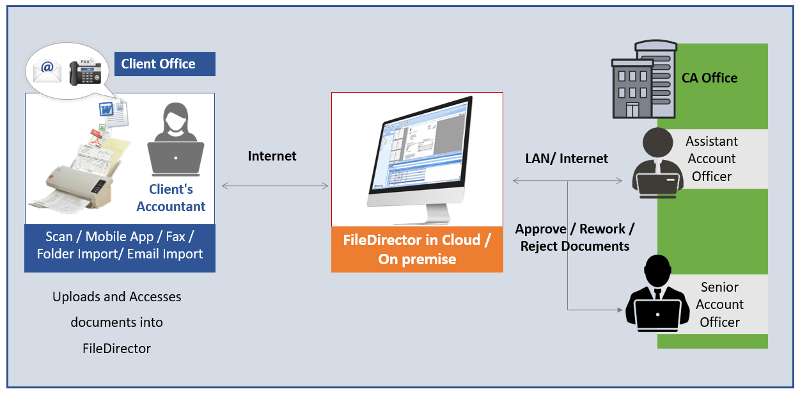
    Introducing FileDirector, a workflow and document management software that can help in achieving your goals.

    With the ease of generating electronic documents and internet availability, document flow has increased four folds in the industry. WhatsApp, Telegram, email etc. are a few means of sharing information at your fingertips. While these have made things easy to share, it has also resulted in a massive pile of data. Finding the right document/data at any given point in time has become an increasingly lengthy process.  

    Chartered Accountancy firms find it extremely difficult to keep track of documents received from their various clients. There is a need to streamline the process of collection of data and sharing of information which would be in the form of .xls, .doc, .pdf etc. files or then Tally backups. Another problem faced is the multiple versions of documents floating around. How does one know which is the correct version? 

    Rincon has a portal which helps CA firms receive the information from their clients in an organized manner. Each document is uploaded by the client itself in the system using an easy-to-use web page under the different categories and adding the associated fields along with it. There can be different types of documents such as 

    1. GST 
    1. Audit 
    1. ITR 
    1. eTDS

    The authorized persons from the CA firms can download the required data for a particular client with a few clicks. They can download the document, go through their internal process and comment. Once done they can upload the document back into the system so that the latest version is available always. While the person is working on the file, if someone else tries to download it, the other person is notified that someone else is working on the file. No more version conflicts.

    A complete audit trail is maintained in the system like when the document was uploaded, who and when the document was opened, etc. A layer of security can be added which helps the CA firms

    protect their client information to be viewed/downloaded for certain employees only. Thus, data for a client’s GST matters cannot be viewed by someone who is looking after TDS.

    Instead of spending time searching for information, the system helps people concentrate on their work and increase their productivity.

    Benefits

    • Efficient, Flexible and Scaleable
    • Helps you focus on growth and core competency
    • Reduce Overheads
    • Maximize ROI
    • Value-added service for your clients
    • Clients and CA Firm can access documents at the click of a button
  • Document Management for Accounts

    Don’t get lost in the maze of Accounting Documents.
    Use a Document Management Software

    The finance and accounts department is swamped with papers and finding the right paper, when needed, is like a needle in a haystack

    • Document management solutions (DMS) helps you locate documents in a jiffy so your team can focus on core activities.
    • DMS is accessible and affordable.
    • It helps the Finance and Accounts department improve by reducing time spent managing paperwork and approvals.
  • Human Resources (HR) Document Management

    Human Resource Management can be a source of strategic advantage for every company, but is your Human Resources department able to effectively and efficiently do their job?

    The amount of paper and electronic documents that any HR department generates and receives can be huge with numerous files having to be maintained for every employee and applicant. In addition, ensuring compliance with regulations is essential as well as improving departmental efficiency.

    Employee Screening and Selection

    On-Boarding

    Talent Management

    General HR

    • Resumes and applications
    • Interview records
    • Pre-employment testing
    • Verification and reference checks
    • Government forms
    • Benefit forms
    • Emergency notification forms
    • Performance management
    • Talent reviews
    • Training and certifications
    • Promotions and transfers
    • Exit interviews
    • Wage and salary information
    • Wage garnishments
    • Formal discipline
    • Job-related medical records

    How FileDirector can assist?

    Our document management software for Human Resources helps HR department retain documents for the appropriate time and improve office efficiency. Personal information for every employee and applicant’s information is safely stored in our electronic repository for quick and easy access.

    Now every resume, cover letter, internal memo, employee review, sick leave request and more is traceable and easily maintained.

    Reduce Compliance and Legal Issues

    HR documents like employee files, medical records, and Investment documents can be stored in the system to ensure separation of key HR files. Security features protect employee privacy and comply with. Never again lose or misplace documents, even odd sized documents such as doctor’s notes.

    Benefits

    • Central repository for all HR documentation
    • Save time and space filling and retrieving documents
    • Create segregated and secured personnel documents
    • Develop best practices for your departmental records management
    • Rapid Deployment equals rapid ROI
    • You can be up and running today
    • Guaranteed user adoption with the user friendly, flexible interface
    • Let HR staff focus on core activities and less on paperwork
    • Know the status and location of all candidates and employee records in your system
    • Enable staff to view required documents simultaneously
    • Never lose or misplace a file again!

    For more information e-mail us on sales@rincon.co.in and we will be glad to assist you.

  • Document Management for HR

    Human Resource Management can be a source of strategic advantage for every company, but is your Human Resources department able to effectively and efficiently do their job?

    The amount of paper and electronic documents that any HR department generates and receives can be huge with numerous files having to be maintained for every employee and applicant. In addition, ensuring compliance with regulations is essential as well as improving departmental efficiency.

    Key Document Management Issues Facing HR Managers

    Issues
    • Growing volumes (and duplication) of paper and electronic records
    • Manual processes to copy, email, mail, and file HR documents
    • Inconsistent document processes across locations
    • Lack of reporting or audit capability for more complicated internal and external requests
    Impact
    • Slow, sometimes incomplete ability to access employee files
    • Higher labor costs
    • Missing HR files
    • Duplication of effort
    • Can’t verify document retention
    • Delays in processing paper work
    • Risk of fines for noncompliance
    • High storage and shipping costs
    • Privacy and security concerns
    What HR Managers Must Do
    • Create fast and easy access to documents
    • Ensure document security, backup and recovery
    • Reduce storage and shipping costs
    • Improve reporting and audit capabilities
    • Increase productivity
    • Reduce exposure to compliance fines
    • Optimize use of HR staff
    How FileDirector can assist?

    Our document management software for Human Resources helps HR department retain documents for the appropriate time and improve office efficiency. Personal information for every employee and applicant’s information is safely stored in our electronic repository for quick and easy access.

    Now every resume, cover letter, internal memo, employee review, sick leave request and more is traceable and easily maintained.

    Benefits:
    • Central repository for all HR documentation
    • Save time and space filling and retrieving documents
    • Create segregated and secured personnel documents
    • Develop best practices for your departmental records management
    • Rapid Deployment equals rapid ROI
    • Guaranteed user adoption with the user friendly, flexible interface
    • Let HR staff focus on core activities and less on paperwork
    • Know the status and location of all candidates and employee records in your system
    • Enable staff to view required documents simultaneously
    • Never lose or misplace a file again!

    E-mail us on sales@rincon.co.in for more information and we will be glad to assist you.

  • Repost: GST may add to India Inc’s documentation burden

    India gears up for GST to be rolled out from July 1. However, have we thought of the documentation needed for compliance? Here is an interesting article.

    Industry is worried it might face increased compliance burden due to rules under the proposed goods and services tax (GST) regime.

    Companies would have to upload three returns every month – by the 10th, 15th and 20th of the month after a sale happens, said M S Mani, senior director, indirect tax, Deloitte.

    According to rules on returns, companies would have to submit details of its supplies or invoices by the 10th of the subsequent month. They have to upload details of purchases of inputs by the 15th of the subsequent month.

    GST returns, carrying details of taxes paid and input credit taken, have to be filed by the 20th of the next month, said Mani. Besides, by the next year-end, companies would have to upload annual returns as well.

    This would burden industry with too much compliance. Service companies such as Infosys, Tata Consultancy Services (TCS) and Airtel, among others, would be particularly hit.

    Service providers would have to file 37 returns each a year, said Mani, from two returns – one every six months – now.

    Besides, service tax is a central duty. So service providers do not have to file returns in each of the state where they have offices. This will, however, change under the GST regime and they would have to file 37 returns for each state they have an office in, besides the central government.

    Currently, goods companies, on their part, have to file returns every month for value-added tax (VAT) and excise duties.

    The GST Council is to discuss pending rules and changes to the already approved norms this month-end. The Council will work out rules on composition, valuation, input tax credit and transitions on March 31.

    It has already approved rules on refunds, invoices, returns, payments and registration. The government had made public rules on five categories before taking these to the Council. But it would not do so in case of pending rules, said officials.

    Industry is worried that online marketplace players such as Flipkart and Amazon will have to pay up to one per cent tax collected at source (TCS) – rules for which have not yet come — on behalf of vendors and this would add too much procedural work.

    S S Gupta of Taxmann said these marketplaces have thousands of vendors and to exactly match TCS of each would be extremely difficult. If anything goes wrong while matching, the input credit would go to another and the vendor would be asked to pay more, he said.

    If a customer returns a product purchased via an online marketplace, it will take time to reach the supplier. By then, TCS might have been paid by the online company. If that vendor does not supply to the online company again, the marketplace would have to bear the burden, explained Gupta.

    Though a cap on TCS has been reduced from two per cent in draft GST Bills to one per cent in the revised drafts approved by the Council, the tax is not aimed at revenue generation but to keep a track of vendors by the tax authorities.

    The government’s logic has been that as it can’t go after every vendor, it would ask the marketplace to deduct TCS. Keeping track of the vendors and not revenues was the concern here, said the expert with Taxmann.

    Mani said the government was basically burdening industry with compliance, even in areas where the authorities should take the responsibility.

    The other issue relates to input tax credit, rules on which are yet to come. However, rules would not contradict the Bills. A buyer would not get input tax credit unless the supplier concerned paid tax. In state-level VAT, input tax credit would be given as soon as the invoice was uploaded, he added.

    Archit Gupta, founder & chief executive officer of ClearTax.com, said there might be issues around pre-existing VAT credit in the earlier regime when these goods are exempted in GST. “So we hope this is covered under the inputs credit and transition rules.”

    For a truly unified structure, he said, the government must focus on greater fungibility of credit.

    “Exempted excise manufacturers and exempted VAT manufactures may have to face GST rates and taxes, and most of these are state-specific exemptions. So it needs to be seen how these concerns can be uniformly addressed,” added Gupta.

    The Council has cleared all GST Bills and most of these will go to the Cabinet and be tabled in Parliament. Similarly, state GST Bills will be moved to the respective state Cabinets and Assemblies. Only rules and item-wise rates have to be decided.

    While we would have electronic filing, we still have to maintain the pdf files for records. Do give a thought to managing so many files which may be pdfs or maybe hard copy. A Document Management System can help overcome these challenges. Contact sales@rincon.co.in on how we can help achieve your goals and overcome your obstacles.

    The original article appears on rediff.com and is available here

  • Reblog: 7 Powerful Advantages of Using a Document Management System

    There are people who personally prefer chaotic work stations, insisting that chaos fuel their creativity. While that may be true, it hardly works in a business environment where people are usually equipped with the right productivity tools to do the right jobs. This article tackles the benefits of managing your business documents through document management software.

    It happens even to the best of us. A document gets misplaced, and you spend hours looking for it, to no avail. Then, your brother or sister, friend or colleague tells you in their most dismissive tone: “Quit looking for it. You’ll find it when it decides to finally show up.”

    And guess what, they almost always end up right. The moment you stop looking for the darn document, just when you already forget about it, you find it sitting innocently on a pile of other documents, on your night stand, or other places you thought you’ve already turned upside down but never actually had, as if enjoying every moment of the little hide-and-seek it obviously beat you at.

    Now, this is a situation you can have a good laugh about if immediately finding the said document isn’t a matter of life and death, or business-critical, one way or another. What if it’s that one document a team needs to get started on a stringently time-sensitive project? What if it’s something that can save a struggling company from costly litigation? Or a government-mandated shutdown, perhaps?

    This is where a document management system (DMS) becomes absolutely necessary.

    What exactly is a document management system?

    According to iDatix, “document management encompasses the processes and procedures your organization uses as it pertains to capturing, storing, securing and retrieving information on a daily basis,” a process that can be simplified through the use of document management software.

    Document management software makes it easy for businesses to combine paper and digital files into a single hub, as physical documents, including checks and business cards, are scanned and digital formats are imported. File formats supported can range from Word documents, Excel spreadsheets, PowerPoint presentations, PDF files, and so on.

    The basic components of document management software systems include:

    • Document storage
    • Check-in/check-out
    • Simultaneous editing coordination
    • Security and access control
    • Search and retrieval
    • Version control
    • Indexing and classification
    • Audit trails
    • Annotations

    It’s more than just going paperless

    Aside from helping keep trees upright to protect the environment from health and economic hazards such as pollution, landslides and flooding, employing a cloud-based document management software solution comes with a host of advantages.

    Below are seven of them:

    1. Document/file repository

    Cloud-based document management systems serve as a central repository for all your important documents that can subsequently be accessed, viewed, changed and shared with colleagues. No more wasting hours upon hours of precious time frantically looking through stacks of folders to find a single document.

    2. Document/content security

    When documents are not managed, the possibility of important information being exposed to the wrong people is considerable. Vital, sensitive information falling into the wrong hands can bring irreversible damage to a business. Document management software solutions let you safeguard confidential business information through rigorous security policies and role-based access control (RBAC) where authorized users alone are allowed to view certain files or documents.

    In the case of disasters like fire or flooding, cloud-based DMS ensures your business-critical data are kept intact, not wiped out from the face of the earth.

    3. Anytime, anywhere access

    As is the case with cloud-based software solutions, web-based DMS affords users the ability to access files and documents anywhere, anytime, regardless of device used, which is particularly handy when collaborating on projects with team members who are on the go or located remotely.

    4. Integration with third-party software

    App integration is a nifty capability that eliminates redundant data input and allows seamless information flow between disparate platforms. Not only does it save you time and effort, it maintains data integrity and accuracy as well. Some DMS even support email integration, affording you the ability to directly send files and documents to customers, colleagues, and vendor partners.

    5. Better organization

    With tags, categories, subcategories, and metadata to mark your files and documents, they become easier to organize, locate, and retrieve for future use. A search using the appropriate keywords can yield results in a matter of seconds.

    6. Time/cost efficiency

    Employee efficiency is a time-saver. Business-wise or otherwise, time saved is money saved. Add to that the fact that keeping and running a document management system can be done at absolutely no cost (for those with free options).

    7. File sharing

    With DMS, users get to share and collaborate on files and documents with colleagues, regardless of their location. They control who they share documents with, and files can be shared through links, published on the web or sent as password-protected files to third-party stakeholders. With the audit trail functionality, they know who has viewed or edited certain files or documents, also critical when unearthing process errors and inefficiencies.

    How about you ? Which document management system do you like to use ?

    The original article is written by Mamoun Chaouni and appears here.

    If you are considering implementing a document management system for your business, but you are still sitting on the fence when it comes to selecting the right solution, we encourage you to e-mail us on sales@rincon.co.in and we will be glad to assist you.