Tag: Document Management

  • Reblog: Document Management Systems: A Buyer’s Guide

    If you are in the market for a document management system in 2017, one of the first questions you have to answer is whether you want to house the system inside your business, or have it hosted in the cloud. While both options provide a framework for storing and organizing your electronic documents, each has its own advantages and disadvantages.

    Our guide will help you understand the differences between self-hosted and cloud-hosted document management systems, as well as the features they include and the benefits they offer. In addition, our guide offers tips on what to look for when choosing a document management system.

    What Is a Document Management System?

    • Document management systems are electronic filing cabinets that provide a framework for organizing all digital and paper documents.
    • These systems work in tandem with scanners, which convert paper documents into digital versions.
    • Through sophisticated search engines, document management systems allow for quick access to any document or file.

    The functions you can use these systems for include:

    • Storing various document types, including word-processing files, emails, PDFs and spreadsheets
    • Searching an entire library of files by individual keyword
    • Restricting access to certain documents
    • Monitoring who is viewing documents and when
    • Tracking edits being made to documents
    • Retrieving previous versions of edited documents
    • Controlling and regulating when out-of-date documents can be deleted
    • Accessing, editing and sharing documents via mobile devices

    What the experts say: Jeff Pickard, CEO of Lucion Technologies, a provider of document management solutions, said these systems help businesses organize all of their paper and digital files in one central location, where everyone in the office has access.

    “It’s a challenge for companies to keep up with all the paperwork and electronic files that come into a home office or business every day,” Pickard told Business News Daily. “It generally starts slowly — an email here, a receipt there, incoming invoices and customer correspondence. And before you know it, you’ve got a mountain of paper and no way to find the documents you need.”

    Now that you know what a document management system is, you have to decide which type — a self-hosted or cloud-based solution — best fits your needs. Both systems offer the same features, however they do have several key differences.

    Self-Hosted Document Management System

    • All of the software is stored inside your business on your company’s own servers.
    • Self-hosted systems allow you to store as many documents and files as your server allows.
    • The software comes with a one-time cost that’s based, in part, on the number of users. Self-hosted systems typically cost at least several thousand dollars. Some systems charge an initial fee for the software, as well as license fees for each user. In addition, some charge an installation fee.
    • With self-hosted systems, there is also an optional yearly charge for ongoing support and software upgrades.

    Pros: The biggest benefit of a self-hosted document management system is that you are always in control of your system and not relying on anyone else to keep it up and running. You’re not dependent on the Internet, either. If you your online connection goes down, you still have access to all of your documents.

    Cons: The downside comes in the large up-front costs, as well as the extra yearly expense of having to pay for software updates. In addition, it’s also up to you to make sure you have a proper backup system in place, since your files aren’t being automatically saved in the cloud. Another possible negative is that not all self-hosted systems work with both Windows and Mac computers. Many are compatible with only one or the other.

    Cloud-Hosted Document Management System

    • All of the software is hosted by your provider and accessed online.
    • You can log into these systems from any computer or mobile device connected to the Internet.
    • You pay a monthly fee for each user. Costs can range from a few dollars to close to $100 per user, depending on the provider, the number of features you choose and amount of storage you want.
    • The system’s provider, for no additional cost, handles all of the software upgrades and maintenance.

    Pros: The biggest benefits are that you don’t need an IT team to install the software and keep it running properly, and that there aren’t any large up-front costs. You also can tap into these systems from anywhere that has online access, and you never have to worry about backing up your files since they are automatically saved in the cloud.

    Cons: The downside is that you are at the mercy of your provider to keep the system up and running. If your provider has a problem with its data center, it could prevent you from accessing your files until the situation is resolved. In addition, if your Internet connection fails, you won’t be able to get to your files. Cloud solutions also have a storage limit.

    Document Management System FAQs

    Still unsure about exactly what a document management system does? No problem. Here are some questions and answers that may provide some more clarity.

    Q. Are document management systems valuable only to large organizations, or can small businesses benefit from these too?

    A. Although they may not have the extensive number of files that larger organizations do, small businesses can still benefit from using document management systems, according to Jesse Wood, CEO of eFileCabinet.

    “A document management system is a great way for businesses to become more effective in their respective industries, regardless of the size of the company or how many clients it has,” Wood said.

    Q. I often see references to document management systems, document management software and document management solutions. What are the differences?

    A. Despite the different names, they all accomplish the same tasks. Mary Williams, marketing communications director for DocuWare, said the differences are a matter of semantics.

    “Our industry does a good job confusing the general public, because there are many terms out there that are interchangeable,” Williams said.

    Q. What’s the difference between cloud storage and cloud-based document management systems?

    A. While cloud storage serves simply as a place for to house documents in the cloud, cloud-based document management systems are a much more robust solution to help businesses manage their important documents, Wood said.

    “As a mere storage repository, cloud storage lacks the collaboration, security and diverse automation features of a document management system, namely in the form of audit trails, user permissions, templating, versioning and bank-grade encrypted file sharing,” Wood said.

    Q. How do you get documents stored in the system?

    A. There are several ways to add files, including by uploading them from your computer and by scanning paper documents directly into the system.

    Pickard said scanning capabilities are a huge part of a system.

    “Now, scanning takes just seconds, and if you get the right technology package, you can automatically create editable, keyword-searchable files in a universal format, like PDF, while you scan,” Pickard said. “A good scanning solution even makes bulk scanning easy, recognizing where separate documents begin and end in a stack and sending them to the right folder, like a virtual file clerk.”

    Q. How do you find documents in the system after they’re filed away?

    A. These systems offer a number of ways to quickly locate documents, including by searching the file’s title, the name of the author and when it was added into the system. In addition, many of these solutions allow you to search for content within each file.

    “If you find a solution with integrated search features, you can simply conduct a keyword search to pull up documents in seconds [and receive] a preview to make sure you’ve got the right file before opening it,” Pickard said.

    Q. Do document management systems work with other programs I am already using?

    A. While most systems feature integrations for Microsoft Office, Salesforce, DocuSign, QuickBooks and a number of other popular programs, some also include an application programming interface (API) that allows for customized integrations.

    “A document management technology with an open API extends this adaptability to organizations wishing to further tailor the document management system to their specific initiatives,” Wood said.

    Q. Besides keeping you more organized, can document management systems help you get work done in other ways?

    A. Yes, and one way is with work-flow tools, which help businesses keep assignments and projects on track. These tools, which are included in some systems, notify employees when it’s their time to work on certain assignments and help ensure that tasks never get lost in an employee’s in-box, said Errick Anthony, project manager for LSSP Corporation, a document management system provider.

    “Work flow means the ability to let a person or group of people know that action needs to be performed on a file to complete the process,” Anthony said. “Work-flow management also contains the ability for the tracking and managing of those files by a manager.”

    Q. With document management systems, do all users have access to every file?

    A. Most document management systems have security restrictions that can control which employees have access to which files. This ensures that employees are seeing only the documents they should.

    “Security has such a vital role in the document management system,” Anthony said.

    Q. What happens if a disaster strikes my business? Are the files and documents stored in the system lost for good?

    A. A big benefit of the cloud-based solutions is that your data is safely being stored off-site.

    “Document management systems enable an instant business-contingency plan, as your backups are stored off premise in the rare case of damage or destruction to your location,” Anthony said.

    Document Management System User Benefits

    Businesses we spoke with reported a number of advantages to using these systems. Here are some of the largest plusses they pointed to:

    Easy access: John Bustrum, CEO and founder of My403bCoach.com, said having such software in place means he’s no longer forced to stockpile loads of files on his desk. Instead, when clients call, he can instantly find the documents he needs on his computer.

    Easy to search: Being able to easily search through her company’s documents is a huge benefit, said Karen Walker, founder of One Team Consulting. She said the ability to quickly search for and retrieve presentations and notes is invaluable.

    Better collaboration: Getting rid of hard copies of documents makes it easy for employees to work with each other, said Gary Tuch, founder of the Professor Egghead Science Academy. When multiple employees are working off of one document and editing is constantly happening, document management systems ensure workers always have the most up-to-date copy, he said. Employees waste no time on printing revisions or double-checking to make sure they have the current version, Tuch added.

    Added security: Increased security is a huge advantage of using document management solutions, said Andrew Southard, general manager of the Indiana-based Data Management Shredding, Inc. The technology has given his company the option to track who is viewing and editing each document, and designate which employees have access to which files, he said.

    Saves space: Exchanging paper documents for digital versions can save a tremendous amount of physical space, said Randy Jourgensen, owner of Digital Office Solutions. Since transforming his office to a paperless environment more than 15 years ago, Jourgensen has been able to convert space that was formerly used only for file storage into space that can generate revenue, he said.

    Disaster recovery: Businesses that have all of their documents stored in physical filing cabinets face the risk that these papers might be destroyed, or that the business may lose access to them should a disaster occur, said Alan Baker, president and chief consultant at Spitfire Innovations. If a water pipe bursts or there is a fire, business owners can still operate with little impact, since their critical documents are stored online and spared from any destruction.

    What to Look For In a Document Management System

    We asked our experts to highlight what they think are some of the most important features and functionalities that small businesses should look for when choosing a document management solution.

    File structure: The system should offer an easy-to-use file structure that makes sense to users, such as a cabinet-drawer-folder approach.

    Searching: You want a wide range of options for quickly finding files. You should be able to search not only by the file’s name, but also by the content inside the file.

    Ease of use: The system should be simple for employees to use. If it is too difficult, you won’t get complete buy-in from the staff, which will make the system less effective.

    Mobile access: You want a document management system that is accessible via smartphones and tablets.

    Integration: The system should easily integrate with the programs you’re already using, such as your email client and customer relationship management software.

    Scanning: The solution should be compatible with a wide variety of scanners.

    Security: The system should allow you to restrict who can see specific folders and files. You should be able to set access permissions by employee.

    The original article can be found here.

    If you are considering implementing a document management system for your business, but you are still sitting on the fence when it comes to selecting the right solution, we encourage you to e-mail us on sales@rincon.co.in and we will be glad to assist you.
  • Reblog: The Top 7 Benefits of Document Management Systems

    Documents, whether electronic or paper, are an essential component of just about any enterprise. Managing business information, sometimes from several sources, can be a challenging task. Depending on the nature of your company, a document management (DM) solution that captures, stores, and retrieves both paper and electronic documents can provide many key benefits to your organization.

    In this post, I’ll discuss the top 7 benefits of document management systems, including:

    Reduced Storage Space
    Enhanced Security
    Improved Regulatory Compliance
    Easier Retrieval
    Better Collaboration
    Better Backup and Disaster Recovery
    And the “Intangibles”
    Read on to learn more!

    1. Reduced Storage Space

    Commercial property costs are increasing and so is the expense to store paper documents. A software-based document management solution (DMS) that can reduce the need for file cabinets, boxes and storage bins is a valuable asset to any enterprise, freeing up precious office space. Documents that have to be kept as hard copies can often be stored in less expensive locations, such as an offsite warehouse or vault.

    2. Enhanced Security

    Document security is vital to many enterprises. DMS provides better control over sensitive documents. Access to documents can be controlled at the folder level for different groups or individuals. Also, a DMS leaves an audit trail of who has viewed a document, when it was accessed, and how it may have been modified. Managed documents are highly traceable and can be tagged to allow for automated alerts.

    3. Improved Regulatory Compliance

    Compliance requirements for certain documents can be quite complex. Non-conformance can lead to fines, revoked licenses, and in some cases criminal liability. Federal and state regulatory regulations such as Sarbanes Oxley and HIPAA mandate strict security and privacy guidelines. DMS reduces the risk of non-compliance. Records retention schedules, for example, can be automated, and new documents can be more easily classified and stored.

    4. Easier Retrieval

    Searching for and retrieving documents can be very time consuming – and we all know time is money. In fact, PWC published these statistics illustrating the costs related to the average time spent managing paper documents:

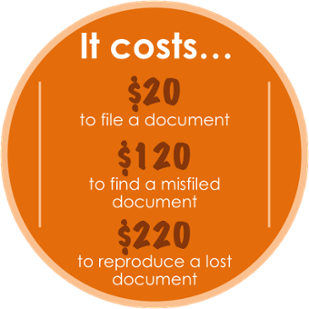
    1. Organizations spend $20 in labor to file a document, $120 in labor to find a misfiled document, and $220 in labor to reproduce a lost document.
    2. 7.5% of all documents get lost; 3% of the remainder get misfiled.
    3. Professionals spend 5 to 15% of their time reading information, and up to 50% of their time looking for it.

    A document management solution, specific for your enterprise, can be a powerful, time-saving tool. Depending on the solution implemented, a DMS can retrieve files by a word or phrase in a document – full text search, or DMS can apply index categories to a document or folder. Easier integration with business applications facilitates access to critical information. DMS also gives the opportunity to access documents remotely. As long as there is internet connection, documents can be accessed from virtually anywhere.

    5. Better Collaboration

    With DMS, information sharing and collaboration can be a lot easier. Documents captured from different sources can be accessed from multiple locations. Electronic imaging makes sharing documents over a network via email or the Internet possible. DMS provides greater visibility to business processes and can allow for better workflow monitoring. Authorized access by external users can be allowed and monitored. DMS also offers Version Control which allows for older versions of the same document to be recovered if needed. This feature is important if several parties work on the same document and there are changes made to a document that were not authorized or meant to happen.

    6. Better Backup and Disaster Recovery

    Any document management solution should include a data backup and disaster recovery plan. With digital archiving as a backup, paper documents are protected from fire and flood and other disasters. With a DMS, documents are highly traceable and can be tracked within a range of criteria.

    Also, because imaged documents are centrally stored they cannot be lost or misplaced after viewing. Documents are less likely to be misfiled, and if so they are easier to locate with cross-indexing. Documents can be digitized and archived at their point of entry into the system.

    7. The Intangibles

    Just a few of the intangible benefits of a document management system include:

    1.Flexibility
    2.Competitiveness
    3.Improved client relations
    4.Peace of mind

    Time is valuable, and time saved is a definite benefit of DMS that often translates directly into increased productivity. Faster and more efficient document retrieval can boost staff morale and increase client satisfaction. Also, document management solutions are scalable to meet the changing needs of any enterprise.

    Proper document management systems can bring many benefits to you and your office. Take initiative and schedule a demo today to see how a tailored document management solution can help you by improving business processes and increasing efficiency.

    The original article can be found here.

    If you are considering implementing a document management system for your business, but you are still sitting on the fence when it comes to selecting the right solution, we encourage you to e-mail us on sales@rincon.co.in and we will be glad to assist you.

  • Proof of Delivery Management

    Proof of delivery (POD) is a method to establish the fact that the recipient received the contents sent by the sender. When the sender sends multiple documents through mail or through a courier service, there is a possibility of some not reaching the intended recipient.

    Proof of delivery becomes very important when legal and financial documents are to be exchanged between two parties. Commercial fleet operators also need to be able to confirm proof of delivery of goods to their customers.

    It is very common for vendors to send invoices with the supporting documents to customers. Most customers now deliver their own goods and have a customer sign the POD. A few days later, when the accounts department is chasing the customer for payment, the customer says they never received one of the items or then never received the invoice.

    With a document management system in place, rather than going into another office to find the paper-work stored in an ever-growing pile of files and folders, the accounts personnel can key in the order number, click search and retrieve the signed POD in a few seconds. They can then email it onto the customer. With the query settled, payment can be collected. Thus it leads to a better cash flow too.

    If you are considering the implementation of a document management system for your business, but you are still on the fence when it comes to selecting the right solution, please e-mail us on sales@rincon.co.in and we will be glad to assist you.

  • ISO Certification – Can a Document Management System help?

    iso9001

    ISO 9001 certification is a must-have for most manufacturing and service companies.  The certification is increasingly required in subcontracts, especially by European multinationals.
    It helps in:
    • Increased marketability
    • Reduction of operational expenses
    • Better management control
    • Increased customer satisfaction
    • Improved internal communication
    • Improved customer service
    • Reduction of product-liability risks
    • Increased attractiveness to investors
    To achieve ISO 9001 certification, a manufacturer must collect, update and share its large library of ISO documents with single point access to the latest documentation.  This is a humongous task using paper-based documents and processes. Digitising the document processes would help simplify and streamline the certification process.
    Some of the processes that must be standardized and documented in ISO 9001 include:
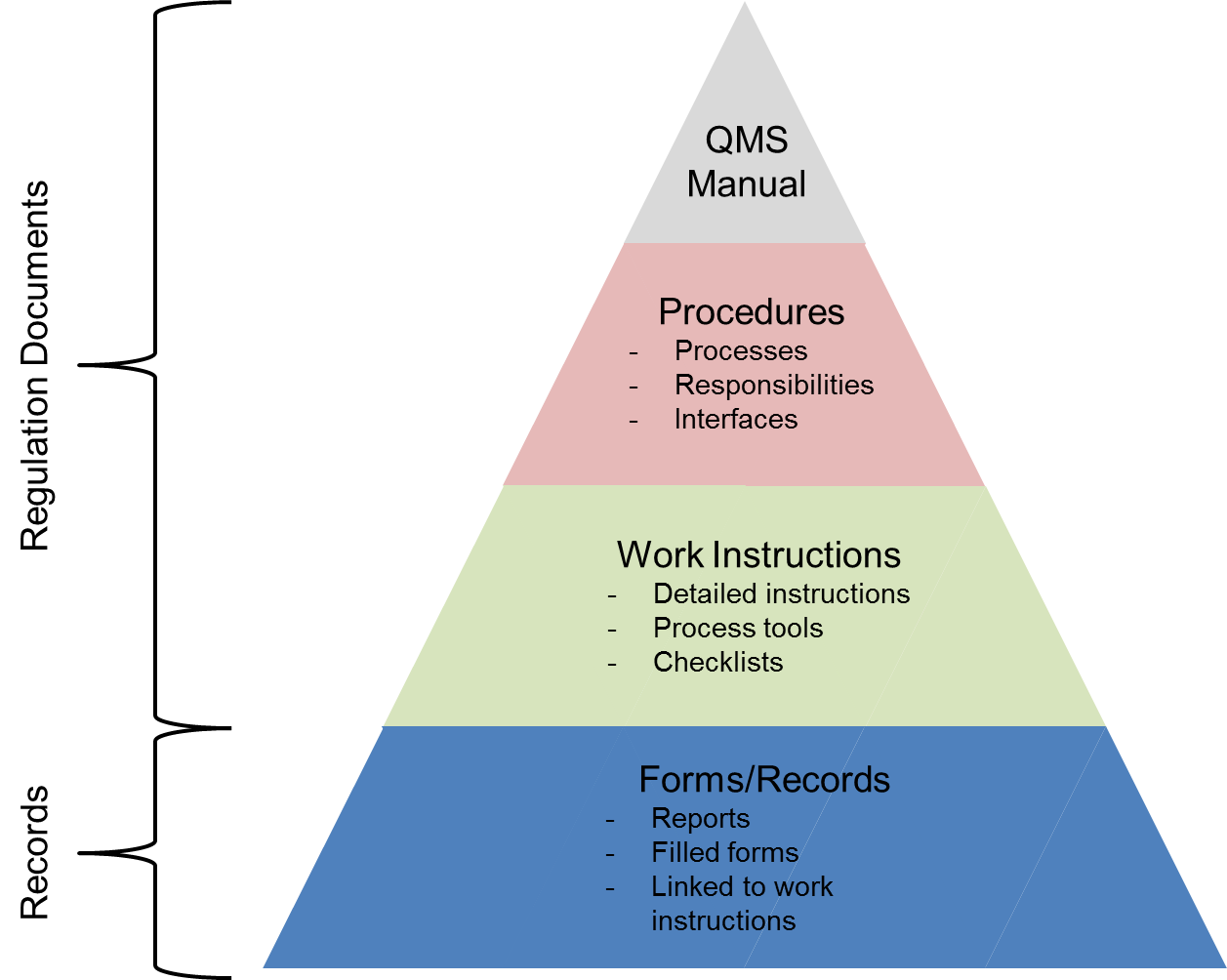
    • Quality Manual – The quality manual defines how each requirement of the rather generic ISO 9001:2008 standard is applied at the company.
    • Quality Procedures – The quality procedures are the essence of the ISO 9001 documentation. The ISO 9001 quality procedures explicitly describe how certain key processes within the company must be performed and who is responsible for them.
    • Quality Policy – The quality policy is the company’s policy defining its stance towards quality and customer satisfaction.
    • Quality Objectives – The quality objectives define measurable goals relative to the company’s quality management system.
    • Process Flowchart – The process flowchart is a description of how the various processes of the ISO 9001 QMS interact with each other.
    • Work Instructions – Work instructions are the most detailed and most company-specific of all ISO 9001 documents. Work instructions describe in detail how particular tasks must be performed. Work instructions are typically written by the people who perform the actual work.
    • Records – Records are different from the above documents, all of which provide directions on how to conduct business. Records, on the other hand, are evidence of things done. ISO 9001:2008 contains numerous explicit requirements on records plus requirements for many more undefined records.
    Most organizations are unaware that even if they previously went through the ISO 9001 certification process, things are changing. A new ISO 9001 standard has been published in September 2015. This means that the ISO 9001:2008 standard will become obsolete on September 14, 2018, and that all ISO 9001:2008 certifications issued in late 2015 and beyond bear an expiry date of September 14, 2018.
    There has never been a better opportunity than now to examine the underlying document management practices associated with ISO 9001 certification. Certifying against the new standard provides an opportunity to view ISO 9001 not only as a paper documentation exercise, but as an opportunity for digitizing document processes – and in the process transforming the business. Leading organizations are increasingly realising that if approached strategically through a document management system, compliance-mandated digital documents can provide a foundation for more effective processes throughout the business and provide insights that are critical to digital transformation.
    If you are considering the implementation of a document management system for your business, but you are still on the fence when it comes to selecting the right solution, please e-mail us on sales@rincon.co.in and we will be glad to assist you.
  • Why do Housing Finance Companies use Document Management Systems?

    mortgagedocuments

    A Housing Finance Company (HFC) processes loans at multiple locations, and retains all related documents at the local / zonal office. Each files received consists of multiple documents and should be filed and processed swiftly considering the competitive environment.
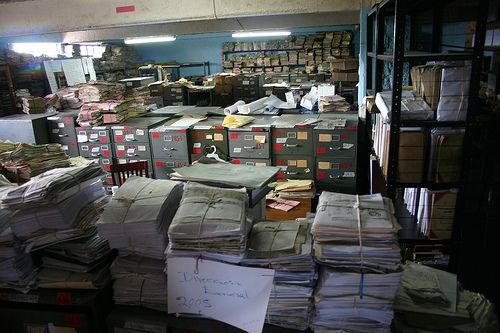
    In the manual process, documents need to be stored physically in the office resulting in wastage of expensive real estate. Additional paperwork needs to be stored in the right place with the other documents so as to make it easily accessible. This results in a lot of time and money spent on handling paper. Finding the correct document is akin to finding a needle in a haystack especially at the time of audits or at the time of a default.
    With a document management system in place,
    • All documents are scanned and archived on a central server thereby making it available to users anywhere (provided they have the requisite rights and permissions).
    • Expensive real estate can be put to better use and documents can be stored off site.
    • The concerned people have access to the records from anywhere they work using the web or mobile interface.
    • Improve workflow, response times and efficiency
    • Reduce costs
    If you are considering the implementation of a document management system for your business, but you are still on the fence when it comes to selecting the right solution, please e-mail us on sales@rincon.co.in and we will be glad to assist you.
  • Document Management system for Property Management organisations

    paperpiles

    A Property Management organisation is one that looks after the management of personal property, equipment, tooling and physical capital assets that are acquired and used to build, repair and maintain end item deliverables. Property management involves the processes, systems and manpower required to manage the life cycle of all acquired property as defined above including acquisition, control, accountability, responsibility, maintenance, utilization and disposition.

    These organisations have to manage leases, contracts, notices, and other property records in a property document management system that keeps important property documents secure and makes them easily retrievable.

    With a document management system in place, property managers, property owners, and property management staff can use it to improve efficiency and make informed decisions regarding the leasing and ownership of property.

    A document management system keeps all records, including important plans and facilities documents, ready for access. Authorised persons can access files outside the office using Web and Mobile access. Users are able to search and retrieve documents on the fly thereby enabling them to make faster and more accurate decisions.

    If you are considering the implementation of a document management system for your business, but you are still on the fence when it comes to selecting the right solution, please e-mail us on sales@rincon.co.in and we will be glad to assist you.

  • Document Management System for Accounts Payable

    Accounts Payable (AP) is a basic function of every organisation. Whatever be your business, you will have invoices to pay, processes to adhere to and accountability to document. Missed early payment discounts, late fees, lost invoices, dozens of calls, emails, faxes, and other inefficiencies can substantially drive up your operating costs.

    Beyond invoices and payments, there are compliance issues surrounding accounting. Auditors require an ability to keep track of and report all aspects of your accounting system and processes including Accounts Payable. Failed audits resulting from lost documents or poor documentation can result in large fines, or a range of other penalties.

    With a Document Management System (DMS) in place, you can ensure processes are being adhered to and are fully auditable. It allows you to:

    • Secure and keep track of all incoming invoices and related documents (PO’s, notes, GRNs, etc.)
    • Ensure early payment discounts and eliminate late payment fees
    • Reduce data entry errors
    • Compare approved purchase order amounts to invoices and eliminate overpayment
    • Ensure all your accounting procedures and approvals are adhered to using automated routing for review, approvals, and processing

    If you are considering the implementation of a document management system for your business, but you are still on the fence when it comes to selecting the right solution, please e-mail us on sales@rincon.co.in and we will be glad to assist you.

  • Don’t get lost in the maze of accounting documents. Use a Document Management System

    Accounting application is a great software solution for keeping the essential information, but there are physical documents of the company, customers and vendor records you could potentially need at any given time. These could include but not limited to purchase orders, invoices, challans, payment details etc. The finance and accounts department is swamped with papers and finding the right paper, when needed, is like a needle in a haystack

    Document management solutions pick up where your accounting applications leave off, giving the team an advantage when it comes to managing their core activities. It helps you locate documents in a jiffy and is accessible and affordable. It helps improve the department efficiency by reducing the time spent managing paperwork and approvals.

    If you are considering implementation of a document management system for your business, but you are still on the fence when it comes to selecting the right solution, please e-mail us on sales@rincon.co.in and we will be glad to assist you.

  • A Document Management System picks up from where HRMS hands off.

    An HRMS is a great software solution for keeping the essential information of the employees, but in physical form. The HR department has to maintain physical files of employee records that could be potentially needed at any given time. However, locating documents is like finding a needle in a haystack.

    After many years in business, an organisation’s personnel files grow out of control. But that all can change after the adoption of a Document Management System (DMS), which offers an accessible and affordable solution. HR department that utilises automated, electronic document processes can dramatically improve the ability to cultivate leading talent by reducing time spent managing paperwork and approvals.

    If you are considering implementing a document management system for your business, but you are still sitting on the fence when it comes to selecting the right solution, we encourage you to e-mail us on sales@rincon.co.in and we will be glad to assist you.
  • FileDirector announces release of Version 3

    Customers do not want new products, they want solutions that offer new and superior benefits. With technology advancing at an incredible pace, the gap between what is currently in the market and the possibility for new or significantly improved products needs to be reduced. With the appropriate combination of technology, innovation and experience, Spielberg Software of Germany is pleased to announce the third generation of FileDirector document management solution. This new release gives a dramatic boost to server performance and has a host of new features and enhancements.

    Contributed by Ashish Baby