Tag: Healthcare

  • Wireless Nurse Call Systems in Hospitals

    In hospitals, care homes and other similar organisations, It is frequent for patients to constantly ask for help.

    Time is the essence as it can be a matter of life and death. If the patient can’t get timely assistance, it not only delays treatments but also greatly affects the whole image of the institution. It is vital for the management of such institutions to ensure that convenient and rapid assistance can be provided when needed. A wireless calling system is a necessary solution for such organisations enabling provision of timely professional service and emergency help if required.

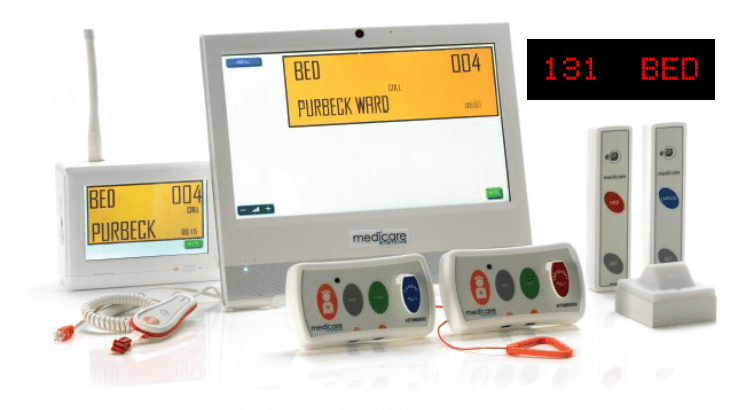
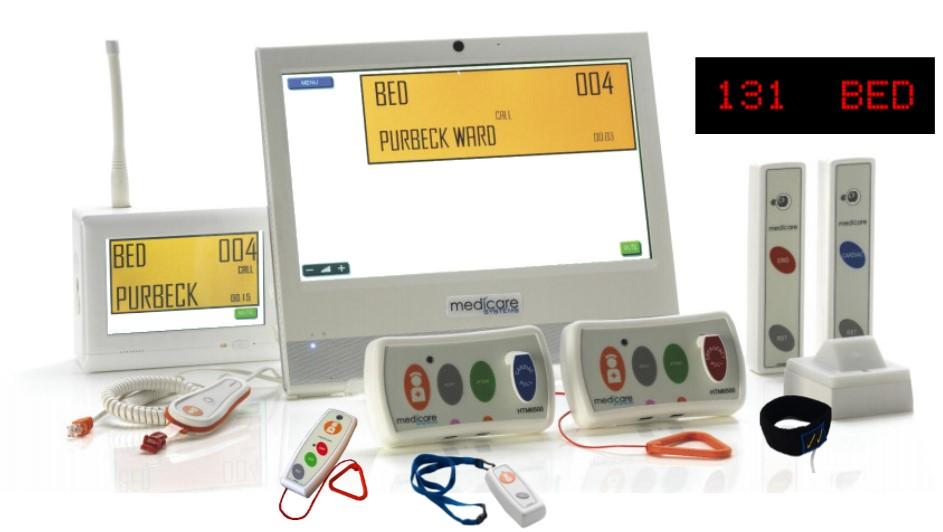
    Medicare systems are an innovative, cost-effective way for patients to call for assistance at any time just by pressing a button. It is easy to use and allows reaching out to the caregiver no matter where they are.

    The system is designed to provide patients with better quality service and helps you in monitoring your staff’s performance. The system records all the information from the patients and the time taken to respond.

    Medicare is UK based and the systems are HTM compliant. Health Technical Memoranda (HTMs) give comprehensive advice and guidance on the design, installation and operation of specialised building and engineering technology used in the delivery of healthcare. Some of the notable features of Medicare systems are:

    • For high dependency unit, (Code Blue) they have a specific single blue button unit
    • Panels are colour-coded to meet HTM guidelines
    • Calls tones are as per their HTM specifications
    • Lights are colour coded in line with HTM guidance.

    For more details contact us on sales@rincon.co.in

  • Why Fax is Still Important?

    Fax is legally binding

    • UETA of 1999, fax contracts are legally binding
    • Regulatory compliance – Personal Data (Privacy) Ordiance (Cap. 486), HIPAA, Sarbanes-Oxley, Graham-Leach-Bliley Act, Basel II
    • For highly regulated industry, e.g. Banking, Finance & Insurance, Legal Firm, Health Care, Hospital
    • EMail is not legal binding

    Email is not secure

    • Email is transmitted through the Internet, captured and scanned by various third parties e.g. Hilary email scandal
    • Avoid hackers which lead to information leakage
    • Avoid Locky Ransowmare Virus

    Email cannot protect privacy (PIA)

    • Sending privacy documents through email means information exposed to the public

    Fax is a tamper-proof transmission

    • Fax is a secure “point-to-point” communication but email is not
    • Proof of delivery with exact time stamp
    • During transmission, cannot copy, tape and hack
    • Avoid email blocking, delay or attachments missing

    A universally accessible and accepted format

    Why use Fax Server to Replace Fax Machine or MFP Fax?

    Consolidation & Audit Trail

    • Consolidate all fax transmission
    • Centralize all fax records and provide audit trail
    • Avoid users sending unauthorized documents

    Save Cost and Achieve Green Office (Environmental Protection)

    • Consolidate all fax machines and MFP fax
    • e.g. 20 fax machines or MFP fax line can consolidate to 4 to 8 lines fax server
    • Compliance with ISO14000
    • Reduce fax line, manual work, fax consumption
    • Save electricity, water, trees, papers, etc

    Efficient and easy to use

    • Send fax throug desktop, email, web, ERP
    • Auto-faxing: Can integrate with backend systems to send fax automatically

    E-mail us on sales@rincon.co.in for more information and we will be glad to assist you.

  • Wireless Nurse Call Systems in India

    Nurse call systems have revolutionised the way in which patients communicate with their care givers and hence the health care industry as a whole all over the world. With the advent of wireless nurse call systems in India, this improvement in communication has only risen further. Wires are no longer the limiting factor and the absence has only taken the health care industry into another league.

    We are pleased to introduce Wireless Nurse call systems from Medicare, UK which are HTM compliant and work on radio frequency. Thus you don’t need to worry about any kind of interference with medical equipment.

    From a patient’s perspective, nurse call stations no longer have a fixed location. The button can be fixed onto the bed head panel for easy access or carried around when patients are not confined to the bed. If the patient is confined to bed, we have the pear push button which can be clipped to the patient’s uniform or to the pillow cover. These features allow patients who rely on the help of nurses, when they are in dire need, to be able to effortlessly ask for help.

    The systems are splash proof and so can be fitted in the toilets as well. The Wireless nurse call system can also be attached to a lanyard, allowing patients to be able to go for a walk in the passage or outside, yet be comforted that help is just a press of the button away.

    For nurses / caregivers, the nurse call system allows for immediate response to a query. Nurses no longer have to be stationed at the main station to be able to know when help is required. There can be door lights outside the room to indicate if the patient inside has called. We can have workflows defined so that if the patient is not attended to in say 5 minutes, the call would be escalated to some other nurse station or maybe the Head of Nursing as the requirement may be.

    Where can one use Nurse Call Systems?

    Suggested areas of usage of Nurse call systems include but are not limited to:

    • Hospitals – The obvious usage is to call a nurse or call for assistance when the patient needs it.
    • Day clinics, nursing homes or old age centres need nurse call systems that are on the go. Patients here, are into their recovery process and this means starting to get by on their own, though still with direct access to medical staff. Wireless call buttons allow for these patients to be able to roam about freely and take in their leisurely walks by carrying it around with them. If they would need help getting back to their room, then a simple press on the call button would give them instant help.
    • At Home use is widely becoming an angle for care, whether for a person in recovery or for old age care. The simple system makes the installation of nurse call systems a breeze. This need no longer be a drawn out process of getting the wiring up and then hassling with the interiors.

    In the next few posts, we will talk about the different components of a Wireless Nurse Call system and their functions.

    To learn more, contact us on sales@rincon.co.in

  • Reblog: Top Options to Boost Your Healthcare IT Infrastructure [Infographic]

    Healthcare IT is evolving and is responsible for bigger & bigger portions of today’s healthcare budgets. Discover 3 ways to take your health IT infrastructure to the next level.

    The evolution of EHR/EMR systems

    When the HIPAA act was introduced in 1996, the landscape of EHR/EMR management shifted. Whereas EHR/EMR systems offered healthcare organizations a way to lower costs, increase efficiency, reduce error and improve patient satisfaction, HIPAA forced EHR/EMR system vendors, as well as healthcare providers and their business associates to conform to mandated security regulations. These regulations required new levels of security to protect patient health information, and as a result, EHR system security was upgraded to include the standardization of safeguards like role-based access control, automatic data backups, audit trails, automatic log-offs, and data encryption. To add to this, the HITECH act, introduced in 2009, outlines “meaningful use” of government-approved EHR/EMR systems in the US, and even included financial incentives for physicians and hospitals who follow its guidelines. Needless to say, since HITECH was implemented, there’s been a dramatic increase in the implementation of EHR/EMR solutions in healthcare organizations.

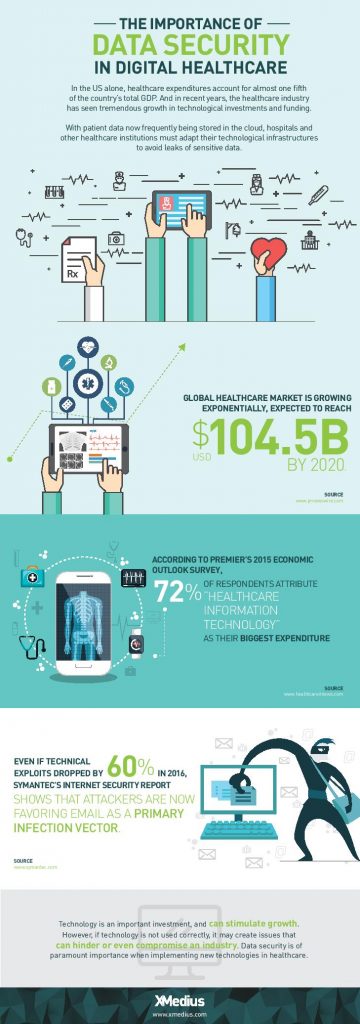
    Health IT expenditures are growing

    While EHR/EMR solutions help a great deal when it comes to accessibility, improved workflow, and interoperability between healthcare institutions when it comes to managing patient records, they only represent a fraction of the IT expenditures in the healthcare industry. 72% of respondents in a 2015 survey of healthcare professionals said that healthcare IT is their organizations biggest expenditure: a number that’s expected to increase globally with upcoming data regulations like GDPR.

    Healthcare IT doesn’t only encompass EHR/EMR systems, but also the networks that support them, as well as the servers, workstations, and mobile devices that healthcare staff access them from.

    When it comes to data management, today’s healthcare IT professionals know that there are a lot of options to invest in when attempting to simplify and centralize their IT infrastructure. There are many health IT hardware and software tools on the market that help healthcare providers reach improved levels of patient care, staff workflow and regulation compliance. Let’s take a look at a few of the best pathways to an improved healthcare IT infrastructure.

    1. Investigate alterative data storage options

    In order to meet growing data storage needs and compliance regulations, many healthcare organizations are building their IT datacenters to be more flexible and scalable. Traditionally, hospital IT admnistrators have preferred on-premise, physical data storage options because of the control it gives them. But with physical on-site storage comes the work of maintenance, deployment of expansion storage, troubleshooting, and more. While not every healthcare organization will benefit from the same type of data storage, many are more likely these days to implement cloud storage into their IT infrastructure.

    Cloud data storage options are flexible, scalable, and come at a lower cost than on-premise deployments. Today’s healthcare providers can choose between public or private hosting facilities, many of which offer appealing back up and disaster recovery plans. Other advantages of storing data on the cloud is freed-up internal storage and resources, improved interoperability, and better integration with applications. If you’re considering migrating some of your healthcare data storage over to the cloud, be sure to discuss the compliance and security measures that potential vendors have in place to ensure you make the best choice.

    2. Ditch traditional fax

    As surprising as it may seem, decades-old fax machines are still widely used in today’s hospitals and physician’s offices. Data security is of utmost importance in today’s healthcare environments, but a large number of providers don’t have the time or resources to explore alternative options.

    Fax machines not only break away from the digital and paperless landscape that compliance regulations have mostly succeeded to build, but the technology is also plain old unreliable:

    • It leaves too much room for human error: sending a fax to a wrong number is a common error as evidenced by a large number or reported data breaches
    • Paper, ink, and maintenance costs add up
    • Regulations such as the HIPAA privacy rule strongly suggest that the minimum amount of information necessary be contained in fax transmissions

    Other options, such as t.38 and cloud fax solutions have emerged as popular alternatives for safely transmitting patient records and other sensitive data. But what is t.38 faxing? It’s a technology that allows you to send faxes over your existing computer network. Cloud faxing essentially allows your fax transmissions to take place over a remote server. These solutions are highly affordable and leverage existing internet connections, they eliminate lost or misused faxes that might be left lying around, and they scale easily. What’s more is that many of today’s fax solution options integrate seamlessly with existing EHR/EMR systems, allowing staff to send and receive mission-critical data right from the platforms they’re most comfortable with.

    3. Secure file exchange: simple solutions for data transmission

    Email is another commonly used tool for transmitting patient data to patients themselves and within the healthcare network. Not all healthcare institutions can afford to implement the security measures needed to make their email servers secure enough to remain compliant and keep incidents of data breach at bay. Another issue within certain healthcare departments is that email doesn’t permit them to attach files over a certain size, forcing them to find other options for sending and receiving bulky patient records and medical images. The radiation Oncology departments at Inova Health System in VA, for example, were burning large files onto CDs and using mail services in order to get patient data to other hospitals and medical facilities in their network before transitioning to XMediusSENDSECURE.

    SendSecure is an example of a collaborative secure file exchange software that takes minimal time and effort to deploy. It uses double encryption, which keeps files encrypted during both the upload and download processes unlike most email servers which only encrypt files while in transit. Users can send an unlimited number of files up to 5TB/ea., thus eliminating any concerns of getting large files where they need to get in a hurry. Similar to today’s FoIP or cloud fax solutions, SendSecure also integrates with day-to-day applications, such as Outlook, and can even be used from any internet browser.

    Looking for ways to boost your health IT infrastructure and ensure your data is safe in transit and at rest? Speak with an expert today about FoIP and secure file exchange solutions that could work for you! Contact us: sales@rincon.co.in

    The original article can be found here.

  • Reblog: We design one thing only. The ultimate fax engine.

    Unlike some of our competitors, XMedius has dedicated itself to developing one of the best secure file exchange solutions for businesses: the XMediusFAX® solution. It’s why XMedius has become one of the leaders in the fax solution market.

    The importance of the partner network

    At XMedius, we fully understand that finding the best partner with which to have a profitable and enduring business relationship can be a challenge. That’s why the success of our partners will always be our primary objective. Our commitment is comprehensive and unswerving. XMedius partners have access to all our products and services, including the RENEWAL of support contracts and the RESALE of the XMediusFAX® CLOUD service.

    Our customer service satisfaction rate exceeds 95%. XMedius customer service experts are located in both Canada and in France so that we can better serve the specific geographic needs of our partners and help them achieve their business objectives. Some competitors outsource customer service; at XMedius, our representatives have expert knowledge of our products and services because they are OUR employees.

    Our partners are the best ambassadors for our brand and solutions, so we strive each and every day to fully attend to their needs and develop a STRONG BUSINESS RELATIONSHIP.

    en

    Innovation is in our DNA

    We’re not content to rely on our past successes. In fact, XMedius is investing more than ever in innovation. A team of approximately 20 employees and more than 10% of our revenues are dedicated every year to improving and broadening the scope of our XMediusFAX® solution. Our specialists follow the market closely to develop a product that precisely corresponds to the needs of our clients. For every product and solution, a detailed road map enables us to optimize the reliability and profitability of secure information exchange.

    Our recent developments and innovations include the launch of two mobile applications (iOS and Android), our new XMediusFAX® Cloud version 1.8, and a range of healthcare connectors (“EHR/EMR” fax connectors for EPIC/Cerner/McKesson). Also, in 2016 we obtained the following certifications:

    • Alcatel-Lucent – OXO R11
    • Cisco UCM 11
    • Cisco Unity ConnX 11
    • Cisco BE7000
    • Cisco UCM 11.5
    • Citrix XenServer 6.5 and 7.0
    • VMWare ESXI 6.0
    • Avaya CM 7.0.1
    • Avaya IPO 10
    • Microsoft Gold app. Developer

    The innovations continue. Here are the new products we will be introducing to the marketplace in the coming months.

    XMediusFAX®

    Hybrid mode:

    • Enables the simultaneous use of the client’s inbound and outbound internal fax lines and the shared inbound and outbound fax lines with the XMediusFAX® Cloud service included in XMediusFAX® On-premises
    • Allows for the optimization of FAX traffic
    • Enables administrators to configure and distribute the lines
    • Makes it possible to use only the shared fax lines with XMediusFAX® Cloud, while internally managing one’s fax server and the third-party applications associated with it.
    • Available by subscription or prepaid
    • Provides detailed billing
    • Enables the porting of internal fax numbers to XMediusFAX® Cloud

    Xerox ConnectKey Connector available with XMediusFAX® On-Premises
    Features include:

    • Fax transmission and reception from ConnectKey compatible Xerox MFDs
    • Cover sheet selection, with the possibility of indicating the subject and comments
    • Transmission to one or multiple recipients
    • Public and private directories, Favourites
    • Fax Options (Delayed transmission, priority, retries, notification options)
    • Languages include English, French, German, Italian, Spanish, Portuguese, Russian
    • Xerox certification
    • 3 methods of authentication; No Login (shared account), Guest Users (XMediusFAX® On-Premises internal users), Using the Login of the Device (SSO)

    Support for several authentication protocols with XMediusFAX® Cloud 1.9

    • Added support for SAML 2.x “Security Assertion Markup Language” to authenticate users with “Active Directory Federation Services” and other similar authentication systems.

    XMediusFAX®

    PCI DSS (Payment Card Industry Data Security Standard) certification

    • Enables integration into a solution that manages banking data

    XMediusFAX® Mobile Connector 2.0 (iOS and Android)

    • Enables fax list management
    • Provides signatures of received faxes and retransmission to the sender
    • Provides fax activity notifications, both transmission and reception

    Ricoh MFD Connector

    • Provides support for the new Smart SDK 1.0 by Ricoh for Android
    • Ricoh certification
    • Carryover of all features available with the Ricoh ESA (SDKJ 12) connector
    • Improves the human-machine interface

    XMediusFAX® Server 9.0
    Features include:

    • Personalized field management: “Create, Edit, Delete”
    • Possibility of classifying received and transmitted faxes
    • Secure Fax over IP (UDPTL over DTLS)
    • Administrator authentication via SSO (Single Sign-On)
    • Printing of broadcast notifications
    • Support for the PostgreSQL database
    • Administrative view of commands
    • And more…

    To learn more contact us sales@rincon.co.in

  • Repost: 5 Typical Examples of Video Conferencing in Different Fields

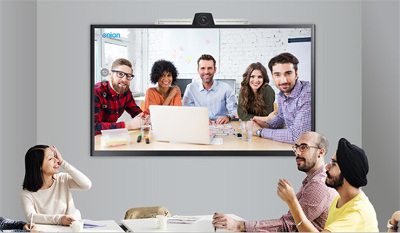
    As an effective collaboration tool, video conferencing is becoming more and more important for businesses of all types and sizes. Generally speaking, video conferencing can be used to host video meetings, online training, webinars and video presentations in various industries such as enterprise, government, education, training, healthcare, law, finance, military and etc. Here we will fully illustrate five typical examples of video conferencing in different fields, especially in business, education, healthcare, training and court.

    1. Example of video conferencing in business

    A large enterprise has established many offices in more than ten different countries all over the globe. It will be difficult for the company’s decision-maker to quickly inform the managers in dispersed offices the important decision simultaneously. By implementing a video conferencing solution, the enterprise can easily host a virtual video meeting. Participants can also express their ideas during the conference. Hence, it makes the face-to-face communication more productive and efficient.

    2. Example of video conferencing in education

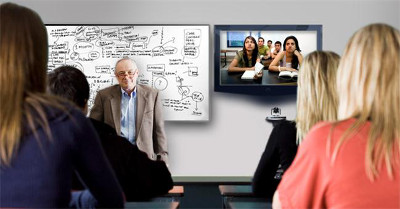
    A famous university has set up some adult education courses and wants to permit remote students to positively take part in the class activities. In order to solve this problem, the university has adopted the advanced video conferencing tool. It thus has improved the access for distance learning and the whole education process. By doing so, students can not only hear the lecture, but also clearly see what’s happening in the classroom. Then they also have chances to engage in the activities.

    3. Example of video conferencing in healthcare

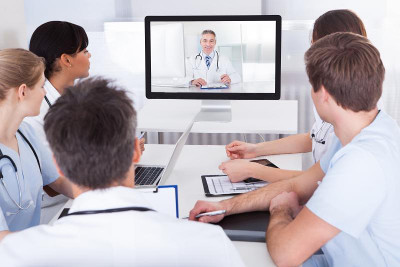
    Hospitals are obviously vital to patients, so it is necessary for hospitals or other healthcare institutions to upgrade its medical equipment with new technology such as video conferencing. A London hospital has utilized video conferencing system which makes it possible for medical specialists to make remote diagnosis of serious illness from patients in different locations. Video conferencing in healthcare thus breaks the space barriers and provides more convenient for patients around the world.

    4. Example of video conferencing in training

    A major training institution plans to conduct a large training course, but some of trainees cannot come for some reason. The training course can’t be terminated or rescheduled for the small part of people. On this occasion, the training institution has employed a video conferencing solution. So those who can’t come to the site can also have an online training. Besides, the recording feature of video conferencing software enables them to replay the whole course later.

    5. Example of video conferencing in court

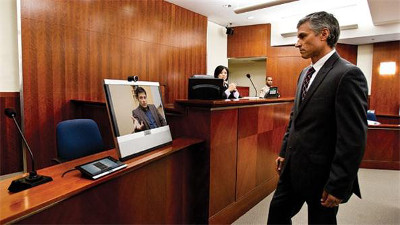
    Apart from the application of video conferencing in business, education, healthcare and training, video conferencing can also be used in court. For instance, in a big criminal case, an important witness won’t want to present personally in the Virginia court for this or that reason some reason. Such as fearing of testifying in the court, concerning about personal security, worrying about privacy exposure, or just because of geographical restrictions. Under such circumstance, the Virginia court has installed video conferencing system, which makes the witness virtually present in the court and guarantees the trial process done as scheduled.

    The above are just five typical video conferencing examples used in business, education, healthcare, training and court, respectively. And of course, there are far more real-life examples. When you select a right video conferencing tool and start to use it for your business, you will definitely find that the benefits and advantages of video conferencing is beyond your imagination.

    The original article can be found here.

    To learn more contact us sales@rincon.co.in

  • Reblog: 6 Ways to Use Telemedicine Video Conferencing

    Telemedicine has been used for more than four decades to improve patient and physician access to healthcare services, according to the American Telemedicine Association. It also has the potential to reduce the cost and improve the quality of healthcare – while meeting a growing consumer demand for telemedical services. With such a strong set of benefits, it’s no surprise telemedicine represents a powerful business opportunity for value-added resellers in the video conferencing space.

    Telemedicine Basics

    Simply put, telemedicine is the exchange of medical information through electronic communications. With telemedicine, doctors, clinics and patients might use two-way video, email, smartphones or wireless communication to share information.

    Telemedicine Video Conferencing

    Video conferencing has fast become one of the most popular tools in telemedicine. The face-to-face capabilities of video conferencing is an ideal fit for the healthcare industry, where patients want convenience and better access but also crave connection and understanding. A growing number of physicians and patients are making use of conferencing technology for live interactive video, sharing video clips for later review, forwarding diagnostic images and more.

    When working with healthcare customers, it’s important to help them see the many different possibilities of video conferencing telemedicine. Consider the following ways the technology can be used:

    1. Improving access for remote patients.

    The No. 1 benefit of video conferencing in medicine is arguably improved access. According to the American Telemedicine Association, telemedicine has the ability to increase healthcare service to millions of new patients, from those in remote rural areas to those in crowded urban environments. Video conferencing can even be useful in disaster areas, reaching those affected by earthquakes, tsunamis and more. These patients can quickly and easily connect with doctors from around the world by taking advantage of technology that can be made available at local hospitals, clinics or relief stations.

    2. Connecting physicians from around the world.

    Video conferencing also has the ability to connect physicians with colleagues, health facilities and experts from around the world. This facilitates an unprecedented level of collaboration and knowledge-sharing that can only benefit the global health community.

    3. Providing medical education.

    Health professionals can use video conferencing to broaden their educational reach as well. Students, fellow physicians and patient advocacy groups can connect via video for seminars, meetings and even ongoing classes to share information that would otherwise be out of reach for some.

    4. Enabling more effective critical care.

    Some people struggle to travel any distance to see their doctor. Patients who are very ill, handicapped, elderly or in the late stages of pregnancy could benefit greatly from video access to health professionals. There is also great potential in pediatrics, as many children’s ailments are common and straightforward enough to be diagnosed remotely – without forcing parents to drag their sick kids to the doctor.

    5. Making mental healthcare more accessible.

    Certain fields of healthcare are even more well-suited to video conferencing than others. With a focus on doctor-patient interaction, mental health services are ideal for telemedicine through video conferencing. Doctors can connect with patients using video, which helps to broaden their reach and save patients time and money.

    6. Specialist referral services.

    Video conferencing can also expedite the specialist referral process. Using video, a primary care or allied health professional can consult with a patient or specialist, which helps them to arrive at a diagnosis and recommend a referral more quickly and recommend a referral more quickly.

    What are some of the other potential areas for video conferencing in the telemedicine field? What has been your experience with video conferencing in hospitals and other healthcare facilities?

    The original article can be found here.

    To learn more contact us sales@rincon.co.in

  • Reblog: Modern nurse call systems are capable of providing much more than nurse call

    On the surface, a nurse call system seems like a straight-forward, almost universally understood concept. Indeed, when they hear the phrase “nurse call,” most people who have worked in healthcare will visualize the same things: dome lights, tones emanating through corridors, and patients using their pillow speakers to change television channels from their beds. They also will picture the chaos of a nurse station while someone speaks to a patient on a nurse call telephone handset.

    While these images all are aspects of nurse call, the modern needs, capabilities and uses of such systems today are often less understood.

    For many years, the technical capabilities of a nurse call system didn’t stray very far beyond what the relevant codes and best practices required. As a result, nurse call systems logically became associated with the hardware and software used to meet those requirements. Today, however, such systems go so far beyond the codes – and can play a role so important to the delivery of care – that the phrase “nurse call” hampers big-picture thinking about the advanced capabilities. Perhaps “caregiver communication and workflow system” more accurately describes where the technology is today.

    The traditional role of nurse call remains relevant, of course, and the basic devices remain fundamental to the healthcare environment. Codes and best practices still require the use of specific devices in specific rooms in specific occupancies. Evolutionary product improvements occur, but the underlying role of a nurse call system remains fundamentally unchanged: for a patient to alert and engage in communication with their caregiver. This aspect of the system is addressed by UL 1069 “Hospital Signaling and Nurse Call Equipment.” (UL 2560 covers similar equipment in senior living facilities.) UL 1069 covers the placement, notification and resetting of staff-initiated and patient-initiated signals intended to alert others to a need, and requires:

    • Audible and visual annunciation of calls at nurse stations
    • Call annunciation at the room’s dome light
    • Visual “call placed” indicator on the patient station
    • Dome light zone visual annunciation
    • Call reset / cancellation

    Facility Guidelines Institute (FGI) Guidelines for Design and Construction of Hospitals and Outpatient Facilities also addresses nurse call and includes specific device requirements based on room type. (While this article uses the word “required,” FGI is a best practices guideline or a code requirement depending on a particular state’s adoption or lack thereof.)

    Components of Traditional Nurse Call

    Master stations provide audible and visual annunciation of calls at the nurse station. A variety of equipment accommodates this:

    • A telephone handset device. Various sizes of LCD screens provide information about calls; some include touch screens.
    • A PC-based console with telephony capabilities. This includes OS-embedded appliance configurations and traditional PCs with large monitors to display high volumes of information.

    Patient stations are located at an inpatient bed and initiate communication to caregivers. The patient usually originates the communication by pressing a button on the pillow speaker, which also can provide television control, lighting control and control of window treatments and room temperature. Caregiver-initiated communications at the patient station include code blue and a request for nurse assistance. (FGI determines what types of communication are required for each room type.)

    The patient station also serves as the wiring hub for several other stations near the patient bed including:

    • Bed connector (wired and wireless options) between the patient bed and nurse call to monitor bed rail position and alert the master station to changes
    • Medical equipment connectors to monitor alarm conditions of bed-side medical equipment at the nurse call master station

    Other stations: Per FGI guidelines, other room types not containing an inpatient bed still require nurse call devices. These stations include:

    • Toilet stations. A pull cord attached to the station summons assistance in getting on or off the toilet and can be activated from a lying position on the floor should a patient fall.
    • Shower stations. These serve a similar purpose as the toilet station but are listed for the wet environment of the shower.
    • Caregiver-initiated stations. These are required by FGI in a range of room types and are used to initiate a request for assistance (i.e., nurse assist call) or to summon a response team (i.e., code blue call).

    Dome lights are placed outside any room that contains an initiating station. The dome light quickly alerts staff to the specific location of the call to expedite the response. Dome lights use multi-colored LEDs and can communicate a variety of information in different ways, including:

    • A unique color to distinguish the nature of the need
    • Various flashing patterns to provide additional information
    • Used in conjunction with staff-locator technology to indicate the type of caregiver in the room

    Dome lights are intended to be mounted so they are visible from the nurse station. When a room is not visible from the nurse station, zone dome lights are used to lead the caregiver in the direction of the call until the room’s light is visible.

    Duty / staff stations allow caregivers therein to be aware of a master station call when they are not at the master station. These are typically rooms where caregivers perform various duties and include nourishment stations, linen rooms, break rooms and similar spaces.

    Duty and staff stations serve similar purposes but there are differences. A duty station provides audible (but not voice) and visual indication that there has been a call initiated on the system. Typically there are three levels of call severity: normal, emergency and staff emergency. A staff station includes the functionality of the duty station and adds two-way voice communication.

    Some manufacturers have stopped producing separate duty and staff stations. Instead they produce a station with two-way voice functionality (traditionally known as a staff station) but market it as a duty/staff station to imply it meets both application needs. This is accurate, but it adds confusion to the difference between a staff and duty station.

    Infrastructure: Traditional nurse call historically has been viewed more like other specialty systems such as fire alarm, paging or security (prior to IP cameras) with its own specialty wiring requirements unrelated to the category cabling world, rather than as a network-based system.

    As part of the evolutionary improvements made in nurse call, even basic nurse call systems with feature sets no deeper than UL 1069 and FGI requirements now have system architectures that have more in common with category cabling than in the past.

    The typical nurse call system today consists of a controller or control panel that is directly on a TCP/IP network, connected using category cabling. The controllers are dispersed through the hospital and their quantity and location are determined based mostly on system capacity considerations. It is not unusual, given that these controller panels are native TCP/IP devices, for them to reside in the telecommunication rooms if the hospital adopts a convergence philosophy.

    A nurse call infrastructure usually uses category cabling downstream of the controller. In most cases the nurse call system dome light is the “wiring hub” for the collection of nurse call stations that are in the room to which the dome light belongs. After bringing category cabling to the first dome light, many brands continue to daisy chain additional dome lights on the same category cabling run. In most cases, it is not a star topology. Despite category cabling being used, this is usually not TCP/IP communications. Rather, it is simply the use of category cabling as the transport mechanism. Most dome lights have an input and output for the category cabling. It is more like a communication trunk line or bus than a conventional structured cabling architecture. The dome lights continue to be daisy chained until the manufacturer’s maximum number of devices or maximum bus length has been achieved. Some manufacturers have their own unique differentiators for the cabling infrastructure, so it is important to understand the intricacies of the product.

    Some manufacturers’ devices do have Ethernet communication over the category cabling. This typically occurs with master stations that use VoIP technology. It is very important to understand how the manufacturer uses Ethernet technology in their solution. Of primary concern is whether the particular Ethernet device is inside or outside of the UL 1069-rated umbrella; this has implications on the acceptability of various termination options of the category cabling in the telecommunications closet.

    The lesson here is that it is important to understand the details of a particular manufacturer’s system topology. Despite category cabling being used in many nurse call system applications, the likelihood is that most of it is not Ethernet communications. How the cabling is ultimately routed, terminated and bundled are project-level design decisions.

    Beyond UL 1069 and FGI

    Recent significant advancements have been made in nurse call, most of which go beyond UL 1069 and FGI requirements. This is where the revolutionary change is occurring, and why “nurse call” may not be a suitable name going forward.

    Driving much of this change is the Affordable Care Act, a game changer for providers in many ways, with nurse call playing a significant role as the healthcare system shifts from a “fee for service” to a “fee for outcomes” structure. Nurse call helps healthcare providers meet the challenges of this new reimbursement model in two primary ways: HCAHPS and operational efficiency.

    HCAHPS and patient satisfaction: In simple terms, HCAHPS – Hospital Consumer Assessment of Healthcare Providers and Systems – is a patient satisfaction survey. A portion of healthcare reimbursements are tied to HCAHPS scores. This means that healthcare, like other industries, is now being rated in terms of “customer service.” Healthcare customers – i.e., patients – may rate their service by answering such questions as:

    • How well did the hospital take care of my needs?
    • How fast did caregivers respond to me?
    • Did they help me when I needed help?
    • Did they bring me a drink when I wanted one?

    Countless examples could be provided. The bottom line is that nurse call systems serve as the primary communication tool between caregiver and patient – and can have a positive or negative influence on a patient’s level of satisfaction. Therefore, the choice of nurse call system, how it is used, and the system architecture serve a significant role in HCAHPS scores.

    A great deal of effort should be spent looking at how to use nurse call technology to decrease the time it takes for a patient to talk to a caregiver and for that patient to see the caregiver in their room. Specific nurse call systems today are engineered to be best suited for specific caregiver models and are no longer a commodity in which every vendor manufacturers the same box on the wall. Some of the most common caregiver models are:

    • Decentralized nursing communication: This is the conventional approach consisting of a unit-based master station at a conventional unit-based nurse station. Patient calls are routed to the unit-based master station and then triaged out to the assigned caregiver.
    • Centralized nursing communication: In ICT terms, think of this as a central phone system operator. One (or more) staff members are dedicated to answering patient calls in a centralized location with the calls coming in from multiple units, multiple floors, an entire building and even an entire campus. Patient calls are triaged out to the assigned caregiver’s mobile telephony devices from this centralized operator. Some convincing evidence from healthcare systems using this approach show meaningful increases in responsiveness to patients through a decrease in most types of response times.
    • Direct-to-caregiver: In this model, the master station takes a backseat and becomes the “fallback plan.” Patient calls are routed directly to the mobile telephony device of the assigned caregiver. The master station (still required by UL 1069 and FGI) is used should the caregiver not respond to the call within the required time. The challenge with this model is that responsiveness to one patient can become an interruption to another patient. In addition, some calls require an RN (i.e., pain medications) and some do not (i.e., “I need a drink.”). Ultimately, however, one caregiver must be chosen to receive the initial call – assuring that in a significant percentage of the cases, the initial caregiver answering the call will be the wrong caregiver for the need.

    Operational efficiency: Nurse call plays a significant role in automating, monitoring, reporting and simplifying processes in the hospital. Indeed, most nurse call manufacturers now talk about “workflow” in their marketing materials and sales presentations.

    Many current nurse call products that deal with workflow processing are hardware-focused solutions requiring a caregiver to go to a fixed location to initiate a workflow process. Some manufacturers take a different approach based on the highly mobile environment of healthcare. They believe workflow processing should be done while mobile, so they focus more on a software approach using the caregiver’s mobile devices in lieu of a fixed hardware location.

    Whether hardware- or software-driven, today’s nurse call can serve as the system that handles clinical workflows in a variety of ways:

    • Automating notification to housekeeping (when a patient room needs to be cleaned) and to the admission, discharge and transfer (ADT) system (when a room is ready for admission) to improve room churn
    • Automating notification when a patient is ready to be seen by a particular specialist, when a particular lab result is available, or when a patient is in need of transport staff, etc.
    • Automating the check-in process for rounding, requesting chaplain services, requesting a family member consultation, etc.
    • Powering the intelligence behind “bed boards,” the large monitors displaying dashboard information about the status of the room and the staff and patients within it

    Making the right (nurse) call

    The recent advances in modern nurse call systems mean that there are proper applications and misapplications of any specific nurse call solution depending on the unique project requirements.

    A well-informed selection process needs to exist in order to properly recognize and vet these nuances between systems.

    The end goal is for the selected nurse call system’s unique characteristics to meet the needs of a particular healthcare facility’s workflow and care delivery model. This will improve patient satisfaction, HCAHPS scores, operational efficiency, and ultimately the facility’s bottom line.

    The original article can be found here.

    To learn more about Nurse Call Systems, contact us on sales@rincon.co.in
  • Reblog: 5 factors to consider while choosing a 3rd party video conferencing tool for your telemedicine app

    Building a healthcare solution is a complicated process, and a myriad of regulatory requirements often add time and costs to the product.

    For this reason, experienced health-tech developers like Kays Harbor rely on their ability to integrate relevant 3rd party solutions which can expedite the development of your healthcare software without the need to reinvent the wheel, at the same time adhering to the strict regulatory requirements.

    One such area where we suggest our clients to opt for a 3rd party tool is the video conferencing module when it comes to developing a telemedicine solution. With so many third-party video conferencing products available in the market, it could be a challenging task to decide which solution to incorporate in your product.

    While you are doing your research around the available options in the market, do keep the following 5 points in mind that guide you to towards the right 3rd party video conferencing tool for your needs.

    When choosing a video conferencing tool for your telemedicine solution, make sure you look out for these five factors:

    1. Check if it is HIPAA compliant

    In all probabilities, you would have kept HIPAA compliance in mind while you are building the telemedicine solution. You don’t want to undo the hard work your developers have put into your product by integrating a non-compliant 3rd party solution.

    a. Privacy and security compliance

    The third-party product must be compliant with HIPAA’s Privacy and Security Rules, especially in relation to the increased requirements relative to the HITECH Act.

    b. Complete protection of PHI

    While your portion of the telemedicine solution has been built in a way that it doesn’t access the protected health information (PHI) being transmitted, you must ensure that 3rd party VC tool you are integrating also protects the PHI. As you are considered under HIPAA to be a covered entity and you are using another party’s service to assist in transmitting PHI, therefore HIPAA requires a business associate agreement to be in place to protect all parties.

    c. The tool should allow peer-to-peer sessions

    To remain compliant, the video conferencing tool you choose should create a portal from endpoint to endpoint, thus ensuring that PHI is never stored or received in any way by your own telemedicine solution. This essentially means the video conferencing tool acts as a closed portal through which information passes, preventing the interception or leakage of data between points A and B. It should only broker the connection between securely verified participants and allow for the administration and management of the list of such users.

    d. Choose a tool that integrates encryption

    While the Security Rule doesn’t require data encryption in cases where it can be shown to not be reasonable or appropriate, the video conferencing tool you choose should encrypt the data that it generates. If there is a breach for any reason,proper encryption provides a safe harbor and you would not need to provide notification of the breach as otherwise required by HIPAA’s Breach Rule (as defined in the HITECH Act).

    e. The video conferencing solution should allow HIPAA compliant local file storage

    You should choose a tool that allows your users to save the PHI created to your own hardware, which should itself be HIPAA compliant. The tool should not itself store any data within its infrastructure or be allowed to access the said data, to protect yourself and your clients.

    2. Video and Audio performance

    The video conferencing tool you choose to integrate into your telemedicine solution should add versatility and adaptability to the way your users connect to one another.

    a. Crystal clear clarity regardless of connection quality

    The tool you choose should provide high quality audio and visual performance regardless of the user’s connection speed, or disparate connection speeds between users. The tool should offer compatibility with and the ability to thrive on bandwidths of all types.

    b. Efficiency on multiple displays

    Your users may be running telemedicine sessions over different device types and screen sizes. The 3rd party video conferencing solution should be able to render seamlessly irrespective of the screen size and resolution, without any severe effect on the video/audio quality.

    c. A customizable interface helps build trust

    The tool you choose should allow users to customize the video feed with options such as being able to resize video, allow the feed to appear frameless to improve the personal connection between the doctor and patient, allow users to arrange multiple feeds, and other similar display functionality.

    3. Purpose-specific features

    Depending on the purpose and functionality of your telemedicine solution, there can be several custom features you might want to incorporate in your product. In that scenario, your 3rd party video conferencing tool should be flexible enough to allow you to easily build such functionalities on top of it. Consider the following custom features and decide for yourself.

    a. Pause and annotate live video

    You might need a tool that allows the doctor to pause the video, annotate records, or even draw on the monitor to share information with the patient.

    b. Patient queue

    If your telemedicine tool is being used to allow doctors to perform virtual consultations, it might be necessary to choose a video conferencing solution that keeps a queue of patients to manage appointments and contacts at a glance.

    c. Multimedia functionality

    In order to allow users to share documents, records, educational material or other information with other participants, you might need a tool that allows the ability to patch in alternate content feeds.

    d. Multi-User feeds and chat

    There are video conferencing tools that allow your users to add in other users to video conversations in situations where appropriate, such as consults with families or when participants are in multiple locations.

    4. Customization

    To create the most versatile telemedicine solution, your video conferencing component must include a significant degree of customizability and be compatible with the other components of your product.

    a. User interface and portal

    The 3rd party tool should be flexible and customizable enough so that it doesn’t appear to be a separate module from the rest of your telemedicine solution’s interface. It should also include many relevant UI options, such as the ability to access client records, scheduling tools, and workflow and productivity tools, to maximize integration and usability.

    b. Information is easily accessible

    Data created by the video conferencing tool should easily integrate into the existing data captured by the rest of your telemedicine solution and be compatible with software and hardware in use in the medical field. Ensure any data created during a session is converted to text or data files that can be uploaded into users’ existing EMR / EHR systems and that videos can be saved in accessible and HIPAA-compliant formats.

    5. Compatibility with your own systems

    The most important factor in choosing which videoconferencing tool to integrate into your telemedicine solution is determining with which systems the tool should be compatible.

    a. Browser compatibility

    As you have specific browser requirements and functionality built into your tool and your users likely have their own preferences, you want a tool that is compatible with as many browser platforms as possible, including but not limited to Safari, Chrome, and Firefox.

    b. Technology compatibility

    Even more important is knowing the hardware preferences of your intended client base. The tool you choose must include compatibility with your intended target operating systems, be it Windows or Mac. If mobility is a concern, consider compatibility with Android and iOS. Finally, does the tool include compatibility with JavaScript and other software solutions that might be integrated into your telemedicine solution?

    The original article can be found here.

    To learn more contact us sales@rincon.co.in

  • Reblog: Real-Time Location Systems (RTLS) For Hospitals: 5 Things To Consider

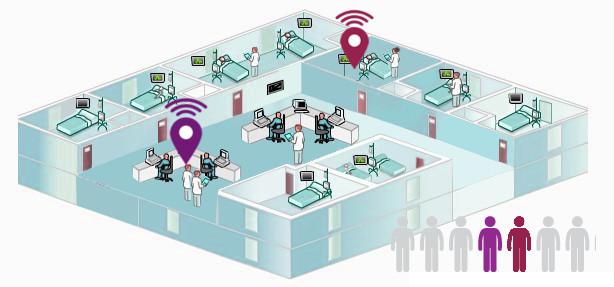
    Real-time location system (RTLS) technology is used in a variety of settings to determine an asset’s relative or exact location at any given moment. In hospitals and other healthcare settings, there are a number of reasons why RTLS technology is valuable:

    • Ensuring high-value equipment stays in the correct location.
    • Locating easily misplaced assets in high-traffic areas (say, an emergency room).
    • Receiving alerts if something leaves a hospital floor.
    • Monitoring people in the hospital, whether they are patients, doctors, or miscellaneous staff.

    RTLS technology has been around in various forms for about 15 years—so it exists in many different forms:

    • Infrared RTLS, like Versus.
    • WiFi RTLS, like Ekahau.
    • Ultra wide-band RTLS, like Zebra.
    • Low-cost RTLS, like AirFinder.

    Each type of RTLS solution has its benefits and drawbacks, and the solution best-suited for your needs depends largely on whether you’re involved with a health care system directly or an OEM who builds RTLS solutions for hospitals. Below, we’ll walk through five things you may want to take into consideration before you select a hospital RTLS.

    5 Things To Consider When Choosing A Hospital RTLS

    1. IS THE SOLUTION WITHIN YOUR BUDGET?

    • Tag costs: A $50 tag may not seem unreasonable—but if you need 5,000 tags, you may run into some budgetary constraints. Additionally, some solutions force you to use a proprietary tag technology instead of allowing you the choice through open source technology. This will definitely up the cost.
    • Power consumption costs: Be sure to consider how much power each tag or access point will draw as well as whether your system (or your customer’s system) can handle it.
    • Labor costs: If someone has to create an elaborate map in order to integrate your RTLS technology, you’re going accrue more labor costs.
    • Integration costs: If you’re integrating an infrared RTLS solution, this will require a great deal of work. You will have to install a tag reader in the ceiling of every room in the network and hardwire those readers back to a central access point. Of course, running cables and power through the ceiling of every room can be very disruptive and difficult to do.

    2. HOW COMPLEX WILL THE IT INTEGRATION BE?

    Working with the IT department to implement a new solution can be a frustrating experience, as it typically involves filling out a lengthy security questionnaire and waiting 3-6 months for approval. Some RTLS solutions—like AirFinder—require no IT integration whatsoever. Be sure to keep this in mind when crafting or purchasing a solution.

    3. HOW MUCH OF THE FACILITY WILL YOU NEED TO OUTFIT?

    If you’re only focused on tracking 10 items in five rooms, integrating an extensive infrared RTLS solution may be wasteful. Carefully consider what you want to track and how much of your hospital or health care system will be affected before choosing your solution.

    4. DO YOU NEED TO KNOW AN EXACT LOCATION OR A PROXIMITY?

    Does it matter whether you can triangulate the exact position of a tracked item, or do you just need to know a general location of the item, at the room level, within your hospital? Keep this in mind when you’re looking at solutions.

    5. WHAT DO YOU WANT TO TRACK?

    If you only need to track expensive capital assets, like an infusion pump or X-ray machine, spending $80 on an RTLS tag isn’t problematic. But if you need to make sure you know where Dr. Bob’s special surgery stool is (so his interns aren’t running around looking for it before the surgery can begin)—or if you want to track 1,000 pillows around the hospital—a $2 tag meets the use case more appropriately.

    The original article can be found here.

    To learn more about RTLSS contact us on sales@rincon.co.in