Blog

  • Reblog: How Can an Audit Trail Help Law Firms Protect Client Interests?

    Sharing legal documentation can be a tricky, but vital, aspect of virtually any legal firm’s business. Legal firms need to deliver documents to clients, the courts, and other concerned parties in a timely manner. Their delivery methods must also take special care to avoid accidentally sharing information with unintended parties as to avoid an accidental breach of attorney-client privilege.

    In the past, when a legal firm needed to ensure proper delivery of documents to a specific party, they would typically hire a process server to physically hand deliver documents. This has typically been considered the best way to securely deliver documents and prove they were received by the intended party. The drawback of this method is that it can be time consuming and very costly, especially if the process server encounters difficulty delivering the documents.

    SHARING INFORMATION VIA EMAIL: DANGEROUS FOR EVERYONE

    For more routine document sharing, such as an attorney sharing court documents with a client or internally with other attorneys, many legal firms find themselves leaning on email and file sharing services. Email, as a rule, should never be used to share sensitive files of any kind. While emailing files is a quick way to share information, someone monitoring traffic in and out of a firm’s IT environment may be able to see the contents.

    The risk of information being accidentally emailed or shared with unintended parties is also a reason to avoid emailing sensitive files. To illustrate the point, according to the Australian government’s Notifiable Data Breaches Quarterly Statistics Report in May 2019, human error was in general, the cause of 31% of breaches in Australia; the second most common reason overall (the first being malicious or criminal attack at 61% of all breaches). The most common error made was sending personal information to the wrong recipient, accounting for 31% of all breaches caused by human error. The second most common error was unauthorized disclosure of information through an unintended release or publication (including online), which could include files inadvertently forwarded to an unintended party.

    Of the malicious and criminal attacks, 5% were caused by social engineering, including email-based executive fraud. All of these factors make sharing files via email an especially risky policy.

    SHARING INFORMATION VIA EMAIL: ESPECIALLY DANGEROUS FOR LAW FIRMS

    If these numbers weren’t daunting enough, the law sector-specific statistics are even worse. While the percentage of breaches caused by human error remains consistent (approximately 34% of legal sector breaches were caused by human error, versus 31% across all industries), 62.5% of those were caused by personal information being emailed to the wrong recipient. Add in the percentage of breaches through unauthorized disclosures, assuming the information was disclosed via email, and that brings the total to 75% of all breaches caused by human error.

    Put another way, during the first quarter of 2019, potentially up to 75% of Australian legal sector breaches caused by human error could have been prevented simply by avoiding the use of email.

    MOST FILE SHARING SERVICES AREN’T MUCH BETTER

    File sharing services may seem like an obvious solution; they are simple to set up and it’s easy to invite relevant parties to collaborate and share documents. The truth is, these types of services frequently lack adequate security (such as two-factor authentication) and retention policies. Additionally, if permissions are not properly set up, it may be possible for collaborators to invite others or share a direct link to the files with unintended parties. These services also often lack detailed auditing functionalities that can decisively prove documents were properly delivered to their intended recipient, nor do they record who actually accessed and downloaded files. What may be the most significant problem is the lack of retention policy controls. File sharing services frequently require files be manually deleted, which can lead to old files remaining in a shared folder well past when is necessary.

    FAX IS BETTER, BUT LIMITED

    Sending documents via fax remains a popular way to securely transfer documents as it is very difficult to intercept faxes in transit. There are a few drawbacks of using traditional fax solutions, however. One is that there can be a risk of unintended parties viewing the files, such as if there is one central, office-wide fax machine. Another is that fax can only support transferring printed documents (no audio or video) and may have constraints on the number of pages that can be faxed based on the memory of the machine receiving the fax (analog fax machines commonly have 64 MB of memory). There often will be a delivery confirmation feature with fax, but in the event the fax is being sent to an office-wide fax machine, there is no real way to tell who has actually looked at the document.

    BUT HOW CAN AN AUDIT TRAIL ACTUALLY HELP?

    A detailed audit trail can make a huge difference in protecting the sanctity of attorney-client privilege, ensuring the proper delivery of legal documents, and holding individuals accountable.

    The original article can be found here.

    E-mail us on sales@rincon.co.in and we will be glad to assist you.

  • Reblog: How should you choose the most suitable online fax service for your company?

    Online fax services offer the possibility to send and receive faxes via an email account, recording them in a digital format. Because of the undeniable advantages of such a telecommunication service compared to traditional fax, more and more companies are turning to this modern solution. But how can you choose the best service and the right supplier?

    Here are some tips for choosing the most suitable online fax service for your company:

    1. Assessing your fax sending and receiving needs

    To select an online fax service, it is essential to assess your needs for sending and receiving faxes. For example, an organization that only sends a small number of faxes per day should consider a pay-as-you-go credit system. In contrast, a company that receives and sends large amounts of documents via every day should instead opt for a fixed-price service, including a high or unlimited number of transmissions. Security issues must also be considered; it will be necessary to know whether need to be protected by effective identification and encryption mechanisms.

    2. Seek advice from other companies in your business sector

    Another good strategy for choosing an online fax service is to search for information from organizations in the same industry sector. Through conversation with organizations that have similar needs, you can discover what functions of Internet fax are practical, essential or superfluous. Sometimes, a business partner will even be able to provide an idea of the cost he is paying for his package, which makes it easier to compare the prices of different suppliers in addition to their service offerings.

    3. Contact a few online fax service providers

    With information and recommendations collected from other companies in the same industry, it is much easier to prepare a list of a few vendors that offer an online fax service with the desired functionality (security, compatibility with mobile devices, etc.). Contacting these companies offers the opportunity to obtain more details about the options and features included in their packages. It is also a good way to test the service quality of sellers, who should take the time to ask you questions to better understand your needs and make you an offer tailored to them.

    4. Evaluate customer service of potential suppliers

    It is always best to ensure the quality of a supplier’s customer service before problems arise. Are agents able to offer 24/24 professional support? An online fax provider whose customer service is reputable should be given extra weight when making your decision.

    The original article can be found here.

    For more information e-mail us on sales@rincon.co.in and we will be glad to assist you.

  • Reblog: Why Do Organizations Still Choose an On-Premises Solution in the Age of the Cloud

    Cloud solutions offer a lot of potential benefits for organizations looking to upgrade their communications infrastructure. They can be scalable, reliable (thanks to geo-redundancy & high availability options), and can allow reductions in staff costs. However, they aren’t for everyone. Some organizations have requirements that Cloud can’t fulfill at this time.

    1. A Hands-On Approach

    Cloud deployments typically get managed outside of the organization. For large enterprises or organizations in regulated industries, handling sensitive data carries with it significant risks. If it is mismanaged, the organization could be fined, or worse, a poor reputation could be the result, causing business to evaporate. Everything is riding on the host of your organization’s communications solution.

    When there is an outage or a system failure, getting the critical services to your organization back up and running is again left up to the host. In contrast, an on-premises solution allows your team of experts to take matters into their own hands and resolve them as quickly as possible.

    2. Following Industry Rules and Regulations

    If an organization is in a highly regulated industry, like finance or healthcare, there are strict compliance standards that need to be followed such as HIPAA and SOX. Not every cloud provider offers the right security measures for every organization. Some organizations need to keep their communications out of the Cloud and in their physical control.

    3. What Level of Support Do You Expect?

    If your organization is used to having the best of the best in-house, migrating to a cloud might be too painful at this time. Internal support who knows your systems integrations inside and out can ensure rapid response times, easily troubleshoot system failures, and ensure protocols are followed. It can be hard for executives to give up being able to walk down the hall and knock on the system administrator’s door.

    4. CAPEX vs. OPEX

    Different organizations have different budgeting habits and limitations. Some might need to plan for a one-time expense instead of a subscription-based service. This can be the case for charities, businesses, and government offices who know they have the budget now, but can’t easily predict fluctuations in donations, allotments, or business in the future.

    The upfront cost can be less with an OPEX model communications solution; however, the overall cost continues for its ongoing services. With a CAPEX model, the ongoing costs are smaller, with much of the expense front-loaded.

    The original article can be found here.

    XMedius Enterprise Communications Solutions

    XMedius has developed a powerful range of enterprise-grade communications applications, such as FoIP, Unified Messaging/Voicemail, Call Center, Secure File Transfer, and more. These solutions are designed to deliver excellent ROI by increasing efficiency while preserving operational security.

    We offer our Unified Communications and secure document exchange products both in the Cloud and On-Premises, allowing organizations to utilize the model that works best for them.

    Both deployment styles of our products have options that include high availability, security to keep your communications safe, and interoperability to leverage your existing infrastructure and meet the changes of tomorrow.

    For more information e-mail us on sales@rincon.co.in and we will be glad to assist you.
  • XM Fax Enabling modern businesses to fax documents online

    For several years, XMedius has been offering its customers the most efficient solutions that are constantly optimized to meet the new realities of business’ data transfer requirements. The XM Fax® solutions suite transforms the manual handling of your organization’s inbound and outbound data transmissions into a managed business workflow. XM Fax software solutions are designed and continuously optimized to enhance productivity, streamline operations, and keep companies compliant with ever-increasing regulatory requirements.

    Whether you choose a cloud fax service, software or the best of both worlds, XMedius solutions will exceed your expectations.

    XM Fax On-Premises

    Redefining fax since 2002, XM Fax On-Premises is the XMedius flagship solution to fax documents online. XM Fax On-Premises is highly scalable to meet the growing document exchange needs of organizations of all sizes. Eliminate fax hardware by sending and receiving sensitive documents from an industry-leading fax solution directly from your workstation, multifunction printer, laptop, or mobile device.

    To offer flexible deployment options, XM Fax On-Premises is available in Service Provider, Enterprise, and Express editions.

    XM Fax Cloud

    In addition to reducing costs by eliminating fax machines, ink, and toner, XM Fax Cloud happens to be hosted by one of the most secure hosting infrastructures in the world. The XMedius cloud fax solution deploys rapidly, so you’ll experience virtually no downtime. Sending and receiving your data transmissions through the cloud means no additional hardware or software investments, and no busy signals.

    XM Fax Cloud also offers unlimited scalability and fax capacity, so as your business grows, your eFax solution will grow right alongside it.

    XM Fax Hybrid

    When it comes to choosing a secure file transfer software, XM Fax Hybrid offers the best of both worlds. It leverages the XM Fax Cloud infrastructure to offer a fast, simple deployment while also giving you full control over data storage, location, and ownership. The robust XM Fax Hybrid solution offers high availability and disaster recovery so you can continue to send business-critical data transmissions in the event of outages.


    For more information e-mail us on sales@rincon.co.in and we will be glad to assist you.
  • Reblog: What is the T.38 Fax Protocol and How is It Used?

    We’ve written extensively about the reasons why fax remains relevant in today’s society from a functional standpoint (widespread systemic adoption within certain industries, privacy regulations, and security), but it can be hard to wrap one’s head around how Fax over IP (FoIP) technology is different from simply uploading and downloading image files from e-mail attachments, file sharing applications, etc.

    The key difference is that fax images are still transmitted as electrical impulses via the phone line rather than files. That makes the core of the technology, even in the age of FoIP, closer to telephony than computer networking.

    Just like Voice over IP (VoIP) technology bypasses large portions of the phone network, FoIP uses IP networks to transmit fax impulses long distances in real time. While full IP transmission is possible, the FoIP data packets are often converted (via a “gateway”) to and/or from traditional phone signals at the beginning or end of their journey to travel some portion via the phones (typically as a local call). Many FoIP solutions use T.38 as their protocol for crossing the IP-based portion of the journey.

    1. How is T.38 FoIP Different than VoIP?


    In terms of their goals and technology, FOIP and VoIP are quite similar, and at least one voice protocol (RTP/G.711) can be used for fax transmission.

    However, some VoIP protocols are balanced for different strengths that can make them less than ideal for FoIP. These protocols are designed to preserve the real-time flow of audio conversation in situations with inconsistent bandwidth, even if they have to drop bits of voice data (typically evidenced by momentary drops in quality like jitter, delay, etc) here and there to do it.

    Given that a fax is being transmitted with the goal of having a complete whole clearly resolved on the other side, this style of omitting compression can cause problems for FoIP.

    T.38 was instead designed with the opposite goal: to preserve the completeness and accuracy of image data, even if it has to use additional bandwidth and time in order to transmit it. In order to do this, there are redundant sections and accuracy checks built into the data streaming in order to make sure everything arrives safely on the other end.

    It’s worth noting that FoIP messages transition to conventional fax protocols (like T.3) if they’re filtered through a gateway and spend time on the conventional phone system. That means that the packet-integrity protections in T.38 only apply while the fax is travelling on the IP network.

    2. Do fax machines use T.38?


    No, most do not. T.38 is generally reserved for fax servers, devices that package faxes in data packets for transmission across IP networks. Traditional fax machines (still in widespread use, despite their drawbacks) and non-FoIP-connected Multifunction Printers (MFPs) rely on traditional phone lines and the fax protocols associated with them (T.3, etc).

    3. How does FoIP save money?


    Traditional faxing has several substantial costs associated with it that FoIP can avoid entirely. Organizations sending & receiving via FoIP can eliminate their fax-dedicated phone lines entirely, dramatically reducing service costs. In addition, because FoIP can be handled by computers rather than fax machines, faxes don’t need to be a physical object. That eliminates the cost of ink, paper, shredding and storage. Finally, fax machines are notoriously unreliable – maintenance and repairs can eat up a lot of IT staff’s time and budget.

    FoIP systems also centralize an organization’s fax processing through a single server that is easier for IT departments to manage, with the various integrated devices and programs sending the faxes (e-mail clients, fax applications, Multifunction Printers, etc) serving merely as points of origin.

    Bring your organization’s document transfer systems into the modern era

    Just because fax is a technology with a history stretching back to the mid-19th century (predating the telephone) doesn’t mean that it has to be clunky today. XMedius offers a cutting-edge FoIP solution that provides all the benefits that have kept fax technology in use (and more!), without the hassles and costs that make traditional fax machines infamous.

    The original article can be found here.

    Reach out to us to learn more about how this technology is saving organizations money, streamlining workflows, and preserving security.

    For more information e-mail us on sales@rincon.co.in and we will be glad to assist you.
  • Patient Tracking Solutions

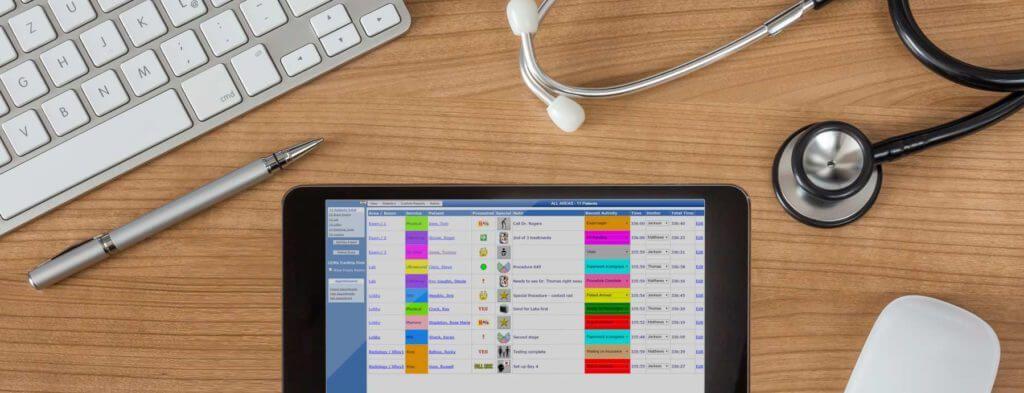
    PatientTrak offers world class patient tracking solutions which can be used in any healthcare setting needing to manage the patient flow process. From single provider practices to large hospital groups, to multi-facility healthcare organizations, our systems are both affordable and scalable.

    Health Clinic, Outpatient, and Hospital Unit Patient Tracking System – Import appointments from your scheduling system and track user defined “activities”, such as check-in time to treatment time, for example. Manage room usage by identifying those rooms which are under/over utilized. Set manual or automatic alerts and generate custom reports for analysis of patient flow. Standard reports include Average Wait & Treatment Times, Peak Times by Area, Time Between Activities, and more.

    Registration, Patient Tracking, and Productivity System – Manage the registration process effectively. Identify the average time it takes to register patients and track which resources are registering patients more efficiently. Eliminate phone calls to other departments and easily manage patient “handoffs” to Outpatient Services. Improve patient satisfaction by reducing wait time, eliminating patient misplacement or oversights, and monitoring lobby and departmental waiting queues. Notifications can be sent based on user defined criteria, such as for those patients who have been waiting for excessive amounts of time. Identify bottlenecks in the registration and patient access services processes. Standard reports include Patient Count, Peak Times, Desk Usage, and more.

    Emergency Department, Walk-In-Clinic, and Urgent Care Center Patient Tracking System – As patients arrive they are entered into the PatientTrak system, immediately recording wait time, chief complaint, and status. User defined “activities” allow your hospital to track times of any desired function or task, assisting in the improvement of patient flow. You may set custom alerts and send email notifications to better identify and inform of long patient wait times and delays. Standard reports include Length of Stay, Patient Count, Peak Times, and more.

  • Reblog: What is the PSTN?

    PSTN stands for the Public Switched Telephone Network – it’s a telecommunications industry term encompassing copper land lines (“POTS”), fiber optics, cellular antennae, satellites and trans-oceanic cables.

    1. What is POTS?

    “POTS” in the telephony world is an acronym for “Plain Old Telephone System”, the modern name for the part of the PSTN made up of old analog copper wire technology. POTS has done the job for decades, but is reaching the end of its usefulness. Modern communications simply require more bandwidth and lower costs than POTS can provide.

    Because of this, analog telephone lines are in the process of being slowly phased out in many developed countries as they transition to more powerful broadband-based communications networks.

    2. What are the advantages of the PSTN?

    When you think about it, the PSTN is one of humanity’s great technological achievements. It gives us the ability to make instantaneous voice connections point-to-point across much of the world, across networks provided by a range of different governments and businesses operating in a variety of different languages.

    A global set of standards mean that any telephonic device can connect with almost any other telephonic device. All you have to do is dial a few numbers, and the network knows exactly where you’re trying to call.

    Because telephone connectivity is considered an essential service in most of the world, governments, businesses, and charitable organizations have gone to considerable trouble to make it as accessible, affordable, and reliable as possible.

    3. What are the disadvantages of the PSTN?

    The primary disadvantage of the PSTN is cost. Maintaining the copper wiring system is time consuming and expensive. The rise of wireless connectivity has led to point-to-point wired connections in general making less sense to install and maintain.

    Business and home telephony is transitioning more and more into VoIP and FoIP technology, as utilizing existing data connections and bandwidth, rather than dedicated phone lines, makes a lot of financial sense.

    The PSTN’s universality is a huge strength, but it also brings with it a notable weakness. Because everything on the network has to work with everything else on the network, across the whole planet, protocols and standards either have to be universally adopted or interoperable to the point where a caller doesn’t have to wait (or lose the call) while their signal crosses from one system to another.

    This can not only lead to increased costs from building in that interoperability, but it also makes change a very time consuming process from a regulatory, roll out, and adoption point of view. The realities of the market can easily interfere with better technology being developed and/or integrated into the system.

    4. What’s the difference between PSTN and VoIP?

    PSTN, Public Switch Telephone Network, POTS, VoIP, Xmedius SolutionsVoIP technology refers to converting vocal communications into data packets and transferring them via internet infrastructure rather than the phone system. VoIP calls can be made between software (i.e. “soft phones”) or physical telephones (“”). If one or more hard phones are involved, it is likely that the phone call at some point has travelled across the PSTN, converted into a normal phone call for at least some distance via network devices known as gateways.

    The use of gateways allows more adaptable and affordable VoIP systems to connect with the more universal and widespread PSTN, giving callers many of the benefits of both. The PSTN portion of the call, with its associated costs, is between the gateway and the recipient’s (or caller’s) phone, which is likely a local call rather than a long distance one. Most of the distance covered is via the internet, where it isn’t a factor in the cost.

    Enhance Your Organization’s Communications with XMedius Solutions

    XMedius offers a range of solutions that can help your business interact with or avoid the PSTN and the Cloud on your own terms. In addition to secure FoIP and file transfer technology, our portfolio also includes CX-E, a top quality Unified Communications platform delivering a suite of applications to companies of all sizes. Reach out to our team to discuss what our technology can do for your organization.

    The original article can be found here.

    For more information e-mail us on sales@rincon.co.in and we will be glad to assist you.

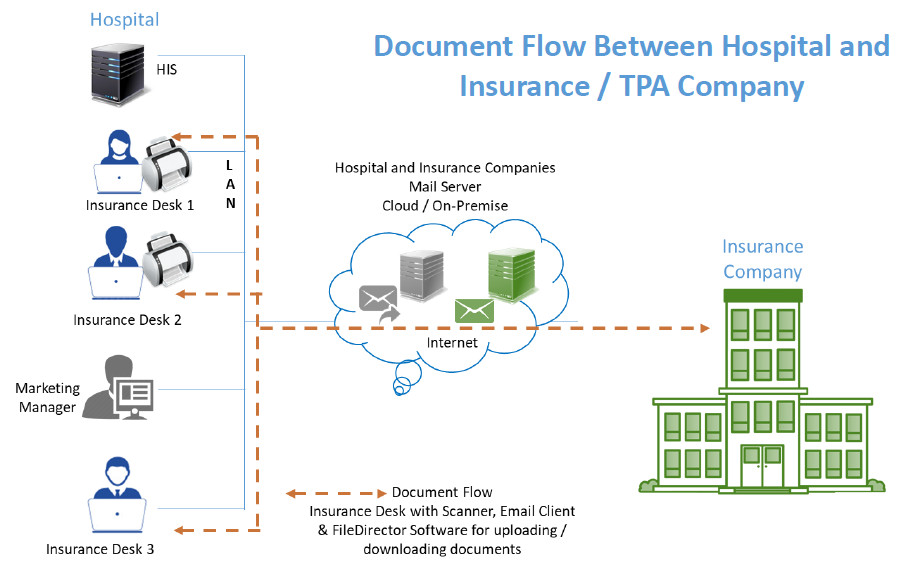
  • FileDirector For Hospital’s Health Insurance Process Automation


    Many hospitals these days offer cashless hospitalisation. This means that a policyholder who is covered under medical insurance will be able to avail of services at these designated hospitals and their bills would be settled by Insurance Company or their TPA (third party administrators). This saves the policyholder/ immediate family’s blocking of money.

    FileDirector software from Spielberg, Germany would be a good fit to streamline the document exchange process which happens between hospitals and Insurance / TPA companies.

    FileDirector will check for prerequisites and inform whether the machine has sufficient rights for installation, operating system compatibility and if the required ports are open.

    The FileDirector server component will be installed on either

    • Windows 7 or above desktop
    • Windows 2008 or above server

    The FileDirector software will run with SQL Express Database which is free of cost. It will install this component in case it is not there on the FileDirector server.

    The hospital insurance desk will have FileDirector scan station license. It is assumed that the Hospital would have reasonably stable internet connectivity to send / receive documents.

    Hospital will get standard cabinet structure for health insurance records. The structure would include mandatory fields such as Name of the patient, Admission Number, Mobile Number, Policy Number etc. as per Insurance company requirements. Broadly speaking these would be common across all Insurance / TPA companies.

    Hospital would get Masters such as Document type which could include but not limited to pre-authorisation application, Query, Response to query, Approval letter, Letter of denial etc. Masters of Insurance Company as well as TPA would be provided for easy indexing.

    Insurance Desk user would be able to scan / drag and drop the document in FileDirector, Index and send the same to Insurance / TPA company. Option will be available to Scan / drag and drop the document in FileDirector, Index and Hold. He or she will be able to add more documents to make this document set complete and then send to Insurance / TPA company via Email.

    Insurance desk user will have an option to print acknowledgement letter for the patient confirming receipt of the number of documents that have been submitted for Insurance processing.


    Reports:
    The system would be able to generate different reports such as:

    • Claims processed today
    • Pending as of today
    • Approved today
    • Rejected today
    • Rejection with reason
    • Partial approved with reason

    View
    View for checking insurance company’s incoming email messages / documents would be provided using IMAP integration. Insurance desk user will index and store these incoming messages in FileDirector for future retrieval.

    Search
    Users would be able to search documents using one or more indexing parameters and see records.

    For more information e-mail us on sales@rincon.co.in and we will be glad to assist you.


  • Wireless Fall Prevention

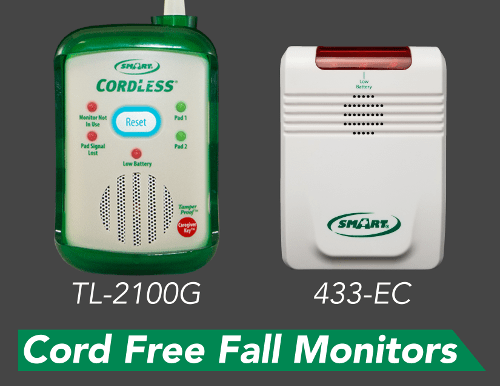
    CordLess Fall Monitors

    CordLess Fall Monitors are designed for use with our CordLess Weight-Sensing Bed / Chair Pads & Floor Mats.  Sensor pads or mats are placed under an at-risk individual and when they rise to get up, a wireless alert is sent to the fall monitor to notify caregivers that assistance is required.  CordLess Fall Monitors allow you to place the alarm outside of the patient’s room and thus eliminate in-room alarm noise.

    [well type=””]

    • TL-2100G

    No noise in room! Place quiet fall monitor where you need it!

    Flexible wireless monitor that receives alert signal from all 433 CordLess Weight Sensing Bed and Chair Pads, Floor Mats, Nurse Call Buttons and Motion Sensors.


    [/well]

    Central Monitoring

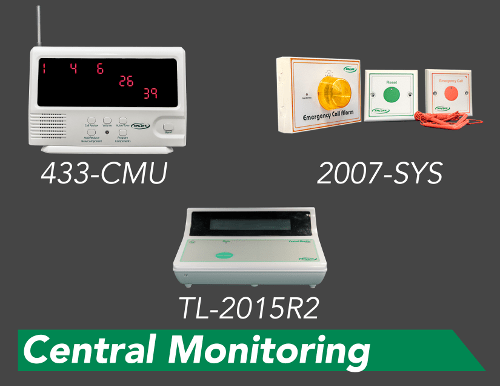
    Central Monitoring Systems can be key in care facilities of all sizes. We offer many fall prevention and anti-wandering solutions to fit your needs. Our Central Monitoring Systems work with several components and can be programmed to monitor multiple residents as well as multiple components at one time. Components that work with our Central Monitoring Systems range from Motion Sensors, Pagers, Call Buttons, Bed and Chair Exit Alarms, Bed Sensor Pads, Chair Sensor Pads and Weight Sensing Floor Mats.


    [well type=””]
    433-CMU
    Resident monitoring from one central location. Works with several wireless components.

    TL-2015R2
    Large facility resident monitoring from one location. Works with several wireless components.

    2007-SYS
    Waterproof! Bathroom emergency call system.

    [/well]

    Portable Paging Systems

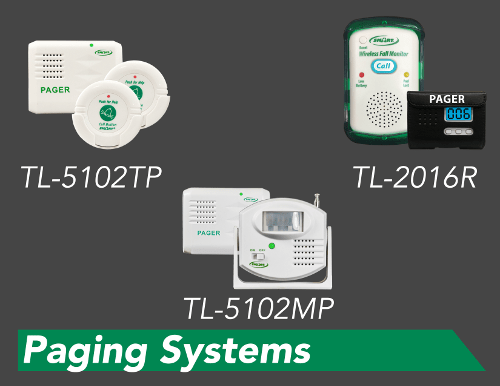
    Caregivers may also be notified on a pager which displays which sensor activated the alert. The Central Monitoring Unit can be placed at the nurses station to alert caregivers when residents are in need of assistance.

    [well type=””]
    TL-5102TP
    Easy to use caregiver paging system.

    TL-5102MP
    Motion sensor exit alarm with wireless signal to pager

    TL-2016R
    Eliminate in-room alarm noise with quiet fall monitor that “talks” to pager.

    [/well]

    To know more contact us on sales@rincon.co.in

  • Reblog: Are IP Fax Solutions More Economical Than Traditional Fax?

    [image src=”https://www.rincon.co.in/site/wp-content/uploads/2019/02/traditionalfax.jpg” shape=”img-rounded”]


    If your organization is still using traditional phone lines, going with a traditional fax machine can be tempting. The machine itself is relatively affordable, and it can use the phone lines you already have. It’s quite possible that your organization already has a traditional fax setup, which can make the costs of a change seem high relative to just staying put with what you know.

    Unfortunately, several factors make traditional fax machines unsustainable today. The day-to-day costs of ink/toner and paper add up fast. Machines break easily, which not only means they’re out of service, but that you’re paying to fix them.

    1. The hidden cost of Traditional Fax is time

    Employees have to print their document, walk to the machine, then wait for it to send its payload so they can retrieve the original (especially important if it contains data covered under GDPR, HIPAA, SOX, FERPA, or similar laws).

    It’s difficult to tell if an entire fax has been received on the other end, so if they’re doing the sending, they may need to call or email the intended recipient to check. If they’re on the receiving end and document is particularly timely, essential, or private, they may have to coordinate with the sender to make sure they’re standing by the machine ready to catch the document when it comes out.

    That’s a lot of wasted time where staff could instead be doing productive work.

    2. Phone lines are dying

    Reliability and consumable costs aside, one key consideration trumps all others: fax machines will be completely unable to operate in a post-phone line world. That time is coming sooner than you may think, Europe has announced an end date for their traditional phone services, Australia is following suit, and several US carriers are planning on ending installation of new lines.

    Once those lines are no longer supported, traditional fax infrastructure becomes useless. This is already the case for many organizations who have moved or are moving their phone services to a VoIP system (such as a SIP Trunk).

    3. Fax over IP (FoIP) has none of these problems

    Cheaper connections & SIP-friendly

    FoIP can completely sidestep a connection to the conventional phone network, using the internet to get the message out instead. IP connections are dramatically cheaper than traditional phone lines, and have the added benefit of being technology that continues to be useful after the traditional network eventually goes away.

    Save time by faxing from anywhere

    Using a FoIP solution, faxes can be sent from an employee’s desk (via a laptop or desktop) rather than a machine down the hall. Solutions with mobile & web clients can even send faxes from mobile devices like tablets and cell phones, allowing faxes to be sent from anywhere there’s a signal.


    The added benefit of routing faxes through these devices is the security your IT department can put around them. If someone has to log into your machine to see a fax, it’s a lot more secure than a piece of paper sitting in a public tray.


    Skip the ink, toner, and paper

    While you can print out a FoIP document, you don’t have to, when sending or receiving. That means fewer consumable costs, and less paper copies of sensitive documents to file or shred.

    Manage IT how you wish, and subscribe rather than buy

    A good FoIP solution should be available both on-premises and in the Cloud. If maintaining a fax server on site isn’t something your organization would like to take on, Cloud FoIP solutions allow you to handle everything via a SaaS subscription. Prepaid credit systems are also available that allow you to only pay for what you use.


    Decrease Costs and Increase Efficiency with XM Fax

    XM Fax is a cutting-edge FoIP solution that can deliver excellent ROI and dramatically reduce the wasted time and frustration associated with traditional fax. Bring all the benefits listed above to bear on your communications needs to reap the rewards. Reach out to us to learn more about what it can do for your organization’s workflows and bottom line.

    The original article can be found here.

    For more information e-mail us on sales@rincon.co.in and we will be glad to assist you.