Blog

  • Rincon Participating In Hospital Planning & Infrastructure Exhibition

    Save The Date: 11th to 13th October 2018

    Bombay Exhibition Center, Mumbai, at Booth No. C-22, 9:30am onwards

    Rincon India Solutions Pvt. Ltd., a leading solutions provider for document automation in the healthcare vertical is pleased to announce its participation in The Hospital Planning & Infrastructure International Exhibition and Summit. This exhibition is being held from October 11 to 13, 2018 at NESCO, Goregaon in Mumbai.

    Team Rincon will showcase their solutions in the area of:

    • Insurance Desk automation
    • Patient Records Management
    • Scanning Services

    These solutions have been successfully deployed across various hospitals in India.

    About the Conference

    Hospital Planning & Infrastructure, South Asia’s leading Exhibition on Hospital Infrastructure, Design & Planning is back with its fifth edition from October 11 to 13, 2018 at Bombay Exhibition Centre, Mumbai. The Expo is a focused Trade Show & Summit which brings together experienced Industry buyers including Key Budget Holders, Investors & Policy Makers who represent the real power behind the development of a World-Class Hospital Infrastructure in South Asia.

    For more information e-mail us on: sales@rincon.co.in

  • Reblog: What is SIP Trunking? How Does it Work?

    Session Initiation Protocol (SIP) trunking is a method of taking an organization’s complex phone infrastructure and connecting it to the outside world via the internet and VoIP technology rather than physical phone lines (either analog or digital).

    “Trunk” is an old telephony term referring to a location’s connection to the wider grid. “SIP” refers to the software protocol used to begin and end communication connections between devices.

    That said, SIP trunks can also carry video and messaging data – so think of them as the general communication bridge to the outside world. They’re a common fixture of modern Unified Communications systems.

    A SIP trunk is essentially a more correct way to say “SIP phone line” or “business VoIP line,” although it can do more than those terms imply.

    What does SIP stand for?

    SIP stands for “Session Initiation Protocol.” SIP is a set of software protocols for initiating and ending connections between devices to send multimedia data (typically via RTP) – it’s key to much of modern organization-level VoIP data transfer, though it also has other uses.

    Alternative data trunking systems exist that work similarly, but use a different (typically proprietary) protocol, so they’re technically not “SIP” trunks.

    What is SIP calling?

    “SIP calling” is a slang term referring to VoIP (Voice over IP) at the organizational level: the process of converting voice audio into data packets and sending them over the same data connections an organization uses for internet access. The system streams them to receiving VoIP hardware, software, or a PSTN gateway (which uses the data to make a traditional phone call closer to the receiving user, a local rather than long distance connection).

    What’s the difference between SIP trunking and VoIP?

    While the two terms are often used interchangeably in casual conversation, they aren’t the same thing. VoIP refers (broadly) to the systems for carrying audio over the internet. SIP is the most popular software protocol used for initiating and ending conversations using that audio. SIP trunking is the term used for connecting office phone systems (using SIP, which not all VoIP systems do) to the internet for VoIP purposes.

    Why use SIP trunks?

    The biggest and best reason organizations use SIP trunks in the short term is cost savings. SIP phone connections tend to be far cheaper (up to 60-80% less) than analog (PSTN) service, so switching can save your business a lot of cash.

    Another good reason is future-proofing. Right now when you make a VoIP call, there’s a good chance that it passes over traditional phone lines at some point in its journey to the recipient. However, that won’t always be the case – analog phone lines are being phased out. In a few years the analog network won’t be there to connect to, so you might as well switch sooner and start saving money now.

    How much bandwidth does a SIP call use?

    This can vary from system to system, but a good estimate of an active SIP call’s bandwidth usage is 64k/s. Because that number is pretty low, the more likely limitation on the number of concurrent calls on a sip trunk is the number of channel licenses the organization has.

    What is a SIP channel?

    While people sometimes ask “how many SIP trunks do I need?” the real question is “how many SIP channels do I need?”

    Each SIP trunk connects one location to the outside world, while the number of SIP channels within that trunk determine the number of concurrent phone calls that can be active at a time. You typically need far fewer channels than you have extensions, as most extensions won’t be in use at the same time.

    The great thing about SIP channels is that increasing or decreasing them typically doesn’t require corresponding hardware changes. While you’d have to add actual cables to increase an organization’s phone lines, channels are more of a licensing and bandwidth concern.

    What is a SIP PBX?

    More properly called an “IP PBX”, these replace traditional analog PBXs with a more compact & powerful digital alternative. They facilitate the connection of calls to and from your company’s private phone network through a SIP trunk (possibly with a Session Border Controller in between) over the internet, to phones around the world.

    Cost-Effectively Upgrade Your Telephony with CX-E

    Taking your phone and fax systems into the modern era with VoIP and (its fax equivalent) FoIP can improve efficiency and drop costs, but you can take things even further. Integrating CX-E, XMedius’s premier solution, leverages your existing hardware to deliver a host of powerful applications, such as automated attendants with voice recognition, Interactive Voice Response (IVR) programs, informal call center functionality, unified messaging and a lot more.

    The original article can be found here.

    For more information e-mail us on sales@rincon.co.in and we will be glad to assist you.

  • Reblog: What hardware is used to send faxes online?

    Traditional fax systems require the use of multiple hardware components such as a dedicated telephone line and a fax machine. However, with an online fax system, you can send faxes without having to worry about this equipment, which can prove costly to maintain.

    Send faxes online from a computer

    Sending and receiving faxes by computer, whether you own a PC or laptop, is becoming the new standard for the modern workforce. In fact, no matter what type or model of computer you have, all you need is an Internet connection to send documents. The text files that you want to send will be converted into faxes, so they can be received by your intended recipient whether on their own Internet fax system, or on a traditional fax machine. Both options are possible.

    Online fax uses the IP infrastructure, which transfers data related to the files over computer networks rather than by telephone lines. Compared to a traditional fax setup, companies can experience cost savings by not having to maintain additional lines on their network when using a fax over IP (FoIP) solution.

    Using computers simplifies not only the sending of faxes, but also their receipt. The files can be opened directly on a computer without having to print them out. This in itself increases the confidentiality and security of exchanges, since there is virtually no risk of someone picking up a fax not intended for them.

    Send faxes from anywhere with a mobile device

    One of the major headaches associated with traditional faxing having to be near a fax machine to feed paper documents to be digitized and then sent. The same goes for waiting around by the fax machine for an important document.

    With fax over IP, there is no need to be at the office to send faxes to your intended recipient. Most providers of online fax services offer mobile applications that can send and receive files from devices like a smartphone or tablet.

    This is a definite advantage, since the users of this system can fax documents remotely and thereby keep work processes going even while on the road.

    Fax paper documents using a Multifunction Printer

    Most organizations have a multifunction printer (MFP), which enables them to digitize documents and print them. If the documents that you want to fax are in paper format, simply adding a fax connector to this type of device will enable you to use it to send faxes. You simply scan the pages using your multifunction printer and then send them to your recipient.

    To switch to fax over Internet

    As you were able to see, the hardware required to send faxes online consists, for the most part, of devices that you use on a daily basis. With this in mind, switching to fax over IP does not result in significant hardware acquisition costs. You can enjoy the advantages of fax over Internet technology without having to invest a fortune.

    For more detailed information on implementing a fax over Internet system in your organization, don’t hesitate to contact the XMedius team. Optimized on an ongoing basis, the tools XMedius has developed for online faxing are designed to improve productivity and simplify operations.

    The original article can be found here.

    For more information e-mail us on sales@rincon.co.in and we will be glad to assist you.

  • Who Needs Fall Prevention?

    Fall Prevention consists of products that a caregiver can utilize to help monitor any person who is at risk of falling.

    Using products to monitor these individuals aids caregivers in responding quickly to the needs of those under their care.

    Who Needs Fall Prevention?

    • For the next 19 years –10,000 people will turn 65 every day
    • By 2050 there will be 1 BILLION seniors worldwide
    • Fall rates are highest for those aged 65+
    • We specialize in fall prevention and wandering
    • There are approximately 19,000 nursing homes nationwide.

    What Types of Products Help Prevent Falls?

    • Bed Pads- Place on mattress under at-risk individual
    • Chair Pads– Place on seat of chair under at-risk individual
    • Floor Mats– Place on floor next to the bed side or in doorway
    • Motion Sensors– Place on floor or wall next to bedside or doorway
    • Door Exit Alarms– Place in bathroom or entry way door frames
    • Call Buttons– Actively signal for assistance

    For more details contact us on sales@rincon.co.in

  • Reblog: Are law firms required to use secure solutions for sending documents?

    Finding the right balance between cost-effectiveness, security features, and adherence to data governance regulations is the key to choosing the right file exchange solution for your law firm.

    New data management and communications technologies are leading an increasing number of law firms to exchange documents online. Although this new approach saves a significant amount of time and money, the fact remains that some risks are still involved.

    With strict regulations governing document sharing and storage in the legal field, it’s important to consider what tools to use to that sensitive information doesn’t fall into the wrong hands when choosing a solution to send and receive your files.

    What the Code of Ethics for Lawyers Says About the Exchange of Confidential Information

    According to the Code of Ethics for Lawyers, all legal professionals are required to take reasonable steps to ensure that the sensitive or confidential information of their clients cannot be accessed or intercepted by an unauthorized third party. This of course includes documents that are sent from or hosted in the Cloud.

    This means that before using Cloud-based file transfer software, lawyers must perform thorough checks that will guarantee the security of the data being exchanged.

    Security Measures Recommended for Sending Legal Documents

    Here are a few tips to help lawyers adopt safe behaviors when they exchange sensitive documents or files, based on best practices suggested by several North American regulatory bodies.

    When using Cloud services, it’s recommended that they have at least one facility in your country of origin. Often, Cloud Service providers use multiple facilities to guarantee uptime in the event of issues like a natural disaster. But if all a provider’s facilities are overseas, it could make things difficult when trying to communicate with them (and in-turn, your clients) if or when disaster does strike.

    Next, law firms should always inform their clients when using a software or Cloud-based file exchange solution. This allows your practice to get client approval before sending any information, and can often positively affect your credibility. Everyone appreciates knowing that their data is in good hands whether its in transit or at rest.

    Finally, it’s also advisable for legal professionals to keep a backup copy of sensitive information stored in the Cloud. This way, the data will be available even in the event of a system outage or a dispute with the Cloud service provider.

    How can lawyers ensure they choose secure file exchange software?

    Legal professionals who want to send files online are faced with a tough choice. While many software solutions exist, not all of them offer the same data protection and privacy features. However, certain certifications can be reassuring.

    For example, ISO 27001 is a model for information security. Among other things, it serves as a benchmark for protecting sensitive and confidential information. It is considered a standard that oversees other legal requirements and rules and ensures that the measures taken to ensure information security are continually updated. This is an essential precaution to cope with the constant and rapidly changing nature of cyber threats.

    A secure file exchange solution tailored to lawyers’ needs

    Lawyers must be very careful when choosing an exchange platform since it is mandatory for them to use every means possible to ensure their clients’ information security.

    They can nevertheless count on the data solutions offered by XMedius. ISO 27001-certified, our trusted company has unique expertise in information security. We are the company to contact if you want to avoid any issues with confidentiality. Questions? Feel free to reach out to one of our knowledgeable experts today.

    The original article can be found here.

    For more information e-mail us on sales@rincon.co.in and we will be glad to assist you.

  • Human Resources (HR) Document Management

    Human Resource Management can be a source of strategic advantage for every company, but is your Human Resources department able to effectively and efficiently do their job?

    The amount of paper and electronic documents that any HR department generates and receives can be huge with numerous files having to be maintained for every employee and applicant. In addition, ensuring compliance with regulations is essential as well as improving departmental efficiency.

    Employee Screening and Selection

    On-Boarding

    Talent Management

    General HR

    • Resumes and applications
    • Interview records
    • Pre-employment testing
    • Verification and reference checks
    • Government forms
    • Benefit forms
    • Emergency notification forms
    • Performance management
    • Talent reviews
    • Training and certifications
    • Promotions and transfers
    • Exit interviews
    • Wage and salary information
    • Wage garnishments
    • Formal discipline
    • Job-related medical records

    How FileDirector can assist?

    Our document management software for Human Resources helps HR department retain documents for the appropriate time and improve office efficiency. Personal information for every employee and applicant’s information is safely stored in our electronic repository for quick and easy access.

    Now every resume, cover letter, internal memo, employee review, sick leave request and more is traceable and easily maintained.

    Reduce Compliance and Legal Issues

    HR documents like employee files, medical records, and Investment documents can be stored in the system to ensure separation of key HR files. Security features protect employee privacy and comply with. Never again lose or misplace documents, even odd sized documents such as doctor’s notes.

    Benefits

    • Central repository for all HR documentation
    • Save time and space filling and retrieving documents
    • Create segregated and secured personnel documents
    • Develop best practices for your departmental records management
    • Rapid Deployment equals rapid ROI
    • You can be up and running today
    • Guaranteed user adoption with the user friendly, flexible interface
    • Let HR staff focus on core activities and less on paperwork
    • Know the status and location of all candidates and employee records in your system
    • Enable staff to view required documents simultaneously
    • Never lose or misplace a file again!

    For more information e-mail us on sales@rincon.co.in and we will be glad to assist you.

  • Reblog: XMedius Weighs-In on What Recently Revealed “Faxploit” Attack Could Mean for Organizations

    Newly revealed vulnerabilities mean hackers may be able to access sensitive company data via fax line entry points.

    Last week, researchers from Check Point, an Israeli IT security software provider, revealed vulnerabilities in the fax protocol that could serve as entry points for hackers into corporate networks during a talk they gave at the DEF CON 26 security conference in Las Vegas.

    This type of attack, named “Faxploit”, allows hackers to send crafted images to an organization’s fax machine containing code that exploits vulnerabilities, enabling them to take over the machine. From there, hackers can use the fax machine to deploy other hacking tools that scan local networks and compromise nearby devices. In a demonstration given, Check Point specifically took advantage of two buffer overflows in the implementation of fax capabilities in an HP device: CVE-2018-5924 and CVE-2018-5925. Please note that XMediusFAX software is not affected by the specific vulnerabilities that were discovered and used during this exploit.

    It was reported that the above-mentioned vulnerabilities are simple to exploit; hackers would only need an organization’s fax number to target them. The attack code comes in via dedicated fax lines with no internet connection required. Since fax machines don’t come with security software to scan inbound faxes, Faxploit can be difficult to defend against. Most companies publish their fax numbers in plain sight on their websites, and Google has over 300 million fax numbers indexed, making Faxploit a potentially powerful tool for hackers to be able to target almost any organization in the world.

    Not only Fax Machines are Vulnerable

    It’s important to note that Faxploit also targets multifunction printers (MFPs) with built-in faxing capabilities.

    XMedius wishes to advise concerned organizations on steps they can take to minimize risk of a Faxploit attack:

    • If your company sends and receives fax transmissions via MFP, it is important to contact your provider for any available security patches as soon as possible. So far, HP has already responded by releasing patches for their series of HP Officejet all-in-one printers, but many fax machine and MFP vendors could also be vulnerable.
    • A simple method of defense against Faxploit attacks is network segmentation. Breaking larger corporate networks into smaller networks, or isolating fax machines onto their own subnetworks can not only greatly reduce the risk of attack, but also limit scope of personal data that hackers could gain access to.
    • A third option would be to reduce your organization’s possible attack area using centralized fax server solutions instead of hundreds of fax devices spread across your whole network. Centralized fax solutions are easier to protect, update and monitor.

    Your faxing environment needs to be handled with an appropriate level of precaution, just as you do for your mail, your web server or your workstation environments. If your organization is currently using, or is considering migrating to a fax server solution, here are a few elements that should be taken into consideration:

    Reduce the risk footprint:

    • Using a fax server/service solution reduces the number of devices you have to be concerned about and provides a more controllable environment
    • You can still leverage your MFPs with the use of several integrations and connectors from your FoIP provider or its partners, allowing them to have faxing capabilities without being connected to the public telephony network
    • Harden your servers by stopping unnecessary services and reducing the number of unneeded software

    Keep software up-to-date:

    • Keep your fax server OS up-to-date, as you would do for your workstation environment
    • Devices like faxes and MFPs need to be updated to get the latest security fix. This is often an oversight in patching policies.
    • Consider retiring devices that cannot be updated. If vendors no longer offer active support and security fixes, these devices can be a weak link in your overall data security strategy

    Monitor your systems for viruses, trojans and other forms of attacks

    • Use a good antivirus/antimalware and make sure to keep it up to date
    • Use vulnerability scanner tools to detect out-of-date software
    • Monitor traffic coming out of the MFD and fax server zones, a compromised device will create atypical network traffic that can be detected by intrusion detection systems (IDS).

    The original article can be found here.

    For more information on minimizing fax protocol vulnerabilities, e-mail us on sales@rincon.co.in and we will be glad to assist you.

  • Reblog: Are free online fax solutions right for companies?

    Choosing a free online fax solution versus a professional service will depend on an organization needs in terms of security features, customer service, and support.

    With all its advantages, online fax technology is increasingly popular within organizations that need to exchange documents on a regular basis. At the same time, alternatives to the traditional fax have been developed by numerous providers. Some developers even present solutions that they offer free of charge over the Internet. But are these free online fax solutions appropriate for companies?

    Here are a few features that highlight various shortcomings of these free Internet fax programs.

    Free online fax solutions and data security

    As recent news about data breaches and compliance issues will show you, more and more companies need to improve the way they handle personal information about their customers or any other sensitive data that may have a high value for defrauders. It’s clear that data security has become a major issue for many organizations.

    To ensure the confidentiality of documents transmitted online, certain telecommunications companies have developed effective solutions for secure transfer, assuring users that their documents can only be consulted by the intended recipients.

    Procedures such as encryption or transit over highly secure infrastructure can guarantee users of an online fax service that their messages will remain confidential.

    It is also possible that the messages received may be infected by computer viruses. It is therefore a good idea to make sure that the selected service can identify the presence of this kind of threat.

    However, these security features are very rarely a privilege of free online faxing, making them a risky choice for companies that work with sensitive data.

    Performance can differ between free and professional services

    Since each company is different, their communications needs will differ based on factors such as their size and their area of business. For example, some organizations require archiving tools, while others must regularly send large files that exceed email attachment limitations.

    However, free fax services often offer only basic options that do not include long-term storage of documents or the sending of larger files.

    Fax solutions providers, on the other hand, offer solutions tailored to their customer’s needs. Organizations who are looking for specific features, like the ability to transmit larger files, customizable security options, and an audit trail, for example, will find that consulting with fax service providers on the options available to them will work better for them in the long run. Today’s fax solutions come with an assortment of volume-based pricing options, so in the end, organizations only pay for their typical usage.

    Support offered by online fax service providers

    Implementing an online fax service may require technical skills that only specialists possess. For companies that need to send faxes daily, a service interruption can cause significant problems.

    For this reason, companies moving to fax over IP solution should be able to count on support from their service provider. Although free fax solutions usually offer customer service, it is rarely fast, nor would a user be able to get the full support they require.

    With a full-featured online fax solution, the customer obtains the benefits of a technical team and 24/7 customer support. This minimizes the risk that a lengthy service interruption will impact the organization’s activities.

    Online fax solutions from XMedius

    In light of this information, although free online fax solutions may be appropriate for certain users, they can be a risky choice for companies that don’t want to find themselves in an unfortunate situation because of their shortcomings.

    In order to benefit from secure transfers, added features and constant technical support, put your trust instead in a recognized provider like XMedius.

    XMedius is a world leader in the field of secure file transfer solutions for companies. It developed the first all-inclusive fax over IP software in the industry. The services it offers have what it takes to meet the needs of all organizations.

    The original article can be found here.

    For more information e-mail us on sales@rincon.co.in and we will be glad to assist you.

  • Reblog: Information security: is it a critical issue for companies?

    Security incidents related to sensitive information have the potential to negatively impact targeted businesses in a variety of ways.

    In recent years, many global businesses have fallen victim to hacks and been robbed of sensitive information about their customers. The impact of these incidents has the potential to negatively affect the targeted businesses in a variety of ways.

    It is therefore more relevant than ever to wonder whether information security should be a critical issue for companies.

    Here are some lines of thought that indicate it should.

    Information a company possesses can be a competitive advantage

    Anyone who runs a business also owns any information about the business itself. This includes information about the products or services it offers, business and financial plans, as well as information about the buyers of the goods or services.

    Some of this business data is used for risk mitigation, revenue optimization and overall improvement of an organization’s core business. By the mere fact that this data can generate future benefits, it becomes an asset that must be protected from the competition. Any information that can be used to grow a business should therefore remain secure and confidential.

    A sensitive data leak can destroy a company’s reputation

    Most companies aim to sell goods or services. Customers transmit sensitive information to them, even with a simple one-time purchase using a credit card. Of course, no serious company would intentionally abuse personal information about its customers. However, a simple unintentional data leak could easily affect their reputation.

    Personal information leaks and security breaches pose a real threat to businesses of all sizes. Moreover, when they happen, there is more than just money at stake. Imperfect data security puts all your customers at risk, and therefore the future of the business as well. Indeed, a good reputation takes years to build while it can be destroyed in just a few seconds.

    More and more governments are putting laws in place to ensure information security

    In addition to negatively affecting a company’s reputation, a leak of sensitive customer information can also have legal and financial ramifications. Many governments now have legislation that holds organizations accountable for the personal data they possess. Those found guilty of negligence at this level can face severe penalties.

    The European Union’s GDPR (General Data Protection Regulation) is a good example. Employed in Europe since 2018, its mission is “to give citizens control over their personal data, while simplifying the regulatory environment for businesses”.

    Get the best advice on data security

    For a company, ensuring perfect data security is no easy goal. However, compared to the undesirable consequences of an information leak, it is certainly worth considering information security as an important issue and securing your business data.

    To support organizations in adopting safe practices when sharing or storing sensitive data, XMedius offers tailored support to meet the specific needs of numerous industries.

    The original article can be found here.

    For more information e-mail us on sales@rincon.co.in and we will be glad to assist you.

  • Reblog: Adapting and evolving Nurse call systems as demand changes

    As featured in Health Estates Journal, Medicare Systems, discusses some of the features and capabilities of modern nurse call systems – the functionality of which now extends well beyond their original purpose, explains what to look for when considering purchasing one, and looks ahead to what new features we can expect to be incorporated in the future.

    Nurse call systems have been a vital part of hospitals since the Victorian era. Today’s systems are an essential part of nursing, and bear little resemblance to their predecessors. Nurse call systems today need to be functional to withstand the demands of a fast-paced hospital environment. It would be fair to say that many systems are no longer simply a nurse call system; their enhanced technology allows hospitals and other healthcare facilities to access a wider range of features, transforming the way that such institutions operate, and including many advantages for nurses, both directly and indirectly.

    Medicare Systems’ MD, Derek Timoney, explains how ‘the information required these days for a nurse call system is far more than just an acknowledgment that the patient in bed 3 has pushed her call button’. He says: “The growth in technology, plus the needs of nursing staff and patients, have led to massive changes in the way the call system operates. We have seen systems with just audible or visual identification become systems with numerous functions, including emergency call, cardiac alert, and real-time data recording, along with the advent of wireless systems which can be installed in hours rather than days, all operating within the busy environment of today’s hospitals. Technology is all-pervasive in our modern-day lives, nowhere more so than the healthcare industry. Indeed, as Pamela Cipriano said in a 2009 article, ‘The technology enabled nurse’, ‘Technology is the greatest tool available to transform and innovate the delivery of nursing care’.”1

    What is a nurse call system?

    Firstly we should define what a nurse call system is? A nurse call system is, first and foremost, a highly cost-effective solution for monitoring the wellbeing of patients. It ensures that when they have a particular need – whether it is simply for a drink or something to eat, or a medical emergency, medical and nursing staff are alerted and can respond quickly However, modern nurse call systems need to offer considerably more if they are to compete in today’s market.

    Functionality

    The key to a contemporary nurse call system is being multifunctional, yet still retaining the simplicity of some of the earlier systems. Nurse call systems now have so much to offer in terms both of improving the patient experience and assisting the nurses caring for them.

    There are three points that are fundamental to any room unit:

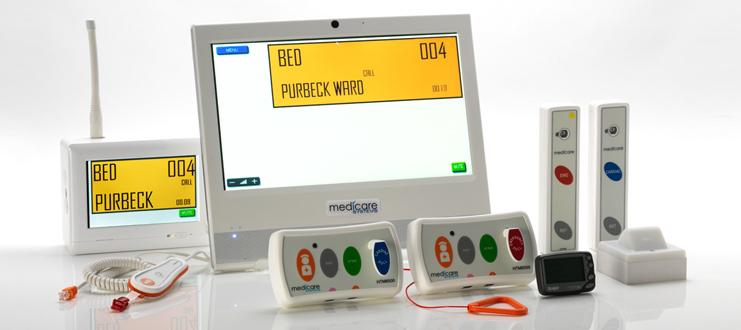
    Performance – The buttons need to be clearly displayed and colour coded. Ask yourself, are the buttons too close together? You don’t want a nurse to press the wrong button by mistake. Each button/call should trigger a different tone for clarity between calls.

    Smart – While the functionality of your room unit is key, it also needs to look smart within the bay. The unit needs to be crisp and clear. Hygiene is paramount in hospitals, and ensuring that the nurse call units and system components are easy to clean is vital.

    Robust – A nurse call unit or components that will break at the slightest knock are no use to a hospital or other healthcare facility. Hospital environments can be extremely busy, and there is thus a strong chance that your unit could be dropped, so you need to ensure that the unit you choose will stand the test of time. Bedroom units include two sockets, one for the pear push lead and a second for auxiliary items. Your call point should be mounted on a bracket so that it can be moved if required, for safe, easy operation, or secured using a locking clip.

    Display panel requirements

    Display panels should include the very latest in technology, offering multiple options to suit all environments. There must also be a variety of sizes available, and the option of a wall or desk-mounted display panel to provide the ability to view multiple calls on the same screen. Your display panel will be easily programmed to show just a room number or more detailed individual information specific to your needs. The panel will offer a variety of tones, depending on the call type, which will make it easier for nursing staff to establish the urgency of a call. Display panels will also typically show call logging – the primary aim of which is to monitor, record, and print reports on all calls and responses, providing evidential data for reports.

    Medicare Systems’ Call Logging facility makes reporting easy. The key with call logging data is that it needs to be simple, yet at the same time to provide all the necessary information, enabling the recipient to monitor and record all responses. This in return helps to ensure that hospitals and other healthcare facilities get all the information that they require to provide high levels of accountability and efficient delivery of patient care.

    Aesthetics

    Another key feature to consider within a nurse call system is the aesthetics. With technology and manufacturing moving forward there is no excuse for bulky and unsightly systems. The design of the nurse call system should be such that it is immediately clear how to access the key functions, particularly given that in an emergency situation there may be no time to think about which button needs to be pressed. Once staff have been trained, using the system should become second nature.

    When choosing a nurse call system, it is important to ensure that the panels are colour-coded to meet HTM guidelines, as follows:

    • Standard calls (orange).
    • Assistance calls (yellow).
    • Emergency calls (red).
    • Staff presence (green).
    • Call acceptance (grey).

    Call points should also employ HTM colouring as standard, with raised buttons to assist patients with poor eyesight.

    Wired vs. wireless?

    There is still an ongoing argument as to the respective merits of wired vs wireless within the nurse call. Each option has both its positives and negatives to consider (see Table 1), and indeed many manufacturers today offer both wired and wireless systems, to suit the particular application.

    ‘Landscape’ wireless room units

    One flexible solution is with newly designed landscape wireless room units. These are able to fit into bedhead trunking within hospital wards, creating the illusion of a traditional wired system fitting in with the hospital environment, yet simultaneously offering the cost effectiveness and time-saving benefits of a wireless system. Many now argue that wireless call systems offer maximum flexibility, in turn allowing for better care process management. The appropriate use of the system should free up time for staff and enable them to ‘work smarter’, while the greater the ‘future-proofing’ embedded, the better the system will be able to ‘flex’ and be expanded/added to in the future, to address changing demands.

    Cardiac/‘crash’ units

    There may be an area of the hospital which presents frequent high dependency situations, and here the ability to offer an emergency response is critical. Nurse call companies will offer a specific button for this, often a unit with a single HTM compliant blue button. A cardiac/crash unit would be ideal for an emergency department within the hospital.

    Door contact units

    Again, there may be specific areas of the hospital where you may need extra security for patients. A door contact unit is designed to provide an easy-to-operate monitoring system for internal and external doors. The unit will be easily armed and disarmed, often using a magnetic swipe fob or infra-red trigger, and will usually offer an emergency call button for added safety and security.

    Accessories

    With the development of ever more sophisticated and capable call systems, various additional features have been added over recent years. Nurse call manufacturers today offer a variety of accessories. These will typically interface with the installed system and aid even the most severely disabled patient in operating it, while a number of accessories and additional components are designed to provide vital alerts to nursing and clinical teams. For example, pressure mats are now available which will activate an alarm should a patient leave their bed or chair, while installing movement sensors will let staff know if a patient is on the move.

    Thanks to advanced understanding of illnesses today, there are many specifically designed accessories to address the needs of patients living with illnesses such as epilepsy and dementia – for example, specialised Epilepsy monitors, seizure alarms, and tremor alarms. There may be situations when a patient struggles with the ‘pear push’ button, for example if they have only limited use of their hands and require something a little more touch-sensitive. There is now a diverse range of switches and buttons available to aid every need – from extra-large, extra-sensitive buttons, to finger switches and even breath switches – to ensure that every patient need is met.

    Installation

    An important element when considering selecting a nurse call system is the potential disruption that can be caused during its installation. Thankfully, due to considerable advances in technology, wireless nurse call systems offer a simpler installation than their hard-wired counterparts. MD, Derek Timoney, explains: “A radio system with access to all points on the day could be installed in around five hours – there may typically be a couple of display panels in the ward, one at the nurses’ station, and one in the body of a ward. With ‘wireless’ systems we see all the required components installed in hours rather than days. With no wires to worry about, no fundamental changes are needed to the building, while very little manual labour is required. There is thus minimal disruption for either residents or staff, and generally no need to redecorate after the system has been installed.”

    Training

    As mentioned previously, a modern nurse call system should be straightforward to use. To ensure that all staff are confident and can use the system efficiently, free comprehensive training should be given. This is often provided on the day of installation, but a separate appointment should be made if staff members are not available on that specific day, or training could be provided online. Good aftersales support is also key – with an already overstretched service, hospitals and healthcare facilities need to know that there is someone on the end of the phone should they need it.

    Infection control

    Infection control is clearly a paramount factor within the hospital environment, and equipment should be designed and manufactured with infection control strongly in mind. For example, call points need to be able to be easily wiped clean. Medicare designs its call points with the addition of Microban to the labels, while an anti-microbial additive is also added to the plastic during manufacture to enhance infection control. Pear-push leads should also be manufactured with both these additives, and need to be designed so they can be dipped into the cleaning solutions normally used within the hospital environment to clean surfaces. This will help to eliminate the spread of any infection.

    ‘Breakout’ systems

    When a wired system in a hospital fails it often affects the whole ward, and getting the fault repaired can be a time consuming process, with it often taking days to find the cause of the problem. During this time a ward is often without a fully functioning nurse alert system, and this is where hospitals need to be prepared for a crisis. Introducing a wireless nurse call ‘breakout’ system is a quick and easy solution to what could otherwise be a significant problem. The breakout system should take around 20 minutes to install, and then be fully functional immediately. A ‘breakout’ system that is pre-programmed for the hospital environment offers an open and practical solution in times of a nurse call crisis. It should be HTM-compliant and quick and easy to programme.

    Research on the market

    Having looked at what should be considered when selecting a nurse call system, perhaps we should take a little time to consider the future of the nurse call market? Will ongoing development of nurse call systems further enhance the quality of care patients can receive?

    A report recently published by Markets and Markets2 about the global nurse call system market explains how an ageing population, the rising prevalence of chronic diseases, new product launches, technological advancements, and increasing healthcare expenditure, are among the major factors driving the growth of the nurse call market. The nurse call systems market is, it says, segmented into ‘buttons, integrated communication systems, mobile systems, and intercom systems’. It is predicted that the integrated communication systems segment will account for the largest share of the market, growing at an annual rate of 13.6% from 2018 to 2021.

    The technology ‘division’ of the nurse call system market is spilt into wired systems and wireless systems. In 2018, the report maintains, wireless systems are expected to account for the highest growth rate in the market – driven by low-cost and fast installation, plus the speed of transmission of radio communication.

    Future development

    The development of technology in today’s society means consumers are expecting more and more. Whether it’s mobile phones, computers, or televisions, we are constantly adapting and improving products to make designs smaller and functions more advanced. This is certainly very evident within the healthcare sector. When wireless nurse call systems were introduced, and as they developed, they naturally became more ‘intelligent’, and there is constant pressure to continue improving such equipment and to offer hospitals multifunctional systems.

    Del Gray, Medicare Systems’ technical director, explained: “These days call systems are no longer just alerts and alarms; they are an important part of the information technology employed in hospitals. Call systems have come a long way from the simple hand bell, and while their primary function remains the same, they offer so much more than just communication between staff and patients. People want more information, more data analysis, and more functionality.

    Accountability and traceability

    “Accountability and traceability are two increasingly key requirements, which is why we added features such as our call logging system. This feature allows hospitals to record all events and produce tailored evidential activity reports so that key performance indicators – such as staff response – can be monitored, or data provided if incidents need to be investigated. Routine or regularly required reports can be saved and automatically delivered to the required recipients by email, and maintenance is made easy by automated status reports. We have seen an increase in demand for location and tracking features, particularly within MHU, AMU, CCU, Maternity, and areas where the vulnerable staff or patients require monitoring. In these instances it is important to know who the individual that requires assistance or intervention is, and their location. Knowing the latter also ensures an efficient and timely response to events.”

    Enormous changes

    Both society and the healthcare sector have changed enormously, the latter particularly within recent years with the increasing pressures facing both NHS and private hospitals. Through all these changes nurse call systems have continued to develop and adapt. Increasing demand for information at the point of care has prompted the introduction of a host of new products and technologies designed to simplify the job of those at the frontline, but it’s important not to encumber the user, so integration of these services is key to both the efficient running of a care facility, and the effectiveness of staff under increasing pressure to deliver care within tight budgets. Looking at the progressive nature of the nurse call system, and the new technology developed year after year, the future for such systems, and for companies such as Medicare developing and pioneering new technologies, looks an exciting one.

    The original article can be found here.

    For more details contact us on sales@rincon.co.in