Blog

  • Reblog: Why is Fall Prevention so important?

    Among older adults, Falls are the leading cause of injury deaths, unintentional injuries, and hospital admissions for trauma. Falls can take a serious toll on quality of life and independence. To recognize this critical issue, at the state level, SCR 77 (D-Lowenthal) was passed in 2008 declaring the first week of Fall each year as Fall Prevention Awareness Week.

    According to HRET-HEN:

    • Among older adults, ages 65 or better, Falls are the leading cause of injury-related death (CDC). Falls are also the most common cause of non-fatal injuries and of hospital admissions for trauma.
    • In acute and rehabilitation hospitals, Falls resulting in injury occurred in 30% to 51% of patients.
    • Falls are associated with increased lengths-of-stay, increased utilization of healthcare resources, and poorer health outcomes.
    • Soft tissue injuries or minor fractures can cause significant functional impairment, pain, and distress. Even “minor” Falls can trigger a fear of falling in older persons, leading them to limit their activity and lose their strength and independence.

    Work is being done through the California Hospital Engagement Network (CalHEN) to reduce Falls, and most importantly to reduce injuries from Falls in hospitals. The CalHEN has been working with over 150 hospitals to reduce not only Falls but also Readmissions due to Falls. To date, this work has accounted for the reduction of Falls by approximately 28 percent, accounting for the prevention of 1066 falls with injuries and over $706,758 in health care savings across the state.

    The HQI Falls Toolkit provides tools that work and additional resources as examples for hospitals to implement and develop in their own efforts to reduce harm. Specifically, the checklist on the “Days Since Last Fall Poster” proves effective in Fall reduction efforts.

    The original article appeared on hqinstitute.org and can be found here.

    To learn more about fall prevention, contact us on sales@rincon.co.in.

  • Reblog: Emerging Classifications of the Queuing System

    Classification of the queuing systems is usually governed by variables like phases and channels. They can also be sorted as finite or infinite. However, a unique perspective of queue analysis can be designed to introduce specificity to the waiting lines, which can scrutinize the relationship between congestion and the delay caused by it to introduce effective solutions for queue management.

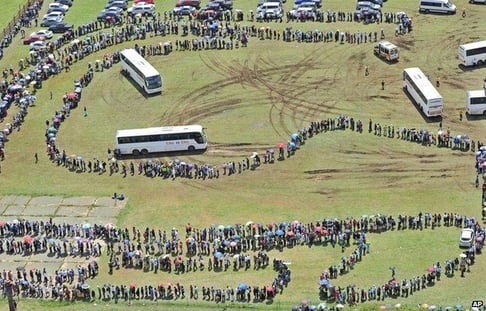
    Snake Queue: Inspired by the evergreen classic Snake Game, people tend to form creative patterns while queuing in the open. Can you sort out an image from the abstract queue below?

    _71695534_hi020319081.jpg

    Civilized Queue: Reflecting their geographical origin, civilized queues integrate virtues like patience and perseverance. A Londoner queue would sufficiently explain the nature of this sort of waiting lines, making them the most cultivated society. Londoners also spend the longest time in queues averaging 9.11 minutes weekly – however, they rarely complain despite excessive queuing.

    150806_Queuing.img_assist_custom-640x418.jpg

    However a situation in the US during a Black Friday sale is not quite similar. They are untamed and restless!

    black-friday-crowded-target-1024x598.png

    Push-n-Stack Queue: When overpopulation and limited resources pair up, we get to see exceptional situations like this one in China:

    Auto-mobile queue: When they can desire to undergo extreme metamorphosis and become a truck, they can definitely arrange themselves up in a perfect bumper to bumper queuing system. Traffic rules to them as school rules to children.

    anautoricksh.jpg

    Footwear Queue: At some place in the Hawaiian Islands, people find it more convenient to let their shoes do the queues. Comfort and queue management tied together!

    OluAU0M.jpg

    Billionaires Queue: With a net worth of approximately $100 billion, the most monetarily sophisticated Indians line up to meet the President of the United States. Even though they would have probably never joined a queue for their consumer needs, but they do show some etiquettes when it comes to political strength.

    queue_625x300_71422348333.jpg

    Queue Management brings together the queuing systems on one platform, providing a solution for the hectic congestions anywhere, everywhere! With Queue Management system, get One Unit Queues to run your business smoothly and satisfy your customer service perception!

    The original article can be found here.

    To learn more, contact us on sales@rincon.co.in

  • Your data – worry-free and safe

    • Maximum Benefit, minimum effort
    • Security, out of the box
    • Reliable Microsoft Azure Platform

    Powerful: FileDirector Cloud by Spielberg Solutions provides your company a scalable and effective solution for all your your off premise Electronic-Content-Management needs.
    Due to the scalability, it is the perfect solution for workgroups, small business or a worldwide operating enterprise.

    For this, FileDirector covers the whole range from simply benefiting from an OCR full text search up to the usage of the powerful Business Process Management. This allows you to use FileDirector Cloud just for a quick retrieval of documents or having the benefits of a process management routing your documents through your company.

    Cost-effective: FileDirector Cloud software as a service enables the business to reallocate IT operations costs towards meeting other IT goals.
    See the advantages of a modern and powerful ECM system – smart and away from hardware and software spending and operational costs for the server equipment.

    Secure: Of course, our FileDirector Cloud solution provides all security features of a local FileDirector installation e.g. its 3-layer-architecture and the built-in rights management.
    FileDirector Cloud is hosted on a Microsoft Azure data centre close to your economic region.

    Easy Budgeting: Unlike traditional software which is conventionally sold as a perpetual license with an up-front cost (and an optional ongoing support fee), Software As A service price applications using a subscription fee. Consequently, the initial setup cost for SaaS is typically lower than the equivalent enterprise software and due to the monthly or annual subscription budgeting is completely transparent and easily calculable.

    To learn more contact us sales@rincon.co.in

  • Reblog: Considerations on choosing the right queuing system

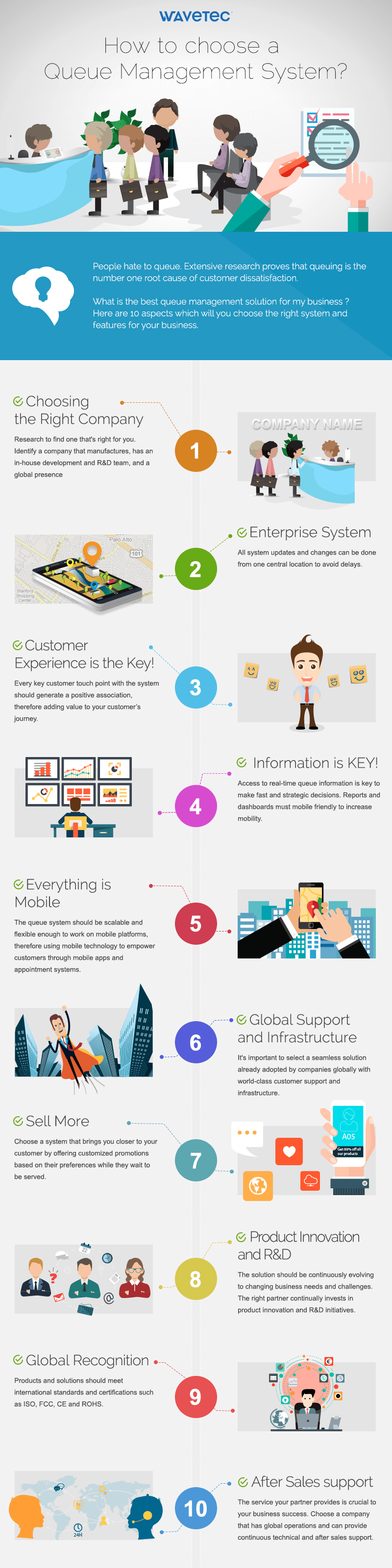
    Standing and waiting to be served is no longer an option for today’s fast paced customer. Numerous service centers and environments are transforming their customer experience by adopting a virtual queuing system to mange long waits.

    Deploying a queue management system surely augments your customers journey, but the real question remains the same, that how do you select the right queuing system which is also right for my business?

    The original article can be found here.

    To learn more, contact us on sales@rincon.co.in

  • Reblog: 3 Ways to Safeguard School Networks to Avoid Cyber Attacks [Infographic]

    A school’s network is all too often an open invitation to hackers. Discover 3 ways to protect networks and keep sensitive data safe!

    The majority of today’s schools are connected online and are facing the same cyber security dilemma as other businesses. Even when school districts and universities have massive budgets, they often fall short of having the right security measures in place to protect sensitive data. Hackers see limited security capabilities as an open invitation for quick profit, whether they’re after financial information or anything else they can use for identity theft purposes.

    In the education field, not all cyber attacks have the intent of stealing sensitive data. In 2015, hackers launched Denial of Service (DoS) attacks on public schools in Miami just as thousands of students were about to take new standardized tests. When students reached the writing portion of the Florida Standards Assessment, they fell upon blank, white screens after a testing vendor’s login server was targeted. Although attacks like these aren’t designed to steal information, it’s clear that they can be just as disruptive. In the age of technology, cyberattacks can be the equivalent of pulling the fire alarm to avoid a test. Check out the infographic beside for a few more examples of recent school cyber attacks, and to see how technology in education has evolved.

    When hackers gain access to a school’s network, it’s safe to say that the results are never good. The good news is that with a few safeguards in place, data loss and disruptions like the one mentioned above can be avoided. Let’s take a look at a few ways to make school networks less attractive targets for hackers.

    1. Establish a strong BYOD Policy

    In the era of laptops, smartphones, tablets, and even smart watches, the majority of today’s students have access to some form of connected device or another. Many schools embrace this and incorporate mobile computing into the standard curriculum. It’s even common for educational institutions to issue mobile devices to be used for schoolwork. It’s commonplace that schools allow students to connect their devices to the internet through their network, but it also raises concerns. Establishing a firm “bring your own device” (BYOD) policy can help manage the risk of data breach when tech-savvy students have access to school networks.

    As part of a BYOD policy, many school districts segregate administrative and guest networks. Implementing a “guest” network for students, visitors, and even some staff members to connect to with their devices works well because it keeps sensitive data on the administrative network and also makes traffic much easier to monitor according to how a BYOD policy defines secure internet usage.

    2. Protect school-owned technology when it’s offsite

    We’ve all grown accustomed to using mobile computing devices while on-the-go, and education staff is no exception. Teachers are typically given laptops for home use, whether it be for grading schoolwork or researching for in-class material, and some even travel with their laptops to conventions. When users connect to wireless hotspots in hotels, cafes, airports, or less-than-secure home networks, they are no longer protected from whichever security measures their school may have in place. Most people don’t carefully monitor their browsing or usage habits, and all this unmonitored offsite connectivity increases risk immensely. There’s the chance that the laptops themselves contain sensitive data and are likely to get hacked on open networks, or they could more easily come back to connect to the school network chock full of viruses or other malware.

    Remote filtering technology is a way to protect laptops and mobile devices when they’re being used on other networks than the school’s. With remote filtering, all registered devices are forced to connect to the internet through a web security gateway. This ensures that web traffic from these devices is subject to the web access and security policies of the organization, no matter where somebody logs on. It’s a relatively inexpensive option that could save schools from many potential headaches.

    3. Upgrade the way you send files

    The most widely used method of sending and receiving student records and other sensitive data is email. While there are highly secure email servers that some schools may wish to opt for, this still doesn’t eliminate the fact that hackers still have ways to access data via phishing scams. Hackers often pose as legitimate senders and use phishing emails that trick individuals into providing access to sensitive information. In a recent example of phishing, a Canadian university was defrauded for $11.8 million when hackers posed as a construction company requesting updated banking info.

    Incorporating a secure file exchange solution into your network environment guarantees that sensitive data like student records, banking information, etc. gets to the right recipient. Using features such as two-factor authentication (2FA), all file transfers require user authentication on both ends. When incorporated into a security policy, banks, parents, healthcare organizations and other schools who are on the receiving end of sensitive file transmissions are required to quickly and easily authenticate themselves before any data downloads or uploads take place. Nobody can therefore pose as anybody else and school data remains safe.

    Want to find out more about solutions that can take your school’s data governance to the next level? Speak with an expert today to learn more! Contact us sales@rincon.co.in

    The original article can be found here.

  • Reblog: Fall prevention safety bundle: Collaboration leads to fewer falls

    At St. Joseph’s Hospital and Health Center in Syracuse, NY, we’re committed to providing a safe, comfortable, caring environment for our patients. We believe all patients deserve to be cared for in the most humane way possible to preserve their dignity and individual rights. This means ensuring our patients’ physical safety, including preventing injuries from falls, during a hospital stay.

    Central to our fall prevention program is the hospital’s patient safety care bundle. We found that bundling (standardizing) fall prevention practices prevents more falls than nonbundling or variable approaches. We also learned that involving all unit and house-wide staff in this approach inspires greater buy-in and participation and fosters best practices.

    Our bundling journey

    St. Joseph’s didn’t always use bundling to prevent falls. Our journey began in 2010 when I was asked to lead a task force to review and revise the hospital’s fall prevention program. After reviewing many articles in the nursing literature, our task force decided to take different concepts that proved effective and combine them into the bundled approach.

    All clinical and nonclinical staff were taught how to use the new bundle. Rapid-cycle piloting in select care areas was implemented. Following a process and outcome review and revision of the bundling approach, full implementation followed throughout our facilities. St. Joseph’s bundled approach to fall prevention includes safety huddles, hourly rounding, use of the Morse scale, individual care plans, and post-fall debriefings.

    Safety huddle: To consistently identify patient safety needs for all shifts, each unit has a safety component as part of its shift-change huddle. The safety huddle must be documented on a form designed by the unit.

    Hourly rounding: Nurses round on patients hourly. The RN uses a consistent, caring conversation, which starts with an introduction, such as, “Mrs. Jones, I’m Marty, your nurse, and I’m here to check on you.” Unless necessary, sleeping patients aren’t awakened. Rounds are documented in the electronic documentation system. The RN admitting new patients explains that hourly rounding is done to anticipate their needs and ensure their safety.

    Morse scale: The Morse fall scale assessment tool, which is individualized for each patient, assesses for the following measures:

    • history of falls
    • secondary diagnosis
    • ambulatory aid
    • I.V.s/normal saline lock
    • gait/transfer
    • mental status.

    According to St. Joseph’s fall prevention protocol, the Morse scale is used upon admission of every inpatient 14 and older, once during every day shift, when a patient’s level of care changes, upon transfer, and after a fall.

    Individualized care interventions: The following interventions are implemented based on individual patient needs:

    Falls that take place while the patient is hospitalized are documented on the plan of care under the Morse scale section. When physical therapy or medication review is requested, it’s documented in the plan of care under the safety and activity section and communicated during handoff.

    Nurses have the option to ask for a gerontology review, which includes consultation with an expert gerontology RN and a pharmacist, and a physical therapy screen.

    Door signs or door magnets alerting staff to the patient’s risk of falls must be used when the patient’s Morse scale score is ≥ 85 (considered high risk), when staff believe the patient is at risk of falling despite a lower fall assessment score, and when patients have an epidural infusion until they’re able to ambulate independently.

    Bed exit and chair alarms* must be used for patients who overestimate or forget their limitations and for those with an impaired gait transfer (as documented in the Morse assessment). Patients with bed exit alarms also must have a chair alarm when out of bed. Any patient with a bed exit alarm, chair alarm, or door magnet is not to be left alone on the commode or in the bathroom.

    Post-fall defusing: Immediately after a fall, we hold a debriefing with the staff involved with the patient’s care. At the debriefing, similar to the huddle concept, we review and discuss the event to help formulate a collaborative approach for immediate care, treatment, and review and prevention of potential future falls.

    Practice implications

    Since our implementation of the bundled approach to fall prevention, we have seen a decrease in the number of falls and a reduction in the severity of injury when falls do occur. (See Reduction in falls.) Perhaps most important, though, is that an all-staff approach to quality care inspires greater buy-in and participation, which fosters best-practice outcomes.

    Case study

    A man in his late 80s was admitted to the medical-surgical unit after several falls at home, including one that resulted in a hip fracture. He had a urinary tract infection (UTI) and was confused and sleep deprived. His family reported that he’d fallen many times at home. Our challenge was to keep him safe while treating his UTI and giving him the rest he needed to get well.

    The patient’s admitting nurse evaluated him with a Morse scale of more than 85, so a magnet indicating this designation was placed on his door and every shift was notified of his fall risk every day. In addition to the door magnet, our interventions included a bed alarm when the patient was in bed, a chair alarm, hip protectors to add extra protection if he fell, and floor mats* on each side of the bed.

    As a result of our interventions, the patient got much-needed rest, his UTI resolved, his cognition improved, and he was able to return home. We gave the hip protectors to the family for use at home.

    Marty Pond, MS, RN-BC–Gerontology is the NICHE Coordinator and Falls Chairperson, St. Joseph’s Hospital and Health Center, Syracuse, New York.

    The original article can be found here.

    To learn more, contact us on sales@rincon.co.in

  • Reblog: What’s new in Zetadocs Expenses October 2017 update

    This article describes the new features and other improvements in the October 2017 release of the Zetadocs Expenses service.

    Zetadocs Expenses Release date and version
    Service September 28, 2017 (version 3.3.17262)
    Connector for NAV September 28, 2017 (version 3.3.17250)
    Apple (iOS) app September 28, 2017 (version 3.3.17262)
    Android app September 28, 2017 (version 3.3.17262)

    Feature enhancements

    Simplified expense creation

    We have improved the process of creating new expenses, reducing the number of keyclicks needed and adding alternative ways of working. These changes make it quicker and simpler to create expenses, and reduce the likelihood of errors due to repetitive steps being missed.

    The main changes are:

    • We have added a New Expense button to the expense view or edit screen. This creates a copy of the expense, making it quicker to enter batches of expenses for a trip or enter repeat expenses.
    • The client app now sets field values automatically when you create a new expense, copying the values from the last expense which you created or edited.
    • Required fields which include only one option are selected automatically when creating a new expense.
    • We have added a New Expense button to the screen for adding expenses to an Expense Report. This makes adding missing expenses quicker and more intuitive, removing the need to exit from the report edit screen to do this.

    Custom property values for new expenses

    For each custom property, you can now configure whether new expenses should use the property value from a previous expense or use a fixed default value. The first option is suitable for fields like “Department” which are likely to be the same for all expenses created by a submitter. The second option is designed for fields like “Recharge to Customer”, where requiring the submitter to choose the option on each expense gives added protection.

    Any existing custom properties will be configured to use a fixed default value. We recommend you change the settings of any existing custom properties to use the new behavior (“copy from previous expense”) to improve usability for expense submitter, unless you specifically need the additional protection.

    Any new custom properties which you create will use the new behavior by default.

    Controlling sales tax reclaim for each expense type

    The finance team can now control sales tax reclaim behavior for each expense type, specifying which sales tax rate to use and whether sales tax can be reclaimed. This prevents users from entering expenses incorrectly, and reduces the effort needed by the finance team to correct expenses which do not comply with the tax regulations.

    These settings are configured using the Expense Types screen in the admin site.

    Exporting to multiple NAV companies

    You can now export to multiple NAV companies from a single Zetadocs Expenses account. This is configured by adding extra companies using the admin site and the Zetadocs Connector Configuration Program.

    On systems which have two or more companies configured, the client app adds a field to the expense form to specify which company the expense is for. Expense reports can include expenses from different companies minimizing any changes required to the expense submission and approval processes.

    For this initial release the GL accounts and other export settings must be the same for each company, so it is intended for use by businesses using a common chart of accounts. This will be extended in future releases – please contact Equisys for further details.

    Viewing next expense or report

    When you view an expense from an expense report or similar list, you can now move through the list by clicking Next and Previous options. This makes it quicker for approvers and finance processors to check a list of expenses, removing the need to return to the list between each record.

    This feature is enabled on desktop browsers where the browser window is above a minimum width.

    Improved export descriptions

    We have improved the descriptions on records which we export to NAV. Most descriptions now include the short ID for the expense or expense report (with prefix “ZD” – eg “ZD12345”) and either the user ID (for reimbursable expenses) or the payment method ID (for company credit card payments).

    Each expense type has an export description field, and this is now included in the exported records instead of the description which the submitter entered, which gives the finance team more control on the records which are created in NAV.

    The description format is a system configuration setting, so the finance administrator can choose whether to switch to the new format. Leaving the setting as FORMAT1 continues with previous behavior. Selecting FORMAT2 enables the new format. Selecting AUTOMATIC uses the new format, and will automatically apply any future improvements.

    This change requires the Zetadocs Expenses Connector for NAV and associated NAV codeunits to be updated for sites using this option to integrate with NAV.

    Swipe gesture for core screens

    You can now switch between the core screens in the client (Home, Expenses, Reports etc) by swiping left and right, on mobile touchscreen devices.

    Preview features

    The following enhancements are enabled on selected accounts only. This allows channel partners and other users to understand the feature and to give feedback on its use before general release. Please contact Equisys if you wish to use any of these preview features.

    Simplify expense approval

    We have improved the screens used for approving reports. Clicking on an approval task now displays a new Approve Report screen, which shows details of the report and expenses. This simplifies the approval process, and makes the process more intuitive for new users.

    Quality and performance improvements

    This update includes a high number of quality and performance improvements, including the following changes.

    Reports resubmitted for approval could include additional expenses

    Previously if a submitter removed expenses from a rejected expense report then resubmitted it for approval, the approver would still see the removed expenses attached to the report in some circumstances. This has now been corrected.

    The original article can be found here.

  • Reblog: A Compliance Expert Answers Your Top GDPR Questions

    The Ageris GROUP is a French-based company founded in 2003 offering specialized information protection, business continuity and personal data protection consulting services to government organizations, as well as to their clients in the healthcare, finance, and industrial sectors. Ageris’ awareness-raining approach enables companies to continually improve their information acquisition, storage, and distribution processes according to international security standards. Their team of expert consultants help organizations from the risk assessment and audit stages right through to the development and implementation of action plans, including software provisions, that adhere to strict safety compliance standards.

    Recently, Denis Virole, Director of Services and Partner of Ageris Group, was invited to speak at a seminar hosted by XMedius in Paris titled “GDPR: Organizational Impacts for Enterprises” regarding the upcoming GDPR regulation and how it is set to affect businesses around the world. Before Mr. Virole captivated attendees with his talk on how organizations can prepare for GDPR before the regulation comes into play on May 25th 2018, we managed to ask him a few questions about how companies around the world can start getting prepared in advance. Read on for a few of his insights.

    Question 1: In your opinion, which sectors will GDPR impact most?

    Denis Virole: The sectors that will be most affected will definitely be government administration offices, banks, insurance providers, and municipalities. The fact of the matter is that GDPR will affect all companies who process and store personal data, so it’s in everyone’s best interests to get familiar with the regulations.

    Question 2: How will the regulations affect daily operations?

    Denis Virole: I’d say that internal operations will see the biggest impact. There will be much more communication between Information Systems Security Managers, Data Protection Officers, and various departments within organizations. There will also be quite a bit of restructuring around processes for handling data.

    Companies will also have to develop transparency policies for their clients or users. Customers must be informed of their rights and how companies are respecting those rights in regard to obtaining and using their personal information. At this stage, even the most mature companies aren’t yet at an adequate level of compliance for the new regulation.

    Question 3: How can organizations educate employees about GDPR?

    Denis Virole: When it comes to GDPR, it’s important to understand that there is no “one-size-fits-all” solution for every organization. Employee education has to be tailored to an individual company’s culture and its constraints, such as its industry, size, IT environment, etc.

    Any training is doomed to fail if an organization’s upper management structure isn’t properly informed of the specific changes that must take place once the GDPR passes. Next, specific training is needed for managers, various channels within the business, any staff who handles personal data regularly, as well as any IT subcontractors.

    Awareness of best practices should also be provided to users. All customer awareness should be at the same level, and developing policies to raise awareness requires that management get involved. Getting the commitment of high-level representatives isn’t always easy, and this is likely to represent a daunting challenge in more so-called “conventional” sectors, such as government.

    Question 4: What are some of the major consequences of non-compliance?

    Denis Virole: A flagrant consequence for non-compliance would be a loss of confidence in a company, both internally from employees, and externally from customers, business partners, investors, and the general public. Respecting the rights of individuals is major, and any infractions could severely damage a company’s reputation.

    In the event of non-compliance with GDPR regulations, EU authorities have the right to force companies to halt all commercial activities. This obviously leads to economic loss, but can also be majorly detrimental for brand awareness.

    There is also a list of financial penalties associated with non-compliance, as well as civil reparations for damages caused to victims.

    Question 5: What are the long term positive benefits that you expect to see from GDPR after May 25, 2018?

    Denis Virole: I envision that the GDPR will improve synergy between various departments within an organization. The deadline allows companies to become compliant, but also to map out their current IT processes and procedures. Various departments will therefore have to break down any communication barriers that stand between them in order to better work together. Therefore, we can expect a deeper understanding of internal processes from all players, and ideally, we can expect better information management on all levels.

    Question 6: How can companies use technology to optimize their data governance?

    Denis Virole: This is a tricky question since technology doesn’t protect companies. It’s a very useful tool, but just a tool nonetheless. In order to ensure data security, a risk analysis must be carried out with the cooperation of various business units in an organization and its Information Systems Security Managers. Afterwards, a concrete action plan needs to be put in place. This way, technology becomes a solution that facilitates best practices.

    Pseudonymization, for example, is a process where the most identifying fields within a data record are replaced by one or more artificial identifiers (or pseudonyms) and are only made visible when necessary, is very useful in a GDPR context. Using encryption technology can also make individuals’ personal data extremely difficult to decode, and is therefore a great solution when handling sensitive data. XMedius solutions respond very well to this need, and are non-restrictive in the sense that deploying one doesn’t require any restructuring of a company’s current business environment. They are easy-to-use and a solid way to optimize internal processes in order to become GDPR compliant.

    Want more information on solutions that will boost your workflow and help you become more compliant with regulations like GDPR? Contact us sales@rincon.co.in

    The original article can be found here.

  • Reblog: Easing in-store Customer Journey with Queuing Solutions

    The in-store checkout process really frustrates!

    As the last touchpoint it can taint the whole shopping experience. Research shows that it is a key area of customer dissatisfaction.

    In a recent survey more than 9 in 10 respondents said that “fast payment and reduced queue times were critical or valuable to their perception of a brand.”

    At the same time it is one of the most cost-intensive operation in stores.

    linear_queue.jpg

    Queues present a great hurdle for brick and mortar stores. Consumers that shop online don’t have to wait in a line to be served whereas lines and waiting times are a chief complaint when customers shop in physical retail stores.

    Combining a queue management system like an Electronic Call Forwarding Solution with more flexible checkout equipment can greatly increase speed, capacity and throughput, reducing customer stress and store operational costs and easing in-store customer journey.

    Digital signage has a crucial role to play in improving the shopper experience and reducing costs by increasing productivity in the Checkout Arena.

    It can provide the analytics and flexible communication to improve customer flow, with clear guidance to put the right shopper in the right queue. Digital screens can also be incorporated into the queuing area itself to help to minimise the perceived waiting time and promote current and future offers.

    The original article can be found here.

    To learn more, contact us on sales@rincon.co.in
  • Prevent Your Patients From Falling

    Falls are not a normal part of aging and most falls can be prevented:

    [well type=”well-lg”]


    [/well]

    Features:

    • Create a safer and more reliable lifestyle for Patients
    • Easy to use and simple to handle
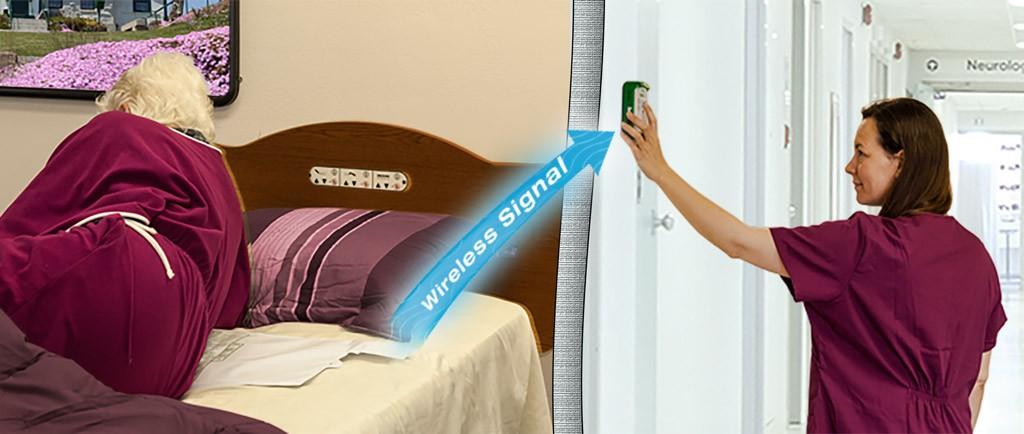
    • Bed alarm allows staff and caregivers to know exactly when a person is getting up
    • Pull-string fall prevention alarms, motion sensors, bed and chair alarms, weight-sensing pads and anti-wander exit alarms.

    Falls frequently cause a disability, functional decline, reduced independence, and reduced quality of life for an elderly person. Patients with a fear of falls may also experience feelings of helplessness, loss of function, depression, anxiety, and social isolation. It is important to take precautions both in and out of a facility to prevent elderly falls, fractures and injury.

    To learn more about how your facilities could be better protected by Fall prevention solution, contact us today.