Blog

  • Document Management Software for Financial Services

    Banks and Financial institutions including Mutual Funds, Insurance companies have to deal with a plethora of documents. These documents are vital as they are mandated by regulations and compliance with regulations is a must.

    As an example, banks have to comply with KYC (Know Your Customer) norms. KYC is a process by which banks obtain information about the identity and address of the customers. This process helps ensure that banks’ services are not misused. The KYC procedure is to be completed by the banks while opening accounts. Banks are also required to periodically update their customers’ KYC details. A bank needs to collect proof of identity and proof of address apart from the photograph of every customer. The Reserve Bank of India has specified 6 documents which can be produced for either or both of the above needs. Banks are required to periodically update KYC records. This is a part of their ongoing due diligence on bank accounts. The periodicity of such updation varies from account to account depending on its risk categorisation by the bank. Periodic updation of records also helps prevent frauds in customer accounts. Let us take State Bank of India with 31 crore savings accounts or in other words 310 million accounts. If each account has to produce 1 page as a KYC proof, there are 310 million pages to manage.

    And it is not just the KYC documents that have to be managed. There are other documents pertaining to Trade, Foreign Exchange and other departments.

    Managing such a large volume of documents manually is a tall order and retrieving a particular document is akin to finding a needle in a hay stack.

    It goes without saying that privacy and safety of this information is crucial.

    This is the reason why Banks and Financial institutions opt for automation solutions based on Spielberg and other software provided by Rincon.

    Rincon helps customers in automating documents every step of the way. Right from scanning paper documents, converting them into electronic images, building document workflows, to quick retrieval all of these from a central repository. Not only does Rincon help in automation but also helps in restricting access to documents. Thus users from Department A need not view documents from another department or whatever other rules that may be needed by the business process.

    Being a centralised repository of electronic documents, the distance between people no longer matters. Whether the person is sitting in the remotest corner of Arunachal Pradesh in the East or maybe in the Andaman and Nicobar islands, as long as he / she has access to the internet, he can access the system using a web browser. The user can view the documents he /she is authorised to and can even upload documents if he is allowed to upload. Thus the entire system is now centralised and everyone can finish off their work without having to depend on the efficiency of the courier system or postal services.

    Apart from all the above benefits, some of the other benefits:

    Save on expensive real estate: When you have to store physical papers, it calls for a lot of real estate which in today’s times is definitely not cheap. With an automation solution in place, you could move the physical documents to an offsite (less expensive) place and store it there.

    Retention policy: You can define the life cycle of the documents so say if the KYC documents are to be collected every 2 years, you could set the life cycle of the documents for 3 years so that the older records would be purged after 3 years. Thus your data size also remains manageable.

    Integration with LoB (Line of Business) Applications: The automation solution can also be integrated with the LoB applications thus streamlining a lot of processes.

    Rincon helps organisations of all sizes to handle their documents right from delivery to destruction. Contact us on sales@rincon.co.in for a free consultation on how we could assist you in your existing processes.

  • Save All in one click

    • Central scanning
    • Offline mode
    • Simple implementation

    The goal, when developing ScanStation, purely was simplicity – for the user. That’s quite a tough goal, but the team succeeded.

    FileDirector ScanStation combines to words in perfection – efficiency and usability.

    Enjoy the experience how ScanStation provides this, by streamling scanning and Electronic Content Managment into one easy-to-use process. It could neither be easier nor more efficiently. FileDirector ScanStation recognises different types of documents and processes them in an efficient and reliable manner. Reliable Electronic Content Management in three steps – walk up to your FileDirector ScanStation, put the documents into the scanner tray and select the type of document to be scanned. It is really that simple. When you are on your way back to your desk, the implemented queue in ScanStation processes your documents in the background, sending them to their next destination.

    Traceability: With FileDirector ScanStation you will know exactly who scanned what. All documents can be traced back to the person that first entered them into the system.

    Simplicity: Worried about implementing a new scanning system? Really, you don’t have to be worried at all. FileDirector ScanStation has been designed for standard PCs and touchscreen PCs. Imagine, scanning without the need of using keyboard or mouse. Identification by RFID card and a pin code, directly entered by touch and that’s the same way how a scan job is selected.
    It is “touch, scan and go”.

    User authentication: FileDirector ScanStation provides a user database, that can integrate with your domain’s Active Directory™ infrastructure.
    The authentication itself can either be done by an RFID card and a 4 digits PIN or user name and a 4 digits PIN. Both ways can be used completely by touch.

    Offline-Functionality: The offline-functionality of FileDirector ScanStation allows you scanning when your network is offline, for some reason. The intelligent, integrated job queue processes documents in the background and keeps your documents save.

    Extendability: FileDirector ScanStation is your smart way into state-of-the-art ECM. Route your documents through your company, exactly to the point where it is needed – on time, everytime.

    FileDirector ScanStation works hand-in-hand with your FileDirector ECM system. Once your documents are scanned, FileDirector BPM takes on. It provides each document exactly to the user or group that has been specified in your company’s processes for verification, approval or automatic export of the relevant metadata for external systems.

    That’s the point where a central-point-scanning becomes a company-wide benefit.

    To learn more contact us sales@rincon.co.in

  • Reblog: The GDPR primer: 5 Tips for getting your organization ready

    In less than 9 months, the General Data Protection Regulation (GDPR) will come into full effect. It will introduce tough new privacy requirements for companies in the EU, as well as anyone who handles EU data. The new set of laws imposed by the GDPR will give consumers significantly more control over the ways in which their data is collected, distributed, kept, and destroyed.

    Although May 2018 may seem like a far way off, but when you consider the complex changes many organizations will have to undergo in the way they handle personal data, the date is actually approaching pretty quickly.

    To successfully prepare for GDPR, companies of all sizes need to establish a solid foundation for meeting compliance before the new laws come into play. We’ve compiled a list of tips you can follow that will help you align your business practices and processes with GDPR regulations. Our list is not exhaustive, but can help businesses put a few preparations into place in advance.

    1. Raise Awareness

    Businesses handling personal data both in and outside of the EU must begin by developing a full understanding of the GDPR and exactly what it entails. It’s vital to recognize that GDPR applies to organizations everywhere in the world as long as they handle data containing any personal information about EU citizens, no matter where the data is stored. Make it a priority to circulate training videos or documentation containing detailed information on GDPR regulations around your organization so that everyone can begin to understand how it applies to your business processes.

    2. Develop a coherent privacy policy

    Organizations will need to clearly communicate with customers the purpose for which they are collecting their data under GDPR, so writing privacy policies that are easily understandable should become a top priority. Consumers need to be aware of their rights to disclose or refuse disclosure of personal information and understand the specific purpose for which it will be used. The GDPR also outlines that any information that’s collected for a stated purpose can only be used for that purpose after obtaining consent.

    Most companies practice transparency, but it’s important to make sure that privacy policies that contain a lot of fine print must be brought to the forefront and made legible and easy to understand or you could be faced with a fine. The fines for data breaches are huge – In cases of violation, the GDPR gives EU regulators the authority to impose fines of between 2 and 4 percent of a company’s global revenues.

    3. Prepare your data breach policy

    GDPR is no different than many regulations in that it requires you to inform consumers about data breaches that may affect their personal information – but with one catch – you have to do it within 72 hours. It’s one of the tightest timelines out there in the compliance world and may require that you revise your current data breach policy. Ensure that your insurance policies and internal procedures for incident reporting reflect the new law.

    4. Assess existing technology risks

    When strict regulations come into play, organizations need to reexamine the solutions they use to send and receive consumer information – it’s important to assess which solutions may need to be upgraded or replaced. If your HR, finance, or other departments are currently using inherently non-secure means of transmitting sensitive data between countries, it’s time to reassess your options. A cloud fax solution, for example, eliminates several of the security risks that come with using traditional fax machines.

    Cloud fax software enables employees to send and receive sensitive documents directly from their workstations, which means no more printed documents left lying around potentially falling into the wrong hands or being otherwise misplaced. Full knowledge of your organization’s technology risks can present opportunities to leverage existing solutions that will get rid of any security gaps in your infrastructure and help enable GDPR compliance.

    5. Investigate innovative new technologies

    GDPR will require companies handling personal data to develop strong data discovery and incident detection processes so that they can keep track of where their information is, and is being sent, at all times. Not everyone has a data controller on staff, and refining these processes doesn’t have to be a complicated task. Consider secure file exchange solutions that automate some of the workload for you.

    Solutions with features such as a built-in audit trail function eliminate guesswork by keeping a timestamped record of all files and documents that are transferred, whether inbound or outbound. Not only does can this boost organizational workflow, you’ll have a chronological record of system activities in case you’re ever up for audit. It’s all too common for organizations to transfer consumer’s personal information without the proper safeguards in place, which is why looking into new technologies that can improve your processes is so crucial.

    By understanding the GDPR in advance, you’ll get a stronger grasp of its requirements and be well on your way to mitigating any risks associated with how you handle personal data. Looking to boost security when sending and receiving sensitive information? Speak with an expert today to learn about solutions that will help take your organization’s security and compliance to the next level.

    The original article can be found here.

    To learn more contact us sales@rincon.co.in

  • Reblog:3 Best Practices for Protecting Student Records

    Compliance, compliance, compliance! A closer look at the basics of FERPA

    Taking measures to protect student record confidentiality isn’t just a list of suggested best practices – it’s the law. Since student records contain so much PII, including student or parent financial and health information, educational institutions must comply with several regulations to keep sensitive data safe.

    These regulations may include:

    • The Family Educational Rights and Privacy Act (FERPA)
    • The Health Insurance Portability and Accountability Act(HIPAA)
    • The Children’s Online Privacy Protection Act (CORPA)

    The regulation that most commonly applies to schools is FERPA. The Family Educational Rights and Privacy Act (FERPA) is a federal law that protects the privacy of student education records. Educational institutions receiving funds under programs administered by the U.S. Secretary of Education are bound by FERPA regulations. The law basically outlines when and to whom it’s okay to disclose student PII to. Whether you’re a teacher, professor, school administrator or healthcare provider, a few key components of the FERPA act you should know are:

    • Once a student turns 18, or begins attending college, university, or any higher education institution considered post high school, the rights transfer from the parents having the right to inspect and review a student’s record to the student themselves.
    • School officials may not disclose PII about students, nor permit inspection of their records, without written permission from the student, unless such action is covered by exceptions permitted by the Act. An acceptable example would be disclosing information to school officials determined by the institution to have a legitimate educational interest.
    • Students have the right to see and review their educational records within 45 days of a request. They also have the right to request an amendment of their education records that the they believe is inaccurate or in violation of their privacy rights.

    Whether one, all of the above, or other compliance regulations for protecting student data apply to your educational institution, it’s clear that it’s important to have the proper security measures in place. Let’s take a look at a few best practices.

    1. Appoint a data security leader: an educator for educators

    One practice that’s required to adhere to strict compliance regulations in healthcare, financial services, technology and other sectors is to designate an individual who’s responsible for understanding regulations, educating staff, and ensuring that the right processes are in place. By tasking an individual (or a committee of individuals) who are responsible for overseeing compliance, you’re well on your way to creating effective security roadmap for protecting your student’s data.

    Your data security leader, whether an appointed existing staff member or outside consultant, can stay informed of changes in the compliance landscape and determine the best and safest methods for responding to both internal and external for access and use of student data. In doing so, it would be this individual (or committee’s) responsibility to:

    • Assess your data collection practices (and improve them accordingly)
    • Identify and implement your security objectives (each institution has its own protocols for things like wireless network access, etc.)
    • Provide ongoing training to educators and administrators

    Which brings us to our next point…

    2. Provide ongoing student privacy training

    Training employees at every level is essential to a solid security program. Everyone in your organization should have a good understanding of the types of issues that can create student privacy and data security risks. In an educational environment, there are endless possibilities for creative training and messaging that will help familiarize all staff of good data privacy and security practices.

    Try to make sure that training is performed regularly, is updated alongside any changes in the laws, and that new staff members receive security training within a reasonable amount of time.

    3. Develop monitoring, auditing, and reporting processes

    No matter which security processes and measures you choose to implement, monitoring is a critical element to keeping your security program in check. Your security processes need to be routinely tested, monitored, and updated to make sure your student data remains safe over time. Malicious computer malware, for example, is a rapidly evolving threat that will always be looking for new ways to make its way onto school databases, so only through continuous auditing by qualified internal or external individuals can your student privacy and security efforts maintain credibility. An important part of your reporting process should include clear protocols for identifying and reporting data breaches in case they occur.

    Looking for a way to ensure your student records are protected in transit and at rest? Speak with an expert today about secure file exchange solutions that improve your security levels and help you adhere to strict compliance regulations.

    The original article can be found here.

    To learn more contact us sales@rincon.co.in

  • Reblog: The Undeniable Benefits of Having a Well-Designed Document Management System

    Today’s businesses are up against more challenges than ever in the past. With technology having such a massive influence on just about every aspect of modern-day business, organizations in just about every industry struggle with how to best approach the workday. One of the biggest effects that modern technology has had on business operations revolves around the demise of paper documents.

    Paper is expensive, wasteful, far from secure, and has very little place in the future of business. While some businesses think they don’t need to move away from paper, getting started with this practice has never been so crucial. Knowing how to make the transition from paper to digital documents can be difficult and there’s no better way to get things off the ground than to implement a well-designed document management system.

    What is a Document Management System?

    To put it simply, the term “document management system” refers to software that allows you to store and keep track of electronic documents. While this is the most basic function of any document management system, those which are designed with functionality in mind typically come along with a variety of features.

    Document management systems come in many shapes and sizes. Some are stand-alone meaning they are programs designed with the sole purpose of assisting users with managing files and documents.1 Others come as part of a more robust suite that entails a number of other business-related tools including calendars, messaging, blogging, wikis, and case tracking, to name a few. Commonly referred to as social business software, social intranet software, or collaboration software, these suites are ideal for businesses that are looking for a singular vehicle for handling day-to-day operation, and Communifire lands firmly in this category.

    Common Features of Today’s Best Document Management Systems

    • Cloud Access
    • Intelligent Organization
    • Attractive User Interface
    • Robust Search Feature
    • Versioning
    • Permissions
    • Universal Format

    As you might expect, not all document management systems are created equal. There are plenty of things that set them apart from each other and understanding what makes for a well-designed platform is important for modern businesses small, medium, and large.

    When shopping for a document management system, consider its features, and be sure that it lives up to the following standards:

    Cloud Access

    These days, practically everything in business takes place online. Because employees need to upload and download documents at any time and any place, cloud access is a must. While web-based document management systems are quickly becoming the standard in the industry, there are still a number of options out there that don’t feature web integration … and these options sho1uld be avoided.

    Intelligent Organization

    Juggling many documents can quickly become problematic. This is especially true for growing businesses. The larger a company gets, the more likely it is there will be more and more documents to organize. Organizational hierarchy is one of the most important features to take into consideration when choosing a d1ocument management system. Categorization, tagging, and rating will help you find the files you need as quickly as possible.

    An Attractive User Interface

    Your staff is going to use your document management system on a daily basis, so you’ll want to make sure that the software features an attractive UI, or user interface. This is what you and your staff see when you log-in, which is understandably one of the most important pieces of the puzzle. If your document management system is hard on the eyes, no one will want to make the transition.

    A Robust Search Feature

    As your knowledge base becomes more fleshed-out, finding specific documents and files can become increasingly difficult. It’s essential that your team is able to search through all of your content, yet so many document management systems lack this important feature. A robust search engine that can help you accurately browse your company’s knowledge base will come in handy on a regular basis, saving you and your staff a great deal of time in the long run.

    Versioning

    As uploaded documents are always in flux, every company should have a document management system that features updates and different versions of files. Everyone has been in a situation when reverting to a prior document is impossible … and when inexcusable mistakes are made, it’s often necessary to start from scratch. The best document management systems save every version of a document when it’s uploaded, allowing you to go back in its history, before crucial changes were made, and save what might otherwise become a useless document.

    Permissions

    If you have a huge staff, it can sometimes be difficult to keep a social community in check. Permissions are truly necessary in this regard, as they allow you to choose who has the ability to delete or change files and documents and who does not. The best document management systems allow administrators to set specific permissions for every employee, helping to keep control and protect important documents from being altered.

    Universal Format Support

    Anyone who has watched technology progress over the past few decades knows that file formats are constantly changing. Today, common extensions such as .pdf and .docx may dominate the professional world, but that doesn’t mean there aren’t other regularly used file formats … and there will always be new file formats popping-up in the future. The more formats your document management system can support, the better. This will ensure that you won’t run into any issues down the road.

    Benefits Associated with Well-Designed Document Management Systems

    • Reduced Physical Storage
    • Lower costs
    • Instant Access
    • Competitive Advantage
    • Robust Indexing
    • Quick Deployment
    • Better Customer Service
    • Simple Updating Process
    • Increase in Productivity
    • Air-tight Security
    • “Green” Business Practice

    The benefits associated with using a document management system to handle digital files are often more impressive than you may realize. Digital documentation is the wave of the future, and the sooner you can make the transition, the better.

    Here are just a few of the most prominent benefits of incorporating a document management system:

    Reduced Physical Storage

    If your office still relies on paper documentation, you can likely attest that extensive storage solutions are needed to handle mountains of paper. With office space getting more expensive as time goes on, paying for space to store paper documents can be out of the question. Switching to a document management system means you can scan and upload the paper that’s taking up office space, allowing you to shred these documents and reclaim your space.

    Lower Costs

    Building a business can be a difficult process, especially when it comes to financial obligations. Modern business owners should do everything possible to keep costs low, and one of the most effective ways to do this is to stop relying on paper. Paper can cost a fortune over a year’s time, especially when used as a vehicle for dispensing information to employees. A document management system is not only more capable of handling this and other tasks, but the amount of money that can be saved by making the switch is impressive.

    Save Time – Instant Access to Documents

    There’s a growing need in today’s professional climate for instantaneous everything. Ignoring this need is the quickest way to fall behind. When documents are piled into filing cabinets, finding something on the fly can be exceptionally difficult. One of the major features and benefits of a document management system is that you and your staff can instantly access whatever documents you may need, regardless of where you are.

    Advantage Over Other Businesses

    It’s an unfortunate reality that many start-ups tend to fail within the first five years of being in operation. As you might expect, gaining a competitive advantage over other businesses is not only beneficial in today’s world, but also necessary. While it’s not always easy to identify ways to get the upper hand over the competition, implementing a document management system is a great way to start. Companies that fail to take this step will inevitably fall behind, leaving those which are well-prepared for the future to flourish.

    Robust Indexing of Documentation

    Regardless of how well-organized a filing system you may have, there’s simply too much potential for error with physical documents. A document management system will provide you and your staff with robust indexing capabilities, allowing you to know exactly where everything is at all times. Even if you’re inundated with files, taking a moment to ensure proper organization is all it takes to stay on top of things.

    Quick Deployment

    If there’s one thing that often causes CEOs and managers to be hesitant about implementing document management software, it’s that they don’t want to fall behind in the process. Switching to an entirely new method of managing files and documents can be anxiety-producing, but often for the wrong reasons. Deployment of a document management system like Communifire is far easier than you may realize, so there’s no need for concern over losing valuable time during the transition.

    Improved Customer Service

    Keeping customers happy and focusing on customer service is essential to any business. Since a document management system can double as a knowledge base, you give your customers instant access to any knowledge, troubleshooting tips, or documents you choose. This can solve problems far easier than if you were wading through an ocean of paper documentation.

    Simple Updating Process

    As the nature of software is always in flux, it’s essential that updates be completed as quickly and easily as possible. Document management software, like Communifire, is the perfect solution for those who are no longer interested in updating software on their own. Updates occur in the background, ensuring that no valuable time is wasted in the process.

    Higher Levels of Productivity

    Increasing productivity levels can be quite challenging because it’s not always easy to identify the issues that stand in the way. It’s important to take whatever steps necessary to bring productivity levels up to new heights, and streamlining business processes falls squarely in line with this. When you and your staff use a document management system to manage and organize files, productivity levels within your company will no doubt soar.

    Air-tight Security

    Even if you believe your documents are extremely secure, it’s impossible to know for sure that problems won’t occur. Security will always come into question when documents make their way in and out of an organization, and the fact that paper can easily be stolen or destroyed means that crucial documents could be compromised at any time. Security only stands to be improved when you make the transition to a document management system, as versioning ensures that you never truly lose an original file.

    “Green” Business Practice

    “Going green” is not only a popular trend, but it’s a necessity for a growing world. People everywhere are taking steps to lower their impact on the environment, and this philosophy extends to the world of business as well. Running a green business isn’t always easy, but one of the best ways to make lasting changes is to move towards utilizing a document management system. Thousands of sheets of paper per month can be saved by taking this step, which translates not only to a more environmentally-friendly business model, but reduced costs as well.

    Tips for Implementing and Getting the Most Out of Your New Document Management System

    • Clarify its importance
    • Schedule a Training Session
    • Scan-in Paper Documents
    • Customize Your System
    • Utilize Customer Support
    • Check in With Staff

    No matter the scenario, transitioning to a new method of handling day-to-day business activities can be tricky for some companies. Fortunately, implementing a document management system like Communifire is typically an easy process that doesn’t lead to any major headaches. In doing this, there are also things that can be done to streamline the experience for your staff.

    When preparing to implement a document management system, be sure to keep the following tips in mind:

    Clarify the Importance of Making the Transition

    When you decide to transition to a document management system like Communifire, there’s always a chance that certain employees will question the reasons for doing so. If someone is set in their ways, they may need some convincing to try something new. Giving your staff a background on the benefits of implementing a document management system is an excellent way to kick-off the process, dispelling any curiosities or concerns they may have about the switch. Be sure to entertain the questions of your staff to the fullest degree, as the earlier you can iron-out any potential issues, the better.

    Schedule a Training Session to Teach Your End Users

    Even though document management software like Communifire is exceptionally easy to use, it’s important that your staff is well-versed on how to get the most out of the system. Every document management system is host to a certain amount of tips and tricks, and communicating these with your staff will ensure that productivity levels end up being as high as possible. A training session doesn’t have to take long, and you can even carry one out virtually if necessary. Be sure to schedule your training before the system actually goes into use in order to avoid any potential user errors that might occur.

    Scan-in Paper Documents, Make them Digital

    One of the first things you should do upon implementation of a document management system is take steps to move away from paper. This means scanning documents and uploading their digital versions to your document management system. While this can be a time-consuming process, the freedom that comes along with moving away from paper is more than worth the extra effort, and the process also gives you an opportunity to pick and choose which documents you hold onto and which can be eliminated.

    Customize Your Document Management System

    One of the best things about using Communifire as your document management system is that it can be fully-customized. Unlike “one-size-fits-all” software, the look, feel, and functionality of Communifire can be changed based on how you and your staff intend to use it. Once you take a moment to further the customization of your software, the true nature of Communifire can be unlocked to best suit your organization’s needs.

    The original article can be found here.

    To learn more contact us sales@rincon.co.in

  • Reblog: Zetafax automatic restart feature

    Over the last few years there has been a lot of work in the computer industry on making software more reliable. One of the main areas of focus has been improving how programs handle software or hardware errors, and particularly automatic recovery if a problem occurs.

    When I got my first programming job after leaving university (more years ago than I like to admit), it was all too easy to build a program which crashed.

    One line of code which tried to access an invalid memory address was enough to cause the program to terminate. As a programmer, there was very little you could do to prevent that apart from checking and rechecking every line of your program.

    As a user, you were used to programs crashing, and you made sure that you saved files frequently to protect against losing your work. You got used to seeing error boxes from Windows if a program failed, often with opaque error messages like General Protection Fault, and restarting the program or your computer to recover.

    Over the intervening years, user expectations have (rightly) risen, and the technology and techniques used to ensure programs keep running have steadily got better. One of the biggest changes has been to improve how programs recover if a problem occurs, so that programs restart automatically on failure without need for user intervention. Software developers still work hard to avoid issues occurring. However, if something does go wrong then automatic recovery options help to minimize the impact, and will often restore behavior without the user being inconvenienced or even noticing.

    As an unattended communications service, it is vital that the Zetafax Server keeps running reliably. When we first built Zetafax, we included several safeguards to help ensure that happened, and Zetafax has an enviable reputation for reliability as a result.

    To help with reliability and scalability, the Zetafax Server comprises multiple independent Windows applications, including Queue Manager and Device Controllers. These are started and controlled by the System Manager program. While the Zetafax Server is running, the System Manager monitors the state of each of these applications.

    Previously if one of the server applications failed, the System Manager would stop the Zetafax Server. This ensures that data is preserved, and prevents the risk of faxes being received with cannot be delivered correctly to the user.

    In our latest release of Zetafax, we have extended this behavior, adding an option to restart the Zetafax Server if one of the server applications fails. This is designed for use on very high availability systems, or on systems which are experiencing intermittent critical issues causing program failure.

    The option is enabled on the General Configuration Options page in the Zetafax Configuration Program. You can adjust further configuration options to tune behavior if needed, for example to adjust the maximum number of time it will restart in a given period. These can be configured in the SETUP.INI server settings file, and are detailed in file SETUP.RTF, but the default settings should be correct for most sites.

    Equisys Zetafax

    We originally added this feature for a UK Platinum Support customer. Their Zetafax Server was stopping every 2 to 3 weeks. As faxes were critical for their business, they needed to find a way to minimize the impact of that while we worked with them to identify the cause.

    Eventually we found the cause was a memory problem on the server computer, and moving the Zetafax Server to a new server computer corrected the issue. In the mean-time, the auto-restart helped to avoid this affecting their business.

    Like most insurance policies, I hope you won’t need it, but I think you’ll be grateful for it if you do!

    The auto-restart feature is included in version 17.1 of Zetafax, which is available without charge for customers with Software Assurance. For more information about the update, see our What’s New technote, or contact Equisys or your local Zetafax distributor.

    The original article can be found here.

    To learn more contact us sales@rincon.co.in
  • Reblog: Ways to Ensure Secure Communication Inside Your Business

    secure-communication

    As threats to data security become more widespread, the need to standardize solid cybersecurity measure in also becomes more crucial.

    In a recent report by CyberSecurity Ventures, it was revealed that global annual cybercrime will grow from $3 trillion in 2015 to $6 trillion annually by 2021 – encompassing damage and destruction of data, stolen money, lost productivity, theft of intellectual property, theft of personal and financial data, embezzlement, fraud, post-attack disruption to the normal course of business, forensic investigation, restoration and deletion of hacked data and systems, and reputational harm.

    With the whopping amount of damage that they can cause, it’s safe to assume that hackers these days don’t seem to bother selecting their targets – even a local café could suffer from the same detrimental effects of a data breach as bigger companies.

    The key to ensuring effective cyber security in business starts with secure communication framework. By keeping all the communication channels of your business secure, you’ll be able to make sure that all data being sent by your employees in and outside your business premises is protected against unauthorized access and manipulation.

    Here are few ways to achieve a secure communication framework in your business.

    1. Ensure Buy-in From Key Stakeholders of the Business

    The first and most important step in achieving secure communication is to make sure that all the stakeholders in the organization are on the same page and accepts that cyber security is a serious matter you cannot afford to ignore.

    These stakeholders include:

    • Cyber security team
    • Outside incident response team,
    • Chief Information Officer, Chief Security Officer
    • Business executive management (CEO, CFO, COO)
    • General Counsel
    • Board of Directors
    • Employees and support staffs
    1. Develop Clear Security Policies

    Based on a risk assessment conducted by your cyber security team, you must quickly develop policies for communication. These policies govern exactly who can access, use or receive which type of content, and who will oversee enforcement actions for violations of these policies.

    These policies should cover key security topic issues as:

    • Security risk management
    • Critical asset management
    • Physical security
    • System and network Management
    • Authentication and authorization
    • Access control
    • Vulnerability management
    • Incident management
    • Awareness and training
    • Privacy
    • Ensure that the intent of each policy is reflected in the standards, procedures, practices, training, and security architectures that implement it.
    1. Establish a Monitoring and Enforcement Team

    Having a separate team who will monitor and enforce communication policy adherence is crucial to the protection of confidential information assets being communicated over various channels. There must be control point in place to track information usage and traffic, so you can verify compliance with information distribution policies and perform enforcement actions for violation of those policies.

    With the amount of electronic communication taking place in modern businesses, your chosen communication platforms should have a monitoring system that will allow you to detect failed access of password hacking, stop unauthorized app usage, and track service availability to ensure high SLA compliance.

    1. Use a Secure Enterprise Text Messaging Platform

    The need for a reliable and secure text messaging app is often overlooked in many companies and organizations. With 80% of professionals currently using text for business-purposes, it’s only imperative for companies and organizations to have their employees use secure messaging service for all work-related purposes.

    As mobile workforce continues to rise, using a platform that will allow an employee to communicate work-related details with his/her colleagues with less risk to data theft is a way to achieve productivity in the workplace as well. With this platform, you will be able to monitor all the conversations being sent through the app, and remotely delete the message if ever the user’s device gets lost or stolen.

    These added benefits make it possible for your workforce to work collaboratively outside your business without running the risk of being intercepted by unauthorized users.

    Protecting confidential information doesn’t start in your enterprise database but on communication channels that connect with it, such as your mobile messaging app. To protect your valuable and sensitive business data, everyone must understand their roles in maintaining cyber security in the workplace, and uphold their duty on ensuring safe and secure communication at all times.

    The original article can be found here.

    To learn more, contact us on sales@rincon.co.in

  • Reblog: How to get rid of analog fax lines

    There’s a conversation your telephone carrier does not want to have with you. That conversation is about how much you are truly spending on analog fax lines.

    Month after month, you pay for analog fax lines that may or may not still be in use. If they are in use, do you really know how many analog fax calls are actually being sent and received? The math is pretty easy to calculate: cost of analog fax lines multiplied by the number of analog fax lines (cost x quantity) gets you the monthly spend on your analog fax line. Factor in long distance charges and you’ll be surprised at how much you are paying just for the capability of sending and receiving analog fax calls.

    Let’s run a scenario. A small- to medium-sized business with 10 fax machines has to pay an average of $50.00 per month for each fax machine. That amounts to $500 a month ($6,000/Year) just for the analog fax line that may or may not be in use. Now factor in the cost of each fax device, supplies, long-distance charges and you’re actual cost is close to $10,000 a year. Is that a good use of operational spend?

    Wouldn’t you also hate to know that most analog fax lines are in place for convenience instead of usage? It’s true that at some point in time someone needed fax capabilities and the only viable option was a fax machine with an analog fax line. But the fact is that most fax machines now sit idle 90% of the time.

    In today’s business environment, the need to receive and send a fax is still there, but there are much more cost-efficient ways to address this need. The best way to reduce the cost of having fax capabilities is by moving to a fax service. A fax service provides better functionality, better accessibility, better metrics, and a better overall user experience. And thanks to number porting, you can keep your existing fax number.

    So if you have some free time–and don’t we all (rolling eyes)? — Just do the math. If you can reduce costs and provide a better fax experience, then what’s stopping you?

    The original article can be found here.

    To learn more contact us sales@rincon.co.in
  • Reblog: We design one thing only. The ultimate fax engine.

    Unlike some of our competitors, XMedius has dedicated itself to developing one of the best secure file exchange solutions for businesses: the XMediusFAX® solution. It’s why XMedius has become one of the leaders in the fax solution market.

    The importance of the partner network

    At XMedius, we fully understand that finding the best partner with which to have a profitable and enduring business relationship can be a challenge. That’s why the success of our partners will always be our primary objective. Our commitment is comprehensive and unswerving. XMedius partners have access to all our products and services, including the RENEWAL of support contracts and the RESALE of the XMediusFAX® CLOUD service.

    Our customer service satisfaction rate exceeds 95%. XMedius customer service experts are located in both Canada and in France so that we can better serve the specific geographic needs of our partners and help them achieve their business objectives. Some competitors outsource customer service; at XMedius, our representatives have expert knowledge of our products and services because they are OUR employees.

    Our partners are the best ambassadors for our brand and solutions, so we strive each and every day to fully attend to their needs and develop a STRONG BUSINESS RELATIONSHIP.

    en

    Innovation is in our DNA

    We’re not content to rely on our past successes. In fact, XMedius is investing more than ever in innovation. A team of approximately 20 employees and more than 10% of our revenues are dedicated every year to improving and broadening the scope of our XMediusFAX® solution. Our specialists follow the market closely to develop a product that precisely corresponds to the needs of our clients. For every product and solution, a detailed road map enables us to optimize the reliability and profitability of secure information exchange.

    Our recent developments and innovations include the launch of two mobile applications (iOS and Android), our new XMediusFAX® Cloud version 1.8, and a range of healthcare connectors (“EHR/EMR” fax connectors for EPIC/Cerner/McKesson). Also, in 2016 we obtained the following certifications:

    • Alcatel-Lucent – OXO R11
    • Cisco UCM 11
    • Cisco Unity ConnX 11
    • Cisco BE7000
    • Cisco UCM 11.5
    • Citrix XenServer 6.5 and 7.0
    • VMWare ESXI 6.0
    • Avaya CM 7.0.1
    • Avaya IPO 10
    • Microsoft Gold app. Developer

    The innovations continue. Here are the new products we will be introducing to the marketplace in the coming months.

    XMediusFAX®

    Hybrid mode:

    • Enables the simultaneous use of the client’s inbound and outbound internal fax lines and the shared inbound and outbound fax lines with the XMediusFAX® Cloud service included in XMediusFAX® On-premises
    • Allows for the optimization of FAX traffic
    • Enables administrators to configure and distribute the lines
    • Makes it possible to use only the shared fax lines with XMediusFAX® Cloud, while internally managing one’s fax server and the third-party applications associated with it.
    • Available by subscription or prepaid
    • Provides detailed billing
    • Enables the porting of internal fax numbers to XMediusFAX® Cloud

    Xerox ConnectKey Connector available with XMediusFAX® On-Premises
    Features include:

    • Fax transmission and reception from ConnectKey compatible Xerox MFDs
    • Cover sheet selection, with the possibility of indicating the subject and comments
    • Transmission to one or multiple recipients
    • Public and private directories, Favourites
    • Fax Options (Delayed transmission, priority, retries, notification options)
    • Languages include English, French, German, Italian, Spanish, Portuguese, Russian
    • Xerox certification
    • 3 methods of authentication; No Login (shared account), Guest Users (XMediusFAX® On-Premises internal users), Using the Login of the Device (SSO)

    Support for several authentication protocols with XMediusFAX® Cloud 1.9

    • Added support for SAML 2.x “Security Assertion Markup Language” to authenticate users with “Active Directory Federation Services” and other similar authentication systems.

    XMediusFAX®

    PCI DSS (Payment Card Industry Data Security Standard) certification

    • Enables integration into a solution that manages banking data

    XMediusFAX® Mobile Connector 2.0 (iOS and Android)

    • Enables fax list management
    • Provides signatures of received faxes and retransmission to the sender
    • Provides fax activity notifications, both transmission and reception

    Ricoh MFD Connector

    • Provides support for the new Smart SDK 1.0 by Ricoh for Android
    • Ricoh certification
    • Carryover of all features available with the Ricoh ESA (SDKJ 12) connector
    • Improves the human-machine interface

    XMediusFAX® Server 9.0
    Features include:

    • Personalized field management: “Create, Edit, Delete”
    • Possibility of classifying received and transmitted faxes
    • Secure Fax over IP (UDPTL over DTLS)
    • Administrator authentication via SSO (Single Sign-On)
    • Printing of broadcast notifications
    • Support for the PostgreSQL database
    • Administrative view of commands
    • And more…

    To learn more contact us sales@rincon.co.in

  • Reblog: U.K. Healthcare System Victim of Vicious Global Cyberattack

    On Friday May 12, a large scale cyberattack was launched affecting tens thousands of computer systems in over 100 countries around the globe. While government officials state that no organizations were targeted specifically, some of the highest-profile victims include U.S.-based international shipment provider FedEx Corp. and England’s National Health Service (NHS). The NHS reports that as a result of the cyberattack, 16 hospitals and private clinics were forced to redirect ambulances and cancel appointments.

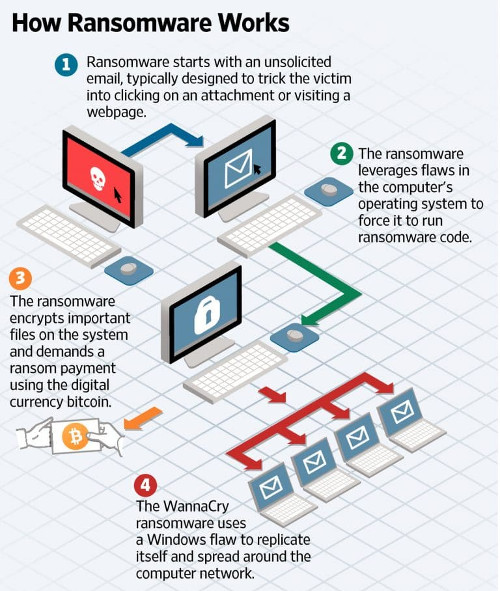
    Hackers used a software called WanaCrypt0r 2.0 or WannaCry that exploits a vulnerability in Microsoft Windows. Microsoft released a software patch that fixes the problem in March, but computers that had not installed the security update remained vulnerable.

    The malicious malware used in the attack encrypts data on infected computers and blocks any access to files until a ransom is paid. The malware is disguised in spam emails that appear to contain invoices, job offers, security warnings or other legitimate files to trick users into opening them. Security researchers say that some victims made bitcoin digital currency payments ranging between £300 and £500 to regain access to their data, but the percentage of victims who paid up to the extortionists is unknown.

    What Happens when Ransomware Hits an Organization?

    A recent article by the Wall Street Journal explains how when WannaCry makes its way into a PC via an unsolicited email, it can replicate itself and spread into an entire network.

    The NHS reported on Saturday that it would upgrade its software in wake of the international attack. Security teams are working around the clock with the NHS to uncover the extent of the ransomware infection, and it remains unclear if any patient data has been affected. One of the many companies targeted in Spain, Telecommunications company Telefonica, said that the cyberattack was limited to some of its internal computers and hadn’t affected clients or services. Portugal Telecom and Telefonica Argentina are also among the organizations that were targeted.

    As international security organizations, Microsoft, and the U.S. authorities continue their investigations and efforts to help organizations globally, it’s still unclear what the full implications of the cyberattack are. The hackers responsible for what’s considered the largest global ransomware attack the cyber community has ever seen still haven’t come forward to identify themselves or claim responsibility.

    How can Organizations Defend Against Ransomware Attacks?

    In light of a global cyberattack, it is a daunting fact to know that an entire organization’s sensitive data could be at risk of an infection starting with a single email. Here are a few things organizations can do to defend against current or future cyber threats:

    Run a mandatory company-wide Windows Update. Organizations who use Windows Vista, Windows 7, and Windows 8.1 can protect from the main route of the WanaCrypt0r 2.0 or WannaCry infection by running Windows Update on their systems. Note: The vulnerability doesn’t exist in Windows 10.

    Raise awareness of ransomware. One of the best ways to defend against cyberattacks is to raise awareness from within an organization. A company-wide memo, ad-hoc meeting, or brief training from the IT department can raise awareness by showing all users how to look out for malicious email attachments.

    Stop Relying on email to transfer secure documents. Email is inherently-non-secure and regardless of the strength of an organization’s IT infrastructure, this recent attack shows that all it takes is the opening of a harmful attachment.

    Although email is the most used communication tool used in business today, there’s a long list of reasons why it can’t be trusted to securely transmit your sensitive data. Alternatives like a cloud fax or secure file transfer solution integrate with the email interface users are familiar with, but are reinforced with robust security features that protect against malware and other threats.

    If you’re looking for a user-friendly way to protect your data, contact us sales@rincon.co.in.

    The original article can be found here.