Tag: Fax

  • Reblog: Top Options to Boost Your Healthcare IT Infrastructure [Infographic]

    Healthcare IT is evolving and is responsible for bigger & bigger portions of today’s healthcare budgets. Discover 3 ways to take your health IT infrastructure to the next level.
    The evolution of EHR/EMR systems

    When the HIPAA act was introduced in 1996, the landscape of EHR/EMR management shifted. Whereas EHR/EMR systems offered healthcare organizations a way to lower costs, increase efficiency, reduce error and improve patient satisfaction, HIPAA forced EHR/EMR system vendors, as well as healthcare providers and their business associates to conform to mandated security regulations. These regulations required new levels of security to protect patient health information, and as a result, EHR system security was upgraded to include the standardization of safeguards like role-based access control, automatic data backups, audit trails, automatic log-offs, and data encryption. To add to this, the HITECH act, introduced in 2009, outlines “meaningful use” of government-approved EHR/EMR systems in the US, and even included financial incentives for physicians and hospitals who follow its guidelines. Needless to say, since HITECH was implemented, there’s been a dramatic increase in the implementation of EHR/EMR solutions in healthcare organizations.

    Health IT expenditures are growing

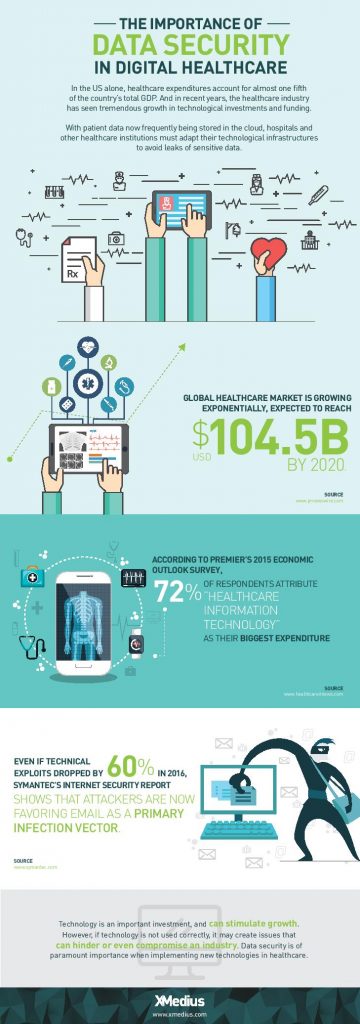
    While EHR/EMR solutions help a great deal when it comes to accessibility, improved workflow, and interoperability between healthcare institutions when it comes to managing patient records, they only represent a fraction of the IT expenditures in the healthcare industry. 72% of respondents in a 2015 survey of healthcare professionals said that healthcare IT is their organizations biggest expenditure: a number that’s expected to increase globally with upcoming data regulations like GDPR.

    Healthcare IT doesn’t only encompass EHR/EMR systems, but also the networks that support them, as well as the servers, workstations, and mobile devices that healthcare staff access them from.

    When it comes to data management, today’s healthcare IT professionals know that there are a lot of options to invest in when attempting to simplify and centralize their IT infrastructure. There are many health IT hardware and software tools on the market that help healthcare providers reach improved levels of patient care, staff workflow and regulation compliance. Let’s take a look at a few of the best pathways to an improved healthcare IT infrastructure.

    1. Investigate alterative data storage options

    In order to meet growing data storage needs and compliance regulations, many healthcare organizations are building their IT datacenters to be more flexible and scalable. Traditionally, hospital IT admnistrators have preferred on-premise, physical data storage options because of the control it gives them. But with physical on-site storage comes the work of maintenance, deployment of expansion storage, troubleshooting, and more. While not every healthcare organization will benefit from the same type of data storage, many are more likely these days to implement cloud storage into their IT infrastructure.

    Cloud data storage options are flexible, scalable, and come at a lower cost than on-premise deployments. Today’s healthcare providers can choose between public or private hosting facilities, many of which offer appealing back up and disaster recovery plans. Other advantages of storing data on the cloud is freed-up internal storage and resources, improved interoperability, and better integration with applications. If you’re considering migrating some of your healthcare data storage over to the cloud, be sure to discuss the compliance and security measures that potential vendors have in place to ensure you make the best choice.

    2. Ditch traditional fax

    As surprising as it may seem, decades-old fax machines are still widely used in today’s hospitals and physician’s offices. Data security is of utmost importance in today’s healthcare environments, but a large number of providers don’t have the time or resources to explore alternative options.

    Fax machines not only break away from the digital and paperless landscape that compliance regulations have mostly succeeded to build, but the technology is also plain old unreliable:

    • It leaves too much room for human error: sending a fax to a wrong number is a common error as evidenced by a large number or reported data breaches
    • Paper, ink, and maintenance costs add up
    • Regulations such as the HIPAA privacy rule strongly suggest that the minimum amount of information necessary be contained in fax transmissions

    Other options, such as t.38 and cloud fax solutions have emerged as popular alternatives for safely transmitting patient records and other sensitive data. But what is t.38 faxing? It’s a technology that allows you to send faxes over your existing computer network. Cloud faxing essentially allows your fax transmissions to take place over a remote server. These solutions are highly affordable and leverage existing internet connections, they eliminate lost or misused faxes that might be left lying around, and they scale easily. What’s more is that many of today’s fax solution options integrate seamlessly with existing EHR/EMR systems, allowing staff to send and receive mission-critical data right from the platforms they’re most comfortable with.

    3. Secure file exchange: simple solutions for data transmission

    Email is another commonly used tool for transmitting patient data to patients themselves and within the healthcare network. Not all healthcare institutions can afford to implement the security measures needed to make their email servers secure enough to remain compliant and keep incidents of data breach at bay. Another issue within certain healthcare departments is that email doesn’t permit them to attach files over a certain size, forcing them to find other options for sending and receiving bulky patient records and medical images. The radiation Oncology departments at Inova Health System in VA, for example, were burning large files onto CDs and using mail services in order to get patient data to other hospitals and medical facilities in their network before transitioning to XMediusSENDSECURE.

    SendSecure is an example of a collaborative secure file exchange software that takes minimal time and effort to deploy. It uses double encryption, which keeps files encrypted during both the upload and download processes unlike most email servers which only encrypt files while in transit. Users can send an unlimited number of files up to 5TB/ea., thus eliminating any concerns of getting large files where they need to get in a hurry. Similar to today’s FoIP or cloud fax solutions, SendSecure also integrates with day-to-day applications, such as Outlook, and can even be used from any internet browser.

    Looking for ways to boost your health IT infrastructure and ensure your data is safe in transit and at rest? Speak with an expert today about FoIP and secure file exchange solutions that could work for you! Contact us: sales@rincon.co.in

    The original article can be found here.

  • Reblog: Zetafax automatic restart feature

    Over the last few years there has been a lot of work in the computer industry on making software more reliable. One of the main areas of focus has been improving how programs handle software or hardware errors, and particularly automatic recovery if a problem occurs.

    When I got my first programming job after leaving university (more years ago than I like to admit), it was all too easy to build a program which crashed.

    One line of code which tried to access an invalid memory address was enough to cause the program to terminate. As a programmer, there was very little you could do to prevent that apart from checking and rechecking every line of your program.

    As a user, you were used to programs crashing, and you made sure that you saved files frequently to protect against losing your work. You got used to seeing error boxes from Windows if a program failed, often with opaque error messages like General Protection Fault, and restarting the program or your computer to recover.

    Over the intervening years, user expectations have (rightly) risen, and the technology and techniques used to ensure programs keep running have steadily got better. One of the biggest changes has been to improve how programs recover if a problem occurs, so that programs restart automatically on failure without need for user intervention. Software developers still work hard to avoid issues occurring. However, if something does go wrong then automatic recovery options help to minimize the impact, and will often restore behavior without the user being inconvenienced or even noticing.

    As an unattended communications service, it is vital that the Zetafax Server keeps running reliably. When we first built Zetafax, we included several safeguards to help ensure that happened, and Zetafax has an enviable reputation for reliability as a result.

    To help with reliability and scalability, the Zetafax Server comprises multiple independent Windows applications, including Queue Manager and Device Controllers. These are started and controlled by the System Manager program. While the Zetafax Server is running, the System Manager monitors the state of each of these applications.

    Previously if one of the server applications failed, the System Manager would stop the Zetafax Server. This ensures that data is preserved, and prevents the risk of faxes being received with cannot be delivered correctly to the user.

    In our latest release of Zetafax, we have extended this behavior, adding an option to restart the Zetafax Server if one of the server applications fails. This is designed for use on very high availability systems, or on systems which are experiencing intermittent critical issues causing program failure.

    The option is enabled on the General Configuration Options page in the Zetafax Configuration Program. You can adjust further configuration options to tune behavior if needed, for example to adjust the maximum number of time it will restart in a given period. These can be configured in the SETUP.INI server settings file, and are detailed in file SETUP.RTF, but the default settings should be correct for most sites.

    Equisys Zetafax

    We originally added this feature for a UK Platinum Support customer. Their Zetafax Server was stopping every 2 to 3 weeks. As faxes were critical for their business, they needed to find a way to minimize the impact of that while we worked with them to identify the cause.

    Eventually we found the cause was a memory problem on the server computer, and moving the Zetafax Server to a new server computer corrected the issue. In the mean-time, the auto-restart helped to avoid this affecting their business.

    Like most insurance policies, I hope you won’t need it, but I think you’ll be grateful for it if you do!

    The auto-restart feature is included in version 17.1 of Zetafax, which is available without charge for customers with Software Assurance. For more information about the update, see our What’s New technote, or contact Equisys or your local Zetafax distributor.

    The original article can be found here.

    To learn more contact us sales@rincon.co.in

  • Reblog: How financial institutions can easily comply with the SOX Act

    The following article is the first one of a series of three about how the fax can help financial organizations to meet their legal obligations. This first text covers Sarbanes-Oxley, a legislation passed by the U.S. Congress to protect shareholders like you and me.

    Despite what people might think, the fax is still an essential communication tool in the financial sector. From banks and insurance companies to investment management and advisory firms, financial service organizations share high volumes of sensitive data. Document transactions are part of complex workflows and information is manipulated by numerous people in different geographic locations, demanding anytime/anywhere access.

    Finance-driven documents

    • Credit applications
    • Financial reports and statements
    • Fund transfers
    • Invoices
    • Loan approvals and denials
    • Mortgage documents
    • Trade confirmations
    • Regulatory disclosures and information
    • Securities reports

    Decision makers are continuously seeking better ways to keep their IT infrastructure costs and operational risks under control while addressing security concerns and complying with stringent industry regulations. Many firms recognize the advantages of moving to the cloud in order to reduce costs, but are rightly concerned about the security of their confidential information.

    The transmission of information by fax remains a critical component of an information system. Choosing a fax provider with a proven track record and demonstrated expertise in developing enterprise-class cloud fax services is of paramount importance.

    SARBANES-OXLEY

    Sarbanes-Oxley (SOX) was implemented in 2002 and legislates how business records are protected and preserved to prevent destruction and corruption. SOX has also set e-records management standards to which all businesses should adhere. SOX mandates that all electronic records (including faxes), be retained for a period of seven years. Furthermore, it requires tamper-proof resources to prevent the corruption and modification of records. This rule is designed to protect investors from fraudulent activity and to safeguard financial data.

    Entities subject to SOX compliance include all US-based publicly traded companies and international companies that have registered equity or debt securities with the Securities and Exchange Commission. Accounting firms that provide auditing services to the above entities are also subject to SOX compliance.

    How XMediusFAX® helps achieve SOX compliance standards

    • Offers secure and real-time fax transmission
    • Faxes are sent and received directly from any application to the intended recipient’s fax number, with notification of receipt and routing of incoming faxes to intended recipients’ email inboxes, network folders or secure printers.
    • Provides a centralized solution – XMediusFAX® allows for secure integration with corporate systems such as ERP, Document Management, Archiving, and virtually any other 3rd party network application to enable inbound and outbound document delivery via fax, email or the Internet.
    • Maintains electronic storage and an audit trail of fax transmission logs
    • XMediusFAX® can be configured to store all incoming and outgoing faxes electronically in a secure cloud-based storage environment, or on a network archiving system or database. It also allows users and administrators to track fax history and verify fax delivery.

    Along with the ability to set up notifications for deliveries and receipts, a complete audit trail of fax activity is also provided.

    XMediusFAX® is ISO 27001 certified for its Information Security Management System (ISMS). The infrastructure supporting the XMediusFAX® service meets the rigorous physical, technical, administrative, processes and management controls required to achieve the highest security standard. ISO 27001:2013 can therefore be used to help verify SOX compliance.

    In short, XMediusFAX® offers a level of security and protection that very few fax cloud providers can match. Clients operate across regulated industries and require an enterprise-grade faxing solution to achieve the highest security standards. XMediusFAX® is that solution.

    Discover how XMedius helped KPMG Australia to reach a higher level of security while reducing their costs associated with faxing: https://www.xmedius.com/en/industries/finance/

    The original article can be found here.
    To learn more contact us sales@rincon.co.in

  • Reblog: Top 5 Reasons why faxing is important to business

    How the shift to cloud-based faxing is ensuring fax will stay around – for years to come

    Have you sent a fax lately? A lot of us may answer no, or perhaps recommend just sending whatever document you have by email or from a multi-function printer as an email attachment. The blogosphere and pundits alike have declared the ‘death of fax’ for many years now. But, much to the contrary, faxing is not dead, and indeed, according to Davidson Consulting, faxing is much alive – and in fact growing. For example, Davidson reports that there are 100 billion faxes send worldwide every year and that the market for fax services is forecast to grow at a notable 15.2% compound annual growth rate through 2017. Not too shabby.

    But sending a fax – really? With so many alternatives available like cloud-based shared folders, FTP, and even Internet of Things (IoT) ‘wearable’ technologies, why are we still using fax, and why is it still alive? Well, if you’ve had to refinance your house, provide a ‘wet ink’ signature on a legal document on behalf of an enterprise or small business – you know the ‘why’. However, there are some other very pertinent reasons why fax isn’t going away anytime soon that your business or enterprise should be aware of.

    Here’s five reasons why faxing is still very much alive and will continue to be a mission critical mode of document conveyance for consumers and businesses worldwide.

    1. Technology. The wave of cloud services and other public cloud offerings has driven a big shift from the way businesses and consumers consume and share information. The evolution to cloud-based services has enabled an ‘anywhere, anytime’ usage model where music, documents and data sharing can be done via any internet connected device. Cloud faxing is no exception. With email-based faxing over cloud networks, for example, electronic faxing is as easy as sending an email – from any connected internet device or multi-function device/printer.

    2. Global Reach. While new cloud technologies continue to evolve, faxing is still recognized as a central means of business communications worldwide since no single technology has superseded faxing. In fact, many businesses are adapting a cloud-based fax model that simplifies their existing workflows with email-based faxing with the added benefit of eliminating the need to maintaining fax servers, telco lines, maintenance agreements, etc.

    3. Audit and Delivery Confirmation. If your business is in a highly regulated sector likehealthcare, finance or legal, you may very well be aware of the implications of compliance issues such as HIPAA, HITECH, SSAE 16, Sarbanes-Oxley or Graham-Leach-Bliley to name a few. Unlike email or mobile text messaging, with electronic faxing, the receiving fax must acknowledge that the document was received successfully. This notification is proof that your document was delivered successfully. This transactional audit trail data is a critical component to an overall compliance strategy.

    4. Secure. Modern cloud-based fax providers can provide the most secure faxtransmissions by enabling TLS encryption (Transport Layer Security) protocol, delivering enhanced security for peace of mind that your documents are protected by NIST-standard level encryption. As an added measure of security, the documents themselves can be stored with Advanced Encryption Standard 256-bit encryption while at rest on cloud networks. A nice advantage over basic email.

    5. Ubiquity. Because electronic faxing has established a foothold worldwide with a universally accepted protocol, fax technology (cloud or physical fax machines) is ubiquitous and is deeply integrated into business processes, such as transferring medical records or financial information. Cloud faxing has adapted with the technology to integrate into core businesses systems such as Electronic Medical Records (EMRs) and Customer Relationship Management (CRM) systems using flexibleApplication Programming Interfaces (APIs). Businesses also receive the added benefit of eliminating the maintenance and overhead of on-premise fax servers and systems.

    As Mark Twain once said after his death was erroneously reported in the New York Times “…the report of my death has been grossly exaggerated.” The same is true with fax. Fax isn’t dead – it’s just evolving with the times.

    The original article can be found here.
    To learn more contact us sales@rincon.co.in

  • Reblog: Fax Server, Less a Luxury, More a Necessity for Any Business

    Technology is revolutionary and each industry is taking benefit of it. Businesses are moving towards the digital revolution. A few tradition are still as important as it was before. Faxing is one of those traditions still having its own importance in businesses and many industries. Still, a few documents such as contracts, legal papers, bills, etc. needs to get faxed as fax has its own legal value. The technology has also paved its way into the faxing to satisfy the business need. The fax server is a technological advancement to make the faxing digitized.

    Fax servers can use the traditional lines or VoIP to send and receive faxes. One of the most widely accepted efaxing technology is FoIP (Fax over IP). It uses the cost-effective and reliable VoIP technology to send the faxes.

    The fax server converts the documents into the digitized format and send it using the predefined channels. It gets converted into the original format at the receiving end. It can be either printed document or an email based on the configuration.

    Benefits of The Fax Server For Any Business:

    • Reduced Costs
      The fax server reduces the operational cost and stationary required in traditional faxing. It eliminates the papers, toner, and bulky fax machines. It also reduces the maintenance cost required to maintain the traditional machines. The fax servers don’t require any extra hardware or plug-ins to work efficiently, which makes it perfect for any business.
    • Improved Productivity
      The faxing can be performed from anywhere with the FoIP. It eliminates the possible long queues to send the fax from the physical machine. With the fax server, one may easily send the faxes using their desktops, laptops, tablets and even phones.
    • Leveraged Network
      The fax servers eliminate the extra telephone lines required for the fax server. It takes the complete benefit of the existing VoIP network. It also removes the need of extra wiring which makes it more scalable and extensible.
    • 24*7 Availability On Finger Tip
      The fax server can be integrated into the web, software or any mail server based on company’s requirement and choice. It makes it available 24*7 even when you are traveling or on a dinner table. You may send and receive the faxes from anywhere using your simple web or mail servers.
    • Robust Disaster Management
      Majority of the fax servers come with the security configuration. It makes the copy of each or important documents on the server which works as a disaster management. Any time, one can get the backup and recover the lost faxes which is nearly impossible with the traditional fax system.
    • Competitive Edge
      The fax servers give a competitive edge to the business with its advanced features. For example, companies can add their own cover page as a signature of all their documents sent to other firms. It also gives notification once the fax is received by the receiving party. The fax can be auto forwarded in case of failure. It gives a competitive edge to any business.

    There is a plethora of advantages rendered by the fax server software. The modern fax server software has many features which makes it more appropriate compared to the traditional fax machines. It provides the fax templates which can be used to send the faxes of the same nature. One may also block unwanted faxes with ease. The color faxing can never be so easy and cheap as it is with the FoIP software. Any business can use their resources efficiently and improve the productivity by giving their business a professional touch with the fax server software.

    If you are considering implementing a fax management solution for your organisation, but are still sitting on the fence when it comes to selecting the right solution, we encourage you to e-mail us on sales@rincon.co.in and we will be glad to assist you.

  • Reblog: What is Fax over IP?

    Everything is going IP these days. The same is true for businesses across the world.

    From voice to video surveillance systems businesses across the world are migrating their legacy analog systems to those that are IP based. Of course the time tested method for sending and receiving important business documents – fax – is also undergoing this migration

    For years you’ve been able to send and receive faxes over an IP network. But until recently successful faxing over an IP network has escaped many a person.

    What’s changed?

    A lot. However, before we get into that, let’s first take a closer look at Fax over IP.

    What is Fax over IP?

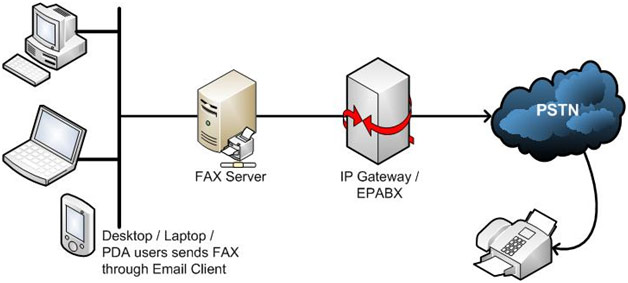
    Fax over IP (also known as FoIP) refers to the method and technology of sending fax documents over an IP network (local or wide area). This is different from the way faxes have traditionally been handled.

    For years the sending and receiving of fax documents has been handled over the PSTN or Publicly Switched Telephone Network. With Fax over IP fax documents by-pass the PSTN completely.

    This is similar to how VoIP (Voice over IP) works, but requires additional network bandwidth due to the increased size of fax documents.

    How does Fax over IP work?

    The concept behind how Fax over IP works is very straight forward (especially if you’re already familiar with how VoIP works).

    With Fax over IP your fax document is first packetized, then encapsulated in a transport protocol and sent from “Point A” to “Point B”. Point A and Point B are typically fax machines which interface with a Fax over IP gateway or some sort of IP adapter.

    These devices allow fax machines to interface with an IP network as well as conduct the digitizing and encapsulating of the fax document.

    Benefits of Fax over IP

    In reading about Fax over IP you might be thinking that Fax over IP simply mimics traditional faxing capabilities.

    While Fax over IP does closely mimic the general set-up and use of traditional faxing it does come with several unique benefits:

    • Unified network connectivity – Fax over IP leverages your existing LAN and WAN IP networks so you don’t have to manage or pay for a separate analog network.
    • Advanced management – Bringing fax documents into IP realm allows for fax documents to be easily archived, sorted and emailed.
    • Lower cost – With one less network to pay for and manage there is a definitive cost saving in using Fax over IP. Fax over IP also tends to be more cost effective on a per-minute rate versus faxing over the PSTN.
    • Remote usage – There are many locations throughout the world in which a fax line cannot be provisioned. In areas such as these individuals typically rely on satellite connections, like satellite Internet, which allows faxing over IP.

    What about Fax over IP being hit or miss?

    Ah yes! Let’s get back to this.

    Due to the nature of IP technology there have traditionally been many hurdles to successfully implementing Fax over IP.

    Like voice, Fax over IP is subject to issues such as latency, packet loss and jitter. With voice calls you can typically deal with these issues as they don’t substantially impact the result of the call.

    But when it comes to faxing anything less than perfect document transmission is unacceptable.

    So what has changed to make Fax over IP 100% reliable?

    Well, much.

    Advances in technology and new offerings from Fax over IP gateway manufacturers have finally made 100% reliable Fax over IP a reality.

    The original article can be found here.
    If you are considering implementing a fax management solution for your organisation, but are still sitting on the fence when it comes to selecting the right solution, we encourage you to e-mail us on sales@rincon.co.in and we will be glad to assist you.

  • Wither fax?

    [wc_column size=”one-third” position=”first”]

    [/wc_column]

    [wc_column size=”two-third” position=”last”]

    Fax is the most commonly forgotten, but most reliable and secure method of document delivery. One of the biggest mistakes a company can make when it comes to securing sensitive data is not utilising the method of faxing for securing sensitive data in their document delivery mechanism.

    Fax is still a much more secure delivery method than both email and cloud storage. This is critical not only for industries such as finance, but also for health care, logistics, education, government and more. Viruses cannot infect your network from a fax, because they cannot be embedded anywhere. Besides your network cannot be hacked into using the fax protocol. [/wc_column]


    The advent of technology has helped companies move over from conventional fax machines to centralised fax servers. A fax server is part of the network yet uses the secure T.30 faxing protocol or the T.38 Fax over IP protocol. The fax server integrates with your mail server as well as your Line of Business applications to offer a seamless experience to users.

    If you are considering implementing a fax management solution for your organisation, but are still sitting on the fence when it comes to selecting the right solution, we encourage you to e-mail us on sales@rincon.co.in and we will be glad to assist you.

  • Reblog: Mobility and the User Experience

    ipad-handsIt should come as no surprise that mobile communications are no longer the wave of the future: they are the wave of today. Here are some recent statistics:

    • The number of mobile devices in use will jump from over 7.7 billion in 2014 to over 12.1 billion by 2018. (Source: The Radicati Group, Inc., February 2014)
    • In 2014, for the first time ever, time spent on mobile apps exceeded desktop web access (Source: Marketing Charts)
    • Over 50% of total email opens occurred on a mobile phone or tablet in Q3 2014. (Source: Experian “Quarterly email benchmark report [Q3 2014]”)
    • And last, but certainly not least, – 64% of employees rarely use enterprise mobile apps because of poor user experience. (Source : Forrester)

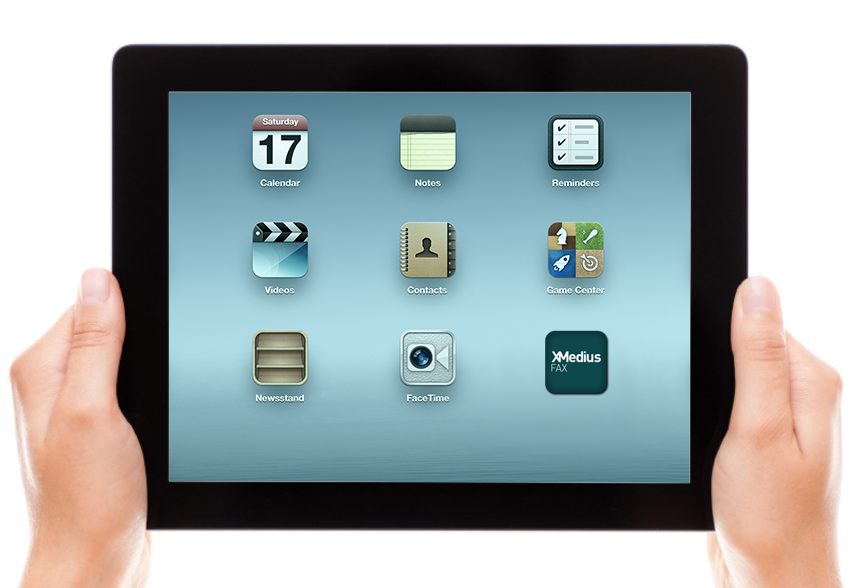
    When we developed XMediusFAX® one of our predominant concerns was to offer users an elegantly simple way to send and receive faxes from the entire range of communication tools, including desktop and email clients, web-browser interfaces, MFPs and mobile devices. With each revision and upgrade, making the user experience even better has been a priority.

    What constitutes a better user experience? Certainly functionality is an essential part of the equation. Is the fax solution comprehensive and versatile enough to address all the user’s needs, whether for communication, tracking or security? Does it improve productivity? Does it enhance rather than impede the workflow? From the user experience perspective, is it simple, easy and enjoyable to use? Does it make your work life easier? Is it intuitive–does it do what you want it to do in the way that you want it to?

    All these considerations were top of mind when we designed the XMediusFAX® for iPhone and iPad app.

    First and foremost, the app allows users to fax documents anywhere and at anytime without the need for a fax machine, a computer or phone lines. And we designed it so that faxing from a mobile device is as simple as sending an email. Unlike email, though XMediusFAX® for iPhone and iPad provides the highest levels of security which enables compliance with the full range of regulatory and compliance mandates.

    We also created an easy-to-use touchscreen interface to optimize the faxing experience. With this interface, users can:

    • Transmit documents to the same fax numbers they have always used
    • Fax legal documents upon signature
    • Select documents from virtually any mobile file management application, such as GoogleDrive and DropBox
    • Use the embedded camera in the iPhone or iPad to scan documents to be sent
    • Fax documents from within any other mobile application that can export PDF, MS Word or image files–or any other format supported by the fax service

    Moreover, in response to expressed user needs, we have provided flexible options for selecting fax recipients–users can select existing contacts, for example, or enter new contacts on the fly.

    Finally, we included enterprise grade features that provide a variety of easy-to-configure fax options, from personalized cover sheets and delayed faxing to notifications and tracking.
    In short, our goal has been to make faxing from a mobile device as versatile, secure and easy as faxing from a desktop or web browser.

    With XMediusFAX® for iPhone and iPad, we’ve tried to create the perfect mobile complement to our XMediusFAX® on-premises and cloud solutions.

    If you are considering the implementation of a fax automation system for your business, but are still on the fence when it comes to selecting the right solution, please e-mail us on sales@rincon.co.in and we will be glad to assist you.

    The original post is written by Marcello Michelet Quintaes and appears here.

  • Fax Automation Simplified

    Since 1998 Rincon has been at the forefront of faxing technology across India and has customers in Sri Lanka and Bangladesh as well.

    faximage

    Why do organisations use Rincon? Rincon has been a market leader with a proven and trusted record. Our credentials speak for themselves :

    • Delivered and managed in excess of 250 projects across customers
    • Large banks, mutual funds, insurance companies use Rincon
    • Blue chip customers include Finance, Government, Healthcare, Utilities, Supply Chain & Logistics and FMCG
    • Cisco and other IP telephony implementations
    • Multi-site and geographical deployments using Analog, E1 PRI, T1, FoIP and SIP Trunk
    • Rincon has enabled organisations across India, Sri Lanka and Bangladesh become agile and better at communication, more organised and effective
    • Rincon offers solutions to suit the customers’ needs and not necessarily pitch solutions it has
    • Integration with SAP, Filenet, IBM CM, MS Exchange, Lotus Domino, Digital Sender and MFPs, Avaya, CISCO, Nortel, Siemens, Matrix, Alcatel, Audiocodes amongst others.

    If you are considering the implementation of fax automation for your business, but are still on the fence when it comes to selecting the right solution, please e-mail us on sales@rincon.co.in and we will be glad to assist you.

  • Make a discerning choice for your faxing needs

    One’s philosophy is not best expressed in words; it is expressed in the choices one makes… and the choices we make are ultimately our responsibility – Eleanor Roosevelt

    Image for blogJust as no two individuals are the same, no two organisations are the same either. Every organisation has it’s own business challenges to overcome. Every challenge has a unique solution designed to meet the individual needs of the organisation.

    Enter Rincon – THE fax experts. As veterans in the field of fax, with almost 2 decades behind us, we are in a position to assess your business needs considering the environment and suggest the perfect fax solution for you. We have a range of products to meet your needs and so you can rest assured that the product we recommend will have the features you need and the size that business demands without exceeding your budget.

    Industries we have catered to include:

    Industry

    Please get in touch with us on sales@rincon.co.in and we will more than happy to help answer your questions about the solutions, services and our lineage.

    Look forward to serving you now and forever.

    Think Fax…. Think Rincon